Танилцуулга
The Naxa NSH-3001 Wi-Fi Smart Camera provides reliable home security monitoring with 24/7 HD recording capabilities. This camera allows you to check in on your home remotely from anywhere using your smartphone. It features motion detection, two-way audio communication, night vision, and customizable activity alerts.
This manual provides detailed instructions for setting up, operating, and maintaining your Naxa NSH-3001 Wi-Fi Smart Camera to ensure optimal performance and security.
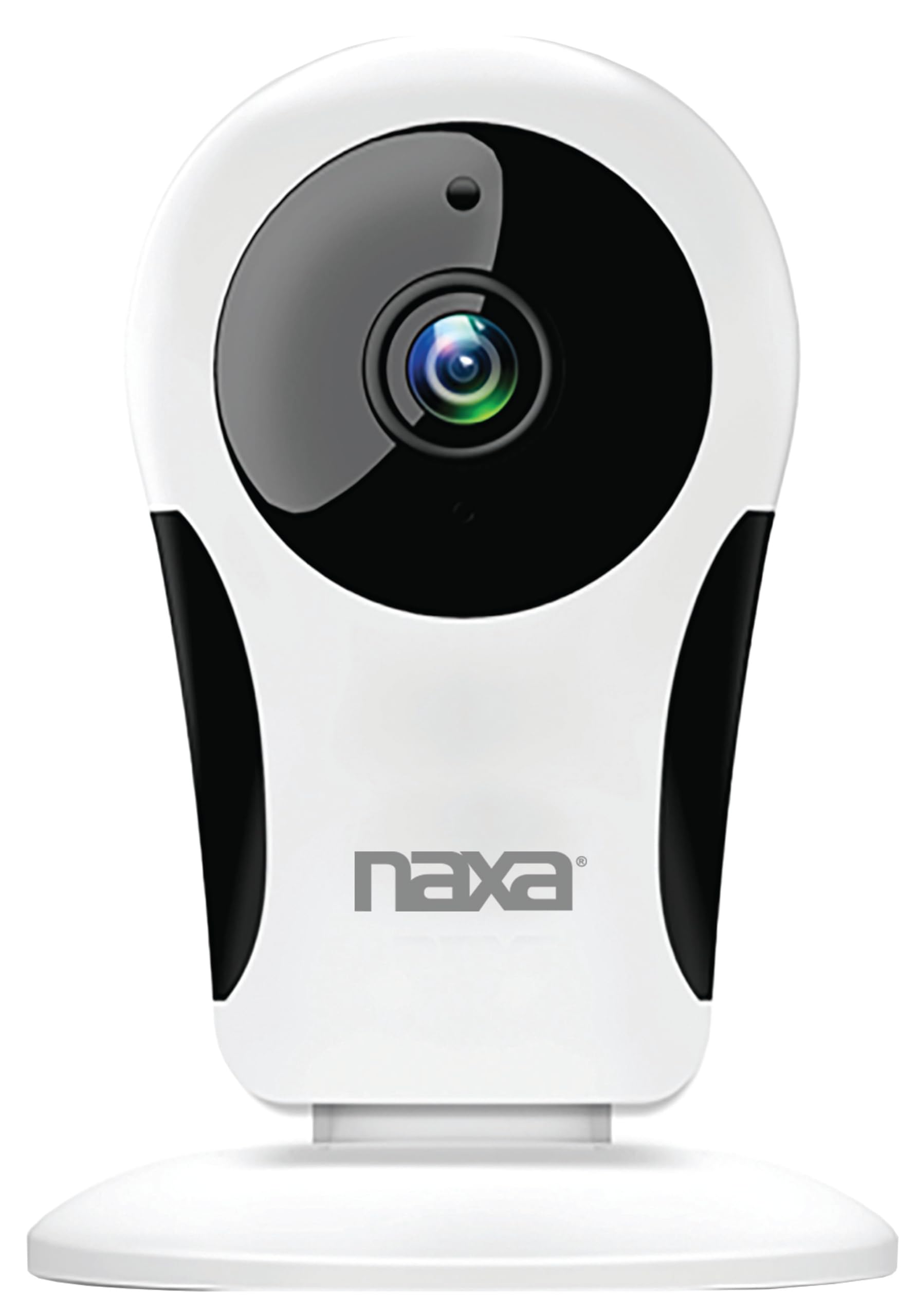
Зураг: Урд view of the Naxa NSH-3001 Wi-Fi Smart Camera, showing the lens and Naxa logo.
Хайрцагт юу байна
Upon unpacking your Naxa NSH-3001 Wi-Fi Smart Camera, please ensure all the following components are present:
- Wi-Fi ухаалаг камер
- АС тэжээлийн хувиргагч
- USB кабель
- Хэрэглэгчийн гарын авлага (энэ баримт бичиг)
Бүтээгдэхүүн дууссанview
Familiarize yourself with the main components of your Naxa NSH-3001 Wi-Fi Smart Camera.

Image: The Naxa NSH-3001 Wi-Fi Smart Camera displayed alongside icons representing its key features: HD Resolution, Encrypted ID, 2-Way Audio, Cloud Service, Motion Detection, IR Night Vision, Time Scheduling, and Hotspot capability.
- Камерын линз: Foo видеог авдагtage.
- Хэт улаан туяаны (IR) LED: Provide night vision capabilities.
- Микрофон: Аудио оролт болон хоёр талын харилцаа холбооны зориулалттай.
- Илтгэгч: Аудио гаралт болон хоёр талын холбооны зориулалттай.
- Микро USB порт: Цахилгаан холболтын хувьд.
- Дахин тохируулах товч: Камерыг үйлдвэрийн тохиргоонд буцаахад ашигладаг.
- Бичил SD картны үүр: For local storage of recorded footage (Micro SD card not included).
Тохируулах гарын авлага
1. Камерыг асаах
- Connect the provided USB cable to the camera's Micro USB port.
- USB кабелийн нөгөө үзүүрийг AC тэжээлийн адаптерт холбоно уу.
- АС тэжээлийн адаптерийг стандарт цахилгаан залгуурт залгаарай.
- The camera will power on, and an indicator light will show its status (refer to the camera's LED indicator guide for specific light patterns).
2. Downloading the Smart Life App
The Naxa NSH-3001 camera is controlled via the Smart Life app. Download it to your smartphone:
- For iOS devices, search for "Smart Life" in the Apple App Store.
- For Android devices, search for "Smart Life" in the Google Play Store.
- Хэрэв танд апп байхгүй бол аппликейшнийг суулгаад шинээр үүсгэнэ үү.

Image: The Naxa NSH-3001 Wi-Fi Smart Camera shown with the Smart Life app logo and icons for the Apple App Store and Google Play, indicating app compatibility.
3. Wi-Fi-д холбогдож байна
Ensure your smartphone is connected to a 2.4 GHz Wi-Fi network. The NSH-3001 camera only supports 2.4 GHz Wi-Fi.
- Open the Smart Life app and tap "Add Device" or the "+" icon.
- "Аюулгүй байдал ба видео тандалт", дараа нь "Ухаалаг камер"-ыг сонгоно уу.
- Follow the on-screen instructions in the app to connect your camera to your Wi-Fi network. This typically involves scanning a QR code generated by the app with the camera's lens.
- Once connected, the camera's indicator light will change (refer to the LED indicator guide), and you will see the camera added to your app.
4. Камер суурилуулах
The NSH-3001 camera is designed for wall mount installation, but can also be placed on a flat surface. Choose a location that provides the desired viewing angle (105 degrees) and is within range of your Wi-Fi signal.

Image: The Naxa NSH-3001 Wi-Fi Smart Camera positioned on a nightstand in a bedroom, demonstrating a typical indoor placement.
- For wall mounting, use appropriate screws and anchors (not included) to secure the camera's base to the wall.
- Хүссэн хэсгийг хамрахын тулд камерын өнцгийг тохируулна уу.
Ашиглалтын заавар
Амьд View болон Алсын хандалт
Once connected, you can access your camera's live feed from anywhere using the Smart Life app on your smartphone.
- Open the Smart Life app and select your NSH-3001 camera from the device list.
- The live video stream will appear.
Хоёр талын аудио холбоо
The camera supports two-way audio, allowing you to hear and speak through the camera.
- Амьдаар view interface of the app, tap the microphone icon to speak.
- Камерын байршлаас аудио сонсохын тулд чанга яригчийн дүрс дээр товшино уу.
Хөдөлгөөн илрүүлэх ба дохиолол
The camera can detect motion and send real-time push notifications to your phone.
- Navigate to the camera settings within the Smart Life app.
- "Хөдөлгөөн илрүүлэлт"-ийг идэвхжүүлж, шаардлагатай бол мэдрэмжийн түвшинг тохируулна уу.
- Configure alert schedules and notification preferences.
Шөнийн хараа
The NSH-3001 features an IR-cut filter for clear night vision, automatically switching between day and night modes based on ambient light.
- Night mode activates automatically in low-light conditions.
- The IR-cut filter ensures optimal clarity in both day and night recordings.
Видео бичлэг хийх, хадгалах
The camera supports 24/7 HD recording. Footage can be stored locally or via cloud service (subscription may be required).
- Микро SD карт хадгалах: Insert a compatible Micro SD card (up to 128GB, not included) into the camera's SD card slot for continuous or event-based recording.
- Үүл хадгалах сан: Check the Smart Life app for available cloud storage options and subscription details.
- Review foo бүртгэгдсэнtage directly through the Smart Life app.
Video Tuning
Adjust video parameters directly from your smartphone for optimal image quality.
- Within the Smart Life app, access video settings to adjust contrast, brightness, saturation, and sharpness.
Цагийн хуваарь
Set schedules for camera operation, recording, or alerts.
- Use the Smart Life app's scheduling feature to define specific times for motion detection, recording, or other functions.
Засвар үйлчилгээ
Proper maintenance ensures the longevity and optimal performance of your Naxa NSH-3001 Wi-Fi Smart Camera.
- Цэвэрлэгээ: Камерын линз болон их биеийг зөөлөн, хуурай даавуугаар зөөлөн арчина. Хүчтэй химийн бодис эсвэл зүлгүүрийн цэвэрлэгч хэрэглэхээс зайлсхий.
- Програм хангамжийн шинэчлэлтүүд: Regularly check the Smart Life app for firmware updates for your camera. Keeping the firmware updated ensures you have the latest features and security enhancements.
- Байршил: Ensure the camera is placed in a stable location and protected from extreme temperatures, direct sunlight, and moisture.
Алдааг олж засварлах
If you encounter issues with your Naxa NSH-3001 Wi-Fi Smart Camera, refer to the following common solutions:
| Асуудал | Боломжит шийдэл |
|---|---|
| Камер Wi-Fi-д холбогдоогүй байна |
|
| Аппликейшнд видео дамжуулалт байхгүй байна |
|
| Хөдөлгөөний сэрэмжлүүлэг хүлээн аваагүй |
|
| Хоёр талын аудио ажиллахгүй байна |
|
If problems persist, please contact Naxa customer support.
Үзүүлэлтүүд
| Онцлог | Дэлгэрэнгүй |
|---|---|
| Загварын нэр | NSH-3001 |
| Брэнд | Накса |
| Холболтын технологи | Wi-Fi (2.4GHz) |
| Видео бичлэгийн нягтрал | 720p |
| Viewing өнцөг | 105 градус |
| Онцлог шинж чанар | Хөдөлгөөн мэдрэгч, шөнийн хараа, хоёр талын аудио |
| Дотор/гадаа ашиглах | Indoor, Outdoor (Note: IP54 rating suggests splash resistance, not full outdoor weatherproofing) |
| Эрчим хүчний эх үүсвэр | Утастай цахилгаан |
| Тохиромжтой төхөөрөмжүүд | Smartphone (via Smart Life App) |
| Суурилуулах төрөл | Ханын бэхэлгээ |
| Хадгалах | Микро SD карт (128GB хүртэл, багтаагүй), Үүлэн санах ой (заавал биш) |
| Хэмжээ (L x W x H) | 3.2 x 3.2 x 4.3 инч |
| Зүйлийн жин | 3.2 унц |
| Материал | Хуванцар |
| Олон улсын хамгаалалтын зэрэглэл | IP54 |
Баталгаат болон дэмжлэг
Naxa Electronics, Inc. manufactures the NSH-3001 Wi-Fi Smart Camera. For specific warranty information, please refer to the warranty card included with your product or visit the official Naxa webсайт.
For technical support, troubleshooting assistance beyond this manual, or inquiries about your product, please contact Naxa customer service. Contact details can typically be found on the Naxa webсайт эсвэл бүтээгдэхүүний сав баглаа боодол дээр.
Naxa Official Webсайт: www.naxa.com


