Бүтээгдэхүүн дууссанview
The typecase Touch Keyboard Case is designed to enhance the functionality and protection of your iPad Air. It features a full-size keyboard with a multi-gesture trackpad, offering a laptop-like experience. The case boasts a 360° rotatable hinge, allowing for multiple viewing angles and usage modes. An adjustable 11-color RGB LED backlight provides comfortable typing in various lighting conditions. Integrated smart features like auto sleep/wake help conserve battery life, and a dedicated holder keeps your Apple Pencil secure.
Гол онцлогууд:
- Тохиромжтой байдал: Specifically designed for iPad Air 11-inch (M3 2025 / M2 2024), iPad Air 5th Gen (2022, 10.9"), and iPad Air 4th Gen (2020, 10.9").
- Integrated Trackpad: Supports multi-gesture controls for precise navigation.
- Арын гэрэлтүүлэгтэй гар: 11 adjustable RGB backlight colors with laser-etched keys and a full row of iPadOS shortcuts.
- Versatile Use Modes: 360° rotatable hinge for 7 different viewing modes (Laptop, Stand, Tent, Tablet, Corner, Share, Protect).
- Ухаалаг хамгаалалт: Premium hardshell design protects all sides of your iPad, with auto sleep/wake function.
- Харандаа эзэмшигч: Conveniently stores your Apple Pencil.
Багцын агуулга
Бүх зүйл багцад байгаа эсэхийг шалгана уу:
- 1 x typecase Touch Keyboard Case for iPad Air 5th/4th Gen (10.9 inch)
- 1 х USB-C цэнэглэх кабель
- 1 х хэрэглэгчийн гарын авлага
Тохируулах гарын авлага
1. Charging the Keyboard Case
Before initial use, fully charge the keyboard case. Connect the provided USB-C charging cable to the charging port on the keyboard and to a USB power adapter (not included).
Charging indicator: The LED indicator will show charging status. Refer to the keyboard's specific LED behavior for full charge indication.
2. Inserting Your iPad into the Case
Carefully align your iPad with the protective shell of the keyboard case. Gently press the iPad into place, ensuring all corners are securely seated. The case is designed to protect all sides of your iPad.
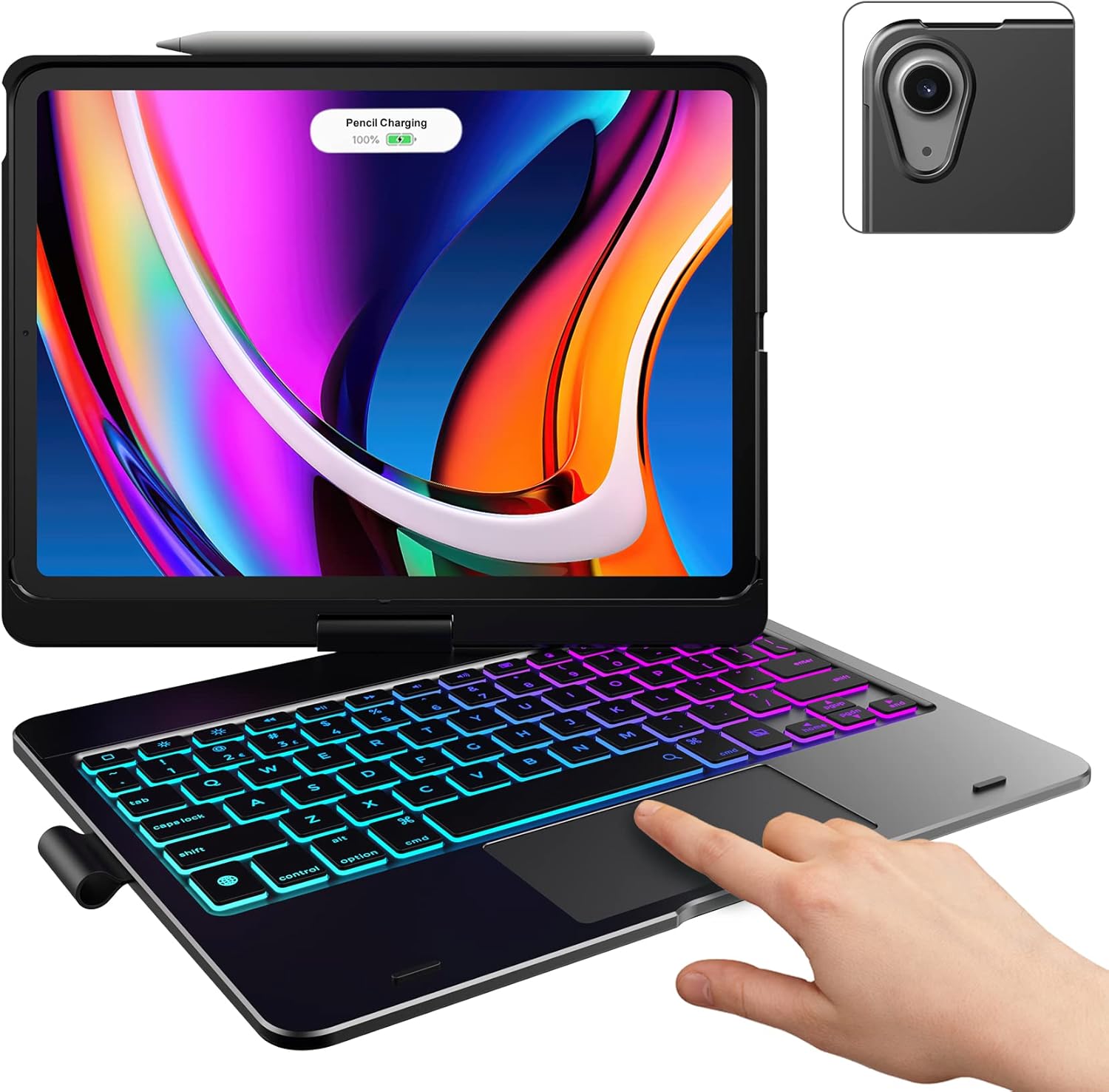
Image: The typecase keyboard case with an iPad securely inserted, ready for use. Note the integrated trackpad and backlit keys.

Image: Visual representation of the 7 versatile modes supported by the 360° rotatable hinge, including Laptop, Stand, and Tablet modes.
3. Pairing with Your iPad (Bluetooth)
- Цахилгаан унтраалгыг ON байрлал руу гулсуулж гарыг асаана уу.
- дээр дарна уу Холбох button (or a similar Bluetooth pairing button, usually indicated by a Bluetooth icon) on the keyboard. The Bluetooth indicator light will start blinking.
- Өөрийн iPad дээр очно уу Тохиргоо > Bluetooth.
- Bluetooth асаалттай байгаа эсэхийг шалгаарай On.
- Locate "typecase Keyboard" or a similar name in the "Other Devices" list and tap on it to pair.
- Once paired, the Bluetooth indicator light on the keyboard will stop blinking and remain solid, or turn off.
Note: The keyboard will automatically enter sleep mode after a period of inactivity to conserve battery. Press any key to wake it up.
Ашиглалтын заавар
Гарны функцууд
The keyboard features a standard layout with 78 comfortably spaced keys and a dedicated row of iPadOS shortcut keys.

Зураг: Нарийвчилсан view of the backlit keyboard, highlighting the iPadOS shortcut keys and the vibrant 11-color RGB backlight.
iPadOS товчлолын товчлуурууд:
| Түлхүүр дүрс | Чиг үүрэг |
|---|---|
| Гэр | Үндсэн дэлгэц рүү буцна. |
| Гэрэл буурах | Дэлгэцийн тод байдлыг бууруулдаг. |
| Гэрэлтүүлэх | Дэлгэцийн тод байдлыг нэмэгдүүлдэг. |
| Keyboard Hide/Show | Toggles the on-screen keyboard. |
| хайх | Activates iPad search. |
| Өмнөх зам | Skips to the previous media track. |
| Тоглуулах/түр зогсоох | Plays or pauses media. |
| Дараагийн дуу | Дараагийн медиа дуу руу алгасах. |
| Дууг хаах | Дууны дууг хаах эсвэл нээнэ. |
| Дууг багасгах | Аудио дууны хэмжээг бууруулдаг. |
| Дууны хэмжээг нэмэгдүүлэх | Аудио дууны хэмжээг нэмэгдүүлдэг. |
| Дэлгэцийг түгжих | iPad-ын дэлгэцийг түгждэг. |
Трекпад хэрэглээ
The integrated multi-gesture trackpad allows for precise control and navigation of your iPad. Ensure the trackpad is enabled in your iPad's settings if you experience issues.
Түгээмэл трекпад дохио зангаа:
- Нэг хуруугаараа товших: Click/Select.
- Хоёр хуруугаараа гүйлгэх: Дээш эсвэл доош гүйлгэнэ үү.
- Томруулахын тулд хавчих: Агуулгыг томруулж эсвэл жижигрүүлнэ үү.
- Гурван хуруугаар дээш шудрах: Үндсэн дэлгэц рүү оч.
- Зүүн/Баруун гурван хуруугаараа шудрах: Нээлттэй програмуудын хооронд шилжих.
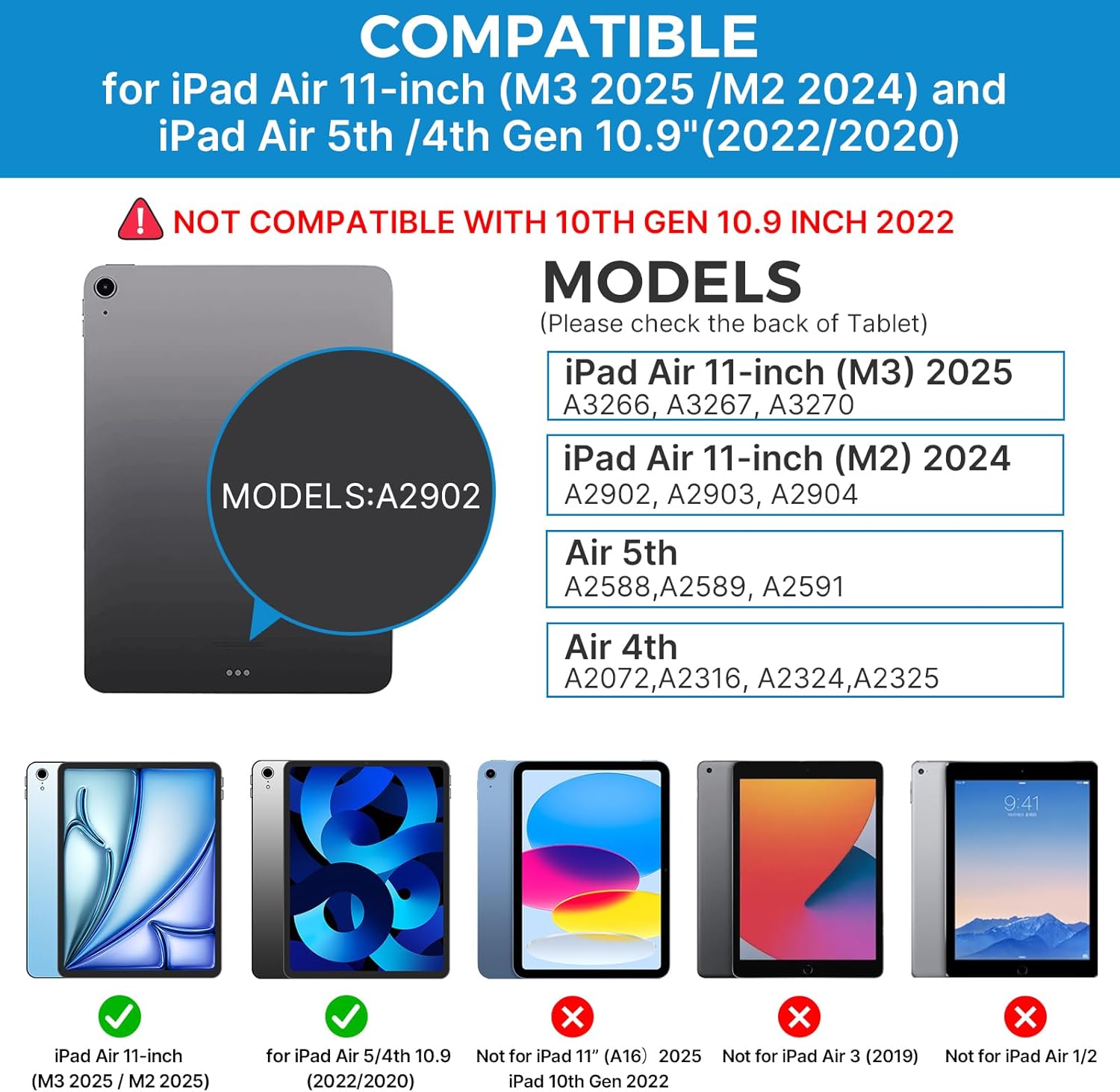
Image: A hand demonstrating the use of the multi-touch trackpad for precise cursor control on the iPad screen.
Арын гэрэлтүүлгийг тохируулах
The keyboard features 11 adjustable RGB backlight colors and 3 levels of brightness. Use the dedicated backlight keys on the keyboard to cycle through colors and adjust brightness levels.
Video: This video demonstrates the 360-degree rotation feature of the typecase Touch Keyboard Case, showcasing its versatility in different viewгоримууд.
Video: This video provides a step-by-step guide on how to properly install and remove your iPad from the typecase Touch Keyboard Case, ensuring a secure fit and preventing damage.
Засвар үйлчилгээ, арчилгаа
- Цэвэрлэгээ: Зөөлөн ашиглах, damp cloth to clean the exterior of the case and keyboard. Avoid harsh chemicals or abrasive materials.
- Хадгалах: When not in use for extended periods, store the keyboard case in a cool, dry place. Ensure the iPad is removed if storing for very long durations.
- Зайны хугацаа: To maximize battery life, turn off the keyboard when not in use. The auto sleep/wake function helps conserve power.
- Шингэнээс зайлсхийх: Do not expose the keyboard case to excessive moisture or liquids.
- Болгоомжтой харьцах: While durable, avoid dropping the case or applying excessive force to the hinge or keyboard.
Алдааг олж засварлах
If you encounter any issues with your typecase Touch Keyboard Case, please refer to the following common solutions:
Keyboard Not Connecting/Typing:
- Гар асаалттай, бүрэн цэнэглэгдсэн эсэхийг шалгаарай.
- Check your iPad's Bluetooth settings to confirm the keyboard is paired and connected. If not, try re-pairing.
- iPad болон гарыг хоёуланг нь дахин эхлүүлнэ үү.
- Бусад Bluetooth төхөөрөмж холболтод саад болохгүй байгаа эсэхийг шалгаарай.
Трэппад хариу өгөхгүй байна:
- Гар нь Bluetooth-ээр холбогдсон эсэхийг шалгана уу.
- Check iPad settings: Тохиргоо > Хүртээмжтэй байдал > Хүрэх > AssistiveTouch. Ensure "Mouse Keys" is off if it's causing interference.
- Аливаа хог хаягдлыг арилгахын тулд trackpad гадаргууг цэвэрлэ.
Арын гэрэл ажиллахгүй байна:
- Гар хангалттай цэнэглэгдсэн эсэхийг шалгаарай.
- Гэрлийн түвшин болон өнгийг хооронд нь сэлгэхийн тулд арын гэрэлтүүлгийн тохируулгын товчлууруудыг дарна уу.
iPad Not Entering Sleep/Wake Mode:
- Ensure the iPad is correctly seated in the case.
- Check iPad settings: Тохиргоо > Дэлгэц ба Гэрэл > Түгжих/тайлах. Ensure this feature is enabled.
If problems persist, please contact typecase customer support for further assistance.
Үзүүлэлтүүд
| Онцлог | Дэлгэрэнгүй |
|---|---|
| Загвар | B09WVRD5JD |
| Тохиромжтой байдал | iPad Air 11-inch (M3 2025 / M2 2024), iPad Air 5th Gen (2022, 10.9"), iPad Air 4th Gen (2020, 10.9") |
| Холболт | Bluetooth |
| Гарны зохион байгуулалт | 78-key standard with iPadOS shortcuts |
| Арын гэрэлтүүлэг | 11 өнгөт RGB, 3 гэрэлтүүлгийн түвшин |
| Trackpad | Multi-functional, multi-gesture |
| Hinge Rotation | 360° (20,000-cycle stress tested) |
| Эрчим хүчний эх үүсвэр | Батерейгаар ажилладаг (1 литийн полимер батерей багтсан) |
| Зүйлийн жин | 1.52 фунт |
| Бүтээгдэхүүний хэмжээ (LxWxH) | 11.02 x 8.66 x 0.79 инч |
| Материал | Premium hardshell design |
Баталгаат болон дэмжлэг
typecase offers a comprehensive warranty and support for your product:
- 1 жилийн солих үйлчилгээ: Enjoy worry-free after-sales support with a 1-year replacement service for manufacturing defects.
- 30 хоногийн буцаан олголт: Хэрэв та худалдан авалтандаа сэтгэл хангалуун бус байвал худалдан авснаас хойш 30 хоногийн дотор буцаан олголт авах эрхтэй байж магадгүй.
- Хэрэглэгчийн дэмжлэг: For any questions, technical assistance, or warranty claims, please contact typecase customer service. Refer to the contact information provided in the product packaging or on the official typecase webсайт.

Зураг: Дууслааview of typecase's customer support and warranty policy, including 1-year replacement and 30-day refund.