1. Танилцуулга
The ACT AC7049 Dual Monitor Docking Station transforms your laptop into a complete workstation. This versatile 11-in-1 docking station allows you to connect up to two Full HD displays (max. 2048 x 1152 resolution) to your laptop via HDMI, using a single USB-C/A cable. It expands your laptop's connectivity with a Gigabit LAN port, microphone and headphone jacks, and six additional USB ports. Featuring DisplayLink® technology, it ensures advanced screen display on both MacOS and Windows computers.
2. Үндсэн шинж чанарууд
- Хос мониторын дэмжлэг: Connect up to two external displays with HDMI ports, supporting resolutions up to 2048x1152@60Hz.
- Нийтэд нийцтэй байдал: Works with laptops featuring a USB-C or USB-A 3.2 Gen1 (USB 3.0) port, compatible with MacOS and Windows thanks to DisplayLink technology.
- Өргөн хүрээтэй холболт: Includes 2x HDMI, 1x Gigabit Ethernet, 3x USB-A 3.2 Gen 1 (one with fast charging), 4x USB-A 2.0, and 3.5mm audio jacks for microphone and headphones.
- Уян хатан байршил: Designed for both vertical and horizontal placement to optimize desk space and port accessibility.
- USB цэнэглэх порт: Dedicated USB port for charging smartphones and tablets.
3. Багцын агуулга
Дараах зүйлсийн багцад байгаа эсэхийг шалгана уу.
- ACT AC7049 Docking Station
- USB-C/A 3.2 Gen1 Connection Cable (USB-A to USB-C)
- Эрчим хүчний адаптер
- Босоо зогсоол
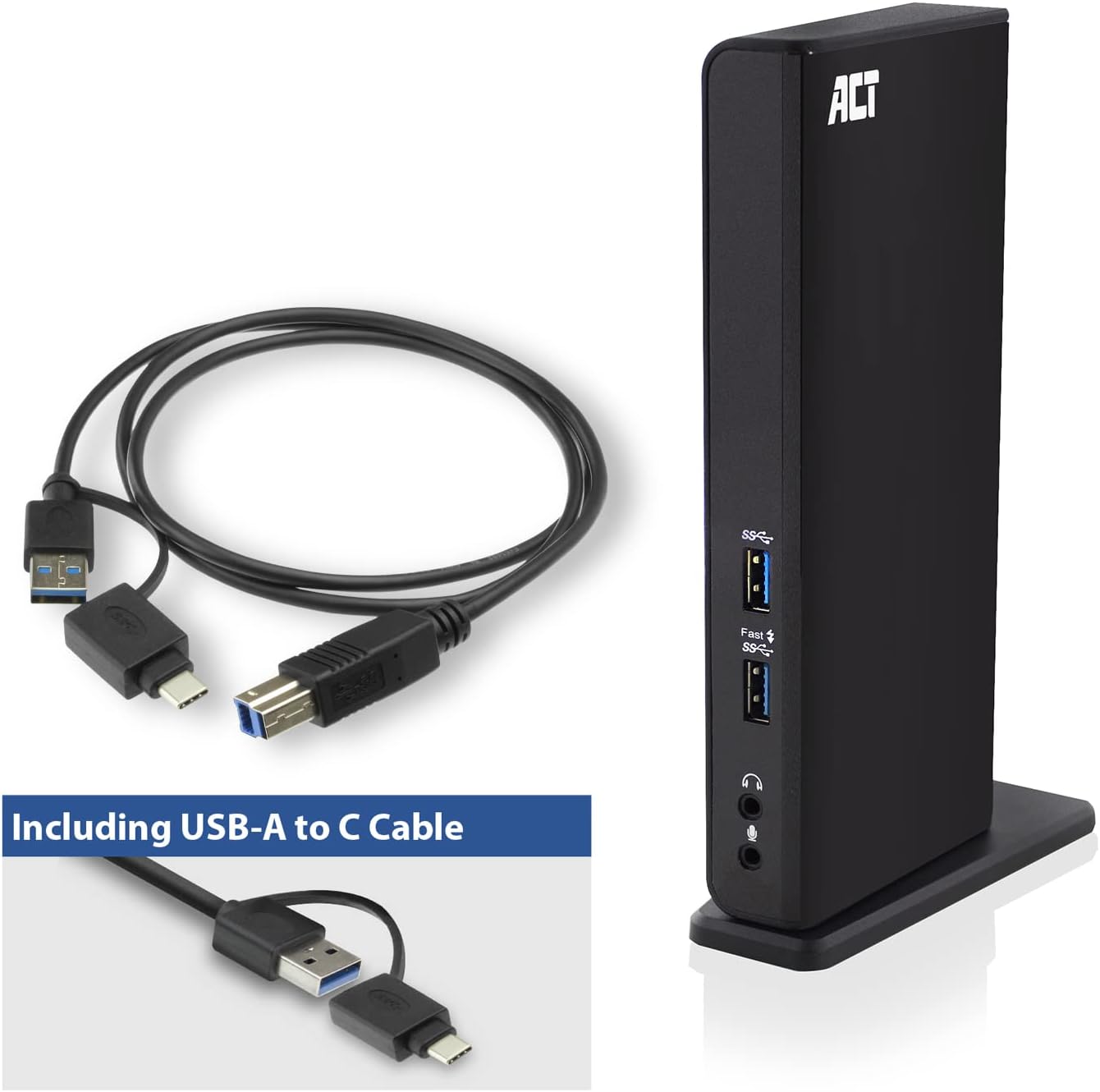
Image: The ACT AC7049 Docking Station shown with its included USB-A to USB-C connection cable and power adapter, highlighting the components provided in the package.
4. Тохируулах гарын авлага
4.1. Цахилгаан хувиргагчийг холбох
- Connect the power adapter to the DC 5V input port on the back of the AC7049 docking station.
- Plug the power adapter into a wall outlet. The docking station will power on.
4.2. Зөөврийн компьютерт холбогдох
- Use the provided USB-C/A 3.2 Gen1 connection cable. Connect the USB-B end to the corresponding port on the docking station.
- Connect the other end (USB-A or USB-C, depending on your laptop's port) to an available USB 3.2 Gen1 (USB 3.0) or USB-C port on your laptop.
4.3. Драйвер суулгах (DisplayLink)
The AC7049 utilizes DisplayLink technology for extended monitor functionality. Drivers are typically installed automatically on most operating systems. If not, please follow these steps:
- Албан ёсны DisplayLink-д зочилно уу webсайт (www.displaylink.com/downloads) to download the latest drivers for your operating system (Windows or MacOS).
- Install the downloaded driver package and follow the on-screen instructions.
- Хэрэв асуувал компьютерээ дахин эхлүүлнэ үү.

Image: The official DisplayLink 'Plug and Display' logo, indicating the technology used for multi-monitor support.
5. Ашиглалтын заавар
5.1. Connecting External Displays
- Connect your HDMI monitors to the two HDMI ports on the back of the docking station.
- Once connected, your operating system should detect the new displays. You can configure display settings (extend, mirror, primary display) through your computer's display settings.

Image: A visual representation of the docking station enabling both 'Mirror your content' and 'Extend your content' display modes across a laptop and two external monitors.
5.2. USB захын төхөөрөмжүүдийг холбох
- Урд USB портууд: Two USB-A 3.2 Gen1 ports (one with fast charging capability) are located on the front for easy access to frequently used devices like USB drives, smartphones, or tablets.
- Rear USB Ports: Four USB-A 2.0 ports are located on the back for connecting peripherals such as keyboards, mice, printers, or other less frequently connected devices.
5.3. Сүлжээний холболт
Connect an Ethernet cable from your router or network switch to the Gigabit Ethernet port on the docking station. Your laptop will automatically gain wired network access.
5.4. Аудио холболт
Connect your headphones and/or microphone to the dedicated 3.5mm audio jacks on the front of the docking station.

Image: An isometric diagram showcasing the comprehensive connectivity of the ACT AC7049, demonstrating how a laptop, two monitors, a keyboard, mouse, network cable, headphones, and a smartphone can all be connected simultaneously.
6. Байршуулах сонголтууд
The ACT AC7049 docking station offers flexible placement options to suit your workspace:
- Босоо байрлал: Use the included stand to position the docking station vertically. This saves desk space and provides easy access to all ports.
- Хэвтээ байрлал: The docking station can also be placed horizontally if preferred.

Image: The ACT AC7049 Docking Station positioned vertically on its stand, highlighting its compact design and accessible ports.
7. Засвар үйлчилгээ
To ensure optimal performance and longevity of your ACT AC7049 Docking Station, follow these maintenance guidelines:
- Цэвэрлэгээ: Док станцын гадна талыг зөөлөн, хуурай даавуугаар цэвэрлэнэ үү. Төхөөрөмжийг гэмтээж болзошгүй тул шингэн цэвэрлэгч эсвэл аэрозоль хэрэглэхээс зайлсхий.
- Агааржуулалт: Хэт халалтаас урьдчилан сэргийлэхийн тулд док станцыг агааржуулалт сайтай газар байрлуулсан эсэхийг шалгаарай. Агааржуулалтын нүхийг бүү бөглөөрэй.
- Хадгалах: Удаан хугацаагаар ашиглаагүй тохиолдолд залгах станцыг нарны шууд тусгал, хэт температураас хол, сэрүүн, хуурай газар хадгална.
- Кабелийн менежмент: Keep cables organized and free from kinks or excessive bending to prevent damage to the cables and ports.
8. Алдаа засах
If you encounter issues with your ACT AC7049 Docking Station, please refer to the following common troubleshooting steps:
- Дэлгэцийн гаралт байхгүй:
- Ensure the docking station is powered on and correctly connected to your laptop.
- HDMI кабель нь залгах станц болон дэлгэцийн аль алинд нь найдвартай холбогдсон эсэхийг шалгана уу.
- Гадаад дэлгэцүүд зөв илэрч, тохируулагдсан эсэхийг (жишээлбэл, өргөтгөсөн эсвэл толин тусгалтай) шалгахын тулд зөөврийн компьютерийнхээ дэлгэцийн тохиргоог шалгана уу.
- Reinstall or update the DisplayLink drivers from www.displaylink.com/downloads.
- Асуудлыг арилгахын тулд нэг мониторыг нэг нэгээр нь холбож үзээрэй.
- USB төхөөрөмжүүд ажиллахгүй байна:
- Ensure the docking station is properly connected to your laptop and powered.
- Try connecting the USB device directly to your laptop to confirm it is functional.
- Connect the USB device to a different USB port on the docking station.
- Зөөврийн компьютерээ дахин эхлүүлнэ үү.
- Сүлжээний холболт байхгүй:
- Verify the Ethernet cable is securely connected to both the docking station and your router/switch.
- Check your laptop's network settings to ensure the wired connection is enabled.
- Боломжтой бол Ethernet кабелийг өөр төхөөрөмжөөр шалгана уу.
- Аудио ажиллахгүй байна:
- Ensure headphones/microphone are fully plugged into the correct 3.5mm jacks.
- Check your laptop's sound settings to ensure the docking station's audio output/input is selected as the default device.
9. Техникийн үзүүлэлтүүд
| Онцлог | Тодорхойлолт |
|---|---|
| Загварын дугаар | AC7049 |
| Брэнд | ACT |
| Өнгө | Хар |
| Холболтын технологи | USB-A, USB-C |
| Видео гаралт | 2 x HDMI (Max. 2048 x 1152 @ 60Hz) |
| USB портууд | 3 x USB-A 3.2 Gen 1 (5Gbps, 1x Fast Charging), 4 x USB-A 2.0 (480Mbps) |
| Сүлжээний порт | 1 x Гигабит Ethernet (RJ45) |
| Аудио портууд | 1 x 3.5mm Headphone Jack, 1 x 3.5mm Microphone Jack |
| Тохиромжтой төхөөрөмжүүд | Laptop, Computer (with USB 3.2 Gen1 / USB 3.0 or USB-C port) |
| Үйлдлийн системийн дэмжлэг | Windows, MacOS (via DisplayLink) |
| Хэмжээ (L x W x H) | 10.9 x 6 x 18.1 см (ойролцоогоор) |
| Зүйлийн жин | 317 грамм |
10. Баталгаат хугацаа ба дэмжлэг
ACT products are designed for reliability and adhere to international standards and EU legislation. The ACT AC7049 Docking Station comes with a manufacturer's warranty, typically ranging from 2 to 5 years. For specific warranty details and support, please refer to the official ACT webсайт эсвэл худалдагчтайгаа холбогдоно уу.
For technical support or further inquiries, please visit the official ACT connectivity webсайт: www.act-connectivity.com