Танилцуулга
This manual provides comprehensive instructions for the operation and maintenance of your YAOHUIMI replacement remote control. This remote is designed to be compatible with various Fujitsu air conditioner models, including AR-NJ1, ASY2U0, ASY25U, ASY35U, ASY25UA, ASY35UA, ASH9LSACW, ASH12LSACW, and ASY12USCCW, among others. Please read this manual carefully to ensure proper use and to maximize the lifespan of your remote control.
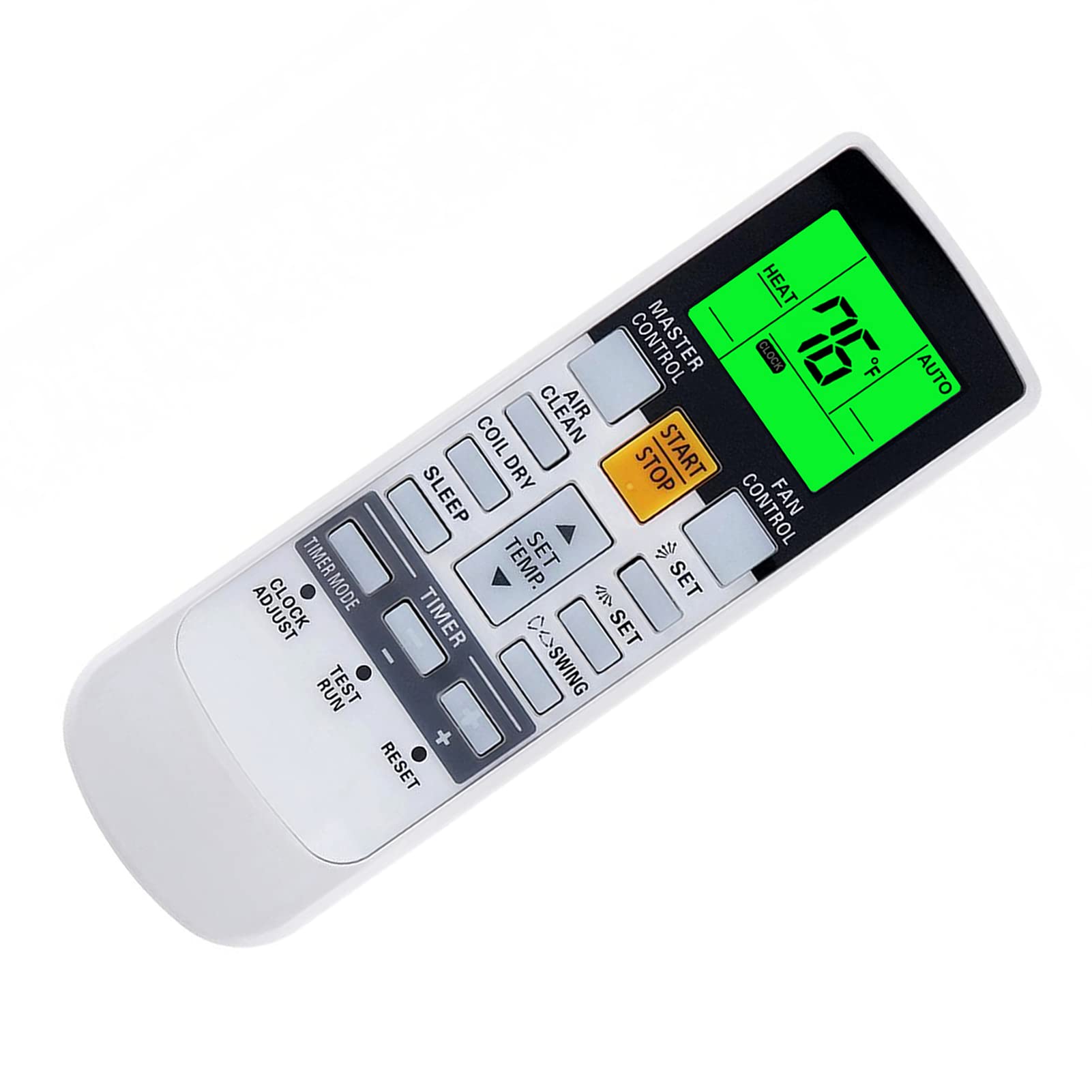
Зураг: Урд view of the YAOHUIMI Replacement Remote Control.
Тохиргоо
Батерей суурилуулах
Алсын удирдлага ажиллахын тулд хоёр AAA батерей (дагалдахгүй) шаардлагатай. Батерейг суурилуулахын тулд дараах алхмуудыг дагана уу:
- Алсын удирдлагын ар талд байгаа зайны тасалгааны тагийг ол.
- Тасалгааг нээхийн тулд тагийг доош нь гулсуулна уу.
- Эерэг (+) болон сөрөг (-) терминалууд нь тасалгааны доторх диаграммуудтай тохирч байгаа эсэхийг шалгаад хоёр шинэ AAA батерейг оруулна уу.
- Батерейны тасалгааны тагийг найдвартай товших хүртэл шургуулна уу.

Зураг: Урд ба хойд view of the remote control, illustrating the battery compartment location.
Анхны хэрэглээ
This replacement remote control is pre-programmed and typically requires no additional setup or pairing. Simply install the batteries and point the remote towards your Fujitsu air conditioner to begin operation.
Ашиглалтын заавар
Үндсэн функцууд
- START/STOP товч: Агааржуулагчийг асаах эсвэл унтраахын тулд дарна уу.
- МАСТЕР ХЯНАЛТ: Cycles through operating modes such as Auto, Cool, Dry, Fan, and Heat.
- ФАН ХЯНАЛТ: Сэнсний хурдыг тохируулна (жишээ нь, Автомат, Бага, Дунд, Өндөр).
- SET TEMP. Buttons (Up/Down Arrows): Хүссэн температурын тохиргоог тохируулна.
- SWING Buttons: Агаарын хуваарилалтын хувьд хаалтны эргэх функцийг хянадаг.
- TIMER Buttons: Used to set ON/OFF timers for the air conditioner.
Temperature Display (Fahrenheit/Celsius)
The remote control can display temperature in both Fahrenheit (°F) and Celsius (°C). To switch between these units:
- With the remote control powered on, observe the current temperature unit on the display.
- Press the designated button (often a small button near the temperature display or a combination of buttons) to toggle between °F and °C. Refer to the image below for visual guidance.

Image: Remote control display illustrating the Fahrenheit and Celsius temperature units and the green backlight.
Green Backlight Feature
The remote control features a green backlight for improved visibility in low-light conditions. This backlight activates automatically when buttons are pressed, making it easier to operate the air conditioner at night.
Advanced Heat Functions (If Applicable)
Some Fujitsu AC models support advanced heat functions such as "10°C HEAT", "50°F HEAT", "MINI.HEAT", or "ECONOMY". These functions are only available if your original remote control also had these specific buttons or capabilities. To activate these, you may need to press and hold a specific button for approximately 4 seconds. Consult your air conditioner's original manual for specific details on these functions.

Image: Diagram showing how to activate advanced heat functions by pressing and holding a button for 4 seconds.
Засвар үйлчилгээ
Алсын удирдлагыг цэвэрлэх
To clean the remote control, use a soft, dry cloth. Do not use liquid cleaners, sprays, or abrasive materials, as these can damage the remote's surface or internal components.
Зай солих
Replace the batteries when the remote control's range decreases, or if the display becomes dim or unresponsive. Always replace both batteries at the same time with new AAA batteries. Do not mix old and new batteries, or different types of batteries.
Хэрэв алсын удирдлагыг удаан хугацаагаар ашиглахгүй бол гоожиж, болзошгүй эвдрэлээс урьдчилан сэргийлэхийн тулд батарейг салга.
Алдааг олж засварлах
Алсын удирдлага хариу өгөхгүй байна
- Батерейг шалгах: Ensure batteries are inserted correctly with the correct polarity (+/-). Replace with fresh AAA batteries if necessary.
- Харааны шугам: Алсын удирдлага болон агааржуулагчийн хүлээн авагчийн хооронд ямар нэгэн саад бэрхшээл байхгүй эсэхийг шалгаарай.
- Зай: Ensure you are within the effective operating range of the air conditioner's infrared receiver.
- Хэт улаан туяаны хөндлөнгийн оролцоо: Хүчтэй гэрлийн эх үүсвэрүүд (жишээлбэл, нарны шууд тусгал, флюресцент гэрэл) нь хэт улаан туяаны дохионд саад учруулж болзошгүй. Алсын удирдлагыг өөр гэрэлтүүлгийн нөхцөлд ажиллуулж үзээрэй.
Дэлгэцийн асуудлууд
- Бүдэг дэлгэц: Энэ нь ихэвчлэн батерейны цэнэг бага байгааг илтгэнэ. Батерейг солих.
- Дэлгэц байхгүй: Check battery installation and ensure batteries are fresh. If the issue persists after replacing batteries, the remote may require service.
Functions Not Working
- Тохиромжтой байдал: While this remote is broadly compatible, some advanced functions might not be supported by all Fujitsu AC models, especially if your original remote did not have those specific features.
- AC Unit Status: Ensure your air conditioner unit is powered on and functioning correctly.
Үзүүлэлтүүд
| Брэнд | ЯОХУИМИ |
| Загварын дугаар | A420220331-BEIGUANG-87 |
| Тохиромжтой төхөөрөмжүүд | Fujitsu AC models including AR-NJ1, ASH12LSACW, ASH9LSACW, ASY12USCCW, ASY25U, ASY25UA, ASY2U0, ASY35U, ASY35UA, and others. |
| Холболтын технологи | Хэт улаан туяаны (IR) |
| Онцлог шинж чанар | Ergonomic design, Green Backlight, Fahrenheit/Celsius display |
| Эрчим хүчний эх үүсвэр | 2 x AAA батерей (оруулаагүй) |
| Үйлдвэрлэгч | HUIMIKEJI |
Дэмжлэг
For further assistance or inquiries regarding your YAOHUIMI replacement remote control, please refer to the seller's contact information on the platform where the product was purchased. Ensure you have your product model number (A420220331-BEIGUANG-87) available when seeking support.


