Танилцуулга
Худалдан авалт хийсэнд баярлалааasing the Ysametp Mini Projector M10. This portable video projector is designed to provide a high-quality home theater experience with its 1080P Full HD support and 10000 Lux LED light source. It features dual built-in stereo speakers with an SRS sound system for immersive audio. Its compact size and multi-connection capabilities make it ideal for various entertainment and presentation needs. Please read this manual thoroughly before operating the projector to ensure proper use and maintenance.
Аюулгүй байдлын мэдээлэл
Проекторын ашиглалтын хугацааг уртасгах, аюулгүй ажиллагааг хангахын тулд дараах аюулгүй байдлын урьдчилан сэргийлэх арга хэмжээг дагаж мөрдөнө үү.
- Агааржуулалтын нүхийг бүү бөглөөрэй. Хэт халалтаас сэргийлж, проекторын эргэн тойронд хангалттай агаарын урсгалыг хангана уу.
- Цахилгаан цочрол, гал гарахаас зайлсхийхийн тулд проекторыг бороо, чийгэнд бүү тавь.
- Проекторыг нээж болохгүй casing. Бүх үйлчилгээг мэргэшсэн үйлчилгээний ажилтнуудад шилжүүлээрэй.
- Зөвхөн проектортой хавсаргасан тэжээлийн адаптерийг ашиглана уу.
- Place the projector on a stable, flat surface to prevent it from falling.
- lamp асаалттай байна.
- Аянга цахилгаантай бороо орох эсвэл удаан хугацаагаар ашиглаагүй үед проекторыг цахилгааны залгуураас салга.
Багцын агуулга
Хайрцагнаас задлахдаа багцын агуулгыг шалгана уу:
- 1 x Ysametp Mini Projector M10
- 1 x HDMI кабель
- 1 x 3-in-1 AV Line
- 1 х цахилгаан утас
- 1 х Tripod
- 1 x Drawstring Backpack
- 1 x Алсын удирдлага (батарей ороогүй)
- 1 х хэрэглэгчийн гарын авлага

Бүтээгдэхүүн дууссанview
Проекторын эд ангиуд болон холболтын портуудтай танилцаарай.

Оролт/гаралтын портууд:
- HDMI порт: Connect to devices like TV sticks, laptops, gaming consoles.
- USB порт: Медиа тоглуулахын тулд USB хөтчүүдийг холбоно уу.
- TF картын оролт: Insert TF cards for media playback.
- VGA порт: Connect to computers or laptops.
- AV порт: Connect to older devices like DVD players using the 3-in-1 AV cable.
- 3.5 мм аудио залгуур: Гадаад чихэвч эсвэл чанга яригчийг холбоно уу.
Тохиргоо
1. Байршил ба дэлгэцийн хэмжээ
Position the projector on a flat, stable surface. The projection size can range from 32 inches to 200 inches, with an optimal projection distance between 3.6 feet and 16.4 feet.

2. Эрчим хүчний холболт
Connect the supplied power cord to the projector's power input and then plug it into a power outlet.
3. Фокус ба гол тулгуурын тохируулга
After powering on, adjust the focus and keystone knobs located on top of the projector to achieve a clear and rectangular image. The focus ring adjusts image sharpness, while the keystone correction corrects trapezoidal distortion if the projector is not perfectly perpendicular to the screen.
Ашиглалтын заавар
1. Асаах/унтраах
- Асаахын тулд: Проектор эсвэл алсын удирдлага дээрх цахилгаан товчийг дарна уу.
- Унтраахын тулд: Press the power button again. The projector will go through a shutdown sequence.
2. Оролтын эх үүсвэрийн сонголт
Use the "Source" button on the remote control or the projector's control panel to select the desired input source (HDMI, USB, TF, VGA, AV).
3. Төхөөрөмжүүдийг холбох
- HDMI: Connect an HDMI cable from your device (e.g., TV Stick, laptop, game console) to the projector's HDMI port.
- USB/TF карт: Insert a USB drive or TF card into the respective port. The projector will automatically detect the media or prompt you to select it.
- VGA: Connect a VGA cable from your PC/laptop to the projector's VGA port.
- OF: Use the provided 3-in-1 AV cable to connect to devices with AV output.
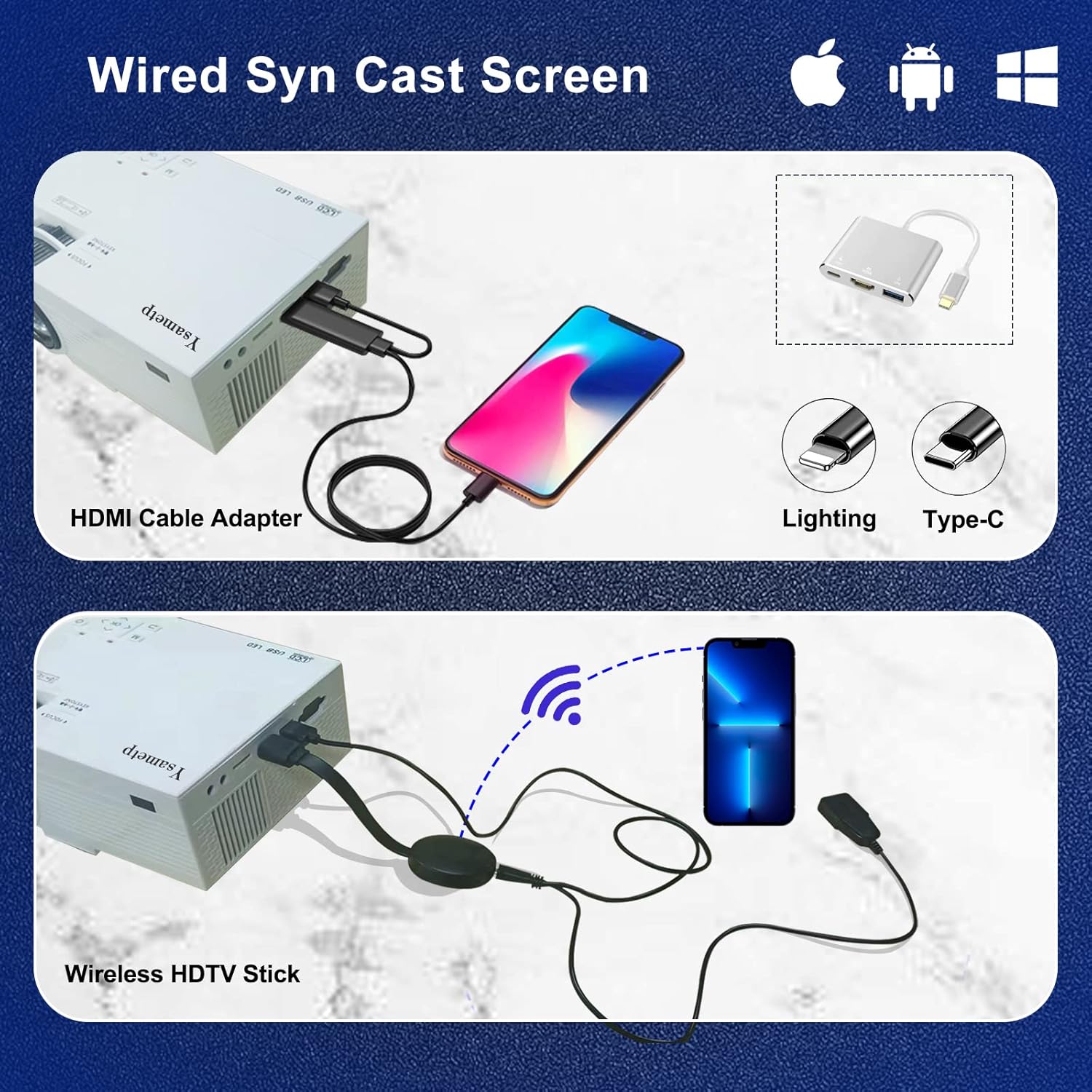
4. Wired Screen Mirroring (for Smartphones)
To mirror your smartphone screen, you will need an HDMI adapter (e.g., Lightning to HDMI for iPhone, USB-C to HDMI for Android) or a Miracast dongle/TV stick (like Roku, Fire TV Stick).

5. Аудио гаралт
The projector has dual built-in stereo speakers. For external audio, connect headphones or external speakers to the 3.5mm audio jack.

Засвар үйлчилгээ
1. Цэвэрлэгээ
- Линз: Оптик линзэнд тусгайлан зориулсан зөөлөн, хөвөнгүй даавууг ашигла. Зүлгүүрийн цэвэрлэгч хэрэглэж болохгүй.
- Casing: Wipe the projector's exterior with a soft, dry cloth. Do not use liquid or aerosol cleaners.
- Агааржуулалт: Regularly check and clean the ventilation openings to prevent dust buildup, which can affect cooling performance.
2. Хадгалах
When not in use, store the projector in a cool, dry place, away from direct sunlight and extreme temperatures. Use the provided drawstring backpack for protection during storage or transport.
3. LED Lifespan
The built-in LED light source is designed to support up to 55,000 hours of use, providing long-lasting performance.
Алдааг олж засварлах
| Асуудал | Боломжит шалтгаан / шийдэл |
|---|---|
| Дэлгэц дээр зураг байхгүй. |
|
| Зураг бүдэг байна. |
|
| Image is trapezoidal. |
|
| Дуу алга. |
|
| Алсын удирдлага ажиллахгүй байна. |
|
Үзүүлэлтүүд
| Онцлог | Дэлгэрэнгүй |
|---|---|
| Брэнд | Ysametp |
| Загвар | M10 |
| Дэлгэцийн технологи | LCD |
| Төрөлхийн тогтоол | 1920 x 1080 Pixels (Full HD Supported) |
| Зургийн тод байдал | 11000 Люкс |
| Зургийн ялгаатай харьцаа | 10000:1 |
| Харьцаа | 4:3 |
| Төслийн хэмжээ | 32 - 200 инч |
| Проекцийн зай | 3.6 фут - 16.4 фут |
| LED ашиглалтын хугацаа | 55,000 цаг |
| Дуу чимээний түвшин | 31 дБ |
| Ватtage | 60 ватт |
| Тоног төхөөрөмжийн интерфейс | VGA, USB, HDMI, 3.5mm Audio, TF Card |
| Хэмжээ (L x W x H) | 23.88 x 15.49 x 8.13 см |
| Жин | 975.22 гр (ойролцоогоор 2.15 фунт) |
Баталгаат болон дэмжлэг
Ysametp provides a Бүтээгдэхүүний 3 жилийн баталгаат хугацаа for the Mini Projector M10.
If you encounter any problems or have questions regarding your projector, please do not hesitate to contact our customer support. Refer to the contact information provided on the product packaging or the official Ysametp webтусламж авах сайт.


