1. Бүтээгдэхүүн дууссанview
The VIVOSUN G4 4" Inline Duct Fan with E42A+ Smart Controller is designed to provide efficient and quiet ventilation for various environments, including grow tents, greenhouses, and home ventilation systems. This system features an energy-efficient EC motor, precise temperature and humidity monitoring, and comprehensive control via the E42A+ controller and a dedicated mobile application. It enables automated environmental management to maintain optimal conditions.

Image: The VIVOSUN AeroZesh G4 Inline Fan with E42A+ Controller, illustrating the fan and its smart control unit.
2. Аюулгүй байдлын мэдээлэл
- Цахилгааны аюулгүй байдал: Цахилгаан эх үүсвэр нь сэнсний дууны түвшинтэй тохирч байгаа эсэхийг шалгаарайtage requirements. Do not operate with damaged cords or plugs. Avoid exposing electrical components to water or excessive moisture.
- Суурилуулалт: Install the fan and controller in a stable, secure location. Ensure proper ducting connections to prevent air leaks and maintain efficiency.
- Үйл ажиллагаа: Keep fingers and foreign objects away from the fan blades during operation. Do not block air intake or exhaust vents.
- Засвар үйлчилгээ: Disconnect power before performing any cleaning or maintenance. Refer to the maintenance section for proper cleaning procedures.
- Хүүхэд ба тэжээвэр амьтад: Keep the device out of reach of children and pets to prevent accidental injury or damage.
3. Багцын агуулга
Бүх бүрэлдэхүүн хэсгүүд багцад байгаа эсэхийг шалгана уу:
- VIVOSUN G4 4" Inline Duct Fan
- GrowHub E42A WiFi Controller
- Sensor Probe (Temperature and Humidity)
- Fan to Controller Cord (10 ft / 3 m)
- Hanging Straps (2 pieces)
- Эрчим хүчний адаптер
- Хэрэглэгчийн гарын авлага

Image: A visual representation of the VIVOSUN G4 4-inch Inline Duct Fan, E42A+ Smart Controller, sensor probe, connecting cables, and hanging straps.
4. Тохируулах заавар
4.1 Сэнс суурилуулах
The inline duct fan can be installed as either an exhaust fan or an intake fan, depending on your ventilation needs. It can be placed inside or outside the grow tent/area.
- Сэнс суурилуулах: Use the provided hanging straps to secure the fan to a sturdy support structure. Loop the straps around the fan's flanges and then around the flange brackets.
- Хоолойн холболт: Connect appropriate ducting to both ends of the inline fan. Ensure connections are sealed tightly to prevent air leakage.

Image: Step-by-step visual guide showing how to loop hanging straps around the fan flanges and connect the controller.
4.2 Хянагчийн холболт
- Connect Fan to Controller: Plug the fan's power cable into the designated port on the E42A+ controller.
- Мэдрэгчийн датчикийг холбох: Insert the temperature and humidity sensor probe into its port on the controller. Position the probe in the area where you want to monitor environmental conditions.
- Асаах: Connect the controller's power adapter to a suitable electrical outlet. The controller display will illuminate.

Image: The VIVOSUN E42A+ Smart Controller, highlighting its various ports for circulation fans, grow lights, duct fans, and temperature/humidity sensors.
4.3 Апп суулгах болон хослуулах
Download the VIVOSUN app from the App Store (iOS) or Google Play Store (Android) to enable remote control and advanced features.
- Апп татаж авах: хайх "VIVOSUN" in your device's app store and install the application.
- Бүртгэл үүсгэх: Follow the in-app instructions to create a VIVOSUN account or log in if you already have one.
- Хос хянагч: In the app, select to add a new device and follow the pairing instructions. Ensure your smartphone is connected to a 2.4GHz Wi-Fi network during the pairing process.

Image: A smartphone displaying the VIVOSUN app interface, which provides real-time environmental data and control over connected devices.
5. Ашиглалтын заавар
5.1 E42A+ Controller Interface
The E42A+ controller features an interactive color display for direct management of your devices.
- Навигац: Цэсүүдээр дамжуулан навигаци хийж, тохиргоог тохируулахын тулд сумтай товчлууруудыг ашиглана уу.
- Хяналт: The display shows real-time temperature, humidity, and VPD (Vapor Pressure Deficit) readings from the connected sensor.
- Төхөөрөмжийн хяналт: Directly adjust fan speed, light intensity, and other connected device settings.

Image: The E42A+ controller's color display showing various settings for circulation fan, grow light, and duct fan, alongside the mobile app interface for automated grow recipes.
5.2 Гар утасны програмын хяналт
The VIVOSUN app provides comprehensive remote management and automation capabilities.
- Бодит цагийн өгөгдөл: Monitor environmental conditions from anywhere via Wi-Fi.
- Grow Recipes: Utilize preset or custom schedules for different growth stages (seedling, vegetative, flowering) to automate equipment operation.
- Auto-Triggers: Set up automated responses based on environmental thresholds (e.g., fan activates if temperature exceeds a set point).
- Төхөөрөмжийн тохиргоо: Adjust fan speed, light intensity, and other connected device parameters remotely.
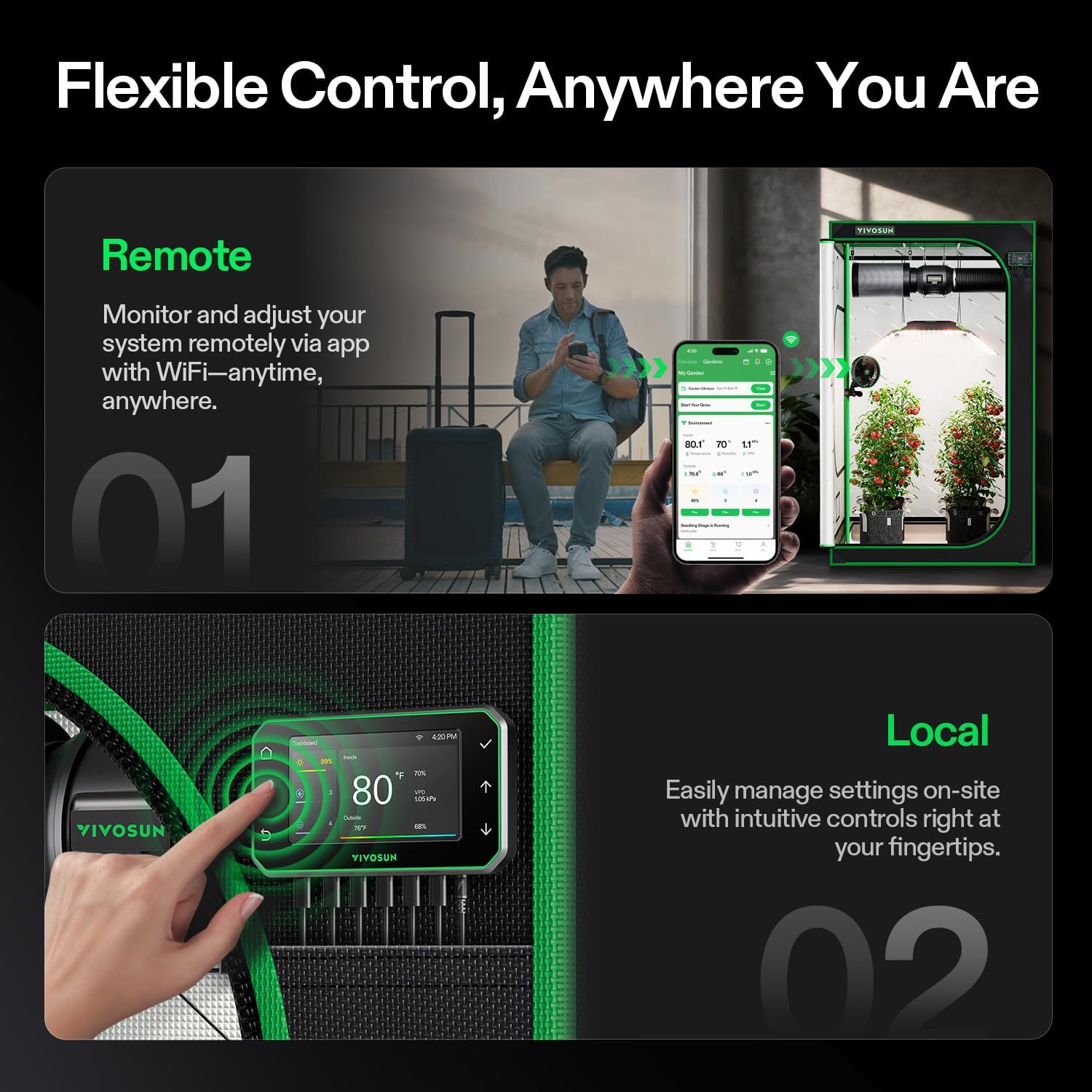
Image: Illustration showing both remote control via the VIVOSUN app on a smartphone and local control directly on the E42A+ controller.
5.3 VPD Management
The system accurately tracks temperature, humidity, and calculates VPD to optimize plant care.
- VPD Calculation: The controller and app display VPD values, which are crucial for plant transpiration and growth.
- Optimized Environment: Use VPD data to fine-tune temperature, humidity, and airflow settings for specific plant growth stages.

Image: Graphs illustrating real-time tracking of VPD, temperature, and humidity, managed by the VIVOSUN E42A+ controller for optimized plant care.
6. Засвар үйлчилгээ
Regular maintenance ensures optimal performance and longevity of your VIVOSUN G4 Inline Duct Fan and E42A+ Smart Controller.
- Фенийг цэвэрлэх: Periodically inspect the fan blades and housing for dust and debris accumulation. Disconnect power before cleaning. Use a soft, dry cloth or a vacuum cleaner with a brush attachment to gently remove any buildup. Do not use liquid cleaners directly on electrical components.
- Cleaning the Sensor Probe: Keep the temperature and humidity sensor probe clean and free from obstructions. Dust or residue can affect accuracy. Wipe gently with a dry, soft cloth if needed.
- Ducting Inspection: Check ducting for any tears, blockages, or loose connections that could reduce airflow efficiency.
- Хянагчийн арчилгаа: Keep the controller display clean and dry. Avoid harsh chemicals.
7. Алдаа засах
| Асуудал | Боломжит шалтгаан | Шийдэл |
|---|---|---|
| Сэнс асахгүй байна | No power, loose connection, fan malfunction | Check power outlet and connections. Ensure controller is powered. If problem persists, contact support. |
| Температур/чийгшлийн заалт буруу байна | Sensor dirty or improperly placed, faulty sensor | Clean the sensor probe. Relocate the sensor to a representative area. If readings remain inaccurate, contact support. |
| Апп холболтын асуудал | Incorrect Wi-Fi password, 5GHz Wi-Fi, network interference | Ensure your phone is on a 2.4GHz Wi-Fi network. Re-enter Wi-Fi password. Restart router and controller. |
| Сэнс чимээ шуугиантай байна | Debris in fan, loose mounting, high speed setting | Disconnect power and check for debris. Ensure fan is securely mounted. Lower fan speed if noise is excessive. |
8. Техникийн үзүүлэлтүүд
| Онцлог | Дэлгэрэнгүй |
|---|---|
| Загварын нэр | VSV-AZG4E42A |
| Хэмжээ | 4-inch / 100 mm |
| Моторын төрөл | EC Motor (Brushless) |
| Агаарын урсгалын багтаамж | 195 CFM (330 м³ / цаг) |
| Сэнсний хурд | 2700 RPM хүртэл |
| Дуу чимээний түвшин | As low as 28 dB (typical operation), 39 dB(A) (max) |
| Эрчим хүчний хэрэглээ | 20 ватт |
| Эрчим хүчний эх үүсвэр | Утастай цахилгаан (120-240V) |
| Хянагч | GrowHub E42A WiFi Controller |
| Хяналтын арга | App Control, Manual Interface |
| Бүтээгдэхүүний хэмжээс | Fan: 11.81"D x 3.94"W x 7.87"H (approx.) | Controller: 5.55"L x 3.19"W (approx.) |
| Зүйлийн жин | 4.5 фунт |
| Bearing IP | IP44 |

Image: A comparison table detailing specifications for VIVOSUN T4, G4, and R4 inline fan models, including motor type, airflow, speed, and power.
9. Баталгаат хугацаа ба дэмжлэг
VIVOSUN products are designed for reliability and performance. For warranty information, technical support, or service inquiries, please refer to the official VIVOSUN webсайт эсвэл харилцагчийн үйлчилгээтэй шууд холбогдоно уу. Худалдан авалтын баримтаа баталгаат нэхэмжлэлд зориулж худалдан авалтын баталгаа болгон хадгална уу.
Онлайн дэмжлэг: зочилно уу www.vivosun.com Түгээмэл асуултууд, бүтээгдэхүүний бүртгэл, холбоо барих мэдээлэл.


