1. Танилцуулга
This user manual provides detailed instructions for the LiNKFOR UHF Handheld Rechargeable Microphone System. This all-metal dual cordless microphone system is designed for various applications including karaoke, conferences, parties, and public speaking, offering clear sound and reliable wireless performance.

Figure 1: LiNKFOR UHF Handheld Rechargeable Microphone System
2. Багцын агуулга
Бүх зүйл байгаа, сайн нөхцөлд байгаа эсэхийг шалгахын тулд багцыг сайтар шалгана уу.
- 1 х хүлээн авагч
- 2 x утасгүй микрофон
- 1 x 6.35 мм аудио кабель
- 2 x RCA Cables
- 1 х 6.35 мм-ээс 3.5 мм-ийн адаптер
- 1 x 2-in-1 Charging Cable
- 1 x тэжээлийн адаптер
- 1 х хэрэглэгчийн гарын авлага
- 2 x Microphone Sponges
- 2 x Microphones Anti-Rolling Rings
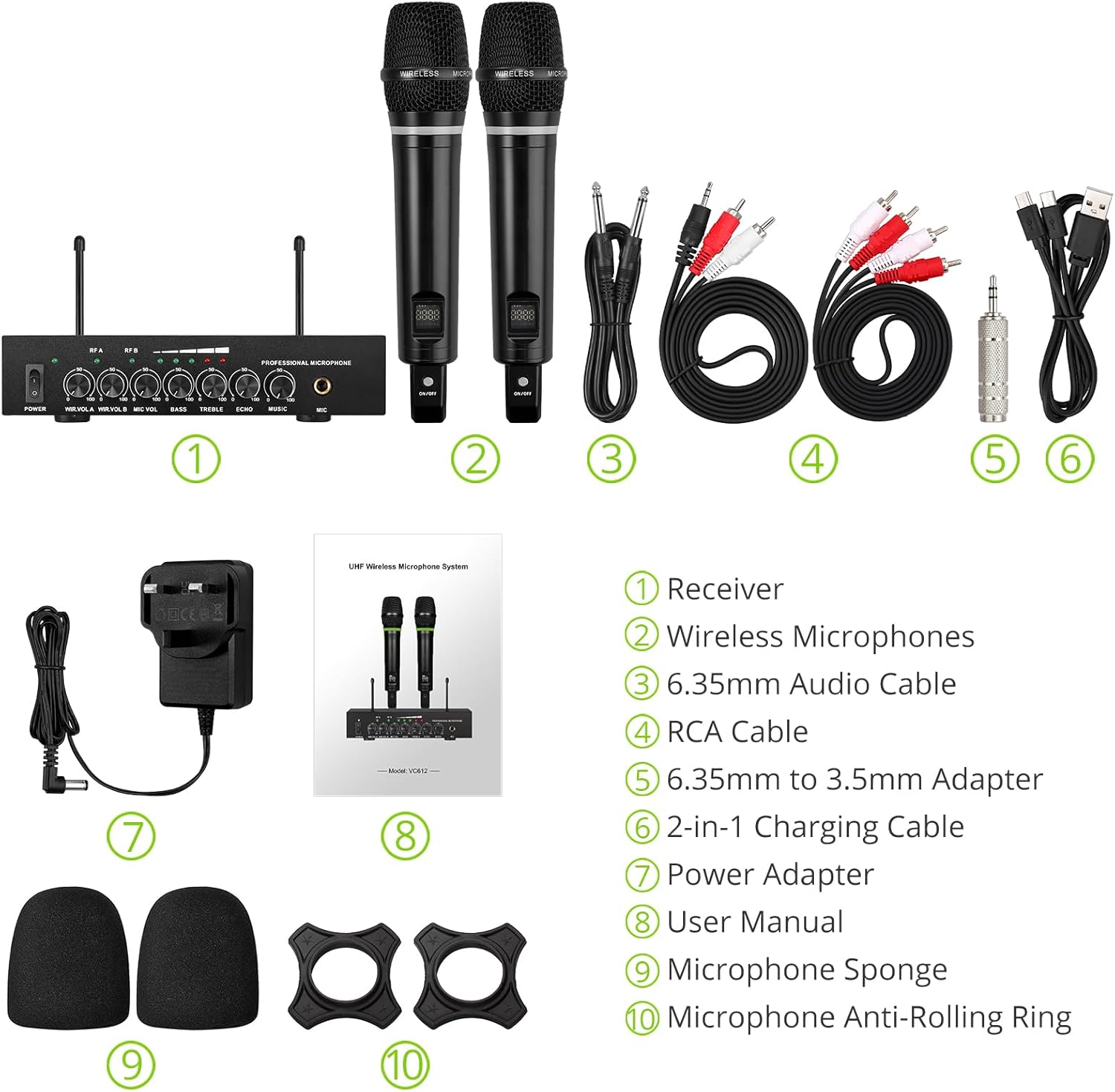
Зураг 2: Багцын бүрэн агуулга
3. Тохируулах заавар
3.1 Хүлээн авагчийг холбох
- Эрчим хүчний холболт: Connect the included power adapter to the DC 12V INPUT port on the receiver and plug it into a power outlet.
- Аудио гаралт:
- For RCA connection: Use the provided RCA cables to connect the "OUTPUT" ports (L/R) on the receiver to the audio input (e.g., AUX, PC) of your sound system (soundbar, amplifier, mixer, or speakers).
- For 6.35mm connection: Use the 6.35mm audio cable to connect the "6.35mm MIC Output" on the receiver to a 6.35mm microphone input on your sound system.
- External Audio Input (Optional):
- For RCA input: Use RCA cables to connect external audio sources (e.g., DVD player, TV) to the "INPUT" ports (L/R) on the receiver.
- For Bluetooth input: Enable Bluetooth on your mobile device (smartphone, tablet) and search for "X168" to pair and connect.

Figure 3: Receiver Connections (RCA Input/Output, 6.35mm MIC Output)

Зураг 4: Bluetooth холболтын тохиргоо
3.2 Микрофон бэлтгэх
- Цэнэглэж байна: The microphones are rechargeable. Use the provided 2-in-1 charging cable to charge both microphones simultaneously. The LED light ring on the microphone will turn red when charging and green when fully charged or in use. A full charge takes approximately 3-4 hours and provides up to 10 hours of play time.
- Асаах/унтраах: Locate the ON/OFF switch on each microphone and slide it to the "ON" position to power on. The display screen on the microphone will light up.
- Anti-Rolling Rings & Sponges: Attach the anti-rolling rings to the base of the microphones and place the microphone sponges over the mesh heads for protection and improved sound quality.

Figure 5: Charging the Microphones
4. Ашиглалтын заавар
- Асаах систем: Ensure the receiver is powered on (POWER switch on the front panel). The indicator lights for RF A and RF B should illuminate when the corresponding microphone is turned on and connected.
- Дууны хэмжээг тохируулах: Use the "WIR.VOL A" and "WIR.VOL B" knobs on the receiver to adjust the individual volume levels of Microphone A and Microphone B.
- Дуу хянах The receiver features independent controls for BASS, TREBLE, and ECHO to customize the sound output. Adjust these knobs to achieve your desired audio effect.
- Хөгжмийн хэмжээ: The "MUSIC" knob controls the volume of the external audio input (e.g., Bluetooth, RCA input).
- Утасгүй хүрээ: The UHF wireless range for the microphones is approximately 165 feet (50 meters). The Bluetooth range for audio input is approximately 32 feet (10 meters).

Figure 6: Wireless Range Overview

Figure 7: Sound Control Features
4.1 Бүтээгдэхүүний албан ёсны видео
Video 1: LiNKFOR Rechargeable UHF Wireless Microphone System Overview. This video demonstrates the setup, features, and usage of the microphone system, including connections and sound adjustments.
5. Засвар үйлчилгээ
- Keep the receiver and microphones clean by wiping them with a soft, dry cloth.
- Төхөөрөмжийг хэт өндөр температур, чийгшил эсвэл нарны шууд тусгалд өртөхөөс зайлсхий.
- Store the system in a dry, cool place when not in use.
- Ensure microphones are fully charged before extended use to maximize battery life.
6. Алдаа засах
| Асуудал | Боломжит шалтгаан | Шийдэл |
|---|---|---|
| Дууны гаралт байхгүй. |
|
|
| Микрофон цэнэглэхгүй байна. |
|
|
| Bluetooth холболтын асуудал. |
|
|

Figure 8: Compatibility and Common Questions
7. Техникийн үзүүлэлтүүд
| Онцлог | Дэлгэрэнгүй |
|---|---|
| Брэнд | LINKFOR |
| Загварын нэр | S-105 |
| Загварын дугаар | ULKVC613us-US |
| Холболтын технологи | UHF Wireless, Bluetooth 5.0 |
| Микрофоны хэлбэр хүчин зүйл | Гарын төхөөрөмж |
| Материал | Металл |
| Эрчим хүчний эх үүсвэр | Батерейгаар ажилладаг (Цэнэглэдэг литийн ион) |
| Тоглох цаг | Up to 10 hours (after 3-4 hours charge) |
| UHF Wireless Range | Ойролцоогоор 165 фут (50м) |
| Bluetooth хүрээ | Ойролцоогоор 32 фут (10м) |
| Дуу шуугианы харьцаа | 95 дБ |
| Эсэргүүцэл | 600 Ом |
| Давтамжийн хариу үйлдэл | 1 KHz (Min/Max) |
| Сувгийн тоо | 2 |
| Хэмжээ (L x W x H) | 16.54 x 12.99 x 3.31 инч |
| Зүйлийн жин | 4.84 фунт (2.2 килограмм) |
| Тохиромжтой төхөөрөмжүүд | Amplifier, Audio Mixer, Karaoke Machine, TV, Laptop, Smartphones (not Bluetooth Speakers) |

Зураг 9: Бүтээгдэхүүний хэмжээс
8. Баталгаат хугацаа ба дэмжлэг
For warranty information or technical support, please refer to the contact details provided in your product packaging or visit the official LiNKFOR webсайт. Баталгаат зардлаа авахын тулд худалдан авалтын баримтаа хадгална уу.
LiNKFOR is committed to providing innovative products and reliable connectivity solutions. For further assistance, please contact customer service.


