Танилцуулга
This manual provides detailed instructions for the safe installation, operation, and maintenance of your bimar Wi-Fi Ceiling Fan, Model 1 (Ø 132). Please read this manual thoroughly before using the product and retain it for future reference.
Зориулалтын хэрэглээ: This high-performance ceiling fan is designed for ventilation in indoor domestic environments. Any other use is considered improper and potentially hazardous. The manufacturer cannot be held responsible for any damages resulting from improper use or repairs performed by unqualified personnel.
Аюулгүй байдлын чухал заавар
Гал түймэр, цахилгаанд цохиулах, эсвэл хүн гэмтэх эрсдэлийг бууруулахын тулд дараах зүйлсийг анхаарна уу.
- Сэнс суурилуулахын өмнө бүх зааврыг уншина уу.
- Суурилуулалтыг орон нутгийн болон улсын бүх цахилгааны дүрмийн дагуу мэргэшсэн цахилгаанчин гүйцэтгэнэ.
- Ensure the installation site can support the fan's weight (approximately 6.2 kg).
- Суурилуулалт, засвар үйлчилгээ хийхээс өмнө үндсэн таслуураас тэжээлийг үргэлж салга.
- Сэнсийг гэмтсэн цахилгааны утас эсвэл залгууртай үед ажиллуулж болохгүй.
- Keep hands, hair, and clothing away from moving blades.
- Do not insert any objects into the fan blades while it is operating.
- Энэхүү төхөөрөмжийг бие бялдар, мэдрэхүйн болон сэтгэцийн хомсдолтой, эсвэл туршлага, мэдлэг дутмаг хүмүүс (хүүхдүүдийг оролцуулан) ашиглахад зориулагдаагүй бөгөөд хэрэв тэдэнд аюулгүй байдлыг нь хариуцдаг хүнээс тухайн төхөөрөмжийг ашиглах зааварчилгаа өгөөгүй л бол.
- Хүүхдийг төхөөрөмжөөр тоглуулахгүйн тулд тэднийг хянах хэрэгтэй.
Хайрцагт юу байна
Your bimar Wi-Fi Ceiling Fan package includes the following components:
- bimar Wi-Fi Ceiling Fan unit (with 3 blades)
- Алсын удирдлага
- Суурилуулах тоног төхөөрөмж (эрэг, хаалт гэх мэт)
- Хэрэглэх заавар (энэ баримт бичиг)

Image: The bimar Wi-Fi Ceiling Fan, featuring three light-colored wooden blades and a brushed metal motor housing and downrod.
Тохиргоо ба суурилуулалт
1. Сэнс суурилуулах
Professional installation by a qualified electrician is strongly recommended. Ensure the ceiling structure can safely support the fan's weight and that all wiring complies with local electrical codes.
- Суулгах газрыг бэлтгэх: Turn off power at the circuit breaker. Securely attach the mounting bracket to a ceiling joist or a fan-rated outlet box.
- Доош чиглүүлэгч болон моторыг угсарна уу: Attach the downrod to the fan motor housing.
- Сэнс өлгөх: Сэнсний угсралтыг болгоомжтой өргөж, бэхэлгээний бэхэлгээнээс өлгө.
- Сэнс утсаар холбох: Connect the electrical wires (live, neutral, ground) from the ceiling to the fan's wiring, following the wiring diagram provided in the separate installation guide (if applicable).
- Хутгыг хавсаргах: Securely fasten the three blades to the motor housing.
- Халхавчийг хамгаалах: Raise the canopy to cover the wiring and mounting bracket, securing it in place.

Зураг: хажуу тал view of the bimar ceiling fan, illustrating the angle of the light wood blades and the connection to the downrod.
2. Wi-Fi болон програмын холболт
The bimar Wi-Fi Ceiling Fan is compatible with the Bimar Live Smart app for advanced control and scheduling.
- Апп татаж авах: хайх "Bimar Live Smart" in your smartphone's app store (iOS or Android) and install it.
- Бүртгэл үүсгэх: Аппликейшнийг нээгээд дэлгэцэн дээрх зааврыг дагаж шинэ хэрэглэгчийн бүртгэл үүсгээрэй эсвэл хэрэв танд аль хэдийн бүртгэл байгаа бол нэвтэрнэ үү.
- Төхөөрөмж нэмэх: Power on the ceiling fan. In the Bimar Live Smart app, tap "Add Device" or the "+" icon. Select "Ceiling Fan" or the appropriate device type.
- Wi-Fi-д холбогдох: Follow the app's instructions to put the fan into pairing mode (usually by pressing a button on the fan or remote for a few seconds). Connect the fan to your home 2.4GHz Wi-Fi network.
- Төхөөрөмжийг нэрлэх: Once connected, you can name your fan for easy identification within the app.

Image: A modern living room featuring the bimar ceiling fan installed, with a smartphone displaying the Bimar Live Smart app interface, indicating Wi-Fi and voice control capabilities.
Ашиглалтын заавар
Your bimar Wi-Fi Ceiling Fan offers multiple control options for convenience.
1. Алсын удирдлагатай ажиллагаа
The included remote control allows direct access to all fan functions.
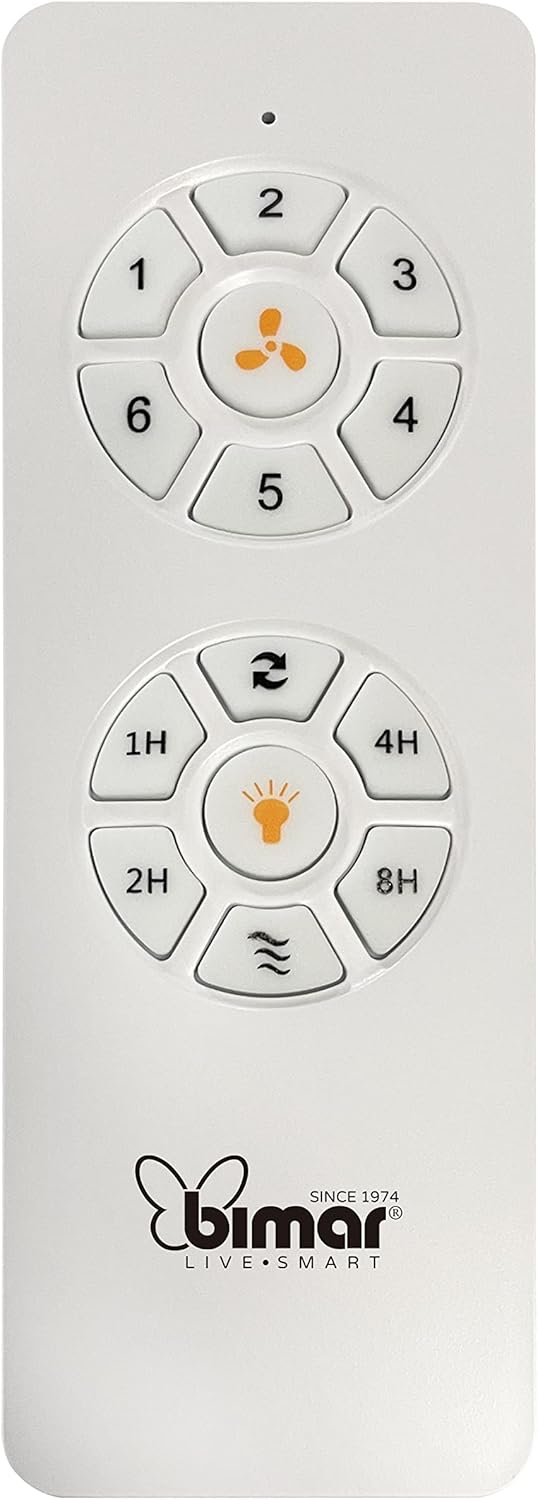
Image: The white remote control for the bimar ceiling fan, showing buttons for fan speed (1-6), fan on/off, timer (1H, 2H, 4H, 8H), mode selection, and reverse function.
- Асаах/унтраах: Сэнсийг асаах эсвэл унтраахын тулд сэнсний дүрсний товчлуурыг дарна уу.
- Хурдны тохируулга: Use buttons 1-6 to select one of the six available fan speeds.
- Таймер функц: Press 1H, 2H, 4H, or 8H to set the fan to automatically turn off after the selected duration.
- Горим сонгох: Use the mode button (often represented by waves or arrows) to cycle through Normal, Natural, Sleep, and Breeze modes.
- Зун/Өвлийн горим: The reverse button (often two arrows forming a circle) changes the blade rotation direction.
2. App Control (Bimar Live Smart)
Once connected to the Bimar Live Smart app, you can access enhanced features:
- Алсын ажиллагаа: Control all fan functions from anywhere with an internet connection.
- Хуваарь: Program daily and weekly on/off times for automated operation.
- Цаг хэмжигч: Adjust the timer from 1 to 8 hours.
- Mode and Speed Selection: Easily switch between the 6 speeds and 4 operating modes.
3. Дуут удирдлага
The bimar Wi-Fi Ceiling Fan is compatible with popular voice assistants like Amazon Alexa and Google Assistant. After connecting the fan to the Bimar Live Smart app, link your Bimar account to your voice assistant app (e.g., Alexa app or Google Home app).
ExampДуут командууд:
- "Алекса, таазны сэнсийг асаагаарай."
- "Хөөе Google, таазны сэнсний хурдыг 3 болгож тохируулна уу."
- "Alexa, turn off the ceiling fan in 1 hour."
4. Operating Modes and Speeds
- 6 Ventilation Speeds: Adjust the airflow intensity to your preference.
- Ердийн горим: Сонгосон хурдаар агаарын тогтмол урсгал.
- Байгалийн горим: Сэнсний хурдыг өөрчлөх замаар байгалийн салхийг дуурайдаг.
- Унтах горим: Саад тотгоргүй амрахын тулд бага, чимээгүй хурдаар ажилладаг.
- Салхины горим: Provides a gentle, intermittent airflow.
5. Зун/Өвөл функц
The reversible blade function allows for year-round use:
- Зуны горим (цагийн зүүний эсрэг эргүүлэх): Доош чиглэсэн агаарын урсгалыг бий болгож, сэрүүцүүлэх салхи үүсгэдэг.
- Өвлийн горим (цагийн зүүний дагуу эргүүлэх): Creates an upward airflow, circulating warm air trapped near the ceiling, improving heating efficiency.

Image: A diagram illustrating the airflow patterns for summer (indirect ventilation, pushing air upwards) and winter (direct ventilation, pulling air downwards) modes of a ceiling fan.
Засвар үйлчилгээ
Тогтмол засвар үйлчилгээ нь таазны сэнсний оновчтой гүйцэтгэл, удаан эдэлгээтэй байдлыг баталгаажуулдаг.
- Цэвэрлэгээ: Before cleaning, ensure the fan is turned off and power is disconnected at the circuit breaker. Use a soft, damp cloth to wipe down the blades and motor housing. Do not use abrasive cleaners or solvents.
- Хутганы үзлэг: Periodically check the blades for any signs of damage or warping. Ensure all blade screws are tight.
- Мотор тосолгооны материал: The fan's DC motor is designed for maintenance-free operation and does not require lubrication.
- Бэхэлгээг чангалах: Over time, some fasteners may become loose. Check and tighten all screws and connections annually.

Зураг: Ойрын зураг view of the bimar ceiling fan's brushed metal motor housing and the attachment points for the light wood blades, highlighting areas for cleaning and inspection.
Алдааг олж засварлах
| Асуудал | Боломжит шалтгаан | Шийдэл |
|---|---|---|
| Сэнс эхлэхгүй байна | No power supply; Remote control battery low; Incorrect wiring. | Check circuit breaker and wall switch. Replace remote batteries. Verify wiring connections (consult electrician). |
| Сэнс ганхаж байна | Суларсан ир эсвэл бэхэлгээний хэрэгсэл; Тэнцвэргүй ир. | Ensure all blade screws and mounting screws are tight. Use a balancing kit (not included) if necessary. |
| Алсын удирдлага ажиллахгүй байна | Low battery; Obstruction between remote and receiver; Remote not paired. | Replace remote batteries. Ensure clear line of sight. Refer to pairing instructions in the full manual. |
| Wi-Fi холболтын асуудал | Incorrect Wi-Fi password; Router too far; 5GHz network selected. | Verify Wi-Fi password. Move router closer or use a Wi-Fi extender. Ensure you are connecting to a 2.4GHz network. Reset fan and re-attempt pairing. |
| Сэнс чимээ шуугиантай байна | Loose screws; Blades hitting an obstruction; Motor issue. | Check and tighten all screws. Ensure nothing is obstructing the blades. If noise persists, contact customer support. |
Үзүүлэлтүүд
| Онцлог | Дэлгэрэнгүй |
|---|---|
| Брэнд | бимар |
| Загварын дугаар | 1 |
| Бүтээгдэхүүний хэмжээс | 132 x 132 x 27.5 см (Диаметр x Диаметр x Өндөр) |
| Жин | 6.2 кг |
| Хутганы тоо | 3 |
| Материал | Мод |
| Өнгө | Black (Note: Blades are light wood finish as shown in images) |
| Моторын төрөл | DC (Brushless, energy-saving) |
| Эрчим хүчний хэрэглээ | 35 Вт |
| Хяналтын аргууд | Remote Control, Bimar Live Smart App, Voice Control (Amazon Alexa, Google Assistant) |
| Сэнсний хурд | 6 |
| Үйлдлийн горимууд | Normal, Natural, Sleep, Breeze |
| Цаг хэмжигч | 1-8 цаг |
| Нэмэлт онцлогууд | Silent operation, Summer/Winter mode (reversible blades) |
| Эрчим хүчний эх үүсвэр | Цахилгаан |
| Суурилуулалтын төрөл | Таазны бэхэлгээ |

Image: The three light wood fan blades, detached and laid flat, showcasing their design and texture.


Зураг: Хоёр views of the bimar ceiling fan, illustrating different downrod lengths: one with a 25 cm downrod and another with a 13 cm downrod, affecting the overall height of the fan.
Баталгаат болон дэмжлэг
For warranty information, technical support, or service inquiries, please refer to the warranty card included with your product or visit the official bimar webсайт. Баталгаат нэхэмжлэл гаргахын тулд худалдан авалтаа нотлох баримтаа хадгалаарай.
Үйлдвэрлэгч: Bimar S.r.l.
Холбоо барих: Та бүхэн зочилно уу the bimar store on Amazon or the official bimar webхолбоо барих мэдээллийг авах сайт.


