Танилцуулга
This manual provides essential information for the proper installation, operation, and maintenance of your TELE System TS6105 DVB-T2 HEVC Digital Terrestrial Decoder. Please read these instructions carefully before using the device to ensure optimal performance and safety.
The TS6105 decoder is designed to receive DVB-T2 HEVC 10-bit digital terrestrial television broadcasts, offering Full HD resolution up to 1080p@60Hz. It includes features such as automatic channel scanning (AUTOSCAN), an Electronic Program Guide (EPG), and multimedia playback capabilities via USB.
Багцын агуулга
Бүх зүйл багцад байгаа эсэхийг шалгаарай:
- TELE System TS6105 DVB-T2 HEVC Digital Terrestrial Decoder
- Алсын удирдлага
- Эрчим хүчний адаптер
- Хэрэглэгчийн гарын авлага (энэ баримт бичиг)

This image shows the compact design of the TS6105 decoder, highlighting the TELE System logo, model number TS6105 DVB-T2 HEVC, Dolby Audio, and HDMI branding on the front, with ventilation on the side.
Тохиргоо
1. Connecting the Decoder
Before connecting, ensure your television and the decoder are turned off.

This image displays the rear panel of the TS6105 decoder, featuring the ANT IN, ANT OUT, COAXIAL, HD OUT (HDMI), SCART, and DC IN ports for power and signal connections.
- Антенны холболт: Газрын антенны кабелиа дараахтай холбоно уу ШОРООГОО IN port on the rear of the decoder. If you wish to loop the signal to another device, connect a coaxial cable from the ШОРГОНЫ ГАРАЛТ port to the next device.
- TV Connection (HDMI): For the best picture quality, connect an HDMI cable from the HD OUT port on the decoder to an available HDMI input on your television. Select the corresponding HDMI input on your TV.
- TV Connection (SCART): If your TV does not have an HDMI input, connect a SCART cable from the SCART port on the decoder to the SCART input on your television.
- Эрчим хүчний холболт: Эрчим хүчний адаптерийг DC IN port on the decoder, then plug the adapter into a wall outlet.
2. First-Time Installation and Channel Scan
After connecting the decoder and turning on your TV, switch on the decoder. The first time you use it, an installation wizard will guide you through the initial setup.
- Хэлний сонголт: Choose your preferred language using the remote control's navigation buttons and press OK.
- Улс сонгох: Select your country. This helps the decoder apply the correct regional settings for channel scanning.
- АВТОСКАН: The decoder will automatically initiate the AUTOSCAN function. This process searches for all available digital terrestrial channels and organizes them logically using the LCN (Logical Channel Number) system. This may take several minutes.
- Дуусгах: Once the scan is complete, the decoder will save the channels and display the first available channel.
Operating the Decoder
Алсын удирдлага дууссанview
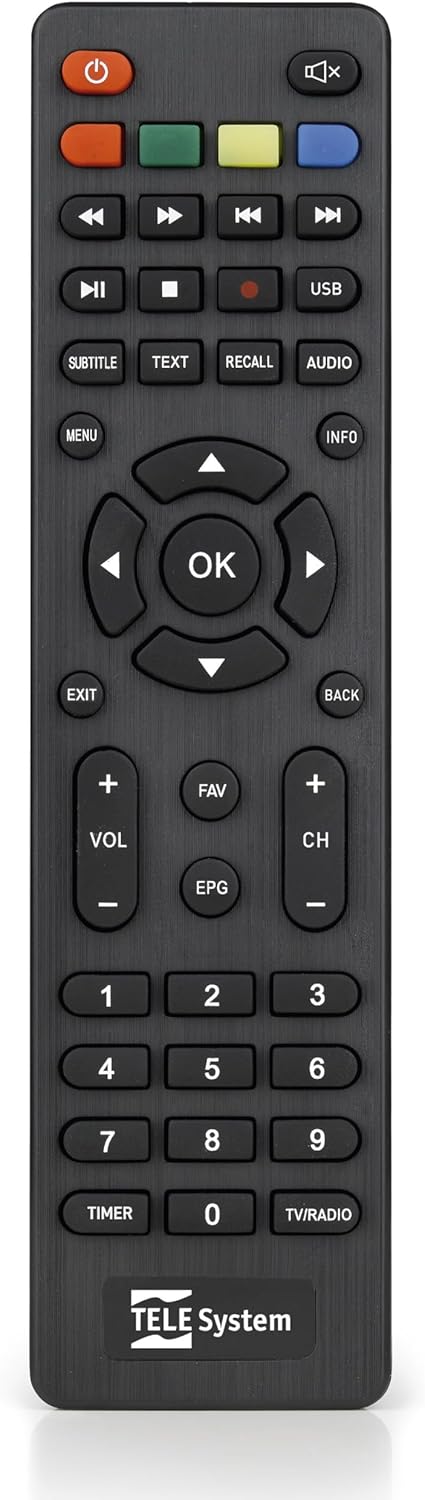
This image presents the remote control for the TS6105 decoder, featuring power, mute, channel, volume, navigation, EPG, media playback, and numeric buttons for comprehensive control.
- Асаах товч (U): Turns the decoder on or off (standby).
- CH +/-: Сувгуудыг дээш эсвэл доош нь өөрчилдөг.
- VOL +/-: Дууны түвшнийг тохируулна.
- БОЛЖ БАЙНА УУ: Confirms selections in menus or displays channel information.
- Цэс: Accesses the main menu for settings and features.
- EXIT/BACK: Одоогийн цэснээс гарах эсвэл өмнөх дэлгэц рүү буцна.
- EPG: Цахим хөтөлбөрийн гарын авлагыг нээнэ.
- TEXT: Activates Teletext.
- Субтитр: Хадмал орчуулгыг асаах/унтраах эсвэл хадмал орчуулгын хэлийг сонгоно.
- USB: Accesses the multimedia player.
- Өнгөт товчлуурууд (улаан, ногоон, шар, цэнхэр): Functionality varies depending on the current menu or EPG.
Цахим хөтөлбөрийн гарын авлага (EPG)
дээр дарна уу EPG алсын удирдлага дээрх товчлуурыг дарна уу view the Electronic Program Guide. The EPG provides information about current and upcoming programs for all channels. You can navigate through channels and time slots to see program details.
Multimedia Player (USB)
The TS6105 can play multimedia fileUSB хадгалах төхөөрөмжөөс.
- Insert a USB drive into the USB port on the decoder.
- дээр дарна уу USB button on the remote control or navigate to the multimedia section via the Цэс.
- Select the type of media you wish to play (Music, Photo, Video).
- Өөрийн files товчийг дарна уу OK тоглох.
Pause TV / Timeshift
The Pause TV / Timeshift function allows you to pause live television and resume viewing later. This feature requires a USB storage device connected to the decoder.
- Нэвтрүүлэг үзэж байхдаа товчийг дарна уу ЗУРАГСАХ button (usually represented by two vertical bars) on the remote control.
- Дахин тоглуулахын тулд товчийг дарна уу ТОГЛОХ button (usually represented by a right-pointing triangle).
- You can also fast-forward or rewind using the respective buttons.
Засвар үйлчилгээ
Цэвэрлэгээ
To clean the decoder, ensure it is unplugged from the power outlet.
- Гаднах гадаргууг зөөлөн, хуурай даавуугаар арчина.
- Do not use liquid cleaners, aerosols, or abrasive materials, as these can damage the device.
- Keep ventilation openings clear of dust and obstructions.
Програм хангамжийн шинэчлэлтүүд
Үйлдвэрлэгчийг үе үе шалгаж байгаарай website for available software updates. Updates can improve performance, add new features, or resolve issues. Follow the instructions provided with the update file болгоомжтой.
Алдааг олж засварлах
If you encounter problems with your decoder, refer to the following common issues and solutions:
- Зураг/дуу чимээ байхгүй:
- Ensure all cables (antenna, HDMI/SCART, power) are securely connected.
- Verify that your TV is set to the correct input source (e.g., HDMI 1, AV).
- Check if the decoder is powered on and not in standby mode.
- Суваг олдсонгүй:
- Perform an AUTOSCAN again from the menu.
- Check your antenna connection and ensure the antenna is properly positioned and functional.
- Verify that your region has DVB-T2 HEVC broadcasts.
- Алсын удирдлага хариу өгөхгүй байна:
- Алсын удирдлага дахь батерейг солино уу.
- Ensure there are no obstructions between the remote control and the decoder's IR sensor.
- Picture Freezing or Pixelation:
- This often indicates a weak or unstable signal. Check your antenna connection and position.
- Try rescanning channels.
Үзүүлэлтүүд
- Загвар: TS6105
- Брэнд: TELE систем
- Өнгө: Хар
- Тохируулагчийн төрөл: DVB-T2 HEVC 10-bit
- Видеоны нягтрал: Up to 1080p@60Hz (Full HD)
- Холболт: HDMI, USB, SCART, Coaxial (ANT IN/OUT)
- Онцлогууд: AUTOSCAN, LCN, EPG, Pause TV/Timeshift, Multimedia Player (USB), Teletext, Subtitle Support
- Загварын дугаар: 21005353
Баталгаат болон дэмжлэг
Баталгаат хугацааны мэдээлэл
This product comes with a manufacturer's warranty of 2 years. Please retain your proof of purchase for warranty claims. The warranty covers defects in materials and workmanship under normal use. It does not cover damage caused by misuse, accidents, unauthorized modifications, or improper installation.
Хэрэглэгчийн дэмжлэг
For technical assistance, troubleshooting beyond this manual, or warranty inquiries, please contact TELE System customer support. Refer to the official TELE System webхамгийн сүүлийн үеийн холбоо барих мэдээллийг авахын тулд сайт эсвэл бүтээгдэхүүний сав баглаа боодол.


