Танилцуулга
This manual provides detailed instructions for the installation, operation, and maintenance of your MYPIN Solar Wireless PTZ Security Camera. Please read this manual thoroughly before using the product to ensure proper function and safety. Keep this manual for future reference.
Бүтээгдэхүүн дууссанview
Юу багтсан бэ
- MYPIN PTZ Security Camera
- Нарны хавтан
- Цэнэглэдэг лити-ион батерей (урьдчилан суулгасан эсвэл тусад нь дагалдана)
- Суурилуулах бэхэлгээ ба шураг
- USB цэнэглэгч кабель
- Хэрэглэгчийн гарын авлага
Гол онцлогууд
- 1080p Full HD видео: Тодорхой, нарийвчилсан видео бичлэгийг өгдөгtage.
- Өнгөт шөнийн хараа: Equipped with infrared LEDs and white light for clear night vision, including full-color options.
- Нарны эрчим хүчээр ажилладаг ба цэнэглэдэг батерей: Continuous power supply through the solar panel, with a built-in rechargeable battery for uninterrupted operation.
- AI Smart Recognition & PIR Motion Detection: Advanced AI technology distinguishes between humans, pets, and vehicles, reducing false alarms.
- Хоёр талын аудио: Built-in speaker and anti-noise microphone allow for real-time two-way communication.
- PTZ функц: Pan 335°, Tilt 90°, and 4x digital zoom for flexible viewөнцөг.
- IP65 цаг агаарт тэсвэртэй: Designed to withstand various weather conditions, suitable for outdoor use.
- Утасгүй холболт: Supports 2.4 GHz Wi-Fi for easy installation (5 GHz Wi-Fi not supported).
- Хадгалах олон сонголтууд: Supports cloud storage (7-day free playback, max 1GB) and local storage via Micro SD card (up to 128GB, not included).
- Ухаалаг гэрийн интеграци: Compatible with Amazon Alexa for voice control and live view.

Image: MYPIN Solar Wireless PTZ Security Camera with its solar panel.
Тохиргоо
1. Анхны цэнэглэлт
Before first use, fully charge the camera's built-in battery using the provided USB cable and a 5V/2A power adapter (not included). A full charge ensures optimal performance, especially during initial setup and periods of low sunlight.
2. Апп суулгах болон бүртгэл үүсгэх
- -г татаж авах VicoHome ухаалаг гар утасныхаа апп дэлгүүрээс (iOS эсвэл Android) апп татаж аваарай.
- Аппликешныг нээж, дэлгэцэн дээрх зааврыг дагаж шинэ бүртгэл үүсгэх эсвэл хэрэв танд бүртгэл байгаа бол нэвтэрнэ үү.
3. Camera Pairing with App
- Ensure your camera is powered on.
- VicoHome аппликейшнд шинэ төхөөрөмж нэмэхийн тулд "+" дүрс дээр товшино уу.
- Жагсаалтаас камерынхаа загварыг сонгоно уу.
- Follow the app's instructions to connect the camera to your 2.4 GHz Wi-Fi network. You may need to scan a QR code displayed on your phone with the camera lens.
- Холбогдсоны дараа камертаа нэр өгөөд, тохиргооны процессыг дуусгана уу.
4. Solar Panel and Camera Mounting
The camera and solar panel can be installed in two ways: integrated or separated. Choose a location that provides optimal sunlight exposure for the solar panel and a clear view камерт зориулсан.
- Нарны хавтанг байрлуулах: Mount the solar panel in a location that receives direct sunlight for several hours daily. Ensure the cable can reach the camera.
- Камер байрлуулах: Use the provided mounting bracket and screws to securely attach the camera to a wall or other stable surface. Adjust the camera angle for optimal surveillance coverage.

Image: Illustration of two installation methods for the solar panel and camera, showing both integrated and separate mounting options.
Ашиглалтын заавар
1. Амьд View болон тоглуулах
- Open the VicoHome app and select your camera to view амьд тэжээл.
- Бүртгэгдсэн foo руу нэвтрэхtage through the playback feature in the app.
2. PTZ хяналт
Амьдаар view interface, use the on-screen controls to pan (335° horizontally) and tilt (90° vertically) the camera lens. You can also use the digital zoom feature to get a closer look.
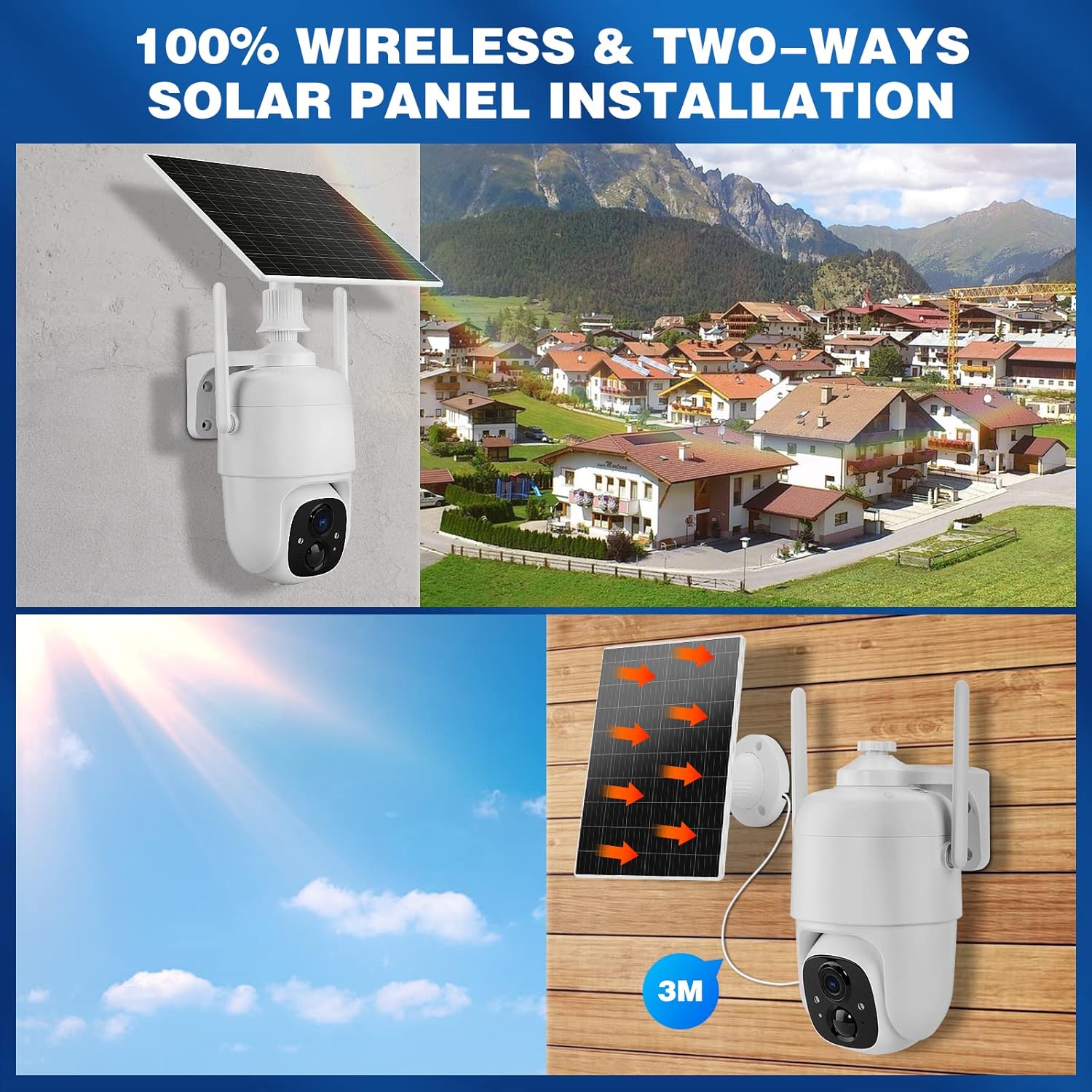
Image: Demonstrates controlling the camera's pan and tilt functions using a smartphone app.
3. Хоёр талын аудио
Аппликешн дээрх микрофоны дүрсийг товшино уу view to speak through the camera's speaker. The camera's built-in microphone will capture audio from the camera's vicinity, allowing for two-way communication.

Image: A person speaking through the camera to a delivery person, demonstrating the two-way audio feature.
4. Хөдөлгөөн илрүүлэх ба дохиолол
- Configure motion detection sensitivity and activity zones within the VicoHome app.
- Enable AI Smart Recognition to differentiate between humans, pets, and vehicles for more accurate alerts.
- Хөдөлгөөн илэрсэн үед ухаалаг гар утсан дээрээ шуурхай мэдэгдэл хүлээн аваарай.

Image: A person walking past a gate, triggering a PIR human detection alert on a smartphone.
5. Шөнийн харааны горимууд
The camera offers both infrared (IR) night vision and full-color night vision. You can switch between these modes in the app settings based on your preference and lighting conditions.

Зураг: хуваагдал view showing the difference between color night vision and standard IR night vision at night.
6. Хадгалах сонголтууд
- Үүл хадгалах сан: The camera offers 7 days of free cloud playback (up to 1GB). Additional cloud plans may be available through the app.
- Микро SD карт: Insert a Micro SD card (up to 128GB, not included) into the designated slot for local video storage.
7. Amazon Alexa интеграци
To integrate with Amazon Alexa, enable the VicoHome skill in the Alexa app and link your VicoHome account. You can then use voice commands to view your camera's live feed on compatible Alexa-enabled devices.

Image: A MYPIN camera and an Amazon Echo Show displaying the camera's live feed, illustrating Alexa integration.
Засвар үйлчилгээ
1. Цэвэрлэгээ
- Камерын линз болон нарны зайг зөөлөн арчиж тогтмол арчиж, damp тоос шороо, хог хаягдлыг арилгах даавуу.
- Химийн бодис, зүлгүүрийн цэвэрлэгч бүү хэрэглэ.
2. Зайны арчилгаа
- Ensure the solar panel is free from obstructions to maximize charging efficiency.
- If the camera is stored for an extended period, charge the battery periodically to prevent deep discharge.
3. Програм хангамжийн шинэчлэлтүүд
Check the VicoHome app regularly for firmware updates. Keeping your camera's firmware updated ensures optimal performance, security, and access to new features.
Алдааг олж засварлах
| Асуудал | Шийдэл |
|---|---|
| Камер Wi-Fi-д холбогдоогүй байна | Ensure your Wi-Fi is 2.4 GHz. Check Wi-Fi signal strength. Restart your router and camera. Re-pair the camera in the app. |
| Видео чанар муу | Check your Wi-Fi connection speed. Clean the camera lens. Ensure adequate lighting for optimal image capture. |
| Батерейг цэнэглэхгүй байна | Ensure the solar panel is clean and receives direct sunlight. Check the connection cable between the solar panel and camera. Charge directly via USB if necessary. |
| Хуурамч хөдөлгөөний дохиолол | Adjust motion detection sensitivity in the app. Utilize AI Smart Recognition to filter out non-human movements. Define specific activity zones. |
| Хоёр талын аудио ажиллахгүй байна | Check microphone and speaker settings in the app. Ensure your phone's volume is up. Verify network connection stability. |
Үзүүлэлтүүд
- Загвар: HS0366
- Видеоны нягтрал: 1080p бүрэн HD
- Пан өнцөг: 335°
- Өнцөгийг хазайлгах: 90°
- Дижитал томруулах: 4x
- Шөнийн хараа: Infrared and Color Night Vision
- Утасгүй холболт: Wi-Fi 2.4 GHz (IEEE 802.11b/g/n)
- Эрчим хүчний эх үүсвэр: Solar Powered, Rechargeable Lithium-ion Battery (5 Watt-hours)
- Цаг агаарын эсэргүүцэл: IP65
- Ашиглалтын температур: -10°C - 45°C (14°F - 113°F)
- Хадгалах: Cloud Storage (up to 1GB free for 7 days), Micro SD Card (up to 128GB, not included)
- Аудио: Хоёр талын аудио (суулгасан микрофон ба чанга яригч)
- Хөдөлгөөн илрүүлэх: PIR with AI Human/Pet/Vehicle Recognition
- Материал: Металл
- Хэмжээ: Ойролцоогоор 20.2 x 19.7 x 13.9 см
- Жин: Ойролцоогоор 1.27 кг

Image: The MYPIN camera and solar panel installed outdoors during winter, highlighting its IP65 waterproof rating and operating temperature range.
Баталгаат болон дэмжлэг
For warranty information and technical support, please refer to the contact details provided with your purchase or visit the official MYPIN webсайт. Худалдан авалтын баримтаа баталгаат нэхэмжлэлд зориулж худалдан авалтын баталгаа болгон хадгална уу.


