1. Танилцуулга
The WitMotion WTGPS-300P is an advanced inertial navigation satellite positioning module designed for high-precision positioning and navigation applications. It integrates satellite positioning (GPS/GNSS/BDS/GLONASS) with inertial navigation capabilities, providing robust performance even in environments with poor satellite signal reception. This module is suitable for vehicle-mounted applications, offering features like driving behavior monitoring and automatic switching between GPS and inertial navigation.
This manual provides essential information for the proper setup, operation, and maintenance of your WTGPS-300P module.
2. Бүтээгдэхүүний онцлог
- Уян хатан суурилуулалт: Designed for versatile installation in various positions and postures, particularly in automotive environments.
- Driving Behavior Monitoring: Capable of analyzing driving behaviors such as hard braking, harsh turns, sudden acceleration, and deceleration.
- Automatic Navigation Switching: Seamlessly switches between GPS navigation and inertial navigation for continuous positioning.
- Multi-Satellite System Support: Compatible with BDS, GPS, and GLONASS satellite systems.
- PC Software & Customization: Includes PC software for data review and offers customization options.
- High Precision INS: Integrates satellite positioning and inertial navigation to overcome challenges of poor satellite signals and inaccurate positioning.
- Built-in IPX Interface: Supports connection to various external active antennas for enhanced adaptability.
- Type-C интерфейс: Provides plug-and-play connectivity for easy data review on a PC.
- Farah Capacitance: Offers power storage to save data for 60 seconds after power loss.
- GPS-IMU Integration: Receives GPS signals and fuses them with an integrated navigation algorithm.
- Цуваа холболт: Reserved serial port on the module for communication.
- Sub-meter Navigation: Supports RTCM2.3 protocol for sub-meter navigation accuracy.
- Firmware Algorithm: Utilizes an Adaptive Kalman Filter algorithm for improved performance.
3. Тохируулах гарын авлага
3.1 Савлах, шалгах
Upon receiving your WTGPS-300P module, carefully unpack it and inspect for any visible damage. Ensure all components are present.
3.2 Тоног төхөөрөмжийн холболт
- Эрчим хүчний хангамж: Connect the module to a stable 3.3V power source via the VCC and GND pins.
- Антенны холболт: Connect a compatible external active antenna to the IPX interface. Ensure the connection is secure.
- Өгөгдлийн холболт: For data communication, connect the module to your host device (e.g., PC, microcontroller) using the TXD and RXD pins for serial communication, or the Type-C USB port for PC connection.
- PPS гаралт: The PPS pin provides a Pulse Per Second output for precise timing synchronization.
3.3 Анхны суурилуулалт
Before powering on the module, ensure it is fixed in its intended installation location. The module requires a stable, non-moving state during power-on for proper initialization of its inertial sensors. Avoid any movement during the initial power-up sequence.
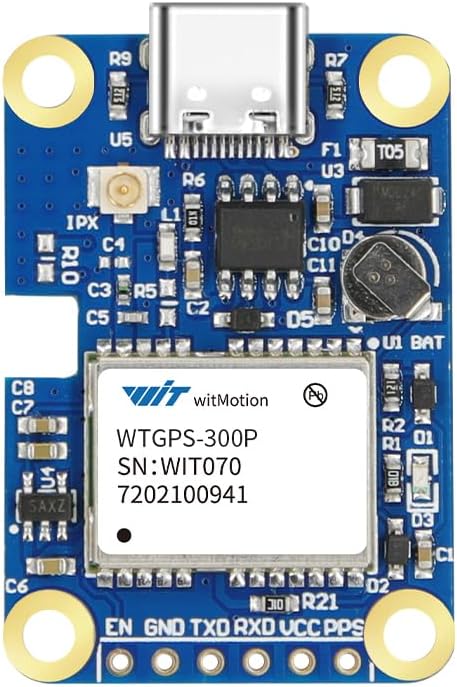
Figure 1: WitMotion WTGPS-300P Module. This image shows the compact design of the module, highlighting the Type-C USB port, IPX antenna connector, and various pins for power and data.

Figure 2: Hardware Analysis of WTGPS-300P. This diagram illustrates key components and interfaces of the module, including the IPX interface for external antennas, Type-C port for PC connection, Farah Capacitance for power backup, GPS-IMU for integrated navigation, and the serial connection points.
4. Ашиглалтын заавар
4.1 Асаах ба эхлүүлэх
Once connected, apply power to the module. The module will begin its initialization sequence. Ensure the module remains stationary during this phase to allow the inertial sensors to calibrate correctly.
4.2 Мэдээлэл цуглуулах
The WTGPS-300P outputs positioning and navigation data through its serial port or Type-C USB interface. Use the provided PC software or a custom application to read and interpret the data stream. The data includes 3D position, 3D velocity, 3D attitude (Pitch, Roll, Heading), 3D acceleration, and 3D angular velocity.

Figure 3: Powerful Satellite Search. This image shows the PC software interface displaying satellite search results, including a sky plot of visible satellites and a bar graph indicating signal strength for various satellite systems.
4.3 Inertial Navigation and GPS Integration
The module automatically integrates GPS and inertial navigation data. In environments where GPS signals are weak or unavailable (e.g., tunnels, underground garages), the inertial navigation system provides continuous positioning data. When GPS signals are restored, the system seamlessly switches back to GPS-aided navigation.

Figure 4: High Precision INS - Precise Positioning. This image displays a map with vehicle trajectories in Shanghai, demonstrating how the WTGPS-300P maintains accurate positioning through tunnels and garages by integrating satellite and inertial navigation.

Figure 5: Signal Reception in Weak Signal Areas. This illustration shows the module's ability to maintain signal reception for up to 30 minutes even in areas with weak satellite signals, crucial for continuous navigation.

Figure 6: IMU Algorithm Integration. This comparison highlights the advantage of the WitMotion GPS module, demonstrating continuous data output during GPS signal outages in a tunnel, unlike other systems that may lose data.
4.4 Driving Behavior Analysis
The module's integrated navigation system provides high-precision vehicle attitude, acceleration, and angular velocity data. This data is used to perform accurate driving behavior analysis, identifying events such as rapid acceleration, rapid deceleration, sudden lane changes, sharp turns, vehicle rollovers, abnormal attitudes, and potential collisions.

Figure 7: Driving Behavior Analysis Algorithm. This flowchart details the process of how satellite navigation and inertial navigation data are combined to derive 3D attitude, acceleration, and angular velocity for precise driving behavior analysis.
5. Засвар үйлчилгээ
The WTGPS-300P module is designed for durability and reliability. Minimal maintenance is required.
- Цэвэр байлгах: Ensure the module and its connectors are free from dust, dirt, and moisture.
- Аюулгүй холболтууд: Periodically check that all cable connections (power, antenna, data) are secure and free from damage.
- Байгаль орчны нөхцөл: Operate the module within its specified temperature and humidity ranges to ensure optimal performance and longevity.
- Програм хангамжийн шинэчлэлтүүд: Check the official WitMotion website for any available firmware updates to ensure your module has the latest features and performance enhancements.
6. Алдаа засах
6.1 No Data Output
- Эрчим хүчийг шалгах: Verify that the module is receiving the correct 3.3V power supply.
- Холболтуудыг шалгах: Ensure the serial or Type-C USB data connections are correctly wired and secure.
- Програм хангамжийн тохиргоо: Confirm that your PC software or host application is configured with the correct serial port settings (baud rate, parity, stop bits).
6.2 Буруу байрлал
- Антенны байршил: Ensure the external antenna has a clear, unobstructed view of the sky. Avoid placing it near metallic objects that could interfere with signal reception.
- Антенны холболт: Verify the IPX antenna connection is tight and undamaged.
- Эхлүүлэх: Confirm the module was stationary during power-on for proper inertial sensor calibration. If moved, power cycle the module while stationary.
- Signal Environment: In areas with very weak or no satellite signals, the accuracy will rely solely on inertial navigation, which may drift over extended periods without GPS correction.
6.3 Module Not Recognized by PC
- USB кабель: Try a different Type-C USB cable.
- Жолооч нар: Ensure necessary USB drivers are installed on your PC. Refer to WitMotion support resources for driver information.
- Port Conflict: Check Device Manager for any conflicts or unrecognized devices.
7. Техникийн үзүүлэлтүүд
| Параметр | Үнэ цэнэ |
|---|---|
| Зүйлийн жин | 0.02 килограмм (0.704 унц) |
| Багцын хэмжээ | 2.91 x 2.91 x 0.87 инч |
| Ботьtage | 3.3 В |
| Ажлын температур | -30 хэмээс 85 хэм хүртэл |
| Хадгалах температур | -40 хэмээс 125 хэм хүртэл |
| Timing Precision (SBAS) | 1.0м |
| Positioning Precision (RMS) | 30 ns |
| Speed Precision (99%) | 60 ns |
| Heading Precision | 0.05м/с |
| Operating Limit (Angle) | 0.3 градус |
| Operating Limit (Dynamic) | <= 4g |
| Operating Limit (Height) | <= 50,000м |
| Operating Limit (Velocity) | <= 500m/s |
| Суурилуулах төрөл | Dashboard Mount, Panel Mount |
| Supported Satellite Systems | BDS/GPS/ГЛОНАСС |
Figure 8: WTGPS-300P Technical Specifications. This table provides detailed technical parameters for the module, including physical dimensions, electrical requirements, environmental limits, and performance metrics for timing, positioning, speed, and heading precision.
8. Баталгаат хугацаа ба дэмжлэг
For warranty information, technical support, and additional resources, please visit the official WitMotion webсайт эсвэл харилцагчийн үйлчилгээтэй холбогдоно уу. Баталгаат зарга авахын тулд худалдан авалтын баримтаа хадгална уу.
WitMotion Official Webсайт: Visit the WITMOTION Store on Amazon


