1. Танилцуулга
Thank you for choosing the HXSJ X50 Wireless Game Mouse. This manual provides detailed instructions for setting up, operating, and maintaining your new wireless mouse. Please read this manual thoroughly before use to ensure optimal performance and longevity of your device.
Багцын агуулга:
- HXSJ X50 Wireless Game Mouse
- USB хүлээн авагч

Image 1.1: The HXSJ X50 Wireless Game Mouse and its USB receiver.
2. Аюулгүй байдлын мэдээлэл
- Хулганыг ус эсвэл хэт их чийгэнд бүү оруул.
- Хулгана унах, хүчтэй цохилтонд оруулахаас зайлсхий.
- Төхөөрөмжийг хэт өндөр температураас хол байлга.
- Хулгана өөрөө задлах, засах гэж бүү оролдоорой. Шаардлагатай бол мэргэшсэн үйлчилгээний ажилтантай холбоо барина уу.
- Орон нутгийн дүрмийн дагуу батерейг хаях.
3. Тохиргоо
3.1 Батерей суурилуулах
The HXSJ X50 Wireless Game Mouse requires batteries for operation. Please ensure you have the necessary batteries (typically 1x AA battery, not included) before proceeding.
- Хулганы доод талд байгаа зайны тасалгааг ол.
- Зайны тасалгааны тагийг нээ.
- Зөв туйлшралыг (+/-) баталгаажуулан батерейг оруулна уу.
- Зайны тасалгааны тагийг сайтар хаа.
3.2 USB хүлээн авагчийг холбох
- Компьютер дээрээ байгаа USB портыг олоорой.
- Insert the USB receiver into the USB port. Your computer should automatically detect and install the necessary drivers.
3.3 Асаах
Slide the power switch, located on the underside of the mouse, to the 'ON' position. The mouse is now ready for use.
4. Ашиглалтын заавар
4.1 Товчлуурын функцууд
The HXSJ X50 mouse features 6 buttons for enhanced functionality:
- Зүүн товшилтын товчлуур: Үндсэн функц, сонголт.
- Баруун товчлуур дээр дарна уу: Secondary function, context menus.
- Гүйлгэх дугуй: Дээш/доошоо гүйлгэж, дунд товш.
- DPI тохируулах товч: DPI тохиргоогоор эргэлддэг.
- Хуудас урагшлуулах товчлуур: Урагшаа дотогш чиглүүлнэ web хөтөч эсвэл file судлаачид.
- Page Backward Button: Буцаж дотогш шилжинэ web хөтөч эсвэл file судлаачид.

Зураг 4.1: Хажуу тал view showing the ergonomic design and side buttons.
4.2 DPI тохируулга
Press the DPI adjustment button (located behind the scroll wheel) to cycle through the available sensitivity settings: 1000DPI, 1200DPI, 1600DPI, and 2400DPI. Select the DPI that best suits your preference and task.
4.3 Эрчим хүч хэмнэх
The mouse features a power switch on its underside. To conserve battery life, slide the switch to the 'OFF' position when the mouse is not in use for extended periods.
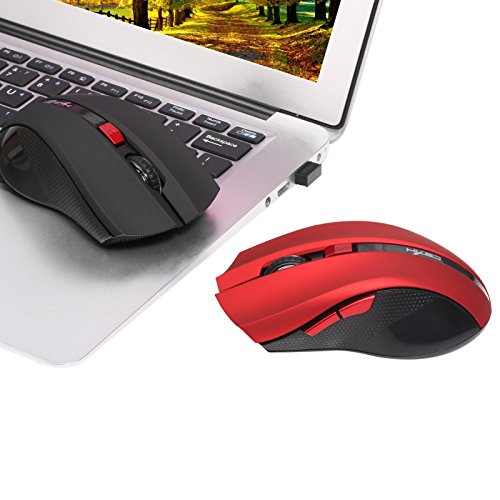
Image 4.2: The HXSJ X50 mouse in use with a laptop.
5. Засвар үйлчилгээ
5.1 Цэвэрлэгээ
To clean the mouse, gently wipe its surface with a soft, dry cloth. For stubborn dirt, slightly dampдаавуугаар усаар. Хүчтэй химийн бодис, зүлгүүрийн цэвэрлэгч хэрэглэхээс зайлсхий.
5.2 Хадгалалт
When not in use, store the mouse and USB receiver in a dry, cool place, away from direct sunlight and extreme temperatures. If storing for an extended period, it is recommended to remove the battery.
6. Алдаа засах
- Хулгана хариу өгөхгүй байна:
Ensure the mouse is powered on. Check if the USB receiver is securely plugged into a working USB port. Replace the battery if it is low or depleted. - Курсорын хөдөлгөөний жигд бус байдал:
Clean the optical sensor on the underside of the mouse. Ensure the surface you are using the mouse on is clean and non-reflective. - Холболтын асуудал:
Try plugging the USB receiver into a different USB port. Move the mouse closer to the receiver to rule out interference. - Side buttons not working:
Ensure your operating system and applications support the forward/backward functions. Some software may require specific drivers or settings.
7. Техникийн үзүүлэлтүүд
| Онцлог | Дэлгэрэнгүй |
|---|---|
| Брэнд | HXSJ |
| Загвар | X50 |
| Холболт | Утасгүй (USB хүлээн авагч) |
| Утасгүй сүлжээ | 10-15 метр хүртэл |
| Хөдөлгөөнийг илрүүлэх | Оптик |
| DPI тохиргоо | 1000, 1200, 1600, 2400 (Тохируулж болно) |
| Товчлуурын тоо | 6 (Зүүн, Баруун, Гүйлгэх дугуй, DPI, Урагш, Хойш) |
| Эрчим хүчний эх үүсвэр | Зай (1х АА, ороогүй) |
| Зайны хугацаа (дундаж) | 6 сар |
| Гарын чиг баримжаа | Хоёр талт |
| Материал | Хуванцар |
| Зүйлийн жин | 80 гр |
| Тохиромжтой үйлдлийн систем | Windows 98/ME/2000/XP/Vista/7/8, Linux |
8. Баталгаат хугацаа ба дэмжлэг
For warranty information or technical support, please refer to the documentation provided with your purchase or contact the retailer/manufacturer directly. Keep your proof of purchase for warranty claims.