Танилцуулга
Thank you for choosing the HTC Neckband Headphones. These headphones are designed to provide a superior audio experience with advanced features such as Bluetooth 5.0 connectivity, Active Noise Cancellation (ANC), and Environmental Noise Cancellation (ENC) for clear calls. With an IPX5 waterproof rating and up to 16 hours of playtime, they are suitable for various activities, from daily commutes to intense workouts.

Image: The HTC Neckband Headphones in red, showcasing their ergonomic design and in-ear earbuds.
Аюулгүй байдлын мэдээлэл
- Сонсголыг гэмтээхгүйн тулд өндөр дуугаар удаан сонсохоос зайлсхий.
- Хүрээлэн буй орчны дуу чимээг сонсохгүй байх нь аюултай (жишээ нь: машин жолоодох, дугуй унах, замын хөдөлгөөнд оролцох) үед чихэвчийг бүү ашигла.
- Keep the headphones dry. Do not expose them to extreme temperatures or humidity.
- Зөвхөн өгсөн цэнэглэгч кабель эсвэл баталгаажуулсан түүнтэй адилтгах төхөөрөмжийг ашиглана уу.
- Орон нутгийн дүрэм журмын дагуу бүтээгдэхүүнийг хариуцлагатайгаар устгана уу.
Багцын агуулга
- HTC Neckband Headphones
- USB Type-C цэнэглэх кабель
- Олон хэмжээтэй чихний үзүүр
- Хэрэглэгчийн гарын авлага
Бүтээгдэхүүн дууссанview
The HTC Neckband Headphones feature a flexible neckband design with integrated controls and magnetic earbuds for secure storage. The earbuds are designed for comfortable in-ear fit, and the neckband rests lightly around your neck.
Хяналт ба үзүүлэлтүүд

Зураг: Нарийвчилсан view of the control panel on the neckband, indicating buttons for On/Off, Volume +, Volume -, ANC Noise Reduction, Type-C charging port, and LED indicator.
- Асаах/унтраах товч: Чихэвчийг асаах эсвэл унтраах.
- Эзлэхүүн + товчлуур: Increases volume, next track (long press).
- Дууны түвшин - Товчлуур: Decreases volume, previous track (long press).
- ANC товчлуур: Идэвхтэй дуу чимээг арилгахыг идэвхжүүлдэг эсвэл идэвхгүй болгодог.
- Type-C цэнэглэх порт: Төхөөрөмжийг цэнэглэхэд зориулагдсан.
- LED үзүүлэлт: Shows power status, charging status, and pairing mode.
Тохиргоо
1. Чихэвчийг цэнэглэх
Before first use, fully charge your headphones. Connect the provided USB Type-C charging cable to the charging port on the neckband and the other end to a USB power source. The LED indicator will show charging status. A full charge takes approximately 1 hour and 50 minutes, providing up to 16 hours of playtime.
2. Bluetooth хослол
- Чихэвч унтарсан эсэхийг шалгаарай.
- Press and hold the On/Off button until the LED indicator flashes rapidly (usually blue and red), indicating pairing mode.
- Төхөөрөмж дээрээ (ухаалаг утас, таблет гэх мэт) Bluetooth-ийг идэвхжүүлж, боломжтой төхөөрөмжүүдийг хайж олоорой.
- Select "HTC Neckband Headphones" from the list of devices.
- Холбогдсоны дараа LED заагч нь ихэвчлэн цэнхэр гэрлийг харуулах эсвэл удаан анивчдаг.
Ашиглалтын заавар
Асаах/унтраах
- Асаахын тулд: Press and hold the On/Off button for approximately 3 seconds until the LED indicator lights up.
- Унтраахын тулд: Press and hold the On/Off button for approximately 5 seconds until the LED indicator turns off.
Хөгжим тоглуулах
- Тоглуулах/түр зогсоох: On/off товчийг нэг удаа дар.
- Дууг нэмэгдүүлэх: Эзлэхүүн + товчийг дарна уу.
- Дууг багасгах: Дууны түвшин - товчийг дарна уу.
- Дараагийн дуу: Дууны түвшин + товчийг удаан дар.
- Өмнөх бичлэг: Дууны түвшний товчийг удаан дар.
Дуудлага удирдах
- Дуудлагад хариулах/дуусах: On/off товчийг нэг удаа дар.
- Дуудлагаас татгалзах: Long press the On/Off button.
- Сүүлийн дугаарыг дахин залгах: Double-press the On/Off button.
Идэвхтэй дуу чимээг цуцлах (ANC)
The ANC feature reduces ambient noise, allowing for a more immersive audio experience. The headphones also feature Environmental Noise Cancellation (ENC) for clearer voice calls.

Image: HTC Neckband Headphones with visual representation of sound waves, highlighting the ANC + ENC Noise Reduction feature for pure music enjoyment.
- ANC-г идэвхжүүлэх/идэвхгүй болгох: Press the ANC button once. The LED indicator may change to confirm activation/deactivation.
Чихэвч зүүж байна
For optimal comfort and sound quality, ensure the earbuds fit snugly in your ears. The neckband is designed to rest comfortably around your neck. The magnetic design of the earbuds allows them to securely attach to each other when not in use, preventing tangling and ensuring they stay in place around your neck.

Image: A woman wearing the red HTC Neckband Headphones comfortably around her neck and in her ears while exercising, demonstrating the secure fit.

Image: A man and a woman wearing HTC Neckband Headphones, illustrating the comfortable and secure fit. Inset shows different ear tip sizes (L and S) for customization.
Засвар үйлчилгээ, арчилгаа
- Цэвэрлэгээ: Gently wipe the headphones with a soft, damp даавуу. Химийн хатуу бодис, зүлгүүрийн материалыг бүү ашигла.
- Хадгалах: When not in use, store the headphones in a cool, dry place, away from direct sunlight and extreme temperatures. The magnetic earbuds help keep them tidy.
- Усны эсэргүүцэл: The headphones are IPX5 waterproof, meaning they are resistant to sweat and light splashes of water. Do not submerge them in water or expose them to heavy rain.

Image: A man exercising, wearing the HTC Neckband Headphones, with an overlay indicating IPX5 Waterproof Design, suitable for sweat and light rain.
Алдааг олж засварлах
- Чихэвч асахгүй байна: Чихэвч бүрэн цэнэглэгдсэн эсэхийг шалгаарай.
- Дуу алга: Check if the headphones are paired correctly and the volume is turned up on both the headphones and your device.
- Хослуулах асуудал: Make sure the headphones are in pairing mode (flashing LED). Turn off Bluetooth on other nearby devices to avoid interference. Try unpairing and re-pairing.
- Дуудлагын чанар муу: Ensure the microphone is not obstructed. Check for strong Bluetooth signal.
Үзүүлэлтүүд
| Онцлог | Тодорхойлолт |
|---|---|
| Брэнд | HTC |
| Загварын нэр | Neckband Headphones Bluetooth 5.0 ANC |
| Утасгүй холбооны технологи | Bluetooth |
| Усны эсэргүүцлийн түвшин | IPX5 (Ус нэвтэрдэггүй) |
| Зайны багтаамж | 130mAh (approximate, inferred from image) |
| Хөгжим тоглох цаг | Up to 16 hours (inferred from product title and image) |
| Call Duration Time | Up to 10 hours (inferred from image) |
| Зогсоолын цаг | Up to 180 days (inferred from image) |
| Цэнэглэх хугацаа | Approx. 1 hour 50 minutes (inferred from video) |
| Материал | Резин, Силикон |
| Зүйлийн жин | 9.1 унц |
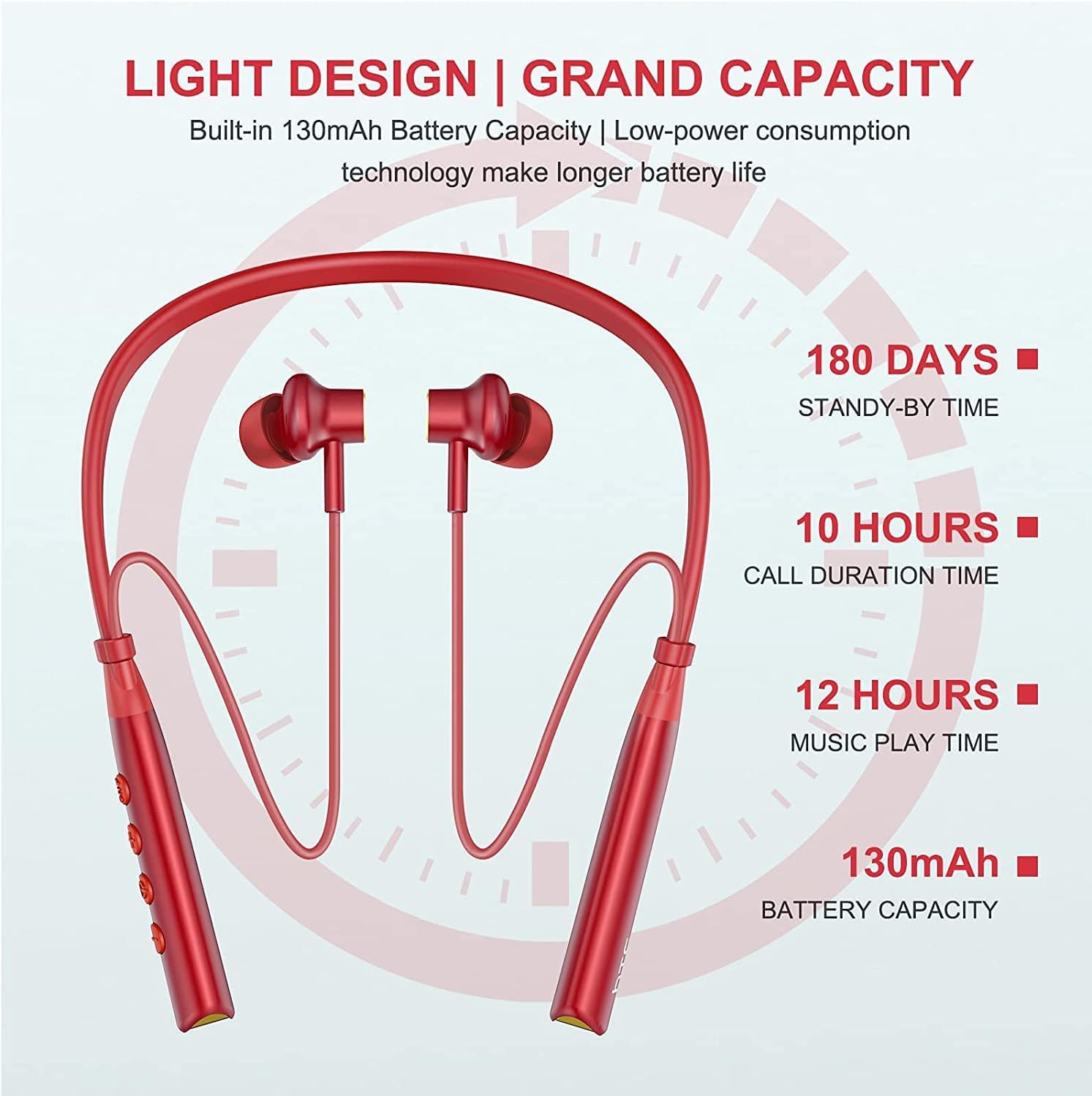
Image: Visual representation of battery specifications, including 180 days standby, 10 hours call duration, 12 hours music playtime, and 130mAh battery capacity.
Баталгаат болон дэмжлэг
HTC products are manufactured to the highest quality standards. For warranty information or technical support, please refer to the official HTC website or contact your local customer service representative. Keep your purchase receipt for warranty claims.
Бүтээгдэхүүний видео гарын авлага
Video: An official product video demonstrating the features and usage of the HTC Wireless Neckband Bluetooth Headphones, including pairing, controls, and comfort.


