1. Танилцуулга
Welcome to the user manual for your new Avtex W195TS Smart TV. This television is specifically designed for mobile living, offering versatile power options (12V, 24V, and 240V) and a range of smart features, including Wi-Fi, Bluetooth, and an integrated Freesat satellite decoder. This manual provides essential information for setting up, operating, maintaining, and troubleshooting your device to ensure optimal performance and enjoyment.
2. Аюулгүй байдлын мэдээлэл
Зурагт ашиглахаасаа өмнө бүх аюулгүй байдлын зааврыг анхааралтай уншина уу. Энэхүү гарын авлагыг ирээдүйд лавлах зорилгоор хадгална уу.
- Эрчим хүчний хангамж: Боть зөв бичсэнийг баталгаажуулна ууtage is used (12V, 24V DC or 240V AC). Do not overload power outlets.
- Агааржуулалт: Агааржуулалтын нүхийг хааж болохгүй. Агаарын урсгалыг хэвийн болгохын тулд ТВ-ийн эргэн тойронд хангалттай зай гарга.
- Ус ба чийг: Зурагтыг бороо, чийгэнд бүү тавь. Зурагт дээр шингэнээр дүүрсэн зүйлийг бүү байрлуул.
- Цэвэрлэгээ: Цэвэрлэхийн өмнө ТВ-ээ салга. Зөөлөн, хуурай даавуу хэрэглээрэй. Шингэн цэвэрлэгч, аэрозол цэвэрлэгч хэрэглэж болохгүй.
- Байршил: Place the TV on a stable, flat surface or mount securely to a wall/bracket. Avoid direct sunlight or heat sources.
- Үйлчилгээ: Энэ бүтээгдэхүүнд өөрөө үйлчлэх гэж бүү оролдоорой. Бүх засвар үйлчилгээг мэргэшсэн үйлчилгээний ажилтнуудад хандаарай.
3. Багцын агуулга
Before setup, please check that all items are present in the box:
- Avtex W195TS ухаалаг ТВ
- Батерейтай алсын удирдлага
- 12V/24V DC тэжээлийн кабель
- 240V хувьсах гүйдлийн тэжээлийн адаптер
- Ширээний суурь (хэрэв байгаа бол)
- Хэрэглэгчийн гарын авлага (энэ баримт бичиг)
4. Бүтээгдэхүүн дууссанview
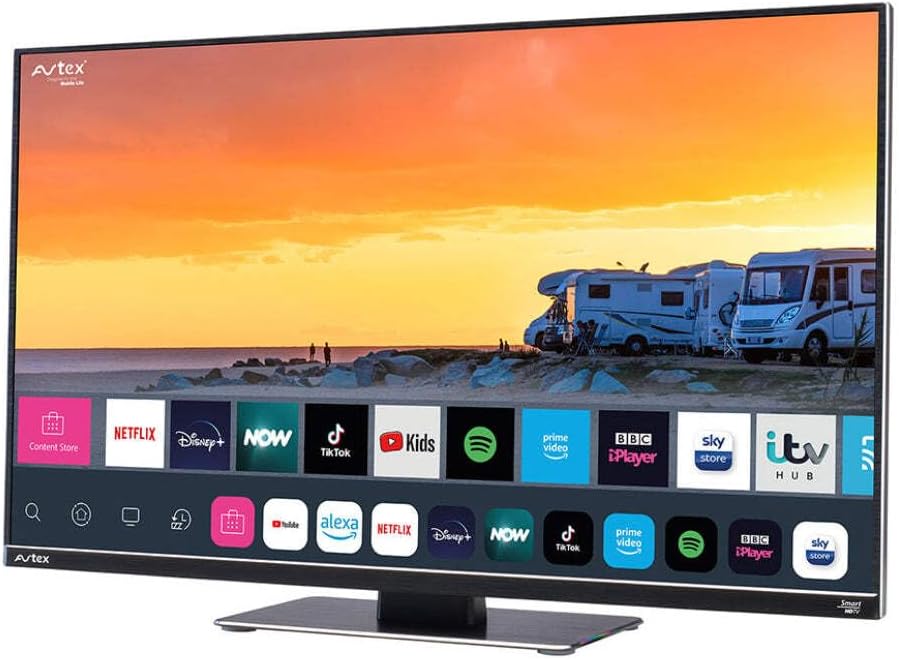
Figure 4.1: Avtex W195TS Smart TV Front View
This image shows the Avtex W195TS Smart TV from a slight angle, highlighting its slim design and the vibrant display. The screen shows a user interface with icons for popular streaming services like Netflix, Disney+, Now, TikTok, Kids, Spotify, Prime Video, BBC iPlayer, Sky Store, and ITV Hub. The background on the screen depicts a scenic view of motorhomes parked near a beach at sunset. The Avtex logo is visible on the top left and bottom left of the TV frame.
4.1. Портууд ба холболтууд
- HDMI портууд: Blu-ray тоглуулагч, тоглоомын консол эсвэл сет-топ бокс зэрэг гадаад төхөөрөмжүүдийг холбох зориулалттай.
- USB портууд (2): USB драйваас медиа тоглуулах эсвэл USB дагалдах хэрэгслийг холбох зориулалттай.
- Антенны оролт: For connecting a terrestrial TV antenna.
- Хиймэл дагуулын оролт: For connecting a satellite dish for Freesat or other satellite services.
- DC тэжээлийн оролт: For 12V/24V DC power connection.
- AC цахилгаан оролт: For 240V AC power connection via adapter.
- Ethernet порт: Утастай сүлжээний холболтод зориулагдсан.
- Аудио гаралт: Гадаад аудио систем эсвэл чихэвч холбох зориулалттай.
5. Тохиргоо
5.1. Installing the Stand (Optional)
- Дэлгэцийг гэмтээхгүйн тулд зурагтыг зөөлөн, цэвэр гадаргуу дээр доош харуулан болгоомжтой байрлуул.
- Зурагтын доод хэсэгт байрлах бэхэлгээний нүхнүүдтэй суурийг зэрэгцүүл.
- Өгөгдсөн эрэг ашиглан тавиурыг бэхлэнэ.
5.2. Эрчим хүчний холболт
The Avtex W195TS supports multiple power inputs:
- 12V/24V DC: Connect the supplied 12V/24V DC power cable to the DC input on the TV and to your vehicle's 12V or 24V power outlet.
- 240V хувьсах гүйдэл: Connect the supplied 240V AC power adapter to the AC input on the TV, then plug the adapter into a standard 240V AC wall socket.
Жич: Do not connect both DC and AC power simultaneously.
5.3. Antenna/Satellite Connection
- Terrestrial TV: Connect your aerial cable to the 'ANTENNA IN' port.
- Satellite TV (Freesat): Connect your satellite dish cable to the 'SATELLITE IN' port.
5.4. Анхны асаалт ба анхны тохиргоо
- Connect the TV to power and press the power button on the remote control or TV.
- The First-Time Setup Wizard will appear. Follow the on-screen prompts to select your language, country, and time zone.
- Perform an automatic channel scan for both terrestrial and satellite channels.
- Connect to your Wi-Fi network by selecting your network name and entering the password.
6. Ажиллаж байгаа
6.1. Алсын удирдлагатай функцууд
Familiarize yourself with the remote control buttons for easy navigation and control of your TV's features.
- Цахилгаан товч: ТВ-г асаах/унтраах.
- Эх товчлуур: Selects input sources (HDMI, USB, TV, Satellite).
- Эзлэхүүн +/-: Дууны түвшнийг тохируулна.
- Суваг +/-: Телевизийн сувгийг өөрчилдөг.
- Навигацийн товчлуурууд (дээш/доошоо/зүүн/баруун/ОК): Цэсийн навигаци болон сонголтын хувьд.
- Ухаалаг төв/Нүүр хуудас товчлуур: Ухаалаг ТВ интерфэйс рүү ханддаг.
- Програмын товчлуурууд: Dedicated buttons for popular streaming apps (if available).
6.2. Ухаалаг ТВ-ийн онцлог
Your Avtex W195TS is equipped with smart TV capabilities:
- App Store: Download and install various applications for streaming, news, and entertainment.
- Дамжуулах үйлчилгээ: Access pre-installed or downloaded apps like Netflix, Disney+, Prime Video, BBC iPlayer, etc. (subscription may be required).
- Web Хөтөч: ТВ дээрээ шууд интернетээр аялаарай.
- Дэлгэц толин тусгал: Connect your smartphone or tablet to display content on the TV screen (compatibility may vary).
6.3. Bluetooth холболт
Pair Bluetooth devices such as headphones or external speakers for enhanced audio experience.
- Go to the TV's settings menu.
- Select 'Bluetooth' or 'Connected Devices'.
- Enable Bluetooth and put your device into pairing mode.
- Жагсаалтаас төхөөрөмжөө сонгоно уу.
6.4. Media Playback via USB
Insert a USB drive into one of the USB ports to view зураг, видео тоглуулах, хөгжим сонсох.
- The TV will usually prompt you to open the media player.
- Өөрийнхөө дундуур шилжинэ үү fileалсын удирдлага ашиглаж байна.
7. Засвар үйлчилгээ
7.1. ТВ цэвэрлэх
- Дэлгэц: Зөөлөн, хөвөнгүй даавуугаар дэлгэцийг зөөлөн арчина. Зөрүүд тэмдгийн хувьд бага зэрэг dampдаавууг ус эсвэл дэлгэцэнд зориулсан цэвэрлэгээний уусмалаар арчина (дэлгэц рүү шууд шүршиж болохгүй).
- Casing: Зурагтыг зөөлөн хуурай даавуугаар арчих casing. Зүлгүүрийн цэвэрлэгч эсвэл уусгагчаас зайлсхий.
7.2. Програм хангамжийн шинэчлэлтүүд
Periodically check for software updates to ensure your TV has the latest features and bug fixes. Updates can usually be found in the TV's settings menu under 'System' or 'Software Update'.
8. Алдаа засах
If you encounter issues with your Avtex W195TS, refer to the following common problems and solutions:
| Асуудал | Боломжит шалтгаан | Шийдэл |
|---|---|---|
| Хүч чадалгүй | Power cable not connected; no power from outlet. | Check power cable connection; test outlet with another device; ensure correct voltage (12V/24V/240V). |
| Зураг байхгүй ч дуу чимээ байна | Буруу оролтын эх үүсвэр сонгогдсон; кабель эвдэрсэн. | Press the 'Source' button on the remote to select the correct input; check HDMI/antenna cables. |
| Дуу байхгүй ч зураг байна | Дууны дууг хаасан эсвэл хэт бага; гадаад аудио системийн асуудал. | Дууг хаах эсвэл түвшинг нэмэгдүүлэх; гадаад аудио төхөөрөмжүүдийн холболтыг шалгана уу. |
| Wi-Fi-д холбогдох боломжгүй байна | Нууц үг буруу; чиглүүлэгчийн асуудал; ТВ чиглүүлэгчээс хэт хол байна. | Re-enter Wi-Fi password; restart router; move TV closer to router or use an extender. |
| Алсын удирдлага ажиллахгүй байна | Батерей цэнэггүй болсон; бөглөрөл; холболтын асуудал. | Replace batteries; remove obstructions; re-pair remote if it's a Bluetooth remote. |
9. Техникийн үзүүлэлтүүд
| Онцлог | Тодорхойлолт |
|---|---|
| Брэнд | Avtex |
| Загварын дугаар | AVTEX W195TS |
| Дэлгэцийн хэмжээ | 19.5 инч |
| Шийдвэр | 1080p (Бүтэн HD) |
| Харьцаа | 16:9 |
| Холболтын технологи | Bluetooth, HDMI, Wi-Fi |
| Нийт USB портууд | 2 |
| Ботьtage | 12 Volts, 24 Volts, 240 Volts |
| Зүйлийн жин | 2.5 кг |
| Загварын жил | 2018 |
10. Баталгаат хугацаа ба дэмжлэг
Your Avtex W195TS Smart TV comes with a manufacturer's warranty. Please refer to the warranty card included in your product packaging for specific terms and conditions, including warranty period and coverage details. Keep your proof of purchase for warranty claims.
For technical support, troubleshooting assistance beyond this manual, or warranty inquiries, please contact Avtex customer service through their official website or the contact information provided with your product. When contacting support, please have your model number (AVTEX W195TS) and serial number ready.


