Танилцуулга
This instruction manual provides essential information for the proper setup, operation, and maintenance of your HamiltonBuhl Smart-Trek Deluxe Stereo Headset, model ST2BK. Please read this manual thoroughly before using the product to ensure optimal performance and longevity.
Бүтээгдэхүүн дууссанview
The HamiltonBuhl Smart-Trek Deluxe Stereo Headset is designed for durability and comfort, suitable for various environments including educational and professional settings. It features a noise-canceling microphone and in-line volume control for clear communication and ease of use.
Гол онцлогууд:
- Rugged and comfortable design for extended use.
- Cushioned ear cups and headband for user comfort.
- Adjustable headband to fit various head sizes.
- High-quality, durable leatherette ear cups for easy cleaning.
- Exclusive Dura-Cord: a chew, kink, and knot-resistant, PVC-jacketed, braided nylon cord.
- In-line volume control for convenient audio adjustment.
- Дуу хоолойг тодорхой дамжуулахын тулд дуу чимээг намсгадаг микрофон.
Оруулсан бүрэлдэхүүн хэсгүүд:
- Smart-Trek Deluxe Stereo Headset (Model ST2BK)
- Чихний дэр
Note: This product is typically supplied in a 50-pack configuration.

Зураг 1: Урд view of the HamiltonBuhl Smart-Trek Deluxe Stereo Headset.

Figure 2: HamiltonBuhl Smart-Trek Deluxe Stereo Headset shown with its 50-pack packaging.
Тохиргоо
- Чихэвчийг холбоно уу: Locate the 3.5mm audio jack on your device (computer, tablet, smartphone, gaming console, etc.). Insert the 3.5mm plug from the headset firmly into the audio jack.
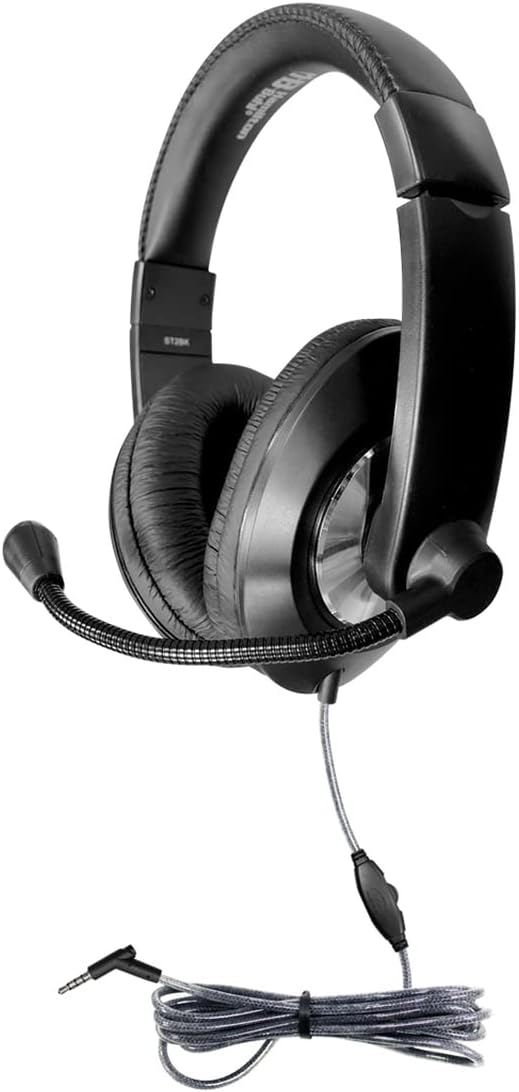
Figure 3: Headset showing the 3.5mm plug and in-line volume control.
- Толгойн туузыг тохируулах: Gently slide the earcups up or down along the headband until they rest comfortably over your ears. The headband is designed to snap into place for a secure fit.

Figure 4: Adjustable headband and cushioned earcups for comfortable fit.
- Микрофоныг байрлуулах: Bend the flexible microphone boom to position the microphone approximately 1-2 inches (2.5-5 cm) from your mouth for optimal voice pickup. Ensure it is not directly in front of your mouth to avoid breath noises.
Ашиглалтын заавар
Дууны хяналт:
The headset features an in-line volume control located on the cable. Use the slider or dial on this control to adjust the audio output level to your preference. Turn the control towards '+' to increase volume and towards '-' to decrease volume.
Микрофоны хэрэглээ:
The integrated noise-canceling microphone is designed to reduce background noise, providing clear voice transmission. Ensure the microphone is properly positioned as described in the Setup section. Some devices may require you to select the headset as the default audio input device in their sound settings.
Төхөөрөмжийн нийцтэй байдал:
This headset is compatible with a wide range of devices that feature a standard 3.5mm audio jack, including:
- Зөөврийн компьютерууд
- Ширээний компьютерууд
- Таблетууд
- Ухаалаг утаснууд
- Тоглоомын консолууд
- Telephones (with compatible 3.5mm jack)
Засвар үйлчилгээ
Цэвэрлэгээ:
- Чихний аяга: The leatherette ear cups can be easily cleaned with a damp cloth and mild soap. Ensure the ear cups are completely dry before use. Do not immerse the headset in water.
- Headband and Exterior: Wipe the headband and other exterior surfaces with a soft, dry, or slightly damp даавуу.
- Dura-Cord: The braided nylon Dura-Cord is designed to be durable. Keep it free from excessive dirt and avoid sharp bends or knots to maintain its integrity.
Хадгалах:
When not in use, store the headset in a clean, dry place away from extreme temperatures and direct sunlight. Avoid wrapping the cord too tightly around the headset.
Алдааг олж засварлах
| Асуудал | Боломжит шалтгаан | Шийдэл |
|---|---|---|
| Чихэвчнээс дуу гарахгүй. |
|
|
| Микрофон ажиллахгүй байна. |
|
|
| Дууны чанар муу эсвэл гажуудсан байна. |
|
|
Үзүүлэлтүүд
| Загварын нэр | Smart-Trek |
| Загварын дугаар | ST2BK |
| Брэнд | Хэмилтон |
| Холболтын технологи | Утастай |
| Чихэвчний үүр | 3.5 мм Жак |
| Дуу чимээний хяналт | Идэвхгүй дуу чимээг арилгах |
| Хяналтын төрөл | Дууны хяналт |
| Чихний байрлал | Чихний дээгүүр |
| Form Factor | Чихний дээгүүр |
| Материал | Nylon (for cord), Leatherette (for earcups) |
| Эсэргүүцэл | 32 Ом |
| Тохиромжтой төхөөрөмжүүд | Laptops, Desktops, Tablets, Telephones, Gaming Consoles |
| Зүйлийн жин | Ойролцоогоор 25.5 фунт (50 ширхэгтэй) |
| Бүтээгдэхүүний хэмжээс | Approximately 28 x 16 x 14 inches (for 50-pack packaging) |
| UPC | 681181628582 |
Баталгаат болон дэмжлэг
For warranty information, technical support, or service inquiries regarding your HamiltonBuhl Smart-Trek Deluxe Stereo Headset, please contact HamiltonBuhl customer service directly. Refer to the official HamiltonBuhl webхамгийн сүүлийн үеийн холбоо барих мэдээлэл болон баталгаат хугацааны талаарх мэдээллийг сайт эсвэл бүтээгдэхүүний сав баглаа боодол дээрээс авна уу.
You can visit the HamiltonBuhl store on Amazon for more information: HamiltonBuhl Store


