1. Танилцуулга
This manual provides essential information for the safe and efficient assembly, operation, and maintenance of your Tempur-Pedic TP7000 Mesh Back Fabric Task Chair. Please read all instructions carefully before use and retain this manual for future reference.
2. Аюулгүй байдлын мэдээлэл
- Хамгийн их жингийн багтаамж: This chair is designed to support a maximum weight of 250 pounds (113 kg). Exceeding this limit may cause damage to the chair or personal injury.
- Зориулалтын хэрэглээ: This chair is intended for office and task use. Do not use it for purposes other than its intended design.
- Ассемблей: Ensure all components are securely fastened before using the chair. Periodically check all bolts and screws for tightness.
- Тогтвортой байдал: Avoid standing on the chair or using it as a step stool. Do not lean excessively to one side or the back, as this may cause the chair to tip over.
- Хүүхдүүд: Keep children away from the chair during assembly. Do not allow children to play on or around the chair.
3. Багцын агуулга
Before beginning assembly, verify that all parts are present and undamaged. If any parts are missing or damaged, do not proceed with assembly. Contact customer support for assistance.
- Chair Back (Mesh)
- Chair Seat (Fabric with Tempur Material)
- Гарын түшлэг (2)
- Chair Base (5-star with casters)
- Хийн өргөх цилиндр
- Механизмын хавтан
- Тоног төхөөрөмжийн багц (эрэг, угаагч, Аллен эрэг чангалах түлхүүр)
4. Тохиргоо ба угсралт
Follow these steps to assemble your Tempur-Pedic TP7000 Task Chair. It is recommended to assemble the chair on a soft, non-abrasive surface to prevent damage.
- Кастеруудыг сууринд бэхлэх: Таван дугуйг сандлын суурийн хөл бүрийн төгсгөлд байгаа нүхэнд хийнэ. Тэдгээрийг байрандаа товших чимээ гартал чанга дарна.
- Хийн өргөгчийг оруулах: Хийн өргөгч цилиндрийг угсарсан сандлын суурийн төв нүхэнд байрлуулна.
- Механизмын хавтанг суудалд бэхлэх: Align the mechanism plate with the pre-drilled holes on the underside of the chair seat. Secure it using the provided screws and Allen wrench. Ensure the front of the mechanism faces the front of the seat.
- Гарын түшлэгийг суудалд бэхлэх: Attach the armrests to the sides of the chair seat using the designated screws. Do not fully tighten yet.
- Attach Backrest to Seat/Mechanism: Align the backrest with the mounting points on the mechanism plate or seat. Secure with screws. Once the backrest is attached, fully tighten all armrest screws.
- Суудлын угсралтыг хийн өргөгчтэй холбох: Угсарсан суудал болон түшлэгийг хийн өргөгч цилиндр дээр болгоомжтой байрлуулж, хийн өргөгчний конус хэлбэрийн үзүүр нь механизмын хавтан дээр найдвартай таарч байгаа эсэхийг шалгаарай.


5. Ашиглалтын заавар (Тохируулга)
Your Tempur-Pedic TP7000 chair offers several adjustments to customize your seating experience for optimal comfort and support.
- Суудлын өндрийн тохируулга: To raise the seat, lift the lever located under the right side of the seat while taking your weight off the chair. To lower the seat, lift the lever while seated. Release the lever at the desired height.
- Туурганы өндрийн тохируулга: Press the button on the side of each armrest and move the armrest up or down to your preferred height. Release the button to lock it in place.
- Tilt Lock/Unlock: The chair features a single reclining position. To allow the chair to recline, pull the lever (usually the same as the height adjustment lever, or a separate one) outwards. To lock the chair in an upright position, push the lever inwards.
- Налалтын хурцадмал байдлын тохируулга: Rotate the round knob located under the front of the seat to adjust the tension of the recline. Turn clockwise to increase tension (making it harder to recline) and counter-clockwise to decrease tension (making it easier to recline).
6. Засвар үйлчилгээ
Зөв арчилгаа нь таны сандлын ашиглалтын хугацаа болон гадаад төрхийг уртасгах болно.
- Цэвэрлэгээ: The fabric seat and mesh back should be spot cleaned only. Use a mild detergent and a damp cloth. Do not saturate the fabric. Test any cleaning solution on an inconspicuous area first.
- Шалгалт: Periodically inspect all bolts, screws, and connections to ensure they are tight. Retighten as necessary.
- Кастерууд: Хөдөлгөөнийг жигд байлгахын тулд дугуйг үс, хог хаягдлаас цэвэр байлга.
- Химийн хорт бодисоос зайлсхий: Do not use abrasive cleaners, solvents, or strong detergents, as these can damage the chair's materials.
7. Алдаа засах
If you encounter issues with your chair, refer to the following common problems and solutions:
- Chair Sinks or Does Not Stay Up:
Шийдэл: The gas lift cylinder may be faulty. Contact customer support for a replacement. - Сандал хашгирах:
Шийдэл: Check all screws and bolts and tighten them. A small amount of silicone lubricant can be applied to moving parts if the squeaking persists. - Casters Do Not Roll Smoothly:
Шийдэл: Кастер дугуйны эргэн тойронд ороосон үс эсвэл хог хаягдлыг зайлуулна. Дугуйг лаазаар цэвэрлэнэ.amp даавуу. - Chair Does Not Recline:
Шийдэл: Ensure the tilt lock lever is disengaged (pulled outwards). Adjust the tilt tension knob counter-clockwise to reduce tension.
8. Техникийн үзүүлэлтүүд
| Онцлог | Дэлгэрэнгүй |
|---|---|
| Брэнд | Темпур-Педик |
| Загвар | TP7000 |
| Өнгө | Cobalt (Seat), Black (Mesh Back) |
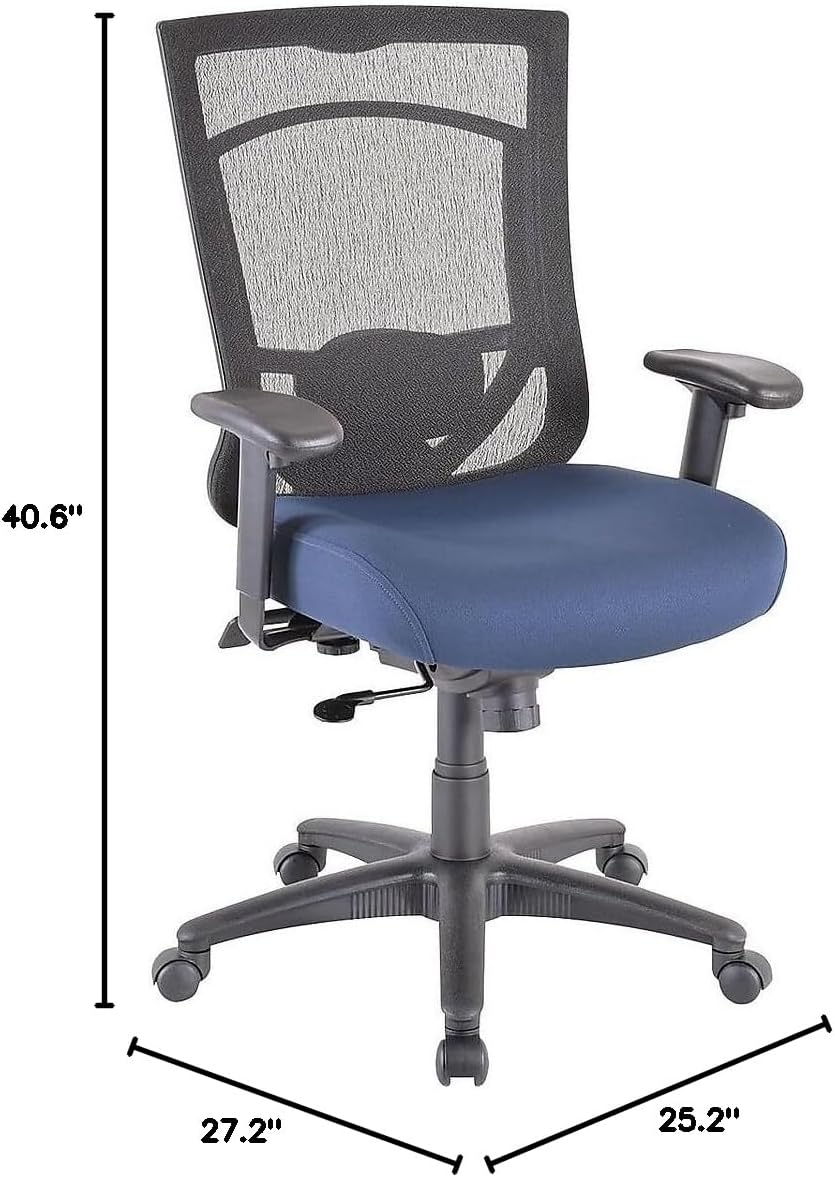
| Ерөнхий хэмжээс (Ө x Г x D) | 40.6-44.1" x 27.2" x 25.2" |
| Суудлын хэмжээс (Өргөн x Дунд) | 20.9" x 20.1" |
| Back Dimensions (W x H) | 20.9" x 22.4" |
| Хамгийн их жингийн зөвлөмж | 250 фунт (113 кг) |
| Материал | Mesh Back, Fabric Seat with Authentic Tempur Material |
| Онцлог шинж чанарууд | Adjustable Height, Adjustable Armrests, Tilt Lock, Tilt Tension |
| Бүтээгдэхүүнийг арчлах заавар | Толбо цэвэр |
| Зөвлөмж болгож буй өдөр тутмын хэрэглээ | 8-10 цаг |
9. Баталгаат хугацаа ба дэмжлэг
Your Tempur-Pedic TP7000 Mesh Back Fabric Task Chair is backed by a Насан туршийн хязгаарлагдмал баталгаа. This warranty covers defects in materials and workmanship under normal use. Specific terms and conditions apply.
For warranty claims, technical support, or to order replacement parts, please contact Tempur-Pedic customer service. Refer to your purchase documentation or the official Tempur-Pedic webхамгийн сүүлийн үеийн холбоо барих мэдээллийг авах сайт.
When contacting support, please have your model number (TP7000) and proof of purchase readily available.


