1. Танилцуулга
Thank you for choosing the COMAOGO T002-W Mini Projector. This manual provides essential information for setting up, operating, and maintaining your projector to ensure optimal performance and longevity. The T002-W is a versatile projector featuring 9500 Lumens brightness, 1080P support, 5G WiFi, and Bluetooth 5.1 connectivity, designed for an immersive view220 инч хүртэл туршлагатай.
2. Багцын агуулга
Дараах зүйлсийн багцад байгаа эсэхийг шалгана уу.
- 1 x COMAOGO T002-W Mini Projector
- 1 x Алсын удирдлага
- 1 х цахилгаан кабель
- 1 x HDMI кабель
- 1 x AV кабель
- 1 х хэрэглэгчийн гарын авлага
3. Бүтээгдэхүүн дууссанview
Проекторын бүрэлдэхүүн хэсгүүд болон интерфэйсүүдтэй танилцаарай.

Image: COMAOGO T002-W Projector with 5G and 2.4G WiFi capabilities, showing wireless screen synchronization with a tablet and smartphone.
The projector features various ports for connectivity, including HDMI, USB, VGA, AV, and a TF card slot, along with a 3.5mm audio output. It also supports dual-band 5G and 2.4G WiFi for stable wireless connections and Bluetooth 5.1 for audio devices.

Image: COMAOGO T002-W Projector connected to various devices including a laptop, game console, and streaming stick, highlighting its multiple input ports (AV, HDMI, USB, TF, VGA).
4. Тохиргоо
4.1 Байршил
Position the projector on a stable, flat surface or mount it on a tripod. Ensure there are no obstructions to the ventilation vents. For optimal viewing, the projection distance should be between 1.5 meters and 5.5 meters, yielding a screen size from 45 inches to 220 inches.
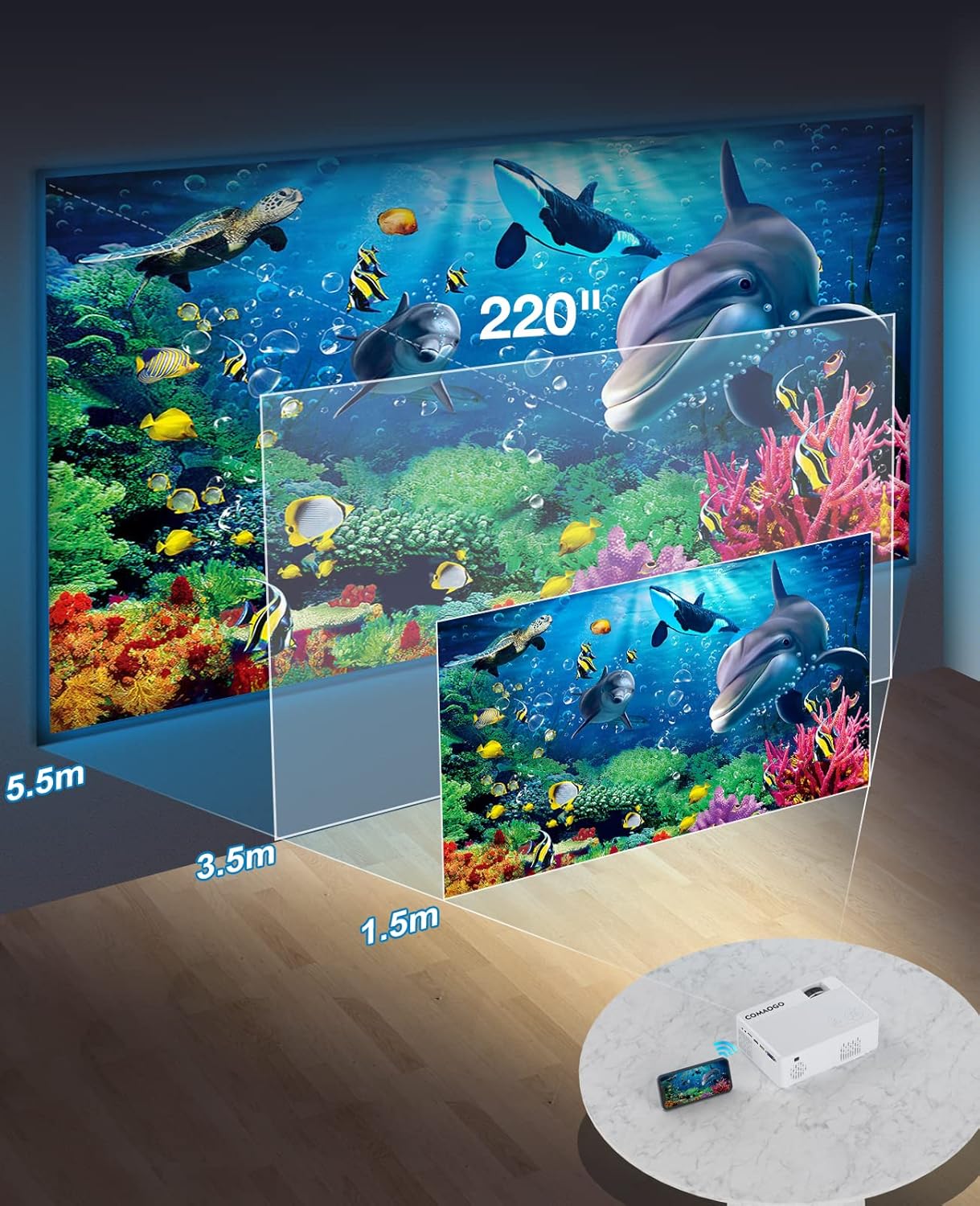
Image: Diagram illustrating the projection distances (1.5m to 5.5m) and corresponding screen sizes (45 to 220 inches) for the COMAOGO T002-W Projector.
4.2 Эрчим хүчний холболт
Connect the power cable to the projector's power input and then plug it into a power outlet (AC 220V).
4.3 Төвлөрөл ба гол чулууг засах
Тодорхой, тэгш өнцөгт дүрсийг авахын тулд:
- Фокусын тохируулга: Зураг тод харагдтал проекторын линз дээрх фокусын цагиргийг эргүүлнэ үү.
- Түлхүүр чулууны залруулга: Adjust the keystone correction dial (if available, or via menu settings) to correct trapezoidal distortion, ensuring the image is rectangular. The projector supports ±15° keystone correction.

Image: Illustration of keystone correction and focus adjustment for the COMAOGO T002-W Projector, showing how to achieve a clear, rectangular image.
5. Ашиглалтын заавар
5.1 Асаах/унтраах
- Асаах: Проектор эсвэл алсын удирдлага дээрх цахилгаан товчийг дарна уу.
- Унтраах: Проекторыг унтраахын тулд цахилгаан товчийг дахин дарна уу.
5.2 Оролтын эх үүсвэрийн сонголт
Use the "Source" button on the remote control or the projector's control panel to select the desired input source (e.g., HDMI, USB, VGA, AV).
5.3 Утасгүй холболт (WiFi)
The projector supports dual-band 5G and 2.4G WiFi for stable screen mirroring.
- Navigate to the WiFi settings on the projector's menu.
- Select your desired WiFi network (5G for faster, more stable connection; 2.4G for longer range and better penetration).
- Холбох нууц үгээ оруулна уу.
- For screen mirroring, select the appropriate option (e.g., "iOS Cast" or "Android Cast") on the projector and follow the on-screen instructions to connect your smartphone or tablet.
5.4 Bluetooth холболт
Connect external Bluetooth audio devices like speakers or headphones.

Image: COMAOGO T002-W Projector demonstrating Bluetooth 5.1 connection with a speaker and headphones.
- Проекторын цэсний Bluetooth тохиргоо руу очно уу.
- Таны Bluetooth төхөөрөмж хослох горимд байгаа эсэхийг шалгаарай.
- Жагсаалтаас төхөөрөмжөө сонгоно уу.
- Note: The projector's Bluetooth function is for connecting output devices (speakers, headphones) only.
5.5 Утастай холболтууд
Боломжтой портуудыг ашиглан янз бүрийн төхөөрөмжийг холбоно уу:
- HDMI: Connect laptops, PCs, game consoles (Xbox), TV sticks (Roku, Chromecast), DVD players.
- USB: Медиа тоглуулах files directly from USB drives.
- VGA: Connect older computers or laptops.
- OF: Connect legacy video devices.
- TF карт: Медиа тоглуулахын тулд TF карт оруулна уу files.
- Important: Copyright-protected content from services like Netflix or Disney+ is not directly supported via screen mirroring. For these services, use an HDMI connection with a compatible adapter (e.g., Lightning Digital AV Adapter for iOS devices) or a streaming stick.
6. Засвар үйлчилгээ
6.1 Линзийг цэвэрлэх
Use a soft, lint-free cloth or lens cleaning paper to gently wipe the projector lens. Avoid using abrasive materials or harsh chemicals that could damage the lens coating.
6.2 Хөргөх систем
The projector features an updated cooling system designed to reduce noise and maintain optimal operating temperature. Ensure the ventilation vents are clear of dust and obstructions to prevent overheating. Regular cleaning of the vents with a soft brush or compressed air is recommended.
7. Алдаа засах
Хэрэв та проектортой холбоотой асуудалтай тулгарвал дараах нийтлэг шийдлүүдийг үзнэ үү.
- Зураг байхгүй:
- Цахилгаан холболтыг шалгаад проектор асаалттай байгаа эсэхийг шалгана уу.
- Verify the input source selection matches your connected device.
- Ensure all cables (HDMI, VGA, etc.) are securely connected.
- Фокус болон гол чулууны залруулгыг тохируулна уу.
- Дуугүй:
- Adjust the projector's volume.
- Хэрэв гадаад чанга яригч ашиглаж байгаа бол тэдгээрийг зөв холбож, асаалттай байгаа эсэхийг шалгаарай.
- Check Bluetooth connection for external audio devices.
- Ensure the audio output from your source device is enabled.
- WiFi/Screen Mirroring Issues:
- Ensure both the projector and your device are connected to the same WiFi network.
- Check for strong WiFi signal.
- Restart both the projector and your source device.
- For Android devices, ensure "Wireless Projection" or "Screen Mirroring" is enabled. For iOS, use "Screen Mirroring" from Control Center.
- Зураг бүдэг байна:
- Линз дээрх фокусын цагиргийг тохируулна уу.
- Төлөвлөсөн зай нь санал болгож буй хязгаарт байгаа эсэхийг шалгаарай.
- Зураг нь трапец хэлбэртэй:
- Adjust the keystone correction dial or setting.
For further assistance or software updates, please contact COMAOGO customer support.
8. Техникийн үзүүлэлтүүд
| Онцлог | Тодорхойлолт |
|---|---|
| Брэнд | КОМАОГО |
| Загвар | T002-W |
| Гэрэлтүүлэг | 9500 люмен (220 ANSI) |
| Ялгаатай харьцаа | 6000:1 |
| Төрөлхийн тогтоол | 1280 x 720 |
| Дэмжигдсэн нягтрал | 1080P |
| Төслийн хэмжээ | 45" - 220" |
| Проекцийн зай | 1.5м - 5.5м |
| Тулгуур чулууг засах | ±15° |
| WiFi холболт | Dual-band (5G + 2.4G) |
| Bluetooth | Bluetooth 5.1 |
| Тоног төхөөрөмжийн интерфейс | 3.5mm Audio, TF Card, USB 2.0, VGA, HDMI |
| Суулгасан чанга яригч | Тиймээ |
| Дуу чимээний түвшин | 45 децибел |
| Эрчим хүчний хэрэглээ | 48 ватт |
| Хэмжээ | 20.32 x 15.24 x 7.62 см |
| Жин | 1 кг |
9. Бүтээгдэхүүний албан ёсны видео
Watch this video for a visual guide on the COMAOGO T002-W Mini Projector's features and operation.
Video: An official product video demonstrating the features and usage of the COMAOGO T002-W Mini Projector, including connectivity and display capabilities.
10. Баталгаат хугацаа ба дэмжлэг
The COMAOGO T002-W Mini Projector comes with a standard manufacturer's warranty. For warranty claims, technical support, or inquiries regarding software updates, please contact COMAOGO customer service through the retailer where you purchased the product or visit the official COMAOGO webсайт.
SOFTWARE UPDATES can be provided; please contact us if needed.


