1. Танилцуулга
Thank you for choosing the HOMVILLA Alarm Clock Model 8813. This manual provides detailed instructions for setting up, operating, and maintaining your new alarm clock. Please read this manual thoroughly before use to ensure proper functionality and to maximize your user experience. Keep this manual for future reference.
2. Багцын агуулга
Дараах зүйлсийн багцад байгаа эсэхийг шалгана уу.
- HOMVILLA Alarm Clock (Model 8813)
- USB цэнэглэгч кабель
- Эрчим хүчний адаптер
- Хэрэглэгчийн гарын авлага (энэ баримт бичиг)

Image 2.1: Alarm clock, USB cable, and power adapter included in the package.
3. Бүтээгдэхүүн дууссанview
Сэрүүлэгтэй цагныхаа янз бүрийн эд анги, удирдлагатай танилцаарай.

Зураг 3.1: Урд ба хойд view of the alarm clock with labeled components.
Урд дэлгэц:
- Том LED дэлгэц: Shows time, AM/PM indicator, Alarm 1 (①), Alarm 2 (②), and DST indicator.
Rear Buttons and Ports:
- Эзлэхүүний хүрд: Adjusts alarm volume (90-120dB).
- DST Button: Activates/deactivates Daylight Saving Time.
- Time Set Button: Цаг тохируулах горимд орно.
- UP товчлуур: Increases values during setting.
- Доошлох товч: Тохиргоо хийх явцад утгыг бууруулдаг.
- Сэрүүлэг тохируулах товчлуур: Сэрүүлгийн тохиргооны горимд орно.
- Асаах/унтраах товч: Turns alarm on/off.
- Дахин тохируулах товч: Resets the clock to factory defaults.
- Бүдэгрүүлэгч дугуй: Adjusts display brightness (0-100%).
- USB порт: Гадны төхөөрөмжийг цэнэглэхэд зориулагдсан.
- DC порт: Эрчим хүчний оролтын хувьд.
Дээд товчлуур:
- Түр хойшлуулах товч: Activates snooze function when an alarm sounds.
4. Тохиргоо
4.1 Эрчим хүчний холболт
The HOMVILLA Alarm Clock is mains powered. Connect the provided USB charging cable to the DC port on the back of the clock and plug the power adapter into a standard wall outlet.
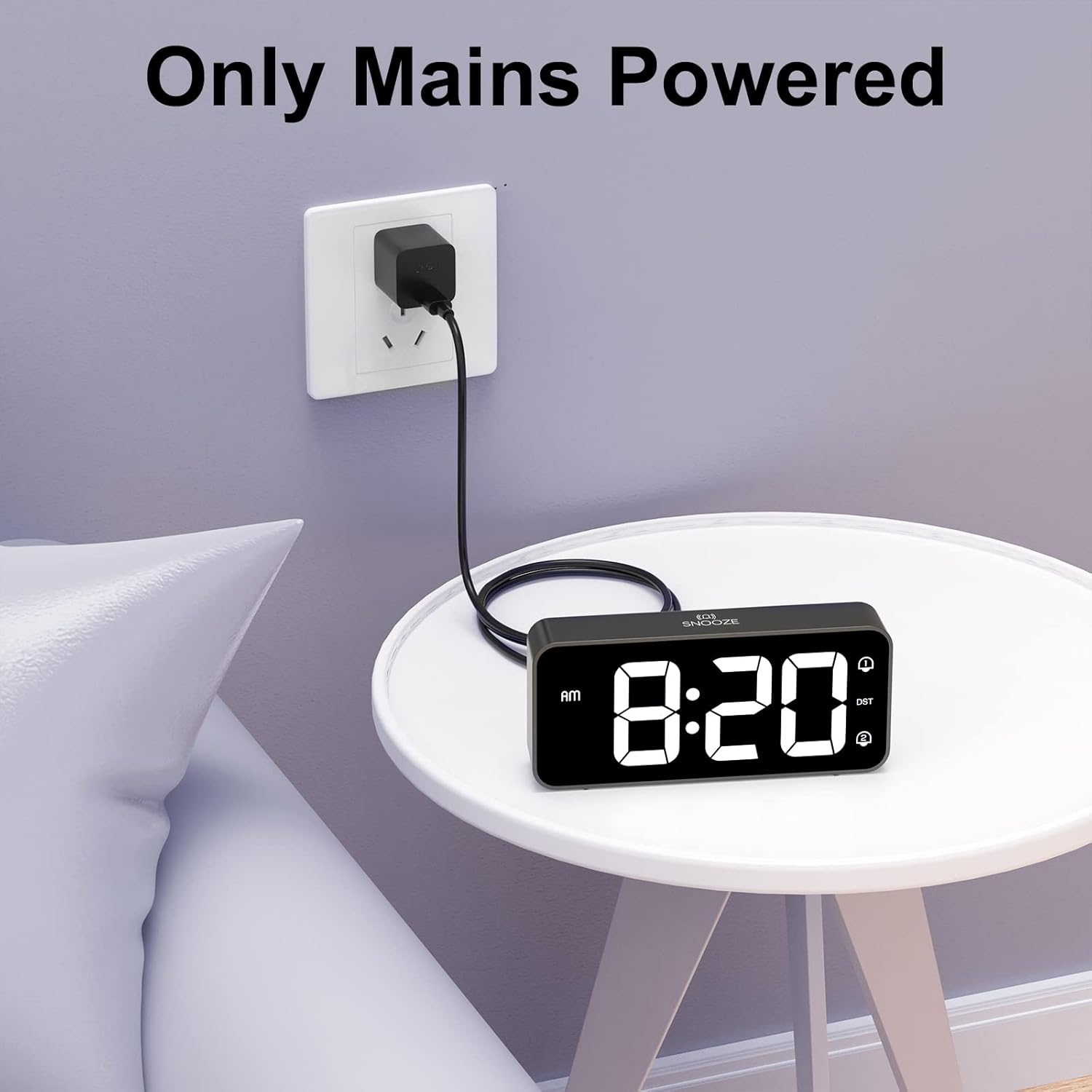
Image 4.1: Connecting the alarm clock to a power outlet.
4.2 Батерейны нөөцлөлт суурилуулах (заавал биш)
Цахилгаан унтраалттай үед цагийн тохиргоог хадгалахын тулдtage, install two AAA batteries (not included) into the battery compartment on the bottom of the clock. The batteries only support the memory function and do not power the display or alarm functions.
- Цагны доод хэсэгт байрлах батерейны тагийг нээнэ үү.
- Хоёр AAA батерейг зөв туйлшралыг (+/-) баталгаажуулна уу.
- Зайны тасалгааны тагийг хаа.

Image 4.2: Installing AAA batteries for memory function.
5. Ашиглалтын заавар
5.1 Цагийг тохируулах
- -г удаан дар Цагийн тохиргоо button on the back of the clock. The hour digits will start flashing.
- -г ашиглана уу UP or ДООШ цагийг тохируулах товчлуурууд.
- дээр дарна уу Цагийн тохиргоо Цагийг баталгаажуулж, минутын тохиргоо руу шилжихийн тулд товчийг дахин дарна уу. Минутын цифрүүд анивчих болно.
- -г ашиглана уу UP or ДООШ минут тохируулах товчлуурууд.
- дээр дарна уу Цагийн тохиргоо button a third time to confirm the minutes and switch between 12-hour and 24-hour format. Use UP or ДООШ сонгох.
- дээр дарна уу Цагийн тохиргоо button once more to exit time setting mode.
5.2 Сэрүүлэг тохируулах (хос дохиолол)
Цаг нь хоёр бие даасан дохиоллыг дэмждэг (Сэрүүлэг 1 ба Сэрүүлэг 2).
- -г удаан дар Сэрүүлэг button. The Alarm 1 icon (①) and hour digits will flash.
- -г ашиглана уу UP or ДООШ Сэрүүлгийн цагийг тохируулах товчлуурууд.
- дээр дарна уу Сэрүүлэг Цагийг баталгаажуулж, минутын тохиргоо руу шилжихийн тулд товчийг дахин дарна уу. Минутын цифрүүд анивчих болно.
- -г ашиглана уу UP or ДООШ Сэрүүлгийн минутыг тохируулах товчлуурууд.
- дээр дарна уу Сэрүүлэг button a third time to select the alarm sound (see section 5.5).
- дээр дарна уу Сэрүүлэг button a fourth time to exit Alarm 1 setting.
- To set Alarm 2, repeat steps 1-6. The Alarm 2 icon (②) will flash during its setting.
5.3 Activating/Deactivating Alarms
After setting an alarm, press the Асаах/унтраах button on the back of the clock to toggle Alarm 1 or Alarm 2 on/off. The corresponding alarm icon (① or ②) will appear on the display when active.
5.4 Түр хойшлуулах функц
When an alarm sounds:
- Томыг дар Түр хойшлуулах button on the top of the clock. The alarm will pause for 5 minutes and then sound again.
- To turn off the alarm for the day, briefly press any of the five buttons on the back of the clock. The alarm will sound again the next day at the set time.

Image 5.1: Snooze function and dual alarm capability.
5.5 Дэлгэцийн гэрэлтүүлгийг тохируулах
The display brightness can be adjusted from 0% to 100%.
- -ийг олох Бүдэг дугуй on the back right side of the clock.
- Slide the wheel up or down to increase or decrease the display brightness to your preference.

Image 5.2: Adjustable display brightness for day and night.
5.6 Дохиоллын дууны түвшинг тохируулах
The alarm volume can be adjusted between 90dB and 120dB.
- -ийг олох Эзлэхүүний дугуй on the back left side of the clock.
- Slide the wheel up or down to increase or decrease the alarm volume.

Image 5.3: Volume and brightness adjustment wheels.
5.7 Дохиоллын дууг сонгох
The clock offers eight different alarm melodies.
- During alarm setting (refer to section 5.2, step 5), use the UP or ДООШ buttons to cycle through the available alarm sounds.
- The available sounds include: Classic ringtone, Bird call, Running water, Crickets, Cock call, White noise, Stringed music, and 'Di di di'.

Image 5.4: Eight available alarm sounds.
5.8 Зуны цаг (DST)
- дээр дарна уу DST button on the back of the clock to activate or deactivate Daylight Saving Time.
- When DST is active, the time will adjust by one hour, and a DST indicator will appear on the display.
5.9 USB цэнэглэх порт
- The USB port on the back of the clock can be used to charge mobile phones or other small electronic devices.
- Connect your device's charging cable to the USB port.
6. Засвар үйлчилгээ
- Цагийг цэвэрлэхийн тулд гадаргууг зөөлөн, хуурай даавуугаар зөөлөн арчина.
- Зүлгүүрийн цэвэрлэгч, уусгагч, химийн шүршигч хэрэглэж болохгүй, учир нь энэ нь өнгөлгөөг гэмтээж болзошгүй.
- Keep the clock away from direct sunlight, extreme temperatures, and high humidity.
7. Алдаа засах
| Асуудал | Боломжит шалтгаан | Шийдэл |
|---|---|---|
| Цагны дэлгэц унтарсан. | Цахилгаан холболт байхгүй. | Ensure the power adapter is securely plugged into the clock and a working wall outlet. |
| Сэрүүлэг дуугарахгүй байна. | Сэрүүлэг идэвхжээгүй эсвэл дууны түвшин хэт бага байна. | Check if the alarm icon (① or ②) is displayed. Adjust the volume wheel to increase alarm volume. |
| Эрчим хүч авсны дараа цаг хугацаа буруу байнаtage. | No battery backup installed or batteries are depleted. | Install fresh AAA batteries for memory function. Reset the time manually if necessary. |
| Дэлгэц хэт тод/бүдэг байна. | Гэрэлтүүлгийн тохиргоог тохируулах шаардлагатай. | Use the Dimmer Wheel on the back of the clock to adjust brightness. |
| USB цэнэглэгч порт ажиллахгүй байна. | Төхөөрөмжийн нийцгүй байдал эсвэл цахилгаан хангамжийн асуудал. | Ensure the clock is powered. Try a different USB cable or device. The port is for charging, not data transfer. |
8. Техникийн үзүүлэлтүүд
| Онцлог | Дэлгэрэнгүй |
|---|---|
| Загварын дугаар | 8813 |
| Дэлгэцийн төрөл | Дижитал LED |
| Эрчим хүчний эх үүсвэр | Mains Powered (USB cable + adapter) |
| Зайны нөөцлөлт | 2 x AAA batteries (not included, for memory function only) |
| Бүтээгдэхүүний хэмжээс | 14.5 x 3.2 x 6.5 см (5.7 x 1.26 x 2.56 инч) |
| Зүйлийн жин | 157 гр |
| Онцлог шинж чанарууд | Dual Alarm, Snooze Function, Dimmable Display, USB Charging Port, DST Mode |
| Дохиоллын дууны хүрээ | 90-120дБ |
| Дэлгэцийн тод байдал | 0-100% тохируулж болно |
9. Баталгаат хугацаа ба дэмжлэг
HOMVILLA offers a lifetime warranty for this product. For any questions, technical support, or warranty claims, please contact our customer service team.
Үйлчилгээний имэйл: support@homvillalife.com

Image 9.1: Service email for customer support.


