1. Танилцуулга
The MICROWARE EZCAP241 MP3 Digital Music Digitizer is a standalone device designed to convert analog audio signals into digital MP3 files. This device allows you to record audio from various sources, such as vinyl record players, cassette players, CD players, DVD players, game consoles, and TV boxes, directly onto a USB flash drive or SD card without the need for a computer. It also features a playback function, enabling you to review recorded audio fileтөхөөрөмж дээр шууд байна.
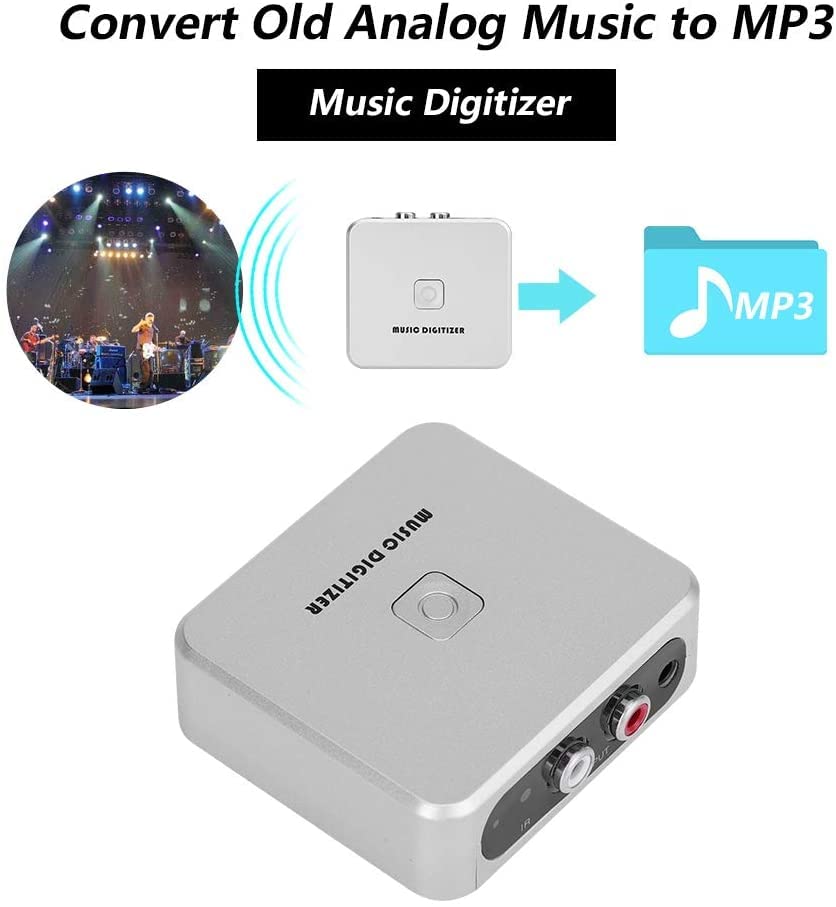
Image 1.1: The EZCAP241 Music Digitizer illustrating its function of converting analog music to MP3 format.
2. Бүтээгдэхүүн дууссанview
The EZCAP241 features a compact design with clearly labeled ports and controls for ease of use.
2.1 Төхөөрөмжийн бүрэлдэхүүн хэсгүүд
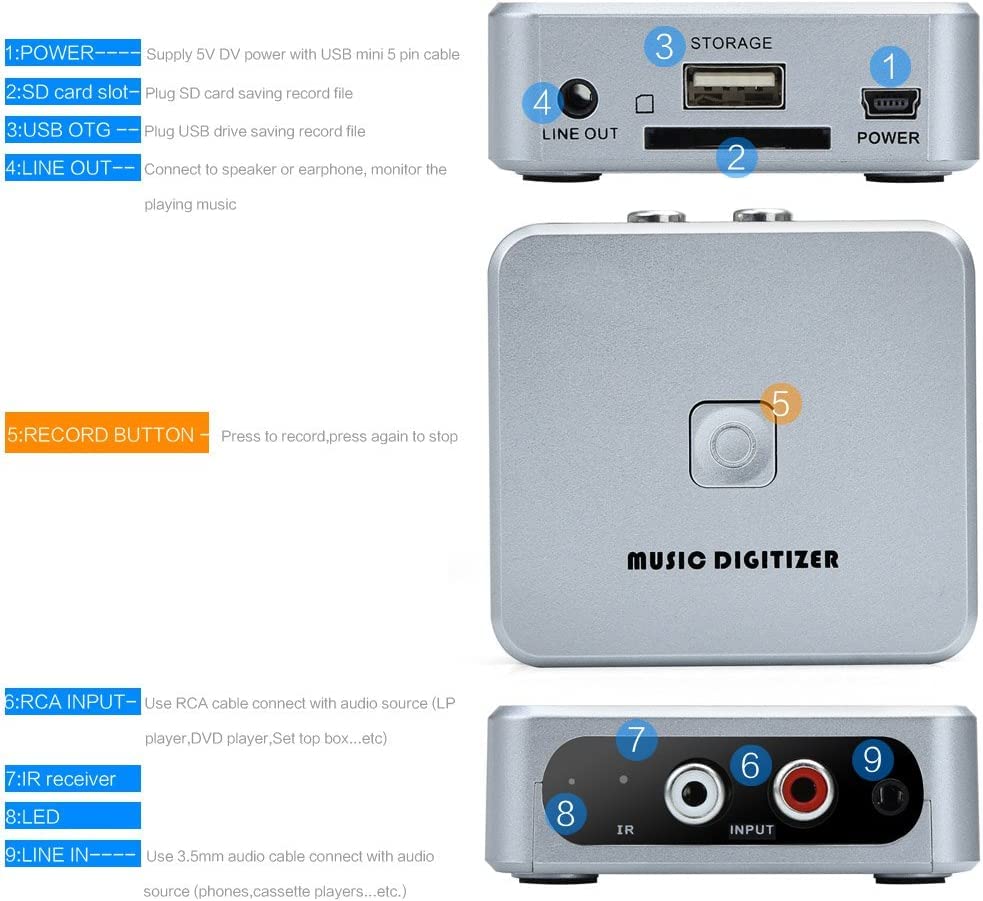
Зураг 2.1: Нарийвчилсан view of the EZCAP241 device, highlighting its various ports and controls.
- POWER (Mini USB): Connects to a 5V DC power supply using a USB mini 5-pin cable.
- SD картны үүр: Insert an SD card for saving recorded audio files.
- USB OTG Port: Connect a USB flash drive for saving recorded audio files.
- LINE OUT (3.5мм): Connect to headphones or speakers to monitor audio during recording or for playback.
- RECORD товч: Press to start recording; press again to stop recording.
- RCA INPUT (Red/White): Connects to audio sources (e.g., LP player, DVD player, set-top box) using an RCA cable.
- IR хүлээн авагч: Алсын удирдлагаас дохио хүлээн авдаг.
- LED үзүүлэлт: Displays device status (Green LED for manual mode, standby, quick flash for recording, slow flash for playback).
- 3.5mm Audio IN: Connects to audio sources (e.g., phones, cassette players) using a 3.5mm audio cable.

Зураг 2.2: Ойролцоогоор view of the EZCAP241's input and output ports with their respective labels.
3. Тохиргоо
Follow these steps to set up your EZCAP241 for recording:
- Эрчим хүчний холболт: Connect the EZCAP241 to a 5V DC power source using the provided USB mini 5-pin cable. The power port is labeled 'POWER'.
- Хадгалах төхөөрөмж: Insert a USB flash drive into the 'USB OTG' port or an SD card into the 'SD card slot'. Ensure the storage device has sufficient free space for your recordings.
- Аудио эх үүсвэрийн холболт:
- For devices with RCA output (e.g., LP players, DVD players), connect them to the 'RCA INPUT' ports (red for right, white for left) on the EZCAP241 using an RCA cable.
- For devices with 3.5mm audio output (e.g., phones, cassette players), connect them to the '3.5mm Audio IN' port on the EZCAP241 using a 3.5mm audio cable.
- Monitoring (Optional): Connect headphones or speakers to the 'LINE OUT' (3.5mm) port to monitor the audio during recording or playback.

Image 3.1: Connection diagram illustrating how to connect the EZCAP241 to different audio sources and storage devices.
4. Ашиглалтын заавар
4.1 Аудио бичлэг хийх
- Ensure the EZCAP241 is properly set up with power, a storage device, and an audio source as described in Section 3.
- Start playing the audio from your source device (e.g., cassette player, record player).
- Press the 'RECORD' button on the EZCAP241. The LED indicator will typically flash quickly to indicate recording is in progress.
- To stop recording, press the 'RECORD' button again. The LED indicator will change to reflect standby or playback mode.

Image 4.1: The 'RECORD' button on the EZCAP241, used to initiate and terminate audio recording.
4.2 Аудио тоглуулах
The EZCAP241 allows you to play back recorded MP3 files directly from the connected USB flash drive or SD card.
- Ensure headphones or speakers are connected to the 'LINE OUT' port.
- Use the remote control (if included) to navigate and select files for playback. Refer to the remote control's specific instructions for navigation.
- The LED indicator will typically flash slowly during playback.

Image 4.2: The EZCAP241 connected to earphones, demonstrating its playback capability.
5. Засвар үйлчилгээ
- Зөөлөн, хуурай даавуугаар арчиж төхөөрөмжийг цэвэр байлга. Шингэн цэвэрлэгч эсвэл уусгагч хэрэглэхээс зайлсхий.
- Төхөөрөмжийг нарны шууд тусгал, хэт температураас хол, сэрүүн, хуурай газар хадгална.
- Төхөөрөмжийг унагах эсвэл хүчтэй цохилтод оруулахаас зайлсхий.
- Ensure all cables are connected securely but do not force them into ports.
6. Алдаа засах
| Асуудал | Боломжит шалтгаан | Шийдэл |
|---|---|---|
| Төхөөрөмж асахгүй байна. | Цахилгаан хангамжгүй эсвэл кабель эвдэрсэн байна. | Ensure the 5V DC power supply is connected correctly and functioning. Try a different USB cable or power adapter. |
| Дуу бичлэг хийгдээгүй. | Incorrect audio input connection, audio source not playing, or storage device issue. | Verify audio input cables are securely connected to the correct ports (RCA or 3.5mm). Ensure the audio source is playing. Check if the USB flash drive or SD card is properly inserted and has free space. |
| Бичлэгийн чанар муу. | Low input volume from source, interference, or dirty connections. | Increase the volume on your audio source device. Ensure cables are not near sources of electrical interference. Clean audio connectors if necessary. |
| Cannot play back recorded files. | No headphones/speakers connected, corrupted files, or incorrect remote operation. | Connect headphones or speakers to the 'LINE OUT' port. Ensure files are valid MP3 format. Refer to remote control instructions for proper playback navigation. |
7. Техникийн үзүүлэлтүүд
| Онцлог | Дэлгэрэнгүй |
|---|---|
| Загвар | EZCAP-241 |
| Брэнд | МИКРО ПРОГРАМ |
| Интерфейсийн төрөл | RCA, USB |
| Аудио оруулах | RCA L/R, 3.5mm Audio In |
| Аудио гаралт | 3.5 мм шугамын гаралт |
| Хадгалах хэрэгсэл | USB Flash Drive, SD Card (FAT32 format recommended) |
| Бичлэгийн формат | MP3 |
| Эрчим хүчний хангамж | 5V DC (via Mini USB) |
| Зүйлийн жин | 140 гр |
| Багцын хэмжээ | 15 x 11.3 x 4.2 см |
| Гарал үүслийн улс | Хятад |
8. Баталгаат хугацаа ба дэмжлэг
For warranty information and technical support, please refer to the documentation provided at the time of purchase or contact MICROWARE customer service directly. Keep your proof of purchase for warranty claims.


