1. Бүтээгдэхүүн дууссанview
The ezcap234 TapeDigi 1 is a multi-functional device designed to bring your analog audio into the digital age. It combines a cassette player, AM/FM radio, and a digital audio recorder/converter into one portable unit. You can enjoy your old cassette tapes, tune into your favorite radio stations, and even record audio directly to a Micro SD card.
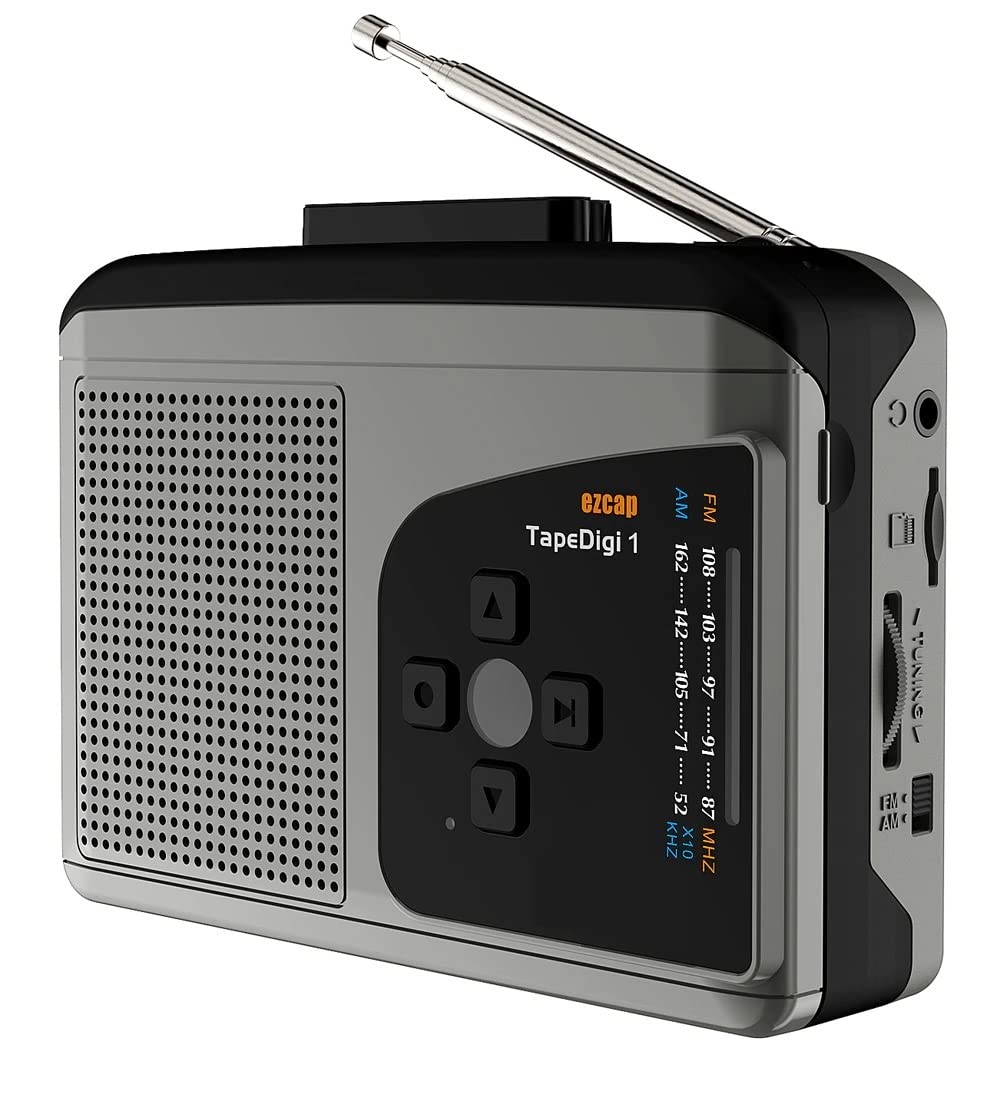
Зураг: Урд view of the ezcap234 TapeDigi 1, showcasing its speaker grille, control buttons, and extended antenna.
2. Үндсэн шинж чанарууд
- Кассет тоглуулагч: Playback your classic cassette tape collection.
- AM/FM радио: Tune into local radio stations with clear reception.
- MP3 Conversion: Convert cassette tapes and radio broadcasts directly to MP3 files on a Micro SD card (up to 32GB).
- Дуу бичигч: Built-in microphone allows for direct voice recording to Micro SD card.
- Нэгдсэн чанга яригч: Enjoy audio playback directly from the device.
- Чихэвчний залгуур: Хувийн сонсох зориулалттай.
- Хос тэжээлийн сонголтууд: Operates via USB power or 2x AA batteries (not included).

Image: Visual representation of the device's core functionalities, including tape playback, radio, recording, and audio output options.
3. Бүрэлдэхүүн хэсгүүдийг тодорхойлох
Familiarize yourself with the various parts of your ezcap234 TapeDigi 1:

Image: Detailed diagram labeling the antenna, volume adjustment, earphone jack, Micro SD card slot, radio tuning knob, FM/AM switch, Tape/Radio switch, Record/Stop recording button, Indicator LED, UP/DOWN/Play/Stop playing buttons, Speaker, Tape fast forward/rewind, Stop playing tape, Play tape, Microphone inside, and 5V DC jack.
- Антен: Extendable for FM/AM radio reception.
- Дууны тохируулга: Rotary knob to control audio output level.
- Чихэвчний залгуур: Чихэвч холбоход зориулсан 3.5 мм-ийн порт.
- Бичил SD картны үүр: Insert Micro SD card for recording and playback.
- Радио тааруулах товчлуур: Радио давтамжийг тохируулна.
- FM/AM Switch: Selects between FM and AM radio bands.
- Tape/Radio Switch: Toggles between cassette player and radio modes.
- Record/Stop Recording Button: Initiates and ends audio recording.
- Заагч LED: Shows device status (e.g., recording, power).
- Control Buttons (UP/DOWN/Play/Stop): For navigation and playback control.
- Илтгэгч: Аудио гаралтын хувьд суурилуулсан чанга яригч.
- Tape Controls (Fast Forward/Rewind/Stop/Play): Standard cassette player controls.
- Микрофон: Internal microphone for voice recording.
- 5V DC залгуур: Эрчим хүчний оролтын порт.
4. Төхөөрөмжийг тэжээх
The ezcap234 TapeDigi 1 can be powered in two ways:
- USB цахилгаан: Connect a 5V DC power adapter (not included) to the 5V DC jack using a USB cable.
- АА батерей: Insert 2x AA batteries (not included) into the battery compartment located on the back of the device. Ensure correct polarity.

Image: The device demonstrating its power options, showing both USB cable connection and the open battery compartment for AA batteries.
5. Кассет тоглуулах
To play a cassette tape:
- Кассетны тасалгааг нээнэ үү.
- Insert a cassette tape, ensuring it is properly seated.
- Кассетны тасалгааг хаа.
- -г гулсуулна уу Tape/Radio Switch to the 'Tape' position.
- дээр дарна уу Тоглох кассет удирдлагын товчлуур.
- -ийг тохируулна уу Дууны тохируулга knob to your desired listening level.
- -г ашиглана уу Хурдан урагшлах болон Ухраах соронзон хальсыг удирдах товчлуурууд.
- дээр дарна уу Зогс тоглуулахыг зогсоох товч.

Image: The ezcap234 TapeDigi 1 positioned on a wooden surface, surrounded by various cassette tapes, illustrating its primary function as a cassette player.
6. AM/FM радиогийн ажиллагаа
Радио сонсохын тулд:
- -г гулсуулна уу Tape/Radio Switch to the 'Radio' position.
- -ийг сунгах Антен оновчтой хүлээн авахад зориулагдсан.
- -г гулсуулна уу FM/AM Switch to select your desired band (FM: 87-108MHz, AM: 520-1610 KHz).
- -г эргүүл Радио тааруулах товчлуур to find a station.
- -ийг тохируулна уу Дууны тохируулга Сонгосон сонсох түвшний товчлуурыг дарна уу.

Image: The device with its telescopic antenna fully extended, highlighting its capability as a portable FM/AM radio receiver.

Image: A conceptual image showing the device broadcasting radio waves, with text bubbles indicating various types of content such as music, news, and talk shows, emphasizing its AM/FM radio function.
7. Аудио бичлэг хийх
The device supports recording from cassette tapes, AM/FM radio, and the built-in microphone directly to a Micro SD card.
7.1. Бичлэг хийхэд бэлдэж байна
- Ensure a Micro SD card (up to 32GB, formatted to FAT32) is inserted into the Микро SD картны үүр.
- Select the desired audio source (Tape or Radio) using the Tape/Radio Switch, or prepare to use the built-in microphone.

Зураг: Ойрын зураг view of the side of the device, clearly showing the Micro SD card slot, indicating where to insert the storage for recordings.
7.2. Recording from Tape or Radio
- Start playback of the cassette tape or tune to the desired radio station.
- дээр дарна уу Record/Stop Recording Button. The Indicator LED will illuminate, indicating recording is in progress.
- дээр дарна уу Record/Stop Recording Button again to stop recording. The LED will turn off.
7.3. Recording Voice (Built-in Microphone)
- Ensure the device is in 'Radio' mode (even if not listening to radio) or 'Tape' mode without a tape playing.
- дээр дарна уу Record/Stop Recording Button. The Indicator LED will illuminate.
- Speak clearly towards the built-in Микрофон.
- дээр дарна уу Record/Stop Recording Button Бичлэгийг зогсоохын тулд дахин.

Image: The device next to a microphone icon and text, illustrating its capability to record voice using its built-in microphone and save to a Micro SD card.

Image: A person speaking near the device, with visual cues of sound waves, demonstrating the microphone recording function to a TF card.
7.4. Recording Modes (Auto/Manual)
The device supports both automatic and manual recording modes. In auto mode, the device can detect pauses in audio and automatically partition recordings into separate MP3 files, which is useful for digitizing albums or long broadcasts.

Image: A graphic illustrating audio waveforms, explaining the Auto or Manual Recording Mode feature, where auto mode can partition songs into separate MP3 files.
8. Converting Tapes to MP3
The ezcap234 TapeDigi 1 simplifies the process of converting your analog cassette tapes into digital MP3 files, saving them directly to a Micro SD card.
- Insert your Micro SD card into the slot.
- Insert the cassette tape you wish to convert.
- -ийг баталгаажуулах Tape/Radio Switch is in the 'Tape' position.
- дээр дарна уу Тоглох кассет удирдлагын товчлуур.
- Нэн даруй дарна уу Record/Stop Recording Button to begin conversion. The audio from the tape will be recorded as an MP3 file Micro SD карт дээр.
- дээр дарна уу Record/Stop Recording Button again to stop the conversion.
The converted MP3 files can then be transferred to a computer or other devices for playback.

Image: A visual representation of the conversion process, showing a cassette tape transforming into MP3 format and being stored on a 32GB Micro SD card.

Image: An overhead shot of a workspace featuring the ezcap234 TapeDigi 1 alongside a laptop and other audio gear, demonstrating its role in converting old cassettes to MP3s for digital use.
9. Playback of Recorded Files
To listen to MP3 files stored on the Micro SD card:
- Ensure a Micro SD card with MP3 fileс-г оруулсан байна.
- -г гулсуулна уу Tape/Radio Switch to the 'Radio' position.
- дээр дарна уу Play/Stop playing button (often the center button in the control cluster).
- -г ашиглана уу ДЭЭШ/ДООШ buttons to navigate between recorded tracks.
- -ийг тохируулна уу Дууны тохируулга knob as needed.

Image: The device surrounded by icons for music, news, and talk shows, illustrating its dual function of playing FM/AM radio and recording that content to MP3 format.
10. Алдаа засах
| Асуудал | Боломжит шалтгаан | Шийдэл |
|---|---|---|
| Цахилгаан байхгүй / Төхөөрөмж асахгүй байна | Batteries are dead or incorrectly inserted; USB cable not connected properly or power source is faulty. | Replace batteries, ensuring correct polarity. Check USB cable connection and try a different power source. |
| No sound from speaker/earphones | Volume is too low; Earphones not fully plugged in; Device in wrong mode. | Increase volume. Ensure earphones are fully inserted. Check Tape/Radio switch position. |
| Радио хүлээн авалт муу | Антен сунгагдаагүй; Сул дохионы бүс; Хөндлөнгийн оролцоо. | Fully extend the antenna. Try repositioning the device. Avoid areas with strong electromagnetic interference. |
| Cannot record to Micro SD card | Micro SD card is full, corrupted, or not formatted correctly (FAT32); Card not inserted properly. | Check Micro SD card capacity. Reformat the card to FAT32 on a computer. Reinsert the card firmly. Try a different Micro SD card. |
| Cassette tape not playing correctly | Tape is tangled or damaged; Tape compartment not closed properly. | Inspect the tape for damage. Ensure the tape compartment is securely closed. |
11. Техникийн үзүүлэлтүүд
| Онцлог | Дэлгэрэнгүй |
|---|---|
| Брэнд | МИКРО ПРОГРАМ |
| Загвар | EZCAP-234-TapeDigi1 |
| Бүтээгдэхүүний хэмжээс | 10 x 3 x 8 см |
| Зүйлийн жин | 290 гр |
| Эрчим хүчний хангамж | 5V DC (USB) or 2x AA Batteries |
| Радио давтамж | FM: 87-108MHz, AM: 520-1610 KHz |
| Бичлэгийн формат | MP3 |
| Хадгалалтын дунд | Micro SD Card (up to 32GB, FAT32 format) |
| Аудио гаралт | Built-in Speaker, 3.5mm Earphone Jack |
| Оруулах | Cassette Tape, AM/FM Radio, Built-in Microphone |
12. Арчилгаа, засвар үйлчилгээ
- Төхөөрөмжийг хуурай байлга. Чийг эсвэл хэт өндөр температурт бүү байлга.
- Гаднах хэсгийг зөөлөн, хуурай даавуугаар цэвэрлэ. Зүлгүүрийн цэвэрлэгч, уусгагчийг бүү ашигла.
- For cassette playback, periodically clean the tape head and pinch roller with a cotton swab lightly dampдууны чанарыг оновчтой болгож, соронзон хальс гэмтэхээс сэргийлж изопропилийн спиртээр бүрсэн.
- Удаан хугацаагаар ашиглаагүй үед гоожихоос сэргийлж батерейг салгаж авна уу.
- Төхөөрөмжийг унагах эсвэл хүчтэй нөлөөнд оруулахаас зайлсхий.
13. Баталгаат хугацаа ба дэмжлэг
For warranty information and customer support, please refer to the documentation included with your purchase or visit the official MICROWARE webсайт. Худалдан авалтын баримтаа баталгаат нэхэмжлэлд зориулж худалдан авалтын баталгаа болгон хадгална уу.
Үйлдвэрлэгч: Microware Multimedia Private Limited
Гарал үүслийн улс: Хятад


