1. Танилцуулга
Thank you for choosing the goobay 58525 TV Stand. This product is designed to provide a stable and adjustable base for your television or monitor, accommodating screen sizes from 32 to 70 inches and supporting a maximum weight of 50 kg. It features a tilt function and height adjustment for optimal viewing, along with an integrated cable management system. Please read this manual carefully before assembly and use to ensure proper installation and safe operation.
2. Аюулгүй ажиллагааны заавар
- Угсрахаас өмнө бүх бүрэлдэхүүн хэсгүүд байгаа эсэхийг шалгаарай. Гэмтсэн эд ангиудыг бүү ашигла.
- 50 кг (110 фунт) ачааны багтаамжаас хэтрүүлж болохгүй.
- This stand is designed for TVs and monitors between 32 and 70 inches. Verify your TV's VESA pattern and weight before installation.
- Always assemble the stand on a soft, clean surface to prevent scratches to the product or your furniture.
- Хөнхрөхөөс сэргийлж суурь нь тогтвортой, тэгш гадаргуу дээр байрлуулсан эсэхийг шалгаарай.
- Угсрах явцад хүүхэд болон гэрийн тэжээвэр амьтдыг хол байлга. Жижиг эд ангиуд нь хахаж цацах аюултай.
- Хэрэв та угсралтын үйл явцын аль нэг хэсэгт эргэлзэж байвал мэргэжлийн туслалцаа аваарай.
3. Багцын агуулга
Please check the package contents against the list below. If any parts are missing or damaged, contact your retailer.

Зураг: Retail box and assembly quick tips with parts list. This image shows the packaging and a diagram detailing the included components and initial assembly steps.
Refer to the "Scope of Delivery" diagram on the quick tip sheet (visible in the image above) for a detailed list of screws, washers, and other hardware.
4. Тохиргоо ба угсралт
Follow these steps carefully to assemble your goobay 58525 TV Stand. It is recommended to have a second person assist with mounting the TV.
4.1 Attach Mounting Brackets to TV
- Дэлгэц гэмтэхээс сэргийлэхийн тулд ТВ-ээ зөөлөн, цэвэр гадаргуу дээр доош харуулан болгоомжтой байрлуул.
- Телевизийнхээ арын хэсэгт байрлах VESA суурилуулах нүхийг олоорой.
- Select the appropriate screws, washers, and spacers from the provided hardware kit that fit your TV's VESA pattern. Refer to your TV's manual for recommended screw length.
- Attach the two vertical mounting brackets to the back of your TV using the selected hardware. Ensure they are securely fastened and level. The hooks on the brackets should face upwards.

Зураг: The goobay 58525 TV Stand's main components, showing the two vertical mounting brackets and the base feet.
4.2 Assemble the Base Feet
- Connect the two base feet to the main vertical support columns using the provided screws. Ensure they are oriented correctly as shown in the diagrams.
- Attach the foam foot pads to the bottom of the base feet to protect your furniture from scratches.
Зураг: The goobay 58525 TV Stand with its base feet assembled, shown from different angles and with a TV mounted.
4.3 Mount TV onto Stand
- With assistance, carefully lift the TV with the attached mounting brackets.
- Hook the top of the TV mounting brackets onto the corresponding slots on the vertical support columns of the stand.
- Ensure the TV is securely seated and level. Fasten the safety screws at the bottom of the brackets to prevent accidental dislodging.

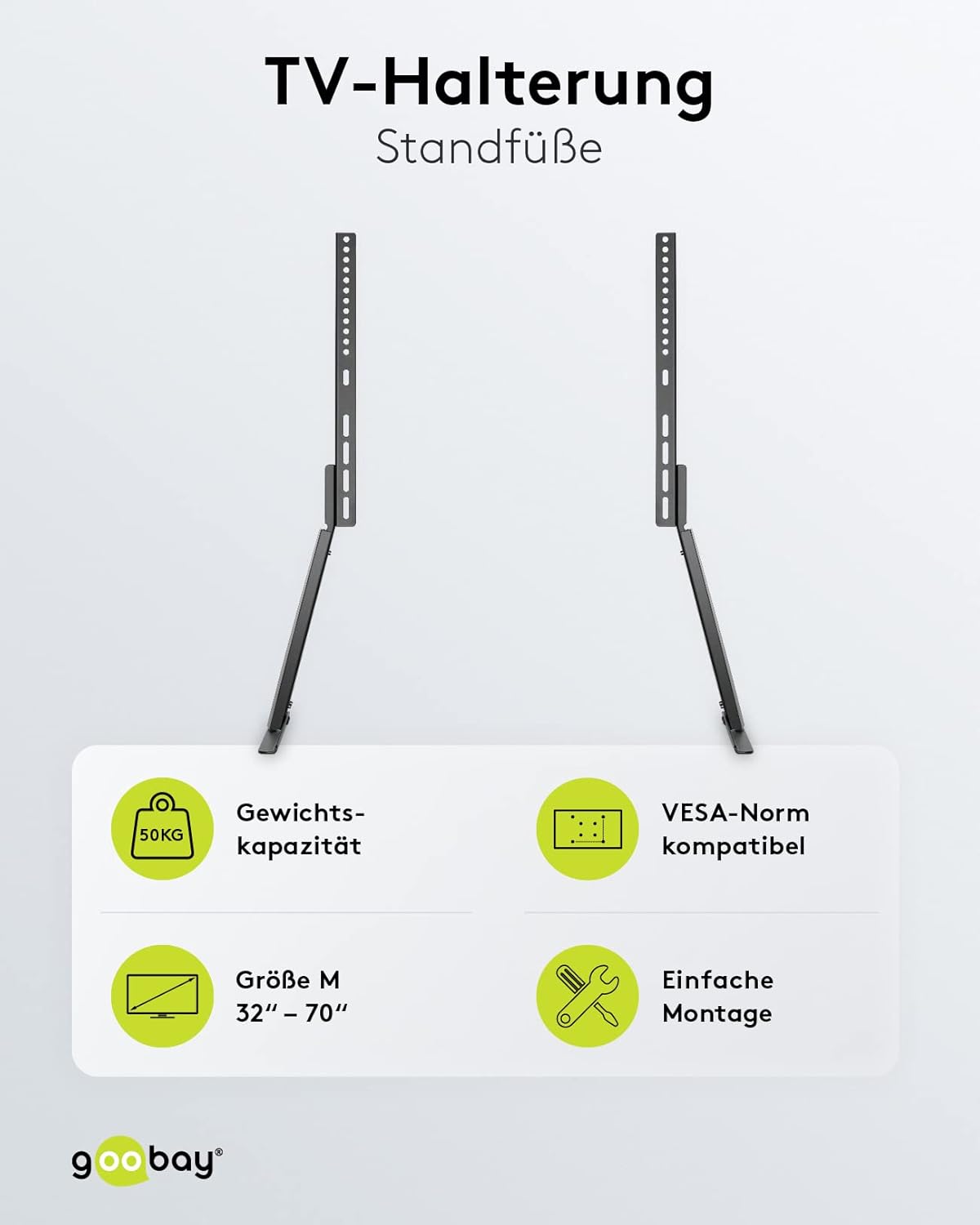
Зураг: The goobay 58525 TV Stand highlighting its weight capacity (50kg), VESA compatibility, screen size range (32"-70"), and easy assembly.
5. Ашиглалтын заавар
5.1 Өндөрийг тохируулах
The goobay 58525 TV Stand offers multiple height adjustment levels. To adjust the height:
- With assistance, carefully lift the TV slightly to relieve pressure on the mounting points.
- Unfasten any safety screws that lock the TV's vertical position.
- Adjust the TV to the desired height by repositioning the mounting brackets on the vertical support columns. The stand offers 3 height levels.
- Once the desired height is achieved, re-fasten the safety screws to secure the TV in place.
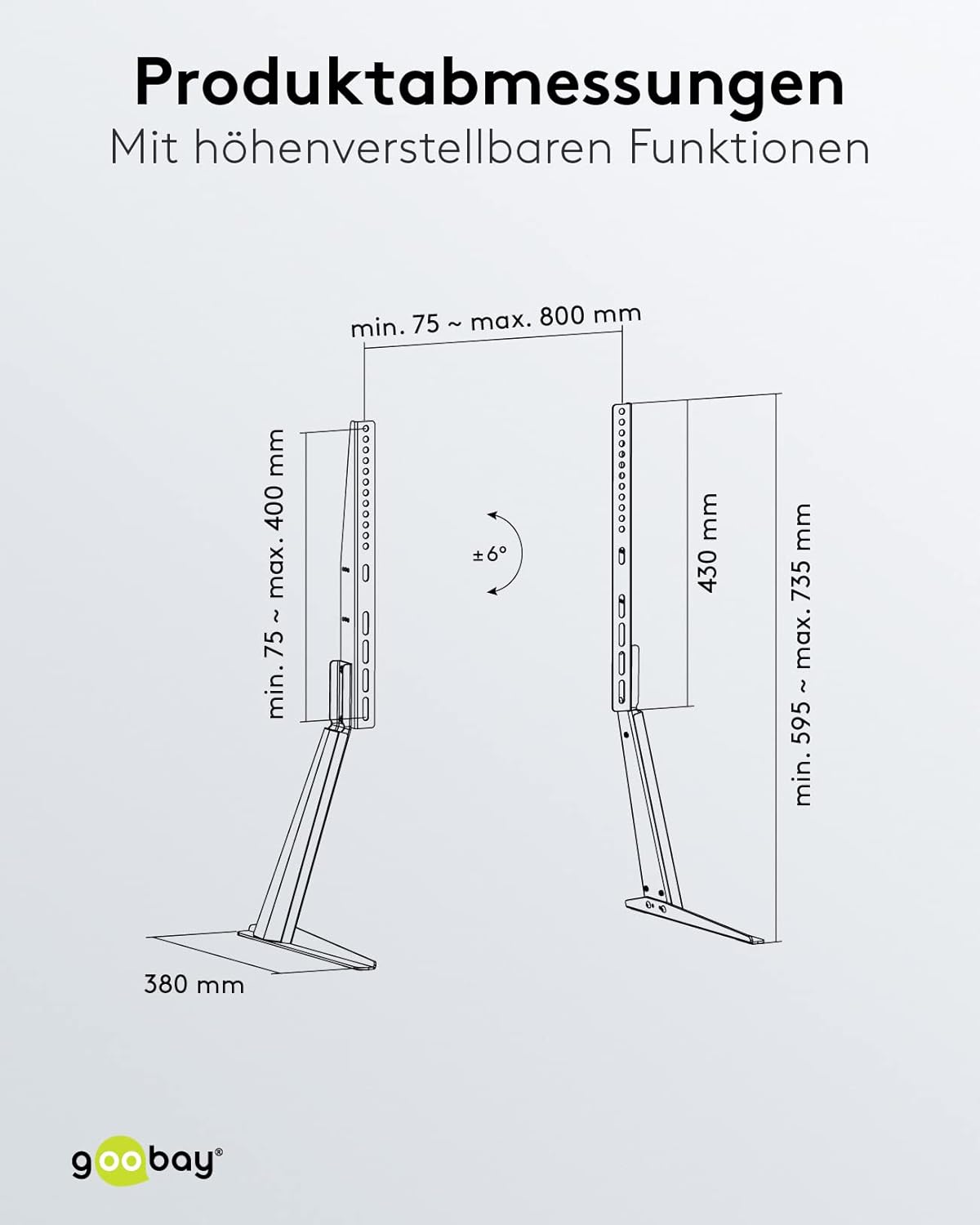
Зураг: Product dimensions and adjustable features, including the tilt angle of ±6 degrees and height range.
5.2 Налалтын өнцгийг тохируулах
The stand allows for a tilt angle of up to 6 degrees. To adjust the tilt:
- Locate the tilt adjustment mechanism on the mounting brackets.
- Loosen the tilt locking screws (if present).
- Gently tilt the TV to the desired angle (up to 6 degrees).
- Tighten the tilt locking screws to secure the TV in position.
5.3 Кабелийн менежмент
The goobay 58525 TV Stand includes an integrated cable management system to keep your cables organized and protected.
- Gather all TV and device cables.
- Route the cables through the designated cable channels or clips on the back of the stand's vertical columns.
- Use the included bezel or cover to discreetly hide the cables within the stand's structure.

Зураг: The goobay 58525 TV Stand showcasing its integrated cable management system, with cables neatly routed through the stand.

Зураг: Ойрын зураг view demonstrating how to route cables through the integrated cable management system of the goobay 58525 TV Stand.
6. Засвар үйлчилгээ
- Цэвэрлэгээ: Зөөлөн, хуурай даавуугаар тавиурыг арчина. Зөрүүд тэмдгийн хувьд бага зэрэг damp Зөөлөн савантай даавуу хэрэглэж, дараа нь хатаана. Зүлгүүрийн цэвэрлэгч эсвэл уусгагчаас зайлсхий.
- Шалгалт: Бүх эрэг ба холболтыг нягт, найдвартай байлгахын тулд үе үе шалгаж байгаарай. Шаардлагатай бол дахин чангална.
- Жингийн хязгаар: Do not place items exceeding the 50 kg weight limit on the stand or attach TVs larger than 70 inches.
7. Алдаа засах
| Асуудал | Боломжит шалтгаан | Шийдэл |
|---|---|---|
| Зогсоол савласан эсвэл тогтворгүй байна. | Screws are loose; stand is on an uneven surface; TV weight exceeds limit. | Check and tighten all assembly screws. Move the stand to a level surface. Verify TV weight is within 50 kg limit. |
| ТВ хазайх боломжгүй. | Tilt locking screws are too tight. | Loosen the tilt locking screws, adjust the angle, then re-tighten. |
| TV cannot be adjusted for height. | Safety screws are engaged; TV is too heavy to lift easily. | Ensure safety screws are disengaged. Seek assistance to lift the TV for adjustment. |
| Scratches on furniture. | Foam foot pads not installed or dislodged. | Ensure foam foot pads are correctly attached to the bottom of the base feet. |
8. Техникийн үзүүлэлтүүд
| Онцлог | Дэлгэрэнгүй |
|---|---|
| Загварын дугаар | 58525 |
| Брэнд | губай |
| Материал | Ган (нунтагласан) |
| Өнгө | Хар |
| Тохиромжтой дэлгэцийн хэмжээ | 32 - 70 инч (81 - 178 см) |
| Хамгийн их ачааллын багтаамж | 50 кг (110 фунт) |
| VESA нийцтэй байдал | 75x75, 100x100, 100x150, 100x200, 150x100, 150x150, 200x100, 200x200, 300x200, 300x300, 400x200, 400x300, 400x400, 600x400, 800x400 mm |
| Налалтын өнцөг | 6 градус хүртэл |
| Өндөр тохируулга | 3 levels (min. 595 mm - max. 735 mm) |
| Гүн | 380 мм |
| Нэгдсэн шинж чанарууд | Cable management system, foam foot pads |

Зураг: Нэг гаруйview of the goobay 58525 TV Stand's benefits, including foot pads for furniture protection, integrated cable management, and easy assembly with VESA standards.
9. Баталгаат хугацаа ба дэмжлэг
Баталгаат хугацааны мэдээлэл болон хэрэглэгчийн дэмжлэг авахыг хүсвэл худалдан авалттайгаа хамт ирсэн баримт бичгийг үзэх эсвэл жижиглэн худалдаачинтайгаа холбогдоно уу. Баталгаат хугацааны нэхэмжлэл гаргахын тулд худалдан авалтын баримтаа хадгална уу.
For further assistance or technical inquiries, please visit the official goobay webсайт эсвэл харилцагчийн үйлчилгээний хэлтэстэй холбогдоно уу.