1. Танилцуулга
Thank you for choosing the Karlsson LED Mirror Alarm Clock. This digital alarm clock features a modern design with a clear LED display integrated into a silver mirror surface, showing time and temperature. This manual provides essential information for the safe and efficient use of your device.
Хайрцагт юу байгаа вэ:
- Karlsson LED Mirror Alarm Clock
- USB цахилгаан кабель

Зураг 1: Урд view of the Karlsson LED Mirror Alarm Clock, showing the time (15:08) and temperature (19°C) on its reflective display.
2. Аюулгүй байдлын мэдээлэл
- Төхөөрөмжийг ус эсвэл хэт их чийгэнд бүү тавь.
- Хэт их температур, нарны шууд тусгал, тоос шороотой орчинд орохоос зайлсхий.
- Хүүхдийн гар хүрэхгүй газар хадгална.
- Use only the provided USB cable or a compatible power adapter.
- When inserting batteries, ensure correct polarity (+/-).
- Хуучин болон шинэ батерей, өөр төрлийн батерейг бүү холь.
- Хэрэв төхөөрөмжийг удаан хугацаагаар ашиглахгүй бол батарейг нь салга.
3. Бүтээгдэхүүн дууссанview
Familiarize yourself with the components and controls of your alarm clock.
Урд дэлгэц:
- Цагийн дэлгэц: Shows current time in 12-hour or 24-hour format.
- Температурын дэлгэц: Орчны температурыг Цельсийн эсвэл Фаренгейтээр харуулна.
Арын удирдлага:
- SET товчлуур: Used to enter setting modes (time, alarm).
- UP товчлуур: Used to increase values or navigate menus.
- Доошлох товч: Used to decrease values or navigate menus.
- MODE/V Button: Used to switch display modes or activate voice control (if available).
- RESET товч: Төхөөрөмжийг үйлдвэрийн тохиргоонд дахин тохируулна.
- DC 5V оролт: USB тэжээлийн кабелийг холбоход зориулагдсан.
- Зайны тасалгаа: Holds 3 x AAA batteries for backup power.
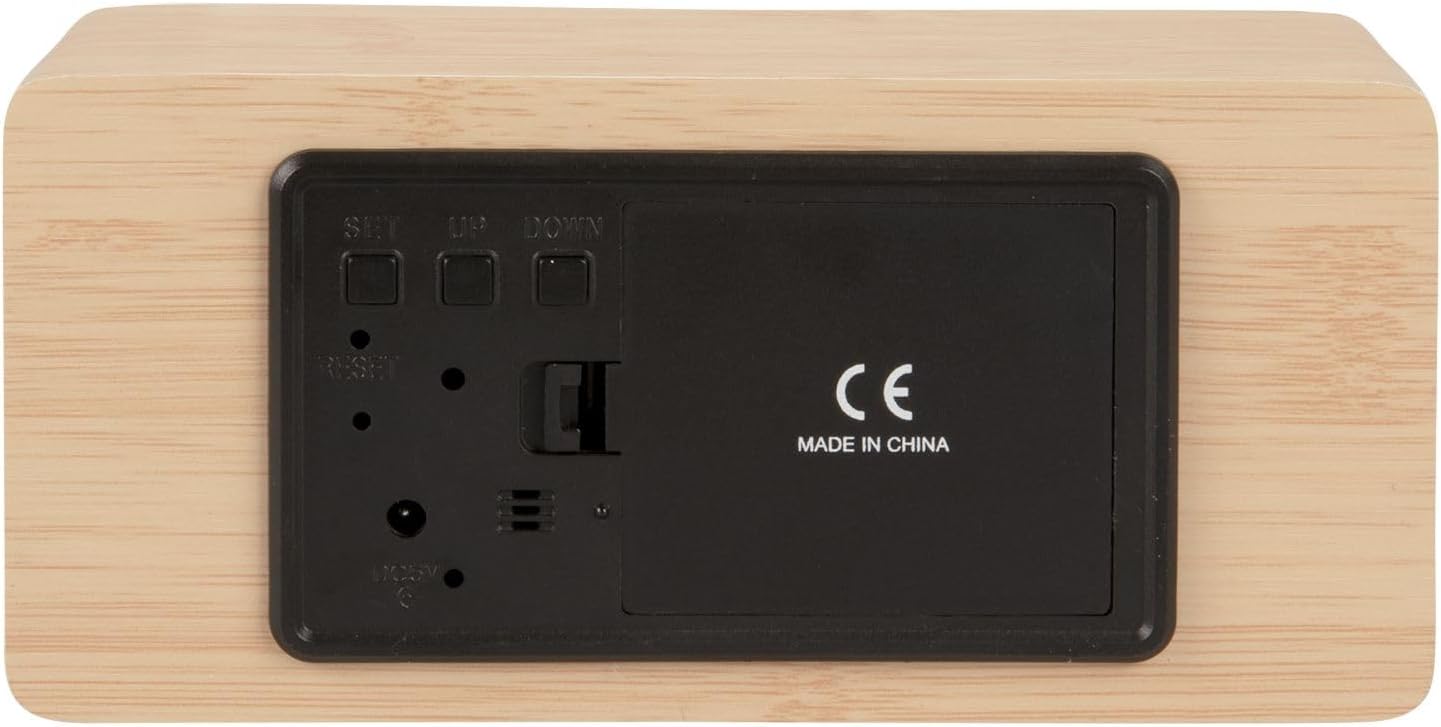
Зураг 2: Арын view of the alarm clock, highlighting the SET, UP, DOWN buttons, power input, and battery compartment.
4. Тохиргоо
Төхөөрөмжийг тэжээх:
The alarm clock can be powered via the included USB cable or by 3 x AAA batteries (not included) for backup.
- USB цахилгаан: Connect the small end of the USB cable to the DC 5V input port on the back of the alarm clock. Connect the other end to a USB power adapter (not included) or a powered USB port.
- Зайны нөөц: Open the battery compartment cover on the back of the clock. Insert 3 x AAA batteries, ensuring correct polarity. Close the cover securely. Batteries are primarily for backup and may not power the display continuously.

Зураг 3: The USB power cable provided for connecting the alarm clock to a power source.
5. Ашиглалтын заавар
Цагийг тохируулах:
- -г удаан дар SET цагийн тоо анивчж эхлэх хүртэл товчлуурыг дарна уу.
- -г ашиглана уу UP or ДООШ цагийг тохируулах товчлуурууд.
- дарна уу SET again to confirm the hour and move to minute setting.
- -г ашиглана уу UP or ДООШ минут тохируулах товчлуурууд.
- дарна уу SET to confirm the minutes and exit time setting mode.
Сэрүүлгийг тохируулах:
- дээр дарна уу SET button once (do not hold) to cycle through display modes until 'AL' or an alarm icon appears.
- -г удаан дар SET button again until the alarm hour digits flash.
- -г ашиглана уу UP or ДООШ хүссэн сэрүүлгийн цагийг тохируулах товчлуурууд.
- дарна уу SET to confirm the alarm hour and move to alarm minute setting.
- -г ашиглана уу UP or ДООШ хүссэн сэрүүлгийн минутыг тохируулах товчлуурууд.
- дарна уу SET дохиолол тохируулах горимыг баталгаажуулж, гарах.
- Сэрүүлгийг идэвхжүүлэх/идэвхгүй болгохын тулд товчийг дарна уу UP button while in normal time display mode. An alarm icon will appear/disappear on the display.
Switching Display Modes (12/24 Hour, Temperature Unit):
- Ердийн цагийн дэлгэцийн горимд дээр дарна уу UP 12 цаг болон 24 цагийн форматын хооронд шилжих товчлуур.
- дээр дарна уу ДООШ button to switch between Celsius (°C) and Fahrenheit (°F) temperature units.
6. Засвар үйлчилгээ
- Clean the alarm clock with a soft, dry cloth.
- Do not use abrasive cleaners, solvents, or harsh chemicals, as these may damage the mirror surface or casing.
- Ensure the device is unplugged and batteries are removed before cleaning.
7. Алдаа засах
- Дэлгэц хоосон байна: Check if the USB cable is securely connected to a power source. If using batteries, ensure they are inserted correctly and are not depleted.
- Сэрүүлэг дуугарахгүй байна: Verify that the alarm is set and activated (alarm icon visible on display). Check the alarm volume if adjustable (this model may not have adjustable volume).
- Incorrect time/settings: дээр дарна уу RESET button on the back of the unit using a thin object (e.g., a paperclip) to restore factory settings, then re-set the time and alarm.
- Температурын үзүүлэлт буруу байна: Ensure the clock is placed in a location away from direct heat sources or drafts that could affect ambient temperature readings.
8. Техникийн үзүүлэлтүүд
| Загварын дугаар | PTG-KA5879WD |
| Материал | Модон өнгөлгөө |
| Хэмжээ (L x W x H) | 15 см x 7 см x 4.5 см (ойролцоогоор 5.9 x 2.76 x 1.77 инч) |
| Жин | 245 гр (ойролцоогоор 0.54 фунт) |
| Өнгө | Light wood casing, silver mirror display |
| Дэлгэцийн төрөл | Дижитал LED |
| Онцлог шинж чанар | Сэрүүлэг |
| Эрчим хүчний эх үүсвэр | USB powered (cable included), 3 x AAA batteries (not included) for backup |
9. Баталгаат хугацаа ба дэмжлэг
This product is manufactured by Karlsson. For any support inquiries, warranty information, or service requests, please refer to the retailer where the product was purchased or visit the official Karlsson website for contact details. Please retain your proof of purchase for warranty claims.


