1. Бүтээгдэхүүн дууссанview
The Sinotimer TM618N-2 is a versatile 7-day weekly digital programmable timer designed for automated control of electrical equipment. It allows users to set specific daily or weekly schedules for turning devices on and off, ensuring efficient energy management and convenience. This timer is suitable for a wide range of applications, including controlling lighting, heating, ventilation, and other electrical appliances.

Зураг 1: Урд view of the Sinotimer TM618N-2 Digital Timer, showing the display and control buttons.
2. Үндсэн шинж чанарууд
- Weekly Programmable: Allows up to 16 ON/OFF programs per day or week.
- Олон үйлдэлт: Includes Clock display, Timer, Countdown, Automatic weekly time deviation correction, and Sleep mode.
- Өндөр хүчин чадал: Дэмждэг 16 Amp / 220 Volt AC loads.
- Өргөн ботьtage нийцтэй байдал: Operates with 220V, 230V, 240V AC.
- Баригдсан батерей: Цахилгаан асаах үед тохиргоог хадгалнаtages (Lithium battery type).
- Олон талт хэрэглүүрүүд: Ideal for controlling dryers, defrosting equipment, swimming pool pumps, gates, lighting, and more.
3. Техникийн үзүүлэлтүүд
| Онцлог | Дэлгэрэнгүй |
|---|---|
| Загвар | TM618N-2 |
| Брэнд | Sinotimer |
| Ботьtage | 220V / 230V / 240V хувьсах гүйдэл |
| Одоогийн үнэлгээ | 16 Amp |
| Програмын тоо | 16 ON/OFF programs |
| Материал | Хуванцар |
| Зайны төрөл | Lithium (internal, non-replaceable by user) |
| Өнгө | Multi-color (typically white/grey) |
4. Суурилуулалт
Аюулгүй байдлын чухал мэдэгдэл: Installation should only be performed by a qualified electrician. Ensure power is disconnected before attempting any wiring.
- Суурилуулалт: The TM618N-2 is designed for DIN rail mounting or screw mounting. Secure the timer in a suitable electrical enclosure.
- Утас: Refer to the wiring diagram on the back of the unit.
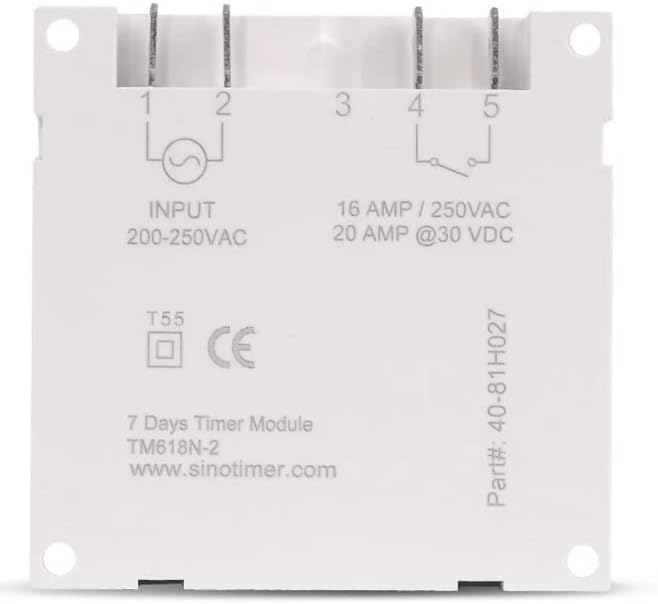
Зураг 2: Буцах view of the Sinotimer TM618N-2, showing input/output terminals and wiring diagram.
- Input (Terminals 1 & 2): Connect your 200-250VAC power supply to these terminals.
- Output (Terminals 3, 4, & 5):
- Terminal 3: Common (COM)
- Terminal 4: Normally Open (NO) - Connect your load here for switched power.
- Terminal 5: Normally Closed (NC) - (Less commonly used for timer applications, but available).
- Асаах: Once wiring is complete and secure, restore power to the circuit. The timer display should illuminate.

Figure 3: Technical drawing showing the dimensions of the Sinotimer TM618N-2 timer.
5. Ашиглалтын заавар
5.1. Товчлуурын функцууд
- ЦАГ: Одоогийн цаг болон өдрийг тохируулахад ашигладаг.
- ХӨТӨЛБӨР: Enters/exits programming mode for ON/OFF schedules.
- ДОЛОО ХОНОГ: Selects the day(s) of the week during time or program setting.
- ЦАГ: Adjusts the hour during time or program setting.
- MIN: Adjusts the minute during time or program setting.
- САНАХ: Recalls or cancels a program setting.
- ГАРЫН АВЛАГА: Manually overrides the timer's current state (ON/AUTO/OFF).
- R (Дахин тохируулах): Small button (requires a pointed object) to reset the timer to factory defaults.
5.2. Одоогийн цаг, өдрийг тохируулах
- -г удаан дар ЦАГ товч.
- Барьж байхдаа ЦАГ, дарна уу ДОЛОО ХОНОГ одоогийн өдрийг тохируулахын тулд (MO, TU, WE, TH, FR, SA, SU).
- Барьж байхдаа ЦАГ, дарна уу ЦАГ одоогийн цагийг тохируулах.
- Барьж байхдаа ЦАГ, дарна уу MIN одоогийн минутыг тохируулах.
- -г суллана ЦАГ тохиргоог хадгалах товч.
5.3. Programming ON/OFF Schedules
The timer supports up to 16 ON and 16 OFF programs. Each program can be set for a specific day or group of days.
- дээр дарна уу PROG товчийг нэг удаа дарна уу. Дэлгэц дээр "1 ON" гэж гарч ирнэ.
- дарна уу ДОЛОО ХОНОГ repeatedly to select the desired day(s) for this program (e.g., MO, TU, WE, TH, FR, SA, SU; MO-FR; SA-SU; MO-SA; etc.).
- дарна уу ЦАГ хүссэн ON цагийг тохируулахын тулд.
- дарна уу MIN хүссэн АСААЛТТАЙ минутыг тохируулахын тулд.
- дарна уу PROG дахин. Дэлгэц дээр "1 OFF" гэж гарч ирнэ.
- Repeat steps 2-4 to set the desired OFF time for the first program.
- дарна уу PROG to move to the next program ("2 ON", "2 OFF", etc.) and repeat the process for up to 16 programs.
- To exit programming mode and save settings, press the ЦАГ товч.
5.4. Гараар хүчингүй болгох
дээр дарна уу ГАРЫН АВЛАГА button to cycle through the output modes:
- АСААЛТ: Гаралт нь тасралтгүй асаалттай, програмуудыг үл тоомсорлодог.
- АВТО: Output follows the programmed schedules.
- Унтрааж байна: Гаралт нь тасралтгүй УНТРААЛТТАЙ бөгөөд програмуудыг үл тоомсорлодог.
Цаг хэмжигч асаалттай байгаа эсэхийг шалгана уу АВТО mode for programmed operation.
5.5. Таймерыг дахин тохируулах
To clear all settings and return the timer to its factory default state, insert a pointed object (like a paperclip) into the small R (Reset) hole and press gently.
6. Засвар үйлчилгээ
The Sinotimer TM618N-2 requires minimal maintenance.
- Төхөөрөмжийг цэвэр, тоос шороогүй байлга. Цэвэрлэхийн тулд зөөлөн, хуурай даавуу ашиглана уу.
- Зүлгүүрийн цэвэрлэгч, уусгагчийг бүү ашигла.
- Ensure the timer is installed in a dry environment, away from direct moisture or extreme temperatures.
- The internal battery is designed for long life and is not user-replaceable. If the display goes blank or settings are not retained after a power outage, the battery may need professional service.
7. Алдаа засах
| Асуудал | Боломжит шалтгаан | Шийдэл |
|---|---|---|
| Дэлгэц хоосон байна. | No power supply; internal battery depleted. | Check power connections. If power is present, the internal battery may need charging (leave connected to power for several hours) or replacement (professional service required). |
| Timer not switching ON/OFF as programmed. | Timer is not in AUTO mode; incorrect program settings; wiring issue. | дарна уу ГАРЫН АВЛАГА "AUTO" гарч ирэх хүртэл.view and correct program settings. Verify wiring connections. |
| Цахилгаан унтраасны дараа тохиргоо алдагдсанtage. | Internal battery is depleted or faulty. | Leave the timer connected to power for at least 4 hours to charge the internal battery. If the problem persists, the battery may need replacement (professional service recommended). |
| Товчнууд хариу өгөхгүй байна. | Temporary software glitch; unit needs reset. | Perform a full reset using the R button. If the issue continues, contact support. |
8. Баталгаат хугацаа ба дэмжлэг
Баталгаат хугацааны мэдээлэл болон техникийн дэмжлэг авахыг хүсвэл худалдан авалттайгаа хамт ирсэн баримт бичгийг үзэх эсвэл жижиглэн худалдаачинтайгаа холбогдоно уу. Баталгаат хугацааны нэхэмжлэл гаргахын тулд худалдан авалтын баримтаа хадгална уу.
Manufacturer: Sinotimer