1. Танилцуулга
This manual provides detailed instructions for the safe and efficient installation, operation, and maintenance of your Link2Home Extend & Tilt TV Wall Mount. Designed for televisions ranging from 42 to 90 inches and supporting up to 154 pounds, this mount offers versatile viewing options with its extendable, swivel, and tilt features. Please read all instructions carefully before beginning installation.
Гол онцлогууд:
- Universal TV Wall Mount for 42" to 90" screen sizes.
- 154 фунт хүртэл жинтэй.
- Compatible with Flat and Curved Screen TVs & Monitors.
- Profile extends 3.1" to 5.3" from the wall.
- Open architecture for increased ventilation and easy access to wires.
- Adjustable tilt range: +5° to -12°.
- Adjustable swivel range: +5° to -5°.
- Screen level adjustment: +-0.98".
- Easy-grip knobs for quick, toolless tilt and lock.
- Anti-theft locking hole (padlock not included).
- Automatic click-in spring lock for secure hold.
- VESA compatibility: 200x200 mm to 600x400mm.
- Includes all necessary hardware and a built-in level.
- Mounts on wood studs, brick, concrete, and sheetrock/plasterboard walls.
2. Аюулгүй байдлын мэдээлэл
- Жингийн багтаамж: Do not exceed the maximum weight capacity of 154 lbs (70 kg). This mount is designed for use with specified maximum weights. Use with products heavier than the maximum weights indicated may result in instability causing possible injury.
- Дэлгэцийн хэмжээ: This mount is suitable for TVs between 42" and 90".
- Суурилуулах гадаргуу: Суурилуулах гадаргуу нь тоног төхөөрөмж болон бүх хавсаргасан тоног төхөөрөмжийн нийт жинг найдвартай дааж чадах эсэхийг шалгаарай.
- Мэргэжлийн суурилуулалт: Хэрэв та суурилуулах үйл явц эсвэл хананыхаа тохирох байдалд эргэлзэж байвал мэргэшсэн мэргэжилтэнтэй зөвлөлдөөрэй.
- VESA нийцтэй байдал: Verify your TV's VESA mounting pattern (distance between screw holes on the back of the TV) is within the supported range of 200x200mm to 600x400mm.
- Багаж хэрэгсэл: Суулгахдаа тохирох хэрэгслийг ашиглана уу. Үргэлж хамгаалалтын шил зүүж байгаарай.
- Хүүхдүүд: Хүүхдийг суулгах газраас хол байлга.
3. Багцын агуулга
Your Link2Home Extend & Tilt TV Wall Mount package includes the following components and hardware:
- Ханын хавтангийн угсралт
- TV Brackets (Left and Right)
- Assorted TV Screws, Washers, and Spacers
- Lag Bolts and Wall Anchors (for various wall types)
- Баригдсан түвшин
- Cable Ties (for cord management)
- Зааварчилгааны гарын авлага

4. Тохиргоо ба суурилуулалт
Follow these steps carefully to install your TV wall mount:
Алхам 1: ТВ-ийн хаалтуудыг телевизортоо холбоно уу
- Зурагтаа зөөлөн, цэвэр гадаргуу дээр доош харуулан зурааснаас сэргийлж болгоомжтой байрлуул.
- Телевизийнхээ арын хэсэгт байрлах VESA суурилуулах нүхийг олоорой.
- Select the appropriate screws, washers, and spacers from the provided hardware kit that fit your TV's VESA pattern.
- Attach the left and right TV brackets to the back of your TV, ensuring they are securely fastened. The hooks on the brackets should face upwards.

Алхам 2: Ханан дээр суурилуулах байршлыг олох
- ТВ-ийнхээ хүссэн өндрийг тодорхойл.
- Use a stud finder to locate wood studs in your wall. Mark the edges and center of the studs. For brick or concrete walls, ensure you have the correct anchors.
- Hold the wall plate against the wall at your desired height and use the built-in level to ensure it is perfectly horizontal. Mark the pilot hole locations.
Алхам 3: Ханын хавтанг хананд бэхлэх
- Drill pilot holes at the marked locations. The size of the drill bit will depend on your wall type (wood, brick, concrete).
- If installing into concrete or brick, insert the appropriate wall anchors into the pilot holes.
- Align the wall plate with the pilot holes and secure it to the wall using the provided lag bolts. Tighten all bolts firmly.

Алхам 4: Зурагтыг ханын тавцан дээр өлгөх
- Тусламжийн тусламжтайгаар зурагтыг болгоомжтой өргөж, хавсаргасан телевизийн хаалтуудыг ханын хавтан дээр холбоно уу.
- Ensure both TV brackets are properly seated and engaged with the wall plate. The automatic click-in spring lock will snap into place for a secure hold.
Суулгах видео:
5. Ашиглалтын заавар
Your Link2Home Extend & Tilt TV Wall Mount offers flexible viewөнцөг:
Налууг тохируулах:
- To adjust the vertical tilt angle (+5° to -12°), loosen the easy-grip knobs on the TV brackets.
- Adjust the TV to your desired tilt angle.
- Tighten the easy-grip knobs to lock the TV in place.
Adjusting Swivel:
- The mount allows for a swivel range of +5° to -5°. Gently push or pull the side of the TV to achieve the desired horizontal viewөнцөг.
Extending/Retracting:
- The mount can extend from 3.1" to 5.3" from the wall. Gently pull the TV forward or push it back towards the wall.

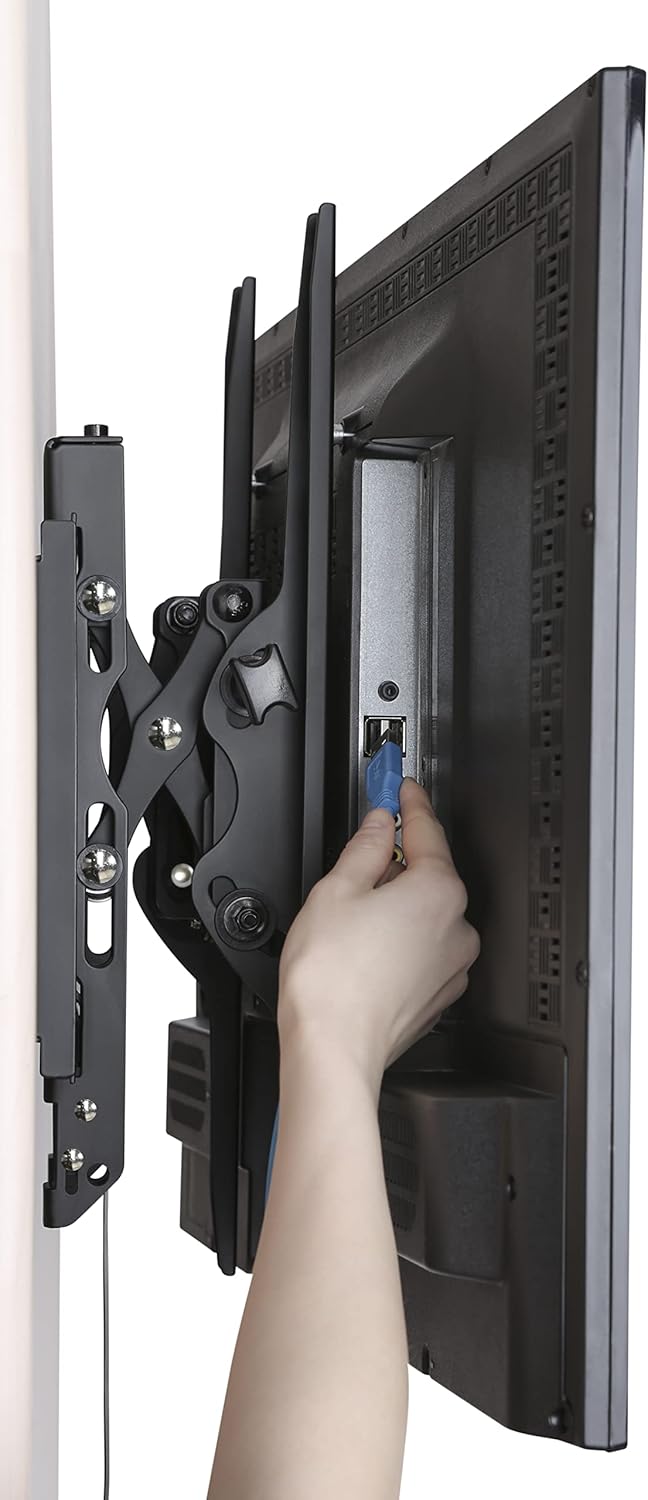
Accessing Wires:
- The extendable profile and open architecture provide easy access to cables and ports on the back of your TV.
6. Засвар үйлчилгээ
- Тогтмол үзлэг: Periodically check that all screws and bolts are securely tightened.
- Цэвэрлэгээ: Суурилуулалтыг зөөлөн, хуурай даавуугаар цэвэрлээрэй. Зүлгүүрийн цэвэрлэгч эсвэл уусгагч хэрэглэхээс зайлсхий.
- Тосолгоо: Хөдөлгөөнт хэсгүүдэд тосолгооны материал шаардагдахгүй.
7. Алдаа засах
- ТВ түвшин биш: Use the screen level adjustment feature by twisting the screws on the arms for micro-adjustment. Ensure the wall plate was installed level using the built-in level.
- Хазайлт/Эргэлтийг тохируулахад бэрхшээлтэй байдал: Ensure the easy-grip knobs are sufficiently loosened before attempting to adjust the tilt. For swivel, apply gentle, even pressure.
- Зурагт сул мэдрэмж төрүүлдэг: Double-check that all mounting bolts on the wall plate and TV brackets are securely tightened. Ensure the automatic click-in spring lock is engaged.
- Cannot Remove TV from Mount: Pull the release strings located at the bottom of the TV brackets to disengage the locking mechanism.
8. Техникийн үзүүлэлтүүд
| Тодорхойлолт | Дэлгэрэнгүй |
|---|---|
| Брэнд | Link2Home |
| Загвар | B0B72CCPY4 |
| Дэлгэцийн хэмжээтэй нийцтэй байдал | 42" - 90" |
| Жингийн багтаамж | 154 фунт (70 кг) хүртэл |
| VESA нийцтэй байдал | 200x200мм-ээс 600x400мм хүртэл |
| Налалтын өнцөг | +5°-аас -12° хүртэл |
| Эргэдэг өнцөг | +5°-аас -5° хүртэл |
| Өргөтгөл Profile | 3.1"-аас 5.3" |
| Материал | Металл |
| Өнгө | Хар |
| Суурилуулах төрөл | Ханын бэхэлгээ |
| Бүтээгдэхүүний хэмжээс | 28.15 x 8.54 x 3.62 инч |
| Зүйлийн жин | 10.38 фунт |
9. Баталгаат хугацаа ба дэмжлэг
The Link2Home Extend & Tilt TV Wall Mount comes with a Насан туршийн баталгаа. For any questions, technical support, or warranty claims, please refer to the contact information provided in your product packaging or visit the official Link2Home webсайт.