1. Танилцуулга
Thank you for choosing the ErGear 63" x 55" Dual Motor L-Shaped Standing Desk. This manual provides essential information for the safe assembly, operation, and maintenance of your new electric height-adjustable desk. Please read these instructions carefully before use and retain them for future reference.

Image 1.1: The ErGear 63" x 55" L-Shaped Standing Desk, showcasing its spacious design and electric height adjustment feature.
2. Аюулгүй байдлын мэдээлэл
Аюулгүй ажиллагааг хангах, эвдрэлээс урьдчилан сэргийлэхийн тулд дараах аюулгүй байдлын удирдамжийг дагаж мөрдөнө үү.
- Хэрэглэхийн өмнө бүх эд ангиудыг найдвартай бэхэлсэн эсэхийг шалгаарай.
- Өндөр тохируулах үед хүүхэд, тэжээвэр амьтдыг ширээнээс хол байлга.
- Ширээг хэт ачаалж болохгүй. Хамгийн их жингийн багтаамжийн талаарх техникийн үзүүлэлтүүдийг үзнэ үү.
- Шингэнийг хяналтын самбар дээр эсвэл цахилгаан эд ангиудын ойролцоо шууд байрлуулахаас зайлсхий.
- Цэвэрлэх, засвар үйлчилгээ хийхээс өмнө цахилгааныг салга.
- Энэхүү ширээ нь зөвхөн дотор ашиглах зориулалттай.

Image 2.1: The desk is certified safe, meeting US federal and state air standards for low VOC emissions, and complies with FCC and UL safety standards.
3. Багцын агуулга
The ErGear 63" L-Shaped Electric Standing Desk package includes all necessary components for assembly. Please verify that all parts are present and undamaged before beginning assembly.
- Desktop sections (multiple pieces for L-shape)
- Leg columns with dual motors
- Foot pads/bases
- Хяналтын самбар
- Цахилгаан адаптер ба кабель
- Угсрах тоног төхөөрөмж (эрэг, боолт, багаж хэрэгсэл)
- Зааварчилгааны гарын авлага
4. Тохиргоо ба угсралт
Assembly of the ErGear L-Shaped Standing Desk requires two people. A screwdriver is recommended for assembly. For detailed step-by-step instructions, please refer to the comprehensive PDF installation manual available online or included with your product.
4.1 Угсралтын сонголтууд
The L-shaped desktop can be assembled with the longer section on either the left or right side, allowing you to customize the desk to fit your space and preference.
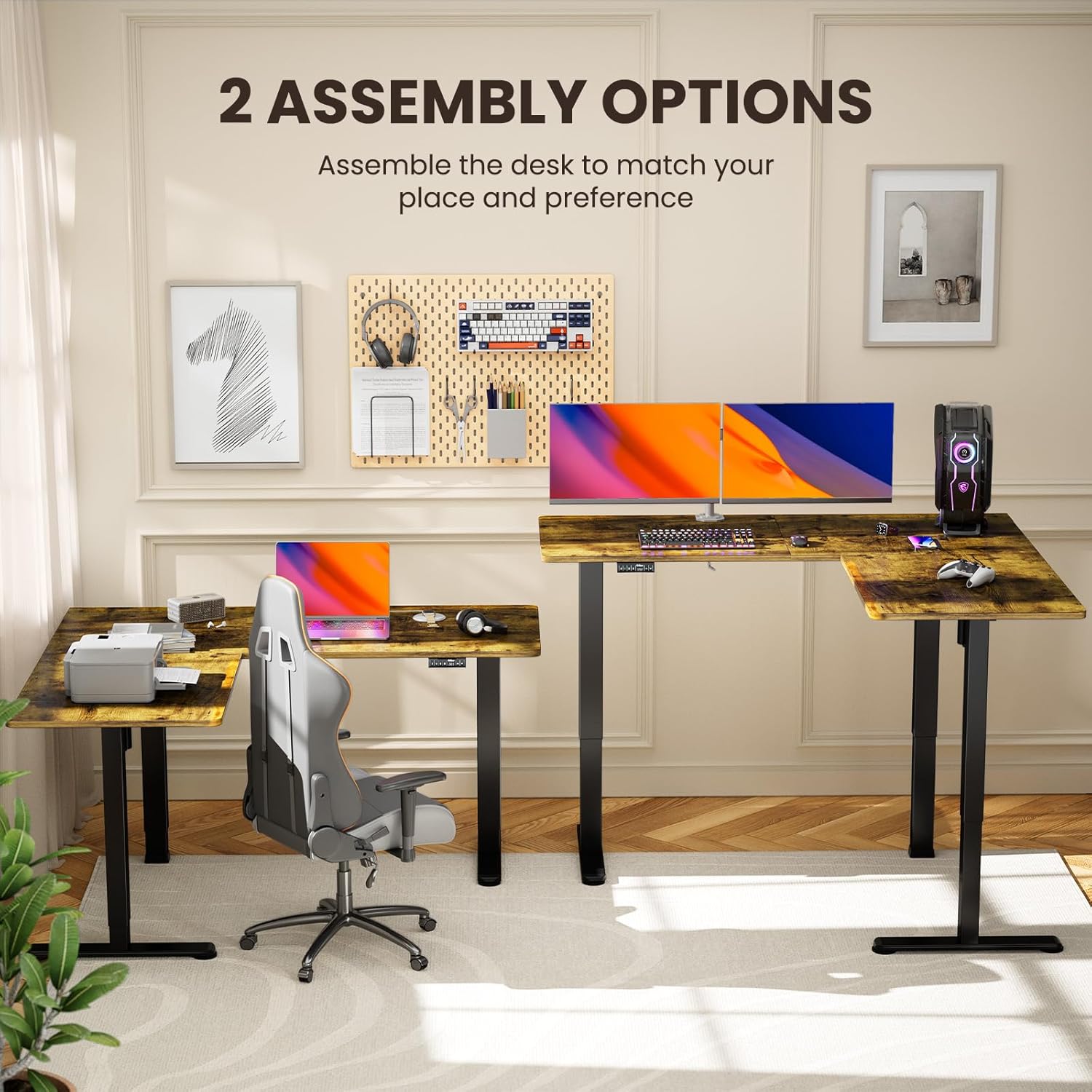
Image 4.1: Illustration of the two possible configurations for the L-shaped desktop, allowing for left or right-hand setup.

Зураг 4.2: Дээд талын ачаалал view demonstrating the flexibility of assembling the desk with the longer section on either side.
4.2 General Assembly Steps (Refer to PDF for details)
- Бүх бүрэлдэхүүн хэсгүүдийг задалж, эд ангиудын жагсаалттай тулгана уу.
- Attach the lifting columns to the desktop sections.
- Secure the foot pads to the lifting columns.
- Connect the motor cables and control panel to the main control box.
- Plug in the power adapter and perform initial calibration as per the detailed manual.
5. Ашиглалтын заавар
Your ErGear standing desk features a dual-motor system for smooth and quiet height adjustments, along with a control panel for easy operation and memory presets.
5.1 Өндөр тохируулга
Use the up and down arrow buttons on the control panel to adjust the desk height. The desk can be adjusted from 28.35 inches to 46.46 inches.

Image 5.1: The desk in a standing position, demonstrating the electric height adjustment feature for ergonomic use.
5.2 Санах ойн урьдчилсан тохиргоо
The control panel allows you to save custom sit and stand height settings for quick transitions. Consult your detailed manual for specific instructions on setting and recalling memory positions.
5.3 Dual Motor System
The desk is equipped with dual motors for faster, smoother, and quieter operation. This system ensures stable and reliable long-term performance.

Зураг 5.2: Дотоод view highlighting the dual motor mechanism responsible for the desk's smooth and efficient height adjustment.

Image 5.3: The quiet operation of the desk allows for an undisturbed work environment, as demonstrated by a sleeping cat.
6. Засвар үйлчилгээ
Regular maintenance helps prolong the life and performance of your desk.
- Цэвэрлэгээ: Ширээний компьютер болон хүрээг зөөлөн арчиж, damp даавуу. Хүчтэй химийн бодис, зүлгүүрийн цэвэрлэгчээс зайлсхий.
- Кабелийн менежмент: Periodically check and organize cables to prevent entanglement or damage during height adjustments.
- Бэхэлгээ: Occasionally check all screws and bolts to ensure they remain tight.
7. Алдаа засах
Хэрэв та ширээн дээрээ асуудалтай тулгарвал дараах нийтлэг шийдлүүдийг үзнэ үү.
| Асуудал | Боломжит шалтгаан | Шийдэл |
|---|---|---|
| Ширээ хөдлөхгүй байна | Power cable disconnected, overload, motor error | Check power connections. Reduce weight on desk. Refer to manual for error code interpretation and reset procedures. |
| Өндөр тэгш бус тохируулга | Obstruction, calibration issue | Ensure no obstructions. Perform a reset/calibration as per the detailed manual. |
| Unusual noise during adjustment | Loose fasteners, obstruction | Check all fasteners for tightness. Remove any objects that may be interfering with the lifting columns. |
If the problem persists, please contact ErGear customer support.
8. Техникийн үзүүлэлтүүд
Key technical details for your ErGear L-Shaped Standing Desk:
- Загварын дугаар: EGESD8V
- Бүтээгдэхүүний хэмжээ: 55"D x 63"W x 28.35"H
- Хамгийн бага өндөр: 28.35 инч
- Хамгийн их өндөр: 46.46 инч
- Хамгийн их жингийн зөвлөмж: 220 фунт
- Үндсэн материал: Нүүрстөрөгчийн ган
- Топ материалын төрөл: Мод (Ламинат)
- Моторууд: Хос моторын систем
- Ассемблей: Шаардлагатай (2 хүн санал болгож байна)
- Баталгаат хугацаа: 5 жилийн баталгаат хугацаа

Image 8.1: Detailed dimensions of the ErGear L-Shaped Standing Desk, including the adjustable height range.

Image 8.2: The desk's robust lifting system is tested to support up to 220 lbs, ensuring dependable performance.
9. Баталгаат хугацаа ба дэмжлэг
ErGear provides a 5-year warranty for this product, covering parts and labor. For warranty claims, technical assistance, or further inquiries, please visit the official ErGear store or contact customer support.
ErGear Store: Visit the ErGear Store on Amazon
Суулгах гарын авлага (PDF): For a detailed installation guide, please refer to the official PDF document: PDF гарын авлага татаж авах


