Танилцуулга
Thank you for choosing the Varmilo MA Series V2 Summit R2 Mechanical Keyboard. This manual provides essential information for setting up, operating, maintaining, and troubleshooting your new keyboard. Please read this manual thoroughly to ensure optimal performance and longevity of your device.
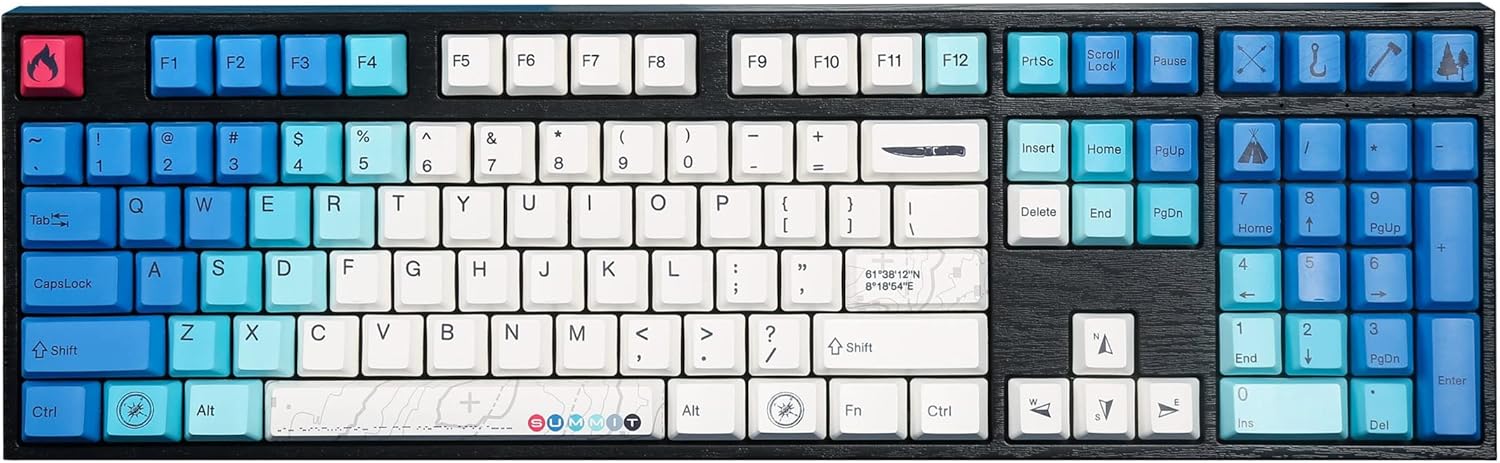
Image: The Varmilo MA Series V2 Summit R2 Mechanical Keyboard, showcasing its full layout and unique keycap design.
Тохиргоо
1. Бэлтгэх хайрцаг
Carefully remove the keyboard and all accessories from the packaging. Ensure the following items are present:
- Varmilo MA Series V2 Summit R2 Mechanical Keyboard
- USB-C кабель
- Түлхүүрийн таг татагч (хэрэв дагалдаж ирсэн бол)
- Хэрэглэгчийн гарын авлага (энэ баримт бичиг)
2. Гарыг холбох
- Гарны ард байгаа USB-C портыг ол.
- Өгөгдсөн USB-C кабелийн нэг үзүүрийг гартай холбоно уу.
- USB-C кабелийн нөгөө үзүүрийг компьютер дээрээ байгаа USB порт руу холбоно уу.
- Гар нь залгаад тоглодог бөгөөд таны үйлдлийн систем автоматаар танигдах ёстой.
3. Гарын өнцгийг тохируулах
The Varmilo MA Series V2 features a double-section kickstand, allowing for two different typing angles. Gently flip out the desired sections of the kickstand located on the underside of the keyboard to adjust its height and angle for ergonomic comfort.

Зураг: Side profile of the Varmilo keyboard, illustrating the adjustable kickstand in an extended position.
Ашиглалтын заавар
1. Үндсэн үндсэн функцууд
The keyboard features a standard full-size (104-key) layout. All alphanumeric and standard function keys operate as expected. The Varmilo EC Ivy V2 switches provide a smooth and responsive typing experience.
2. Function (Fn) Key Combinations
The Fn key (typically located near the right Alt key) allows access to secondary functions printed on certain keycaps. Hold down the Fn key and press the desired function key simultaneously.
- Fn + F1-F12: Multimedia controls (e.g., volume, play/pause, stop).
- Fn + Сумны товчлуурууд: LED brightness or effect control (refer to specific keycap legends).
- Fn + Хожих: Windows товчлуурыг түгжих/түгжээг тайлах.

Зураг: Ойрын зураг view of the right side of the Varmilo keyboard, highlighting the special function keys and their legends.
3. LED Backlighting Control
The keyboard features White LED backlighting. Use the Fn key combinations to adjust the brightness and switch between various lighting effects. Specific key legends will indicate the corresponding functions for LED control.
Засвар үйлчилгээ
1. Гарыг цэвэрлэх
Гарын харагдах байдал, ажиллагааг хадгалахын тулд:
- Цэвэрлэхийн өмнө гарыг компьютерээсээ салга.
- Зөөлөн, хөвөнгүй даавууг бага зэрэг хэрэглээрэй dampтүлхүүрийн таг болон бусад зүйлсийг арчихын тулд ус эсвэл зөөлөн цэвэрлэгээний уусмалаар арчина.asing.
- Товчлуурын хавчааруудын хоорондох тоос, хог хаягдлыг шахсан агаар ашиглана.
- Avoid using harsh chemicals, abrasives, or solvents, as these can damage the PBT keycaps and finish.
2. Түлхүүрийн тагийг авах болон солих
The keyboard features durable Dye Sub PBT keycaps. If you need to remove keycaps for deep cleaning or customization:
- Use the provided keycap puller (if applicable) or a similar tool.
- Gently attach the keycap puller to the keycap and pull straight up to remove it. Avoid twisting or excessive force.
- To replace, align the keycap with the switch stem and press down firmly until it clicks into place.

Image: A collection of individual Varmilo keycaps, including special design keycaps, demonstrating their PBT material and dye-sublimated legends.
Алдааг олж засварлах
If you encounter issues with your Varmilo keyboard, please refer to the following common solutions:
- Гар хариу өгөхгүй байна:
- USB-C кабель гар болон компьютерт найдвартай холбогдсон эсэхийг шалгаарай.
- Компьютер дээрээ гарыг өөр USB порт руу холбож үзнэ үү.
- Системтэй холбоотой асуудлуудаас зайлсхийхийн тулд гарыг өөр компьютер дээр туршиж үзээрэй.
- Компьютерээ дахин эхлүүлнэ үү.
- LEDs Not Working or Incorrect:
- Ensure the LED brightness is not set to the lowest level using Fn key combinations.
- Check if any specific lighting modes are active that might turn off certain LEDs.
- Бүртгүүлээгүй түлхүүрүүд:
- Remove the keycap and inspect the switch for any obstructions.
- Clean around the switch stem with compressed air.
Үйлдвэрийн тохиргоонд дахин тохируулах
If issues persist, a factory reset may resolve them. Consult the Varmilo official website or support for specific reset procedures for your model, as these can vary.
Үзүүлэлтүүд
The following are the technical specifications for the Varmilo MA Series V2 Summit R2 Mechanical Keyboard:
| Онцлог | Дэлгэрэнгүй |
|---|---|
| Брэнд | Вармило |
| Загвар | MA Series V2 Summit R2 |
| Зохион байгуулалт | Full-size (104 + 4 keys) |
| Шилжүүлэгчийн төрөл | Varmilo EC Ivy V2 Mechanical Switches |
| Товчны материал | Dye Sub PBT |
| Холболт | USB-C |
| Арын гэрэлтүүлэг | Цагаан LED |
| Материал | Polybutylene Terephthalate, Silicone |
| Эрчим хүчний эх үүсвэр | USB-р ажилладаг |
| Тохиромжтой төхөөрөмжүүд | Компьютер (USB-C-ээр) |
Баталгаат болон дэмжлэг
Varmilo products are manufactured to high-quality standards. For information regarding warranty coverage, technical support, or service inquiries, please visit the official Varmilo webсайт эсвэл хэрэглэгчийн дэмжлэгтэй шууд холбогдоно уу. Худалдан авалтын баримтаа баталгаат нэхэмжлэлд зориулж худалдан авалтын баталгаа болгон хадгална уу.
Official Varmilo Store: Varmilo Store on Amazon


