Танилцуулга
Welcome to the user manual for your new vtech CS5209 DECT 6.0 Cordless Phone Expansion Handset. This manual provides detailed instructions for setting up, operating, and maintaining your new handset. For optimal performance, please read these instructions carefully before use.
Хайрцагт юу байна
- CS5209 Cordless Handset
- Handset Battery Pack
- Handset Battery Cover
- Charger Cradle for Handset
- Power Adapter for Charger Cradle
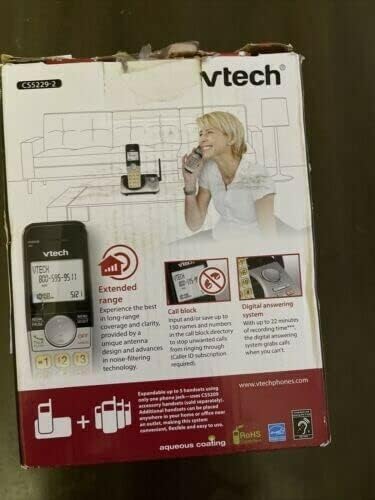
This image displays the product packaging for the vtech CS5209 DECT 6.0 Cordless Phone Expansion Handset. The box highlights key features including extended range for better coverage and clarity, a call block function capable of storing up to 150 numbers to prevent unwanted calls (requires Caller ID subscription), and a digital answering system with up to 17 minutes of recording time to capture messages when you are unavailable. The packaging also indicates that the system is expandable up to 5 handsets using only one phone jack.
Тохиргоо
1. Зай суурилуулах
- Гар утасны арын хэсэгт зайны тасалгааг ол.
- Insert the battery pack into the compartment, ensuring the connector is properly aligned with the socket.
- Close the battery compartment with the battery cover until it clicks into place.
2. Гар утсыг цэнэглэж байна
- Connect the small end of the power adapter to the charger cradle.
- Цахилгаан адаптерийн том үзүүрийг ердийн цахилгаан залгуурт холбоно уу.
- Place the handset face forward into the charger cradle. The charge indicator light on the handset should illuminate, indicating it is charging.
- Allow the handset to charge for at least 16 hours before initial use to ensure full battery capacity.
3. Гар утсыг бүртгэх
The CS5209 is an expansion handset and must be registered to a compatible vtech DECT 6.0 base unit (e.g., CS5229, CS5249) before use. Refer to your base unit's manual for specific registration instructions. Generally, the process involves:
- Place the CS5209 handset in its charger cradle.
- On your base unit, press and hold the ХУУДАС or ГАРЫН БАЙРШИЛ button for approximately 4 seconds until the registration light on the base unit begins to flash.
- 10 секундын дотор товчийг дарна уу # key on the CS5209 handset.
- The handset will display "Registering..." and then "Handset Registered" if successful. If registration fails, try again or consult the base unit's manual for troubleshooting.
Ашиглалтын заавар
Дуудлага хийх, хүлээн авах
- Дуудлага хийхийн тулд: дарна уу ЯРИА / Гялбаа or any dial pad key, then dial the phone number.
- Дуудлагад хариулахын тулд: Утас дуугарах үед дарна уу ЯРИА / Гялбаа or any dial pad key.
- Дуудлага дуусгахын тулд: дарна уу УНТАР/ЦЭВЭР or place the handset back in the charger cradle.
- Дууны тохируулга: Дуудлагын үеэр дарна уу VOL+ or VOL- on the side of the handset to adjust the earpiece volume.
Дуудлага хаах функц
The call block feature allows you to stop unwanted calls from ringing through. You can input and save up to 150 names and numbers in the call block directory. This feature requires a Caller ID subscription from your telephone service provider.
- To Block a Number from Caller ID History: Дахин байхадviewing Caller ID history, press БЛОК to add the number to the block list.
- To Manually Add a Number to Block List: Access the Call Block menu through the handset's menu options and follow the prompts to add a number.
Дижитал хариултын систем
The digital answering system, integrated with your base unit, automatically answers calls and records messages when you are unavailable. It offers up to 17 minutes of recording time.
- Мессежүүдийг тоглуулах: Access the answering system menu on your handset or base unit to play new or old messages.
- Recording an Announcement: You can record a personalized outgoing announcement through the answering system menu.
- Мессежүүдийг устгаж байна: Messages can be deleted individually or all at once through the answering system menu.
Домофон
If you have multiple registered handsets, you can use the intercom feature to communicate between them.
- To Initiate Intercom: дарна уу INT on the handset, then dial the number of the desired handset (e.g., 2 for Handset 2).
- To Answer Intercom: дарна уу ЯРИА / Гялбаа when an intercom call comes in.
Засвар үйлчилгээ
Гар утсаа цэвэрлэж байна
To keep your phone clean, wipe it with a soft, slightly damp cloth. Do not use cleaning sprays or harsh chemicals, as these may damage the finish or electrical components.
Батерейны арчилгаа
- Always charge the handset for at least 16 hours before initial use.
- Хэрэв гар утсыг удаан хугацаагаар ашиглахгүй бол гоожихоос сэргийлж зайгаа салга.
- Replace the battery when the handset consistently shows a low battery warning or has significantly reduced talk/standby time. Use only the specified replacement battery pack.
Алдааг олж засварлах
| Асуудал | Шийдэл |
|---|---|
| Handset does not register to the base unit. | Ensure the handset battery is charged. Follow the registration steps carefully. If issues persist, try resetting the base unit by unplugging its power for a few minutes, then plugging it back in and attempting registration again. |
| Залгах аялгуу алга. | Check that the base unit is properly connected to the telephone line and power outlet. Ensure the handset is registered to the base unit. |
| Poor call quality (static, interference). | Move the handset closer to the base unit. Avoid placing the base unit near other electronic devices (Wi-Fi routers, microwaves, computers) that may cause interference. |
| Хариулах систем нь мессеж бичихгүй байна. | Check if the answering system is turned ON. Ensure there is sufficient recording time available (up to 17 minutes). Delete old messages to free up space if necessary. |
| Handset battery does not hold a charge. | Ensure the handset is properly seated in the charger cradle. Clean the charging contacts on both the handset and cradle. If the battery is old, it may need to be replaced. |
Үзүүлэлтүүд
- Загвар: CS5209
- Утасны төрөл: Cordless DECT 6.0 Expansion Handset
- Өнгө: Хар
- Эрчим хүчний эх үүсвэр: Corded Electric (for charger cradle)
- Залгагчийн төрөл: Ганц товчлуур
- Хариулах системийн төрөл: Digital (integrated with compatible base unit)
- Бичлэгийн багтаамж: Up to 17 minutes (on compatible base unit)
- Тохиромжтой төхөөрөмжүүд: PSTN, ISDN (via compatible base unit)
- Олон шугамын ажиллагаа: Multi-Line Operation (via compatible base unit)
- Дуудагчийг таних: Yes (requires subscription from service provider)
- Үйлдвэрлэгч: vtech
Баталгаат болон дэмжлэг
For warranty information, technical support, or to purchase replacement parts, please visit the official vtech webсайт эсвэл харилцагчийн үйлчилгээтэй холбогдоно уу. Худалдан авалтын баримтаа баталгаат нэхэмжлэлд зориулж худалдан авалтын баталгаа болгон хадгална уу.
Official vtech webсайт: www.vtechphones.com


