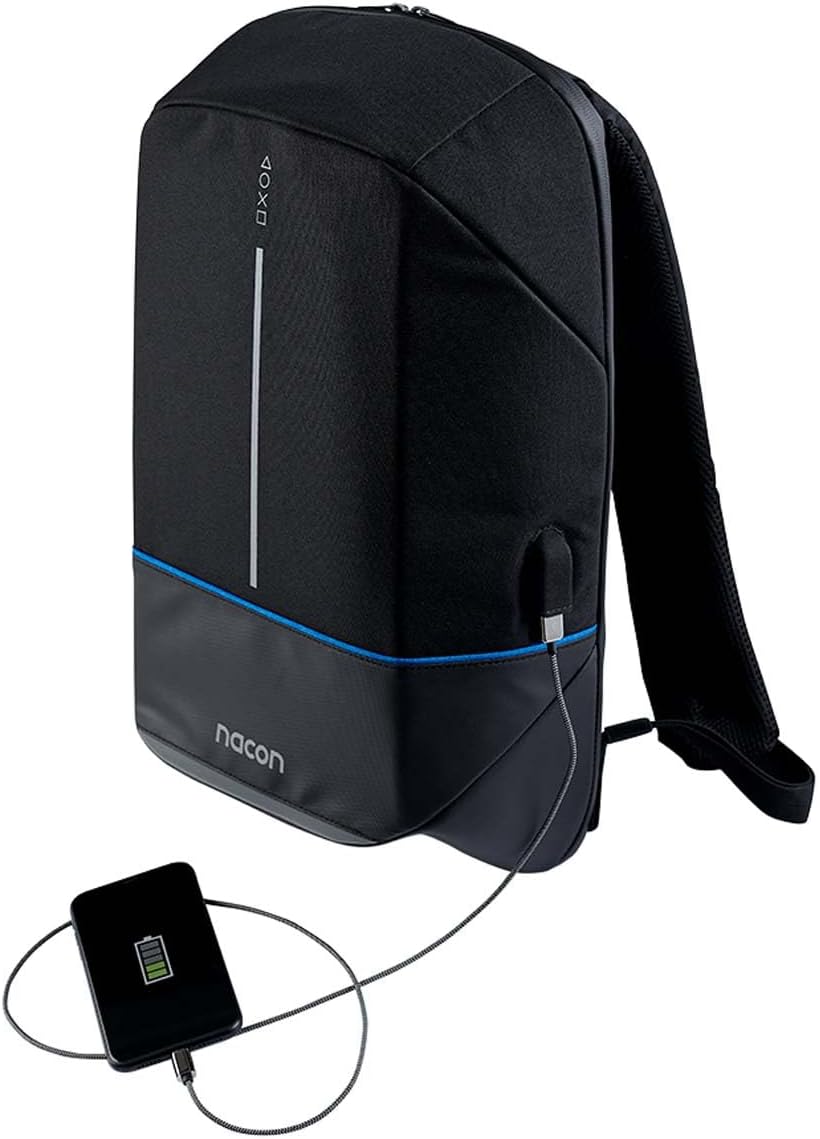
Nacon S55145063

Nacon S55145063 Unisex Adult Backpack User Manual

Загвар: S55145063

1. Танилцуулга

Thank you for choosing the Nacon S55145063 Unisex Adult Backpack. This manual provides essential information for the proper use, care, and maintenance of your new backpack. Please read this manual thoroughly before using the product to ensure optimal performance and longevity.

2. Аюулгүй байдлын мэдээлэл

3. Бүтээгдэхүүн дууссанview

The Nacon S55145063 backpack is designed for versatile use, featuring multiple compartments and a durable construction. It includes a main storage area, front pockets, and adjustable shoulder straps for comfort.

Урд view of the Nacon S55145063 backpack, black with a blue stripe and Nacon logo.

Зураг 3.1: Урд view of the Nacon S55145063 backpack, showcasing its sleek design and the Nacon logo at the bottom.

Хажуу тал view of the Nacon S55145063 backpack with the main compartment open, revealing its spacious interior.

Зураг 3.2: Хажуу тал view of the backpack with the main compartment unzipped, illustrating the wide opening for easy access to contents.

Хажуу тал view of the Nacon S55145063 backpack showing an external USB charging port with a smartphone connected.

Figure 3.3: The backpack's integrated external USB charging port, demonstrating its utility for charging devices on the go (power bank not included).

4. Тохиргоо

The Nacon S55145063 backpack requires minimal setup before use.

  1. Савлах: Remove the backpack from its packaging. Inspect for any signs of damage during transit.
  2. Тохируулах оосор: Place the backpack on your back. Use the adjustable buckles on the shoulder straps to achieve a comfortable and secure fit. The backpack should sit snugly against your back, with the weight evenly distributed.
  3. USB Charging Port (if applicable): If your model includes an external USB charging port, locate the internal USB cable. Connect your portable power bank (not included) to this internal cable. You can then connect your device to the external USB port for charging.

5. Ажиллаж байгаа

Using your Nacon S55145063 backpack is straightforward.

6. Засвар үйлчилгээ

Proper care will extend the life of your backpack.

7. Алдаа засах

Нийтлэг асуудлууд ба тэдгээрийн шийдэл.

АсуудалБоломжит шалтгаанШийдэл
Zipper stuck or difficult to moveFabric caught in zipper; lack of lubricationGently pull fabric away; apply zipper lubricant or wax.
Даавуу дээрх толбоШороо эсвэл асгаралтSpot clean with mild soap and water, or machine wash according to care instructions.
Shoulder straps feel uncomfortableImproper adjustment; overloaded backpackAdjust straps for a snug fit; reduce load if too heavy.

8. Техникийн үзүүлэлтүүд

ОнцлогДэлгэрэнгүй
Загварын дугаарS55145063
БрэндНакон
ӨнгөОлон өнгийн
Хэмжээ (L x W x H)15.4 x 49.29 x 32.2 см (ойролцоогоор 6.06 x 19.41 x 12.68 инч)
Жин1.06 kilograms (approximately 2.34 lbs)
Арчилгааны зааварМашин угаах

9. Баталгаат хугацаа ба дэмжлэг

Nacon products are manufactured to high-quality standards. For information regarding warranty coverage, please refer to the warranty card included with your purchase or visit the official Nacon website. For technical support or inquiries, please contact Nacon customer service through their official channels.

Онлайн дэмжлэг: Visit the official Nacon webТүгээмэл асуултууд, тусламжийн эх сурвалжууд болон холбоо барих мэдээллийн сайт.

Үйлдвэрлэгч: Након

Холбогдох баримт бичиг - S55145063

Урьдчилсанview Nacon RIG 600 PRO утасгүй тоглоомын чихэвчний хэрэглэгчийн гарын авлага
Nacon RIG 600 PRO утасгүй тоглоомын чихэвчний цогц хэрэглэгчийн гарын авлагад PS5, PS4, PC болон Nintendo Switch-д зориулсан тохиргоо, хослуулах заавар, горимын тайлбар, Companion App-ээр дамжуулан тохируулах, аюулгүй байдлын урьдчилан сэргийлэх арга хэмжээ болон дэмжлэгийн мэдээллийг багтаасан болно.
Урьдчилсанview RIG 900 MAX HX хэрэглэгчийн гарын авлага - Nacon утасгүй тоглоомын чихэвч
Comprehensive user guide for the Nacon RIG 900 MAX HX wireless gaming headset, detailing setup for Xbox, PlayStation, PC, and Switch, charging, wireless modes, pairing, customization via the RIG Navigator app, and technical specifications.
Урьдчилсанview Nacon CL-210 Gaming Keyboard: Features, Setup & Support
Explore the Nacon CL-210 Gaming Keyboard. This guide provides essential information on setup, features like RGB backlighting and macro keys, technical specifications, and support resources for gamers.
Урьдчилсанview NACON GC-200WLRGB Wireless PC Controller User Manual
Comprehensive user manual for the NACON GC-200WLRGB wireless PC controller, covering product specifications, package contents, control elements, setup, charging, features like D/X switch and backlighting, important safeguards, ergonomics, technical specifications, and customer support information.
Урьдчилсанview Nacon MG-X хянагч: Хэрэглэгчийн гарын авлага ба техникийн үзүүлэлтүүд
Андройд утсанд зориулсан Nacon MG-X утасгүй хянагчийн цогц хэрэглэгчийн гарын авлага. Онцлог шинж чанарууд, тохиргоо, техникийн үзүүлэлтүүд болон аюулгүй байдлын урьдчилан сэргийлэх арга хэмжээ.
Урьдчилсанview Nacon MG-X хянагчийн хэрэглэгчийн гарын авлага болон онцлогууд
Comprehensive user manual for the Nacon MG-X Controller for iPhone, detailing features, setup, usage, compatibility, and technical specifications. Learn how to connect, charge, and reconfigure your controller for an enhanced gaming experience.