Танилцуулга
This manual provides detailed instructions for the Powerwave Switch Wireless Controller. Learn how to set up, operate, maintain, and troubleshoot your controller to enhance your gaming experience on Nintendo Switch, PC, Android, and iOS devices.

Урд view of the Powerwave Switch Wireless Controller, showcasing its Star White design with blue grips and red shoulder buttons. The controller features standard button layouts including A, B, X, Y buttons, a D-pad, and dual analog sticks.
Бүтээгдэхүүний онцлог
- Утасгүй Bluetooth холболт: Enjoy seamless gaming without cables.
- 3-Speed Dual-Motor Vibration: Experience immersive feedback with adjustable vibration intensity.
- Хөдөлгөөний удирдлага: Enhance gameplay with precise motion sensing capabilities.
- Олон платформын нийцтэй байдал: Works wirelessly with Nintendo Switch, PC, Android, and iOS 13 and above.
- 4 програмчлагдах макро товчлуур: Customize complex inputs and activate them with a single button press.
- Турбо горим: Enable rapid-fire commands for quick actions in games.
- 8-Colour Rotating LED Lighting Effect: Adds a vibrant visual element to your gaming setup.

Visual representation of the controller's key features, including Wireless Bluetooth, 3-Speed Dual-Motor, PC/Android/iOS13 compatibility, 8-Colour Rotating LED, and Programmable Macro Buttons.
Тохируулах гарын авлага
1. Анхны цэнэглэлт
Before first use, fully charge the controller using the provided USB-C cable. Connect the cable to the controller's USB-C port and the other end to a USB power source (e.g., Nintendo Switch dock, PC, or USB wall adapter). The LED indicators will show charging status.
2. Nintendo Switch-тэй хослуулах
- Nintendo Switch HOME цэснээс сонгоно уу Хянагч нар, дараа нь Бариул/Захиалга өөрчлөх.
- On the Powerwave controller, press and hold the HOME товчлуур (house icon) for 3-5 seconds until the LED indicators start flashing rapidly.
- Хослуулсны дараа хянагч дээрх харгалзах тоглуулагчийн LED(үүд) тогтвортой гэрэлтэнэ.
3. Pairing with PC, Android, or iOS (Bluetooth)
- Төхөөрөмж дээрээ (компьютер, Андройд утас/таблет, iOS төхөөрөмж) Bluetooth асаалттай байгаа эсэхийг шалгаарай.
- On the Powerwave controller, press and hold the HOME товчлуур LED индикаторууд хурдан анивчих хүртэл 3-5 секундын турш дарна уу.
- On your device, search for new Bluetooth devices. Select "Powerwave Controller" (or similar) from the list to pair.
- Once connected, the LED indicators on the controller will stop flashing and remain solid.
Ашиглалтын заавар
Үндсэн удирдлага
The Powerwave Switch Wireless Controller features standard button layouts for intuitive gameplay. Refer to your game's specific control scheme for optimal use.
Programmable Macro Buttons (M1, M2, M3, M4)
The controller includes four programmable macro buttons on the back (M1, M2, M3, M4) for executing complex command sequences with a single press.
- Програмчлалын горимд орох: -г удаан дар Макро товч (usually a small button near the M buttons) until the indicator light flashes.
- Recording Macro: Press the desired M button (M1-M4) you wish to program. Then, input the sequence of buttons you want to record (e.g., A, B, X, Y, L, R, ZL, ZR, D-pad directions, analog stick movements).
- Програмчлалын горимоос гарах: дээр дарна уу Макро товч again to save the macro and exit programming mode. The indicator light will stop flashing.
- Using Macro: Simply press the programmed M button during gameplay to execute the recorded sequence.
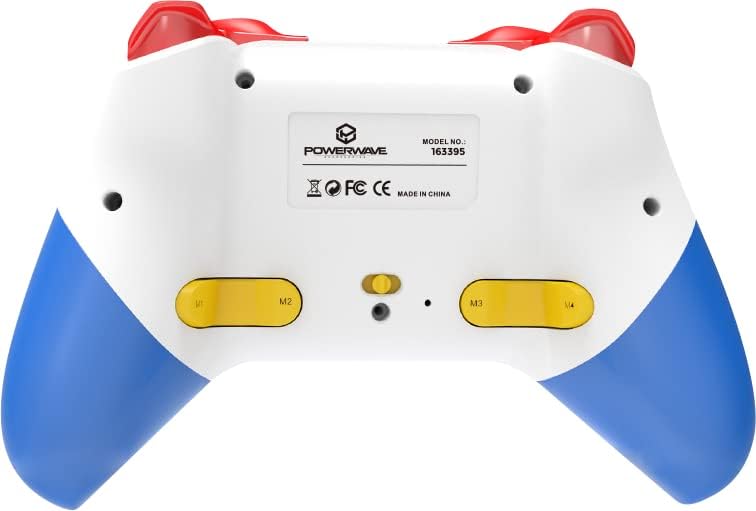
Арын view of the Powerwave Switch Wireless Controller, highlighting the M1, M2, M3, and M4 programmable macro buttons, along with the model number and regulatory markings.
Турбо горим
Turbo mode allows a button to be pressed repeatedly as long as it is held down, providing a rapid-fire function.
- Турбо идэвхжүүлэх: -г удаан дар Турбо товч (usually marked 'T') and then press the desired action button (e.g., A, B, X, Y, L, R, ZL, ZR). The button will now be in Turbo mode.
- Турбо хурдыг тохируулах: барьж байхдаа Турбо товч, move the Right Analog Stick Up or Down to cycle through different turbo speeds (slow, medium, fast).
- Турбо идэвхгүй болгох: To remove Turbo from a specific button, press and hold the Турбо товч and then press the same action button again. To clear all Turbo settings, press and hold the Турбо товч 5 секундын турш.
Чичиргээний тохируулга
The controller features 3-speed dual-motor vibration. To adjust vibration intensity, press and hold the Чичиргээний товчлуур (if available, or a combination like Turbo + D-pad Up/Down) to cycle through intensities (Off, Low, Medium, High).
LED гэрэлтүүлгийн эффектүүд
The 8-colour rotating LED lighting effect can be toggled or adjusted. Refer to the specific button combination for your controller model, often involving a dedicated LED button or a combination with the Turbo button.
Засвар үйлчилгээ
- Цэвэрлэгээ: Удирдлагыг арчихын тулд зөөлөн, хуурай даавуу ашиглаарай. Зөрүүд бохирдлыг бага зэрэг арчинаampдаавуугаар усаар. Химийн хүчтэй бодис, зүлгүүрийн цэвэрлэгч хэрэглэж болохгүй.
- Хадгалах: Удирдагчийг нарны шууд тусгал, хэт температураас хол, сэрүүн, хуурай газар хадгална.
- Батерейны арчилгаа: Зайны ашиглалтын хугацааг уртасгахын тулд хянагчийг ойр ойрхон бүрэн цэнэглэхээс зайлсхий. Удаан хугацаагаар ашиглаагүй байсан ч тогтмол цэнэглээрэй.
- Дусалаас зайлсхийх: Хянагчийг дотоод эд ангиудыг гэмтээж болзошгүй физик цохилт, уналтаас хамгаална уу.
Алдааг олж засварлах
| Асуудал | Боломжит шийдэл |
|---|---|
| Хянагч асахгүй байна. | Ensure the controller is fully charged. Connect it to a power source and allow it to charge for at least 30 minutes before attempting to turn it on again. |
| Controller fails to pair with device. |
|
| Тоглоомын үеэр оролтын саатал эсвэл холболт тасарсан. |
|
| Товчлуур эсвэл аналог саваа хариу өгөхгүй байна. |
|
Үзүүлэлтүүд
- Загварын дугаар: 163395
- Бүтээгдэхүүний хэмжээ: 15 x 6 x 10 см
- Жин: 212 грамм
- Холболт: Утасгүй Bluetooth
- Тохиромжтой байдал: Nintendo Switch, Nintendo Switch Lite, Nintendo Switch OLED, PC, Android, iOS 13+
- Онцлогууд: 3-Speed Dual-Motor Vibration, Motion Controls, 4 Programmable Macro Buttons, Turbo Mode, 8-Colour Rotating LED Lighting Effect
- Unsupported Functions (Nintendo Switch): HD Rumble, NFC, IR Camera
Баталгаат болон дэмжлэг
For warranty information and technical support, please refer to the official Powerwave webсайт эсвэл харилцагчийн үйлчилгээтэй холбогдоно уу. Аливаа баталгаат нэхэмжлэлийн хувьд худалдан авалтаа нотлох баримтаа хадгалаарай.
Powerwave Official Webсайт: www.powerwave.com.au


