1. Аюулгүй ажиллагааны чухал заавар
Read this user manual carefully before using the appliance and save it for future reference. Always follow basic safety precautions when using electrical appliances to reduce the risk of fire, electric shock, and personal injury.
- Боть байгаа эсэхийг баталгаажуулна ууtagТөхөөрөмж дээр заасан e нь таны орон нутгийн сүлжээний эзлэхүүнтэй тохирч байнаtage холбохоос өмнө.
- Do not use the iron if the plug, main cord, or the appliance itself shows visible damage, or if the appliance has been dropped.
- Төмөр болон утсыг асаалттай эсвэл хөргөх үед хүүхдэд хүрэхгүй газар хадгал.
- Хэзээ ч төмрийг ус болон бусад шингэнд дүрж болохгүй.
- Цахилгаан сүлжээнд холбогдсон үед төмрийг хараа хяналтгүй орхиж болохгүй.
- Амрах үедээ төмрийг үргэлж халуунд тэсвэртэй, тогтвортой гадаргуу дээр байрлуул.
- The soleplate of the iron can become extremely hot and cause burns if touched.
- Only use tap water for filling the water tank, unless you live in an area with extremely hard water. In that case, use distilled or demineralized water.
2. Бүтээгдэхүүн дууссанview
Familiarize yourself with the components of your PHILIPS GC4908/80 Steam Iron.
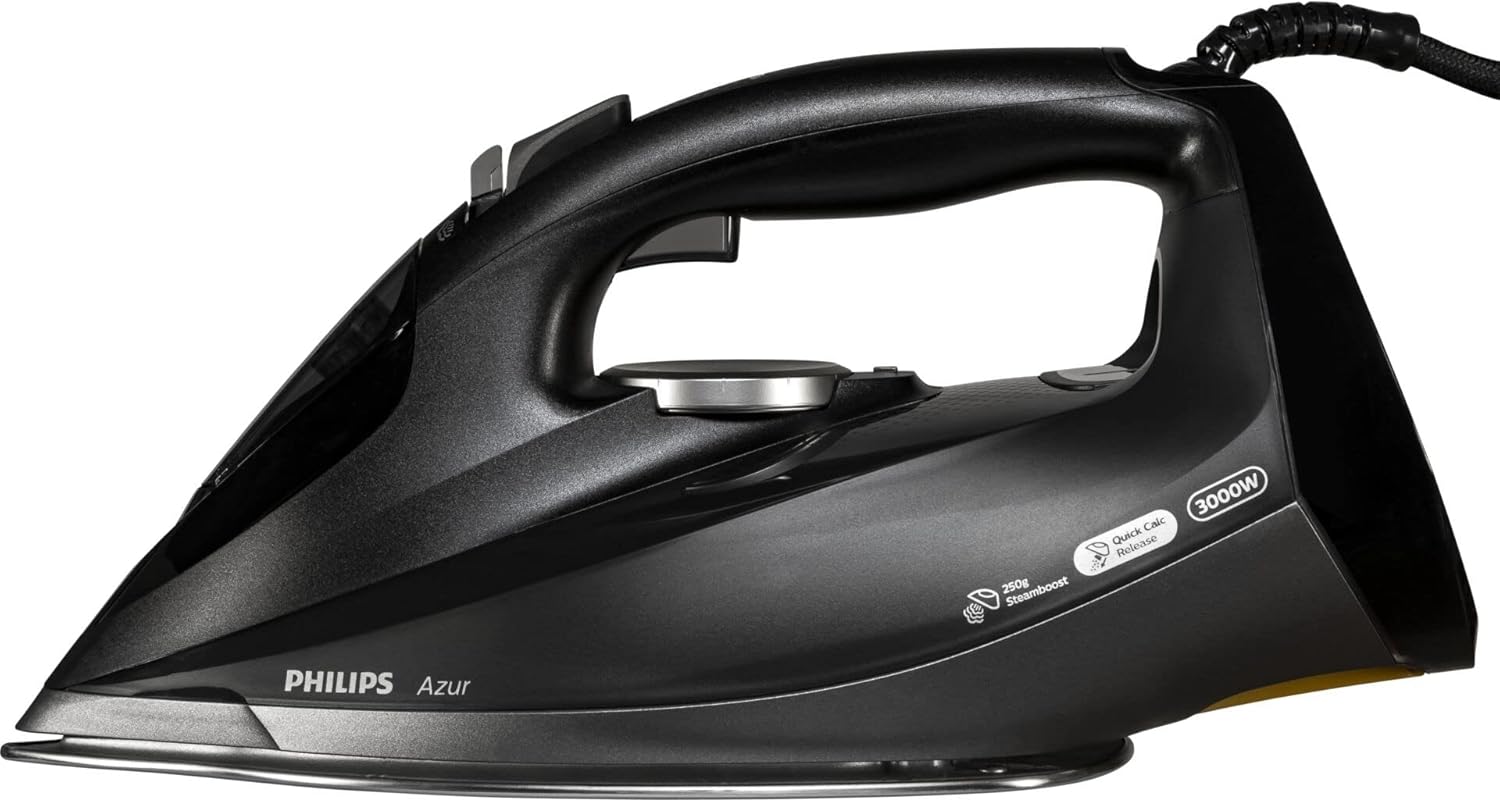
Зураг 1: Топ view of the PHILIPS GC4908/80 Steam Iron. This image displays the iron from a top-down perspective, highlighting the ergonomic handle, the transparent water tank, the temperature control dial, and the steam activation buttons located near the handle. The 3000W power rating and 'Quick Calc Release' feature are visible on the side.
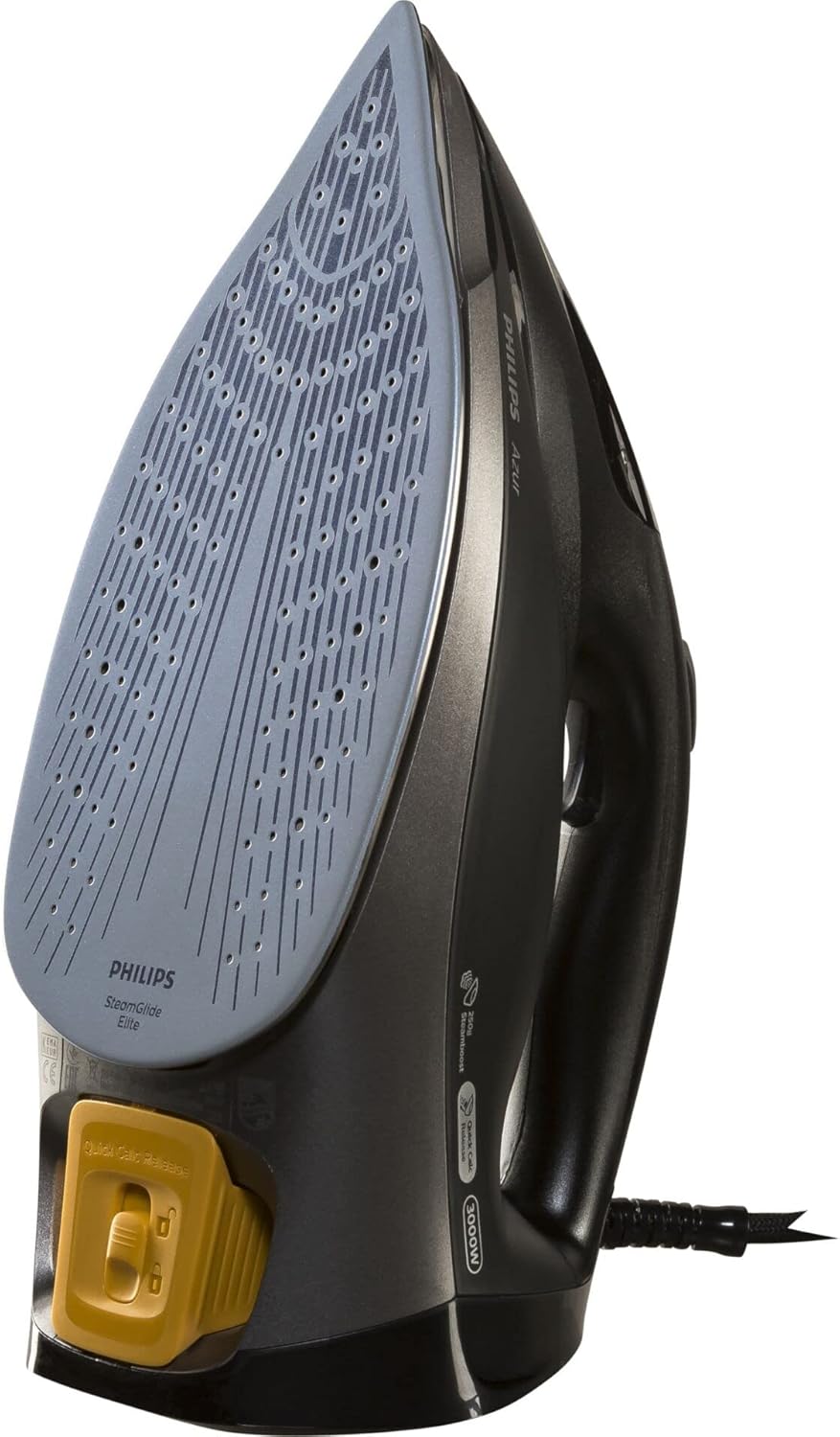
Зураг 2: Доод талд view of the PHILIPS GC4908/80 Steam Iron. This image shows the iron inverted, revealing the SteamGlide Elite soleplate with its numerous steam vents. The 'Quick Calc Release' mechanism, typically a removable part for descaling, is prominently visible at the rear of the soleplate in a contrasting color.
Гол бүрэлдэхүүн хэсгүүд:
- A. Ус дүүргэх нүх: Саванд ус нэмэх зориулалттай.
- B. Шүршигч цорго: Зөрүүд үрчлээг чийгшүүлэх зориулалттай.
- C. Steam trigger/Steam boost button: To activate steam or a powerful burst of steam.
- D. Temperature dial: Янз бүрийн даавуунд тохирох температурыг сонгох.
- E. Soleplate: Даавуу дээгүүр гулсдаг халсан гадаргуу.
- F. Quick Calc Release: Removable part for easy descaling.
- G. Power cord: Төмөрийг цахилгааны залгуурт холбодог.
3. Тохиргоо ба анхны хэрэглээ
Анхны хэрэглээний өмнө:
- Ямар ч наалт эсвэл хамгаалалтын тугалган цаасыг улны хавтангаас ав.
- It is normal for the iron to emit a slight odor and some smoke during the first use. This will stop after a short while.
- To remove any manufacturing residues, iron an old piece of fabric (e.g., a cotton cloth) for a few minutes, using the steam function.
4. Ашиглалтын заавар
4.1 Усны савыг дүүргэх:
- Төмөр нь цахилгаан тэжээлээс салсан эсэхийг шалгаарай.
- Төмөрийг бага зэрэг хазайсан байрлалд барина.
- Ус дүүргэх нүхний тагийг нээ.
- Усны савыг 'MAX' заалт хүртэл цоргоны усаар дүүргэнэ. Хэт дүүргэж болохгүй.
- Ус дүүргэх нүхний тагийг найдвартай хаа.
4.2 Setting the Temperature:
- Төмөрийг газардуулсан залгуурт залгаарай.
- Даавууны төрлөөс хамааран температурын тохируулагчийг хүссэн тохиргоонд нь эргүүлнэ үү. Хувцасны арчилгааны шошгыг үзнэ үү.
- Заагч гэрэл асч, индүү халж байгааг илтгэнэ. Энэ нь тогтоосон температурт хүрэхэд унтарна.
4.3 Using Steam:
- Steam ironing is only possible at higher temperature settings (typically from '••' to 'MAX').
- Once the iron has reached the desired temperature, press the steam trigger to release continuous steam.
- For a powerful burst of steam to remove stubborn creases, press the steam boost button. Wait a few seconds between bursts to allow the soleplate to reheat.
4.4 Dry Ironing:
To iron without steam, ensure the water tank is empty or set the steam control to the 'no steam' position (if available on your model). Select the appropriate temperature for your fabric.
4.5 Auto-Off Feature:
For safety and energy saving, the iron is equipped with an automatic shut-off function. If the iron is left unattended on its heel rest, it will switch off after approximately 8 minutes. If left on its soleplate or side, it will switch off after approximately 30 seconds. The indicator light will flash to signal that the iron has switched off. To restart the iron, simply pick it up or move it slightly.
5. Засвар үйлчилгээ
5.1 Cleaning the Iron:
- Цэвэрлэхийн өмнө төмрийг үргэлж залгуураас салгаад бүрэн хөргөхийг хүлээнэ үү.
- Гаднах хэсгийг арчих casing зартайamp даавуу.
- Улны хавтанг цэвэрлэхийн тулд зарыг ашиглана ууamp cloth and a non-abrasive cleaner if necessary. Do not use abrasive scouring pads or harsh detergents.
5.2 Quick Calc Release:
The Quick Calc Release system helps prevent limescale build-up. For optimal performance, clean this system regularly.
- Төмөр нь залгуураас салсан, бүрэн хөргөсөн эсэхийг шалгаарай.
- Төмөр угаалтуур дээр барина.
- Pull out the Quick Calc Release collector (refer to Figure 2 for location).
- Сул хэмжээний хэсгүүдийг арилгахын тулд коллекторыг урсгал усны дор зайлна.
- Wipe the collector clean and reinsert it into the iron until it clicks into place.
5.3 Хадгалалт:
- Төмөрийг залгуураас салгаад бүрэн хөргөнө.
- Empty the water tank after each use to prevent limescale build-up and leakage.
- Төмөрийг өсгий дээрээ хуурай, аюулгүй газар хадгална.
6. Алдаа засах
| Асуудал | Боломжит шалтгаан | Шийдэл |
|---|---|---|
| Төмөр халаахгүй. | Not plugged in; power outlet faulty; auto-off activated. | Check plug connection; test outlet with another appliance; move the iron to reactivate. |
| Уур байхгүй эсвэл хангалтгүй уур. | Усны сав хоосон; температур хэт бага; уурын нүх хаагдсан. | Fill water tank; set temperature to steam zone; perform Quick Calc Release cleaning. |
| Улны хавтангаас ус гоожиж байна. | Temperature too low for steam; overfilled water tank; limescale build-up. | Increase temperature; do not overfill; perform Quick Calc Release cleaning. |
| Даавуу дээрх бор толбо. | Limescale in water tank; fabric not clean. | Perform Quick Calc Release cleaning; ensure garments are clean before ironing. |
7. Техникийн үзүүлэлтүүд
- Загвар: PHILIPS GC4908/80
- Эрчим хүч: 3000 ватт
- Жин: 2.05 кг
- Хэмжээ (L x W x H): 12.1 x 8.7 x 9 см
- Материал: Alloy Steel (Soleplate)
- Усны савны багтаамж: (Typically around 300-350ml for this type of iron, specific value not provided in input, so omitted)
- Автомат унтрах: Тиймээ
- Улны төрөл: SteamGlide Элит
8. Баталгаат хугацаа ба дэмжлэг
This PHILIPS appliance comes with a standard manufacturer's warranty. For detailed warranty information, terms, and conditions, please refer to the warranty card included with your product or visit the official PHILIPS website. For technical support, spare parts, or service, please contact PHILIPS customer support in your region. Keep your proof of purchase for warranty claims.
Та дэлгэрэнгүй мэдээлэл, дэмжлэг авах боломжтой Philips брэндийн дэлгүүр.