Танилцуулга
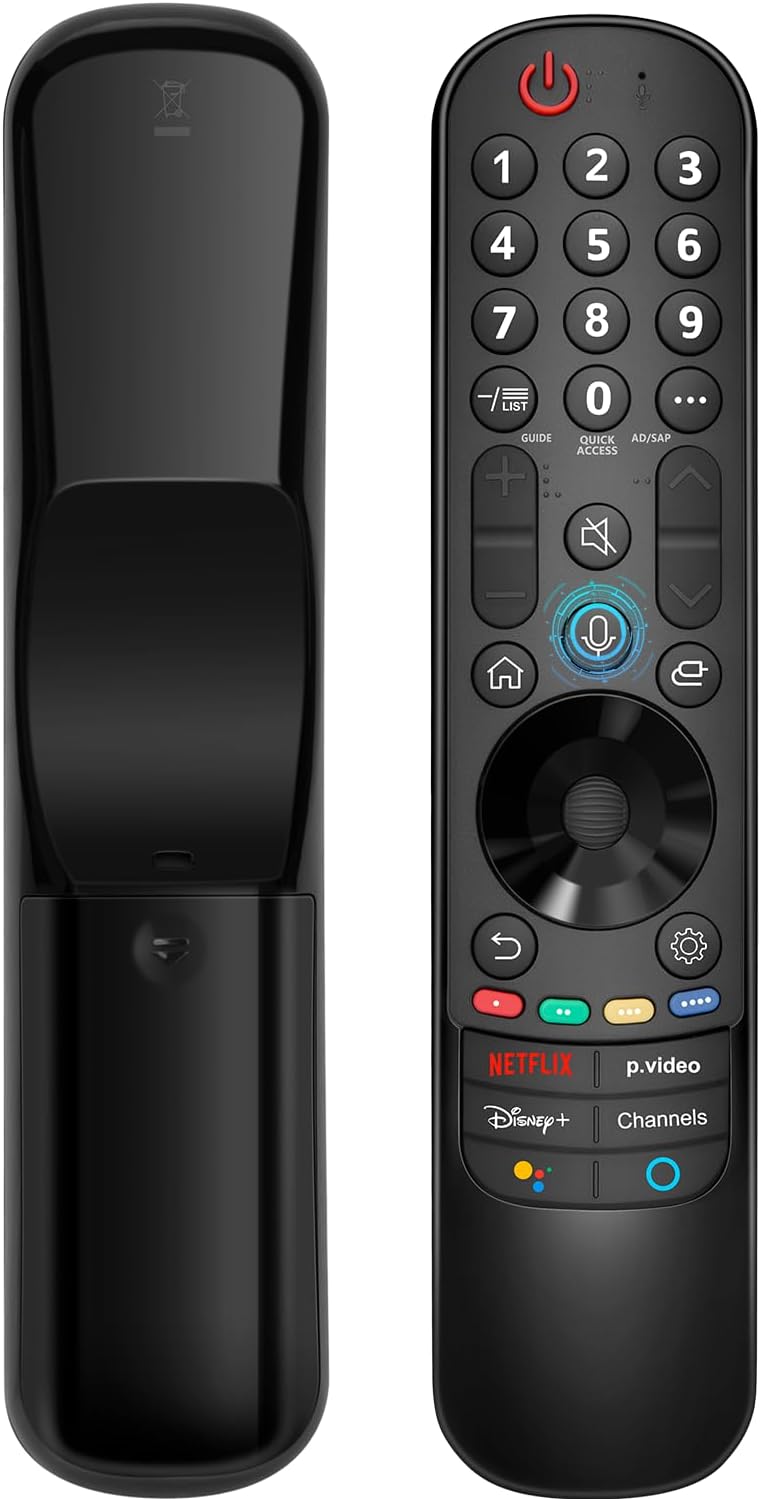
This manual provides instructions for the Angrox AN-MR21GA Magic Remote Control, designed as a replacement for compatible LG Smart TVs. This remote features pointer functionality, voice control, and dedicated shortcut buttons for enhanced navigation and user experience.
The remote is compatible with LG 2021, 2022, 2023, and 2024 OLED, QNED Mini-LED, NanoCell, and UHD TV series. It offers an ergonomic design with soft plastic buttons for comfortable use.
Тохиромжтой байдал
The Angrox AN-MR21GA Magic Remote Control is compatible with the following LG Smart TV series from 2021, 2022, 2023, and 2024:
- OLED TV Series: G1, G2, G3, G4, C1, C2, C3, C4, A1, A2, A3, A4 series.
- QNED Mini-LED TV Series: QNED99, QNED90 series.
- NanoCell TV Series: NANO99, NANO90, NANO85, NANO80, NANO75 series.
- UHD TV Series: UP80, UP75 series.
Specific compatible model numbers include, but are not limited to: 43NANO75UPA, 43UP7100ZUF, 43UP7560AUD, 43UP7700PUB, 43UP8000PUA, 50NANO75UPA, 50NANO77ZPA, 50NANO80UPA, 50NANO85APA, 50UP7100ZUF, 50UP7560AUD, 50UP7700PUB, 50UP8000PUA, 55NANO75UPA, 55NANO77ZPA, 55NANO80UPA, 55NANO85APA, 55NANO90UPA, 55UP7100ZUF, 55UP7560AUD, 55UP7700PUB, 55UP8000PUA, 60UP7700PUB, 60UP8000PUA, 65NANO75UPA, 65NANO77ZPA, 65NANO80UPA, 65NANO85APA, 65NANO90UPA, 65UP7100ZUF, 65UP7560AUD, 65UP7700PUA, 65UP7700PUB, 65UP8000PUA, 70UP7170ZUC, 70UP7570AUD, 70UP7770PUB, 70UP8070PUA, 75NANO75UPA, 75NANO80UPA, 75NANO85APA, 75NANO90UPA, 75QNED90UPA, 75QNED99UPA, 75UP7170ZUC, 75UP7570AUE, 75UP7770PUB, 75UP8070PUA, 82UP8770PUA, 86NANO75UPA, 86NANO85APA, 86NANO90UPA, 86NANO99UPA, 86QNED90UPA, 86QNED99UPA, 86UP8770PUA, BEJMR21GA, OLED48A1AUA, OLED48A1PUA, OLED48C1AUB, OLED48C1PUB, OLED55A1AUA, OLED55A1PUA, OLED55B1PUA, OLED55C1AUB, OLED55C1PUA, OLED55C1PUB, OLED55G1PUA, OLED65A1AUA, OLED65A1PUA, OLED65B1PUA, OLED65C1AUA, OLED65C1AUB, OLED65C1PUB, OLED65G1PUA, OLED77A1AUA, OLED77A1PUA, OLED77B1PUA, OLED77C1AUA, OLED77C1AUB, OLED77C1PUB, OLED77G1PUA, OLED83C1AUA, OLED83C1PUA, RCLLGEMR21GA, R-C-LLGEMR21GA, 43UP7670PUC, 43UP8000PUR, 50NANO75PUA, 50NANO80P, 50UP7670PUC, 50UP8000PUR, 55NANO80P, 55NANO90P, 55UP7670PUC, 55UP8000PUR, 60UP7670PUB, 60UP8000PUR.

Тохируулга ба хослуулах
The Angrox AN-MR21GA remote control is designed for easy setup without complex programming.
1. Зай суурилуулах
Insert two (2) AA batteries into the remote control. Ensure correct polarity (+/-) as indicated inside the battery compartment. Batteries are not included with the remote.
2. Таны ТВ-тэй хослуулах
There are two methods for pairing the remote with your LG Smart TV:
- Method 1 (Automatic Pairing):
- Turn on your LG Smart TV.
- Insert 2*AA batteries into the remote.
- After approximately 20 seconds, point the remote control towards the TV.
- дээр дарна уу Дугуй (ОК) товч.
- The remote control should register automatically, and a "Pairing Complete" message will appear on the TV screen.
- Method 2 (Manual Pairing):
- Turn on your LG Smart TV.
- Insert 2*AA batteries into the remote.
- -г удаан дар Гэр (
 ) ба Буцах () товчлууруудыг 5 секундын турш нэгэн зэрэг дарна.
 - Дараа нь товчийг дарна уу Дугуй (ОК) товч.
- A "Pairing Complete" message should appear on the TV screen.

Ашиглалтын заавар
Basic Navigation and Pointer Function
The remote features a pointer function that allows you to navigate the TV screen by moving the remote. The Wheel (OK) button acts as a click function, and scrolling is also supported.
Дуут удирдлага
The remote includes a voice function for issuing commands to your TV. Press and hold the voice button (microphone icon) while speaking your command. Examples include "Go back home," "Open P.Video," or "Play some music."

Товчлолын товчлуурууд
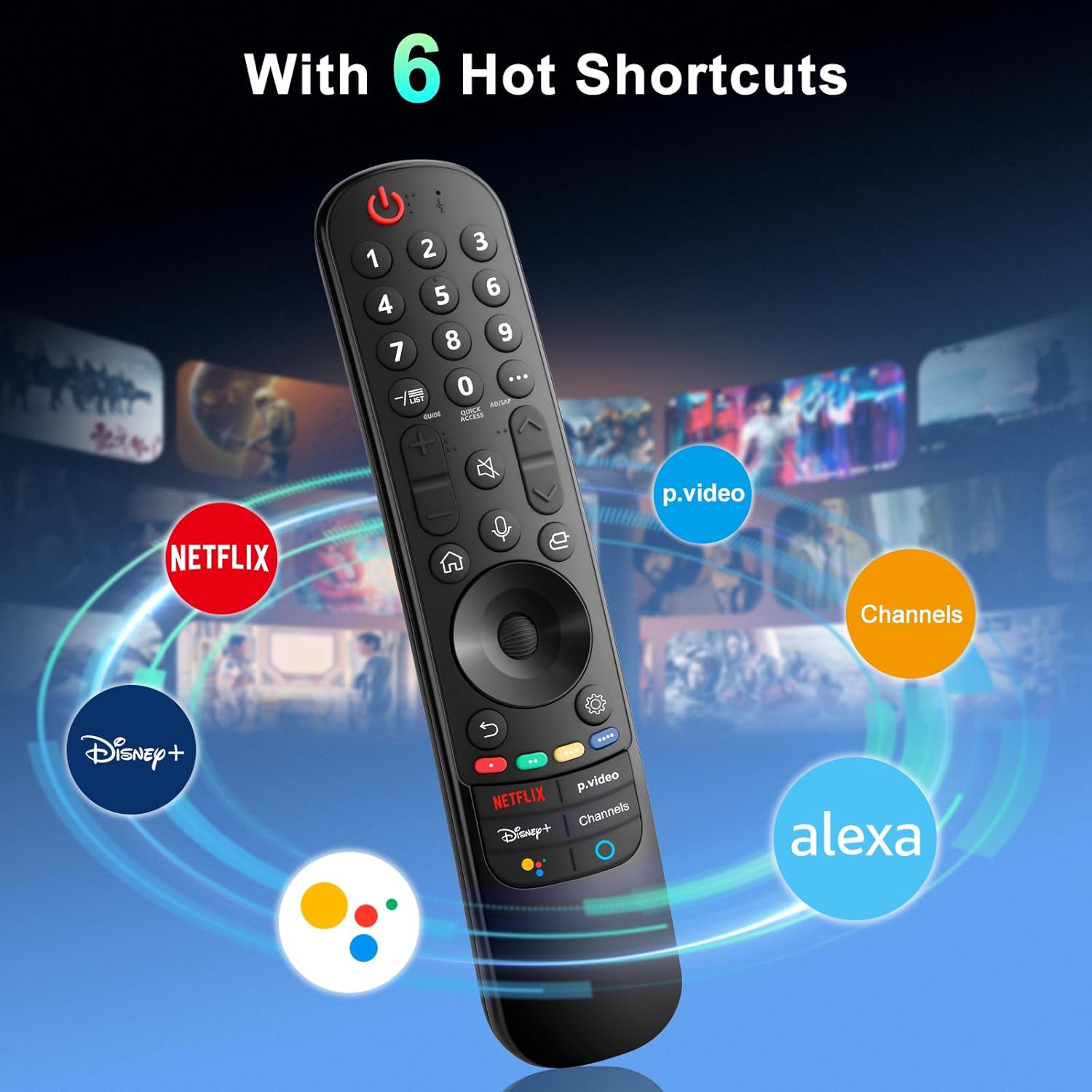
The remote provides dedicated shortcut buttons for quick access to popular streaming services and functions:
- NETFLIX: Netflix програмыг ажиллуулна.
- P.Video: Launches the Prime Video application.
- Disney+: Disney+ програмыг ажиллуулна.
- Сувгууд: Accesses TV channels.
- Google Туслах: Activates Google Assistant for voice commands and searches.
- Alexa: Activates Amazon Alexa for voice commands and searches.

Товчлуурын дэлгэрэнгүй функцууд
For buttons marked with a circle symbol (©), a long press (more than one second) may activate additional functions:
- 9©: Launch Quick Help.
- - / LIST©: Checking saved channels.
- GUIDE©: Launch Guide.
- 0©: QUICK ACCESS засварлах дэлгэц гарч ирнэ.
- ...©: Display additional buttons on the remote control.
- AD/SAP©: Configures SAP.
- Volume Up/Down©: Дууны түвшинг тохируулна уу.
- Channel Up/Down©: Та сувгаа сольж болно.
- Mute©: Select to turn off the sound from the TV.
- Accessibility©: Enter the Accessibility menu.
- Search©: Check out recommended contents. (Recommendation service may not be available depending on the countries you are in.)
- Voice Button (Microphone)©: Push and hold the button while speaking to use the voice recognition function.
- Home Button©: Нүүр цэсийг харуулна.
- Input Button©: Оролтын эх үүсвэрийг сонгоно.
- Settings Button©: Entering into the Home Dashboard.
- Back Button©: Өмнөх алхам руу шилжинэ.
- Exit Button©: Цэсийг хаадаг.
- Quick Settings Button©: Шуурхай тохиргооны цэс рүү орно.
- All Settings Button©: Enters the All Settings menu.
- Launch Record Button©: Launch Record. (Some models may not be supported.)
Алдааг олж засварлах
- Алсын удирдлага хариу өгөхгүй байна:
- Ensure batteries are correctly inserted and have sufficient charge. Replace with new AA batteries if necessary.
- Re-attempt the pairing process (see "Setup and Pairing" section).
- Ensure there are no obstructions between the remote and the TV's infrared receiver. This remote primarily operates via line-of-sight.
- Pointer Function Not Working:
- Алсын удирдлага зөв холбогдсон эсэхийг шалгаарай.
- Try re-pairing the remote using Method 2 (holding Home and Back buttons).
- Дуут удирдлага ажиллахгүй байна:
- Ensure the remote is properly paired and the TV supports voice control.
- Confirm that the voice button is being pressed and held while speaking.
- Check TV settings to ensure voice recognition is enabled.
- Buttons Feel Flimsy or Stick:
- Энэ нь үйлдвэрлэлийн согогийг илтгэж магадгүй. Тусламж авахын тулд хэрэглэгчийн дэмжлэгтэй холбогдоно уу.
Үзүүлэлтүүд
| Брэнд | Ангрокс |
| Загварын дугаар | AN-MR21GA |
| Бүтээгдэхүүний хэмжээс | 7.48 x 1.18 x 1.18 инч (18.54 x 4.06 x 1.77 см) |
| Зүйлийн жин | 3.2 унц |
| Батерей шаардлагатай | 2 АА батерей (оруулаагүй) |
| Онцлог шинж чанарууд | Ergonomic design, No Programming Required, Universal compatibility (for specified LG models), Voice Search, Pointer Function |
| Дэмжигдсэн төхөөрөмжүүдийн хамгийн их тоо | 1 |
| Тохиромжтой төхөөрөмжүүд | LG Smart Televisions (2021-2024 UHD, OLED, QNED, NanoCell series) |
Засвар үйлчилгээ
- Цэвэрлэгээ: Алсын удирдлагыг цэвэрлэхийн тулд зөөлөн, хуурай даавуу ашиглана уу. Шингэн цэвэрлэгч болон зүлгүүрийн материалыг бүү ашигла.
- Зай солих: Алсын удирдлагын ажиллагаа муудсан үед батерейг солино уу. Алсын удирдлагыг удаан хугацаагаар ашиглахгүй бол гоожихоос сэргийлж батерейг салгаж авна уу.
- Хадгалах: Алсын удирдлагыг нарны шууд тусгал, хэт температураас хол, сэрүүн, хуурай газар хадгална уу.
- Харьцуулах: Avoid dropping the remote or subjecting it to strong impacts, as this can damage internal components.
Баталгаат болон дэмжлэг
For warranty information or technical support, please contact the manufacturer, Angrox, directly through their official channels or the retailer where the product was purchased. Please retain your proof of purchase for warranty claims.
Manufacturer: Angror
Нэмэлт тусламж авахыг хүсвэл зочилж болно Angrox Store on Amazon.


