Танилцуулга
This manual provides detailed instructions for the setup, operation, maintenance, and troubleshooting of your Amazon Basics 88-Key Semi-Weighted Digital Piano. Designed for performance, this digital piano offers a realistic playing experience with its semi-weighted keys and a wide array of features to enhance your musical journey.
Гол онцлогууд нь:
- Realistic semi-weighted 88-key keyboard for authentic piano touch.
- Versatile 1/4" audio output for ampчангалагч ба чанга яригч.
- Expansive music library with 140 tones, 200 rhythms, and 16 demonstration songs.
- Educational features like automatic chords, beginner split keyboard function, and dual timbre functions.
- User-friendly USB MIDI and USB-A ports for smart device connectivity and recording.
Тохиргоо
Сав баглаа боодол, бүрэлдэхүүн хэсгийг тодорхойлох
Бүх эд ангиудыг савлагаанаас болгоомжтой авч хаяна уу. Бүх эд анги байгаа эсэхийг шалгаарай:
- Amazon Basics 88-Key Digital Piano
- Тогтвортой дөрөө
- Цахилгаан хангамжийн адаптер
- USB кабель
- Хөгжмийн индэр

Image: All components included with the Amazon Basics 88-Key Digital Piano.
Secure and Easy Setup
The piano is packaged securely with styrofoam. The power adapter is attached within the styrofoam for quick access.

Image: Digital piano secured in packaging with power adapter.
Connecting the Sustain Pedal and Power Supply
Locate the sustain pedal port on the rear of the piano. Ensure the piano is powered off before connecting or disconnecting the sustain pedal. Connect the power supply adapter to the DC IN port and plug it into a wall outlet.

Зураг: Ар талд view of the piano showing connectivity ports.
Хөгжмийн тавиурыг бэхлэх
Insert the music stand into the designated slots on the top panel of the piano.
Ашиглалтын заавар
Асаах / унтраах ба дууны хяналт
To power on the piano, press the 'ON/OFF Power' button. Adjust the master volume using the 'MIN/MAX Master Volume' knob to your desired level.

Image: Control panel with master volume and function buttons.
Selecting Tones and Rhythms
The piano offers 140 tones and 200 rhythms. Use the dedicated buttons on the control panel to select different instrument sounds (e.g., Piano, Electronic Church Organ, Guitar, Bass, Strings) and rhythms. The clear LED display will show your current selection.
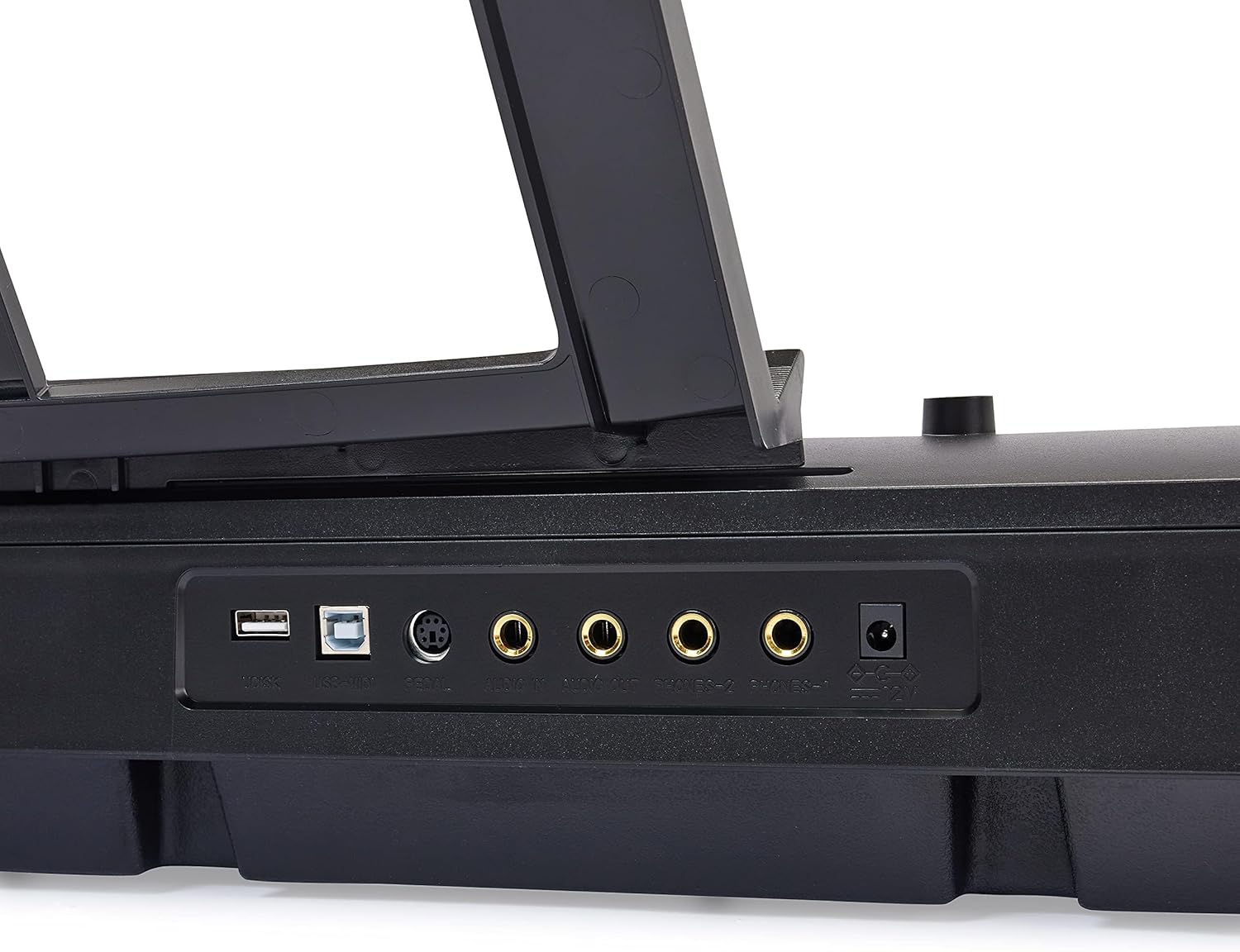
Image: Hand interacting with the piano keys and control panel.
Боловсролын онцлог
Enhance your learning with features such as:
- Хичээлийн горим: Utilize the beginner split keyboard function for guided practice.
- Automatic Chords: Simplify chord playing for beginners.
- Dual Timbre: Layer two different instrument sounds simultaneously for richer tones.
- Метроном: Use the built-in metronome for rhythm training.

Зураг: Дууслааview of learning tools and features.
USB холболт
The piano features USB MIDI and USB-A ports, allowing for simple integration with smart devices. You can connect to compatible software for recording your music or expanding your creative possibilities.
Засвар үйлчилгээ
Цэвэрлэгээ
To clean the piano, use a soft, dry cloth. Do not use abrasive cleaners, waxes, or solvents as they may damage the finish. For stubborn marks, a slightly damp даавууг хэрэглэж болно, дараа нь хуурай даавуугаар нэн даруй.
Хадгалах
Store the piano in a cool, dry place away from direct sunlight, extreme temperatures, and high humidity. Avoid placing heavy objects on the keyboard.
Алдааг олж засварлах
Дуу байхгүй
- Ensure the piano is powered on and the power adapter is securely connected to both the piano and a working electrical outlet.
- Мастер дууны товчлуурыг шалгаад асаалттай байгаа эсэхийг шалгаарай.
- If external speakers or headphones are connected, ensure they are properly plugged in and their volume is adjusted.
Тогтвортой дөрөө ажиллахгүй байна
- Verify that the sustain pedal is fully inserted into its designated port on the back of the piano.
- Always ensure the piano is powered OFF before connecting or disconnecting the sustain pedal to prevent potential issues.
Keys Not Responding or Incorrect Sound
- Try selecting a different instrument tone to see if the issue persists across all sounds.
- Power off the piano, wait a few seconds, and then power it back on to reset the system.
Үзүүлэлтүүд
| Онцлог | Дэлгэрэнгүй |
|---|---|
| Загварын дугаар | АН-882 |
| Түлхүүрүүдийн тоо | 88 |
| Түлхүүрийн төрөл | Хагас жинтэй |
| Хэмжээ (D x W x H) | 11.22"D x 51.1"W x 4.06"H |
| Зүйлийн жин | 14.77 фунт |
| Эрчим хүчний эх үүсвэр | Утастай цахилгаан |
| Холболтын технологи | USB (USB MIDI, USB-A) |
| Өнгө | Хар |
| Ур чадварын түвшин | Бүгд |
| Онцлог шинж чанар | Зөөврийн |
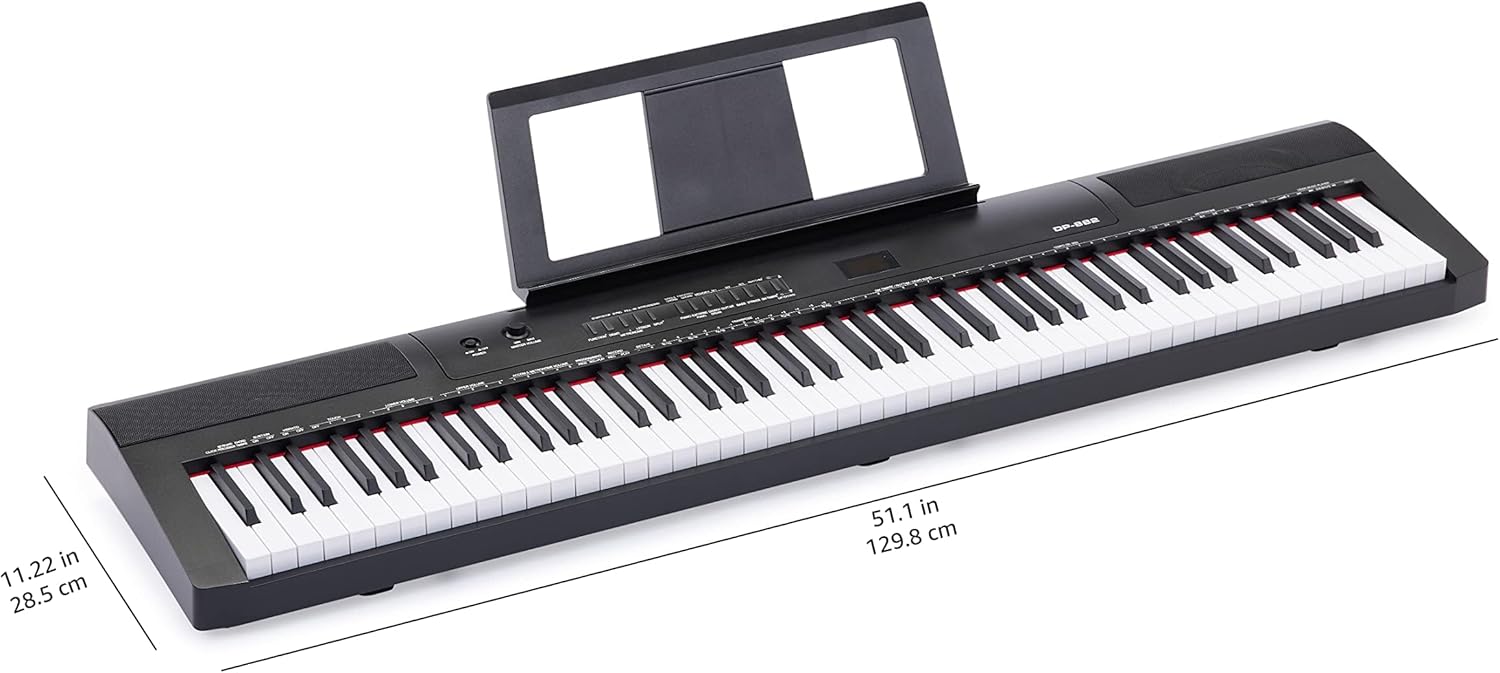
Image: Digital piano with key dimensions.
Баталгаат болон дэмжлэг
Хэрэглэгчийн гарын авлага, баталгааны мэдээлэл
For additional details and comprehensive warranty information, please refer to the official PDF documents:
Хамгаалах төлөвлөгөө
Extended protection plans may be available for your product. Please check the product listing or your purchase documentation for details on available plans, such as 3-Year or 4-Year Protection Plans.
Хэрэглэгчийн дэмжлэг
Нэмэлт тусламж, техникийн дэмжлэг эсвэл үйлчилгээний лавлагаа авахыг хүсвэл зочилно уу Амазон Basics Дэлгүүр эсвэл Amazon-ы хэрэглэгчийн үйлчилгээтэй шууд холбогдоно уу.


