1. Танилцуулга
This manual provides detailed instructions for the installation, operation, and maintenance of your Spedal MINIEYE AC1 Dash Cam. Please read this manual thoroughly before using the device to ensure proper functionality and safety. The MINIEYE AC1 is designed to record your driving journey in high definition and offers advanced features for enhanced road safety.
2. Бүтээгдэхүүн дууссанview
2.1 Гол онцлогууд
- 1944P Ultra Full HD Recording: Тодорхой foo видео авдагtage with a 140° wide-angle field of view.
- AI ADAS (Advanced Driver-Assistance System): Provides real-time alerts for collision avoidance.
- Суурилуулсан G-мэдрэгч: Automatically detects sudden movements or impacts and locks footage.
- 24 цагийн зогсоолын хяналт: Monitors your vehicle even when parked (requires hardwire kit, sold separately).
- Хүчтэй шөнийн хараа: Ensures clear recordings in low-light conditions.
- Давталтын бичлэг: Хамгийн эртний foo-г дарж бичнэtage санах ойн карт дүүрсэн үед тасралтгүй бичлэг хийх боломжтой.
- APP хяналт: Тохиргоог удирдах, view footage, and download videos via a dedicated mobile application.
2.2 Багцын агуулга
Доор жагсаасан бүх зүйл таны багцад байгаа эсэхийг шалгаарай.
- MINIEYE AC1 Dash Cam Unit
- Машины цэнэглэгч
- Цахилгаан кабель
- Хяналтын кабель
- Host Base
- GPS модуль
- Электростатик наалт
- Кабелийн чиглүүлэлтийн зориулалттай ломбард
- Бөмбөлөг түвшин
- Free 32GB TF Card (MicroSD Card)
- Хэрэглэгчийн гарын авлага (энэ баримт бичиг)
2.3 Төхөөрөмжийн бүрэлдэхүүн хэсгүүд
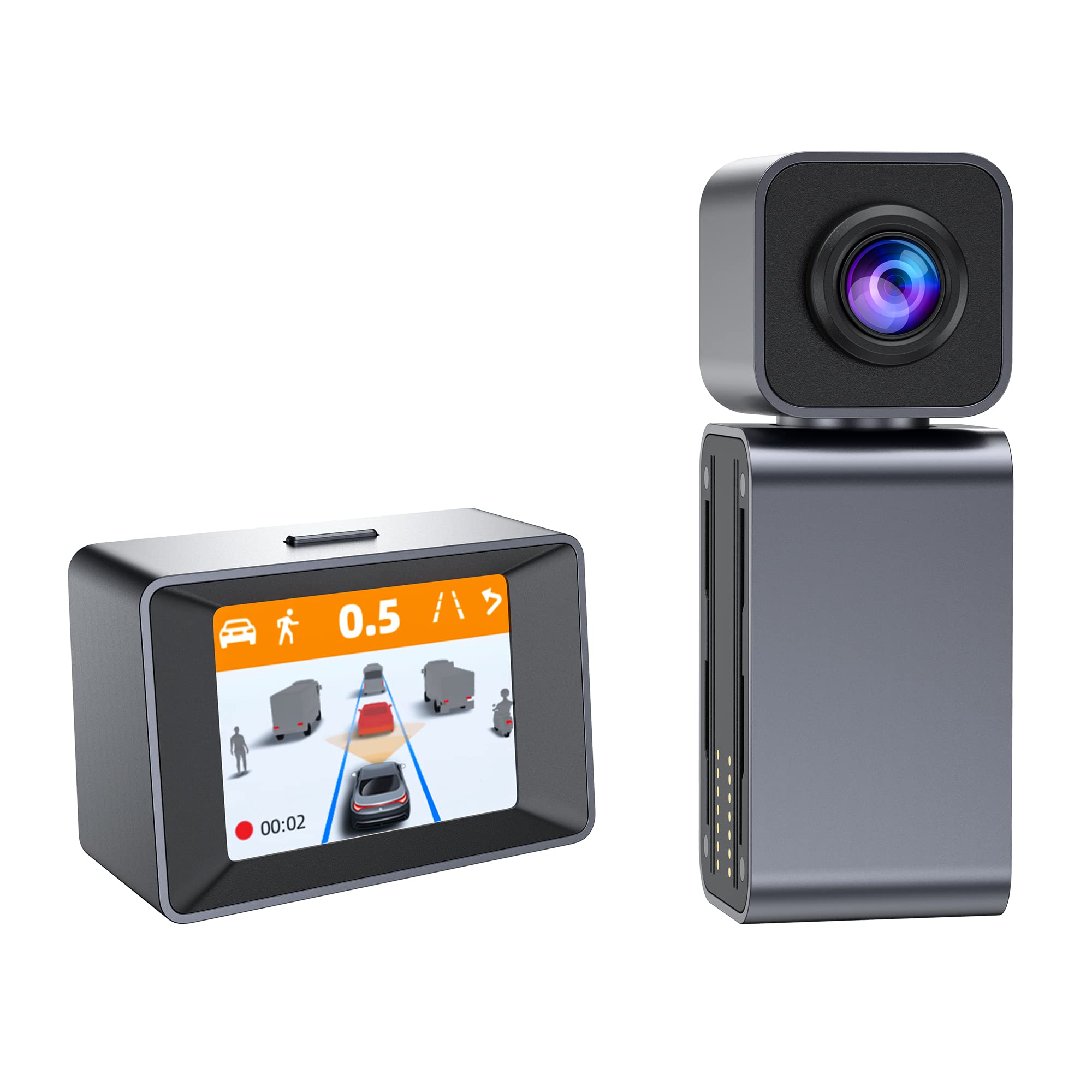
Image: The MINIEYE AC1 Dash Cam showing the main recording unit with its lens and the separate display unit. The display unit shows a simulated traffic scenario with distance warnings, illustrating the ADAS functionality.
3. Тохиргоо
3.1 Суурилуулалт
- Салхины шилийг бэлтгэх: Clean the area on your windshield where the dash cam will be mounted. Ensure it is free of dust and grease.
- Электростатик наалт наах: Apply the electrostatic sticker to the cleaned area. This helps in easy removal and prevents residue on the windshield.
- Attach Host Base: Secure the host base to the electrostatic sticker. Use the bubble level to ensure the base is level for optimal camera angle.
- Dash Cam холбох: Attach the MINIEYE AC1 Dash Cam unit to the host base.
- TF карт оруулах: Insert the provided 32GB TF card into the designated slot on the dash cam. Ensure it is inserted correctly until it clicks into place.
- Эрчим хүчийг холбох: Connect the power cable to the dash cam and route it along the windshield edge and dashboard using the crowbar to tuck it neatly. Plug the car charger into your vehicle's cigarette lighter socket.
- Connect Monitor (if applicable): If using an external monitor, connect it using the monitor cable.
- GPS модулийг холбох: Attach the GPS module to the dash cam for location and speed data recording.
3.2 Анхдагч асаалт ба тохиргоо
- Асаах: Start your vehicle. The dash cam will automatically power on and begin recording.
- TF картын формат: It is recommended to format the TF card upon first use and periodically thereafter to ensure optimal performance. This can usually be done through the device settings or the mobile app.
- Камерын өнцгийг тохируулах: Adjust the camera lens to ensure it captures the road ahead clearly, covering the desired field of view.
3.3 Аппликейшн удирдлагын тохиргоо
- Апп татаж авах: хайх the "MINIEYE" in your smartphone's app store (iOS or Android) and install it.
- Wi-Fi-д холбогдох: Enable Wi-Fi on your smartphone and connect to the dash cam's Wi-Fi network. The network name and password can typically be found in the dash cam's settings or manual.
- Төхөөрөмжийг холбох: Open the MINIEYE app and follow the on-screen instructions to pair your dash cam.
- Тохиргоог тохируулах: Use the app to adjust recording resolution, G-sensor sensitivity, parking monitoring settings, and other preferences.
4. Ашиглалтын заавар
4.1 Үндсэн бичлэг
Once powered on, the MINIEYE AC1 automatically begins continuous loop recording. Video files are saved in segments (e.g., 1, 3, or 5 minutes) to the TF card. When the card is full, the oldest unprotected files дарж бичсэн байна.
4.2 G-Sensor and Emergency Recording
The built-in G-Sensor detects sudden impacts or rapid acceleration/deceleration. When triggered, the current video segment is automatically locked and saved to a protected folder, preventing it from being overwritten by loop recording. The sensitivity of the G-Sensor can be adjusted via the mobile app.
4.3 Зогсоолын хяналт
With the optional hardwire kit (not included), the dash cam can monitor your vehicle while parked. If an impact or motion is detected, the dash cam will automatically record a short video segment. Ensure this feature is enabled and configured in the app settings.
4.4 ADAS (Жолоочийн Тусламжийн Дэвшилтэт Систем)
The AI ADAS features provide real-time alerts to enhance driving safety:
- Урагш мөргөлдөх сэрэмжлүүлэг (FCW): Alerts you if you are approaching a vehicle ahead too quickly.
- Эгнээний гарах анхааруулга (LDW): Хэрэв таны тээврийн хэрэгсэл дохиололгүй эгнээнээс гарсан тохиолдолд танд мэдэгдэнэ.
- Front Vehicle Start Alert: Informs you when the vehicle in front of you has started moving after a stop.
These alerts are typically visual on the display and/or audible. Calibration may be required for optimal ADAS performance.
4.5 ViewFoo-г татаж авч байнаtage
Footagэ байж болно viewed directly on the dash cam's display (if available) or more conveniently through the MINIEYE mobile application. Use the app to browse recorded videos, download important clips to your smartphone, or share them.
5. Засвар үйлчилгээ
- Линзийг цэвэрлэх: Regularly clean the camera lens with a soft, lint-free cloth to ensure clear video quality.
- TF картын формат: Format the TF card every 2-4 weeks to prevent data corruption and maintain optimal recording performance. Back up any important files форматлахын өмнө.
- Програм хангамжийн шинэчлэлтүүд: Check the MINIEYE app or official website periodically for firmware updates. Keeping your dash cam's firmware updated ensures access to new features and performance improvements.
- Хадгалах: Удаан хугацаагаар ашиглаагүй үед хяналтын камерыг сэрүүн, хуурай газар, нарны шууд тусгалаас хол хадгална уу.
6. Алдаа засах
- Хяналтын камер асахгүй байна:
- Машины цэнэглэгчийн холболтыг шалгаж, тээврийн хэрэгслийн тамхины асаагуурын залгуур ажиллаж байгаа эсэхийг шалгаарай.
- Ensure the power cable is securely connected to the dash cam.
- Бичлэгийн асуудлууд (жишээ нь, хөлдөх, эвдэрсэн fileс):
- TF картыг форматлана уу.
- Try a different high-speed (Class 10 or U1/U3) TF card.
- Ensure the TF card is not full of locked files.
- Апп холболтын асуудал:
- Хяналтын камерын Wi-Fi асаалттай байгаа эсэхийг шалгана уу.
- Зураасны камер болон ухаалаг утсаа хоёуланг нь дахин эхлүүлнэ үү.
- Verify you are connecting to the correct Wi-Fi network and using the correct password.
- ADAS сэрэмжлүүлэг ажиллахгүй байна:
- Ensure ADAS features are enabled in the app settings.
- Perform ADAS calibration if available in the app.
- Камерын линз цэвэрхэн, саадгүй байгаа эсэхийг шалгаарай.
7. Техникийн үзүүлэлтүүд
| Онцлог | Дэлгэрэнгүй |
|---|---|
| Загварын нэр | MINIEYE AC1 |
| Брэнд | Хурд |
| Видео бичлэгийн нягтрал | 1944p |
| Бодит өнцөг View | 140 градус |
| Холболтын технологи | USB, Wireless (for App Control) |
| Хяналтын арга | Апп |
| Суурилуулах төрөл | Сорох уул |
| Тээврийн хэрэгслийн үйлчилгээний төрөл | Машин |
| Үйлдвэрлэгч | Shenzhen Youjia Innov Tech Co., Ltd |
8. Баталгаат хугацаа ба дэмжлэг
For warranty information, technical support, or service inquiries, please refer to the warranty card included with your product or visit the official Spedal website. You may also contact Spedal customer service directly through the contact information provided on their website or within the MINIEYE mobile application.
Баталгаат заргад зориулж худалдан авалтаа нотлох баримтаа үлдээнэ үү.


