Танилцуулга
Thank you for choosing the iTOMA CKS213 Digital Alarm Clock. This manual provides detailed instructions for setting up, operating, and maintaining your new alarm clock. Please read this manual thoroughly before use to ensure proper function and to maximize your user experience.
Аюулгүй байдлын мэдээлэл
- Төхөөрөмжийг хэт өндөр температур, нарны шууд тусгал, тоос шороо, чийгшилд бүү өртөө.
- Ensure the power adapter is connected to an easily accessible outlet.
- Зөвхөн дагалдаж ирсэн цахилгаан адаптерийг ашиглаарай. Зөвшөөрөлгүй адаптер ашиглах нь төхөөрөмжийг гэмтээж, баталгааг хүчингүй болгож болзошгүй.
- Төхөөрөмжийг ус болон бусад шингэнээс хол байлга.
- Do not attempt to disassemble or modify the unit. This may cause damage or injury.
- The backup battery is for memory retention only; the clock requires main power for full operation.
Багцын агуулга
Дараах зүйлсийн багцад байгаа эсэхийг шалгана уу.
- iTOMA CKS213 Digital Alarm Clock
- Power Adapter (60-inch cable)
- CR2032 Backup Battery (pre-installed or included)
- Хэрэглэгчийн гарын авлага (энэ баримт бичиг)
Бүтээгдэхүүн дууссанview
Familiarize yourself with the various features and controls of your iTOMA CKS213 Digital Alarm Clock.

Тохиргоо
1. Эрчим хүчний холболт
Connect the provided power adapter to the DC input port on the back of the alarm clock, then plug the adapter into a standard wall outlet. The clock display will illuminate.
2. Installing Backup Battery
The clock includes a pre-installed CR2032 battery for backup. This battery preserves time and alarm settings during a power outage. The clock will not operate on battery power alone; it requires main power for the display and alarm functions.
3. Анхны цагийн тохиргоо
Upon initial power connection, the clock may automatically set the time. If manual adjustment is needed, press and hold the 'CLOCK' button located on the top of the unit. Use the 'SETTING+' and 'SETTING-' buttons to adjust the hour and minute. Press 'CLOCK' again to confirm.
4. 12/24 цагийн формат
To switch between 12-hour and 24-hour time formats, press the '12/24H' button (often integrated with 'CLOCK' or 'SETTING' buttons, refer to the top panel diagram on your device). In 12-hour format, 'AM' or 'PM' indicators will be displayed.
Ашиглалтын заавар
1. Setting Dual Alarms (AL1 & AL2)
The iTOMA CKS213 features two independent alarms. Follow these steps to set an alarm:
- Press and hold the 'AL1' or 'AL2' button to enter alarm setting mode. The hour display will flash.
- Use the 'SETTING+' and 'SETTING-' buttons to adjust the desired alarm hour.
- Press 'AL1' or 'AL2' again to confirm the hour and move to minute adjustment. The minute display will flash.
- Use the 'SETTING+' and 'SETTING-' buttons to adjust the desired alarm minute.
- Press 'AL1' or 'AL2' again to confirm the minute and select the alarm mode.
- Use 'SETTING+' or 'SETTING-' to cycle through the 4 alarm modes:
- ALL-7-DAY: Сэрүүлэг өдөр бүр сонсогддог.
- АМРАЛТЫН ӨДӨР: Сэрүүлэг Даваагаас Баасан гарагт дуугарна.
- WEEKEND: Бямба, Ням гарагт сэрүүлэг дуугарна.
- SINGLE DAY: Alarm sounds only on the selected day.
- Press 'AL1' or 'AL2' one last time to save the alarm settings and activate the alarm. An alarm icon will appear on the display.

2. Түр хойшлуулах функц
When an alarm sounds, press the large 'SNOOZE' button on the top of the clock to temporarily silence the alarm for 9 minutes. You can repeat this up to 6 times. To turn off the alarm completely, press the 'AL1 OFF' or 'AL2 OFF' button.

3. Display Brightness and Automatic Dimmer
The clock features a 0.9-inch orange LED display with adjustable brightness. You can manually set the brightness or enable the automatic dimmer function.
- Гараар тохируулах тод байдал: Press the 'DIMMER' button repeatedly to cycle through 3 brightness levels (High, Medium, Low).
- Automatic Dimmer: The built-in sensor automatically adjusts the display brightness based on ambient light conditions in the room. This feature ensures the display is not too bright in a dark room or too dim in a well-lit environment.

4. Шөнийн гэрлийн ажиллагаа
The clock includes a 2-level orange night light. To activate or adjust the night light, locate the 'NIGHT LED' button (or similar) on the top panel and press it to cycle through the brightness levels or turn it off.
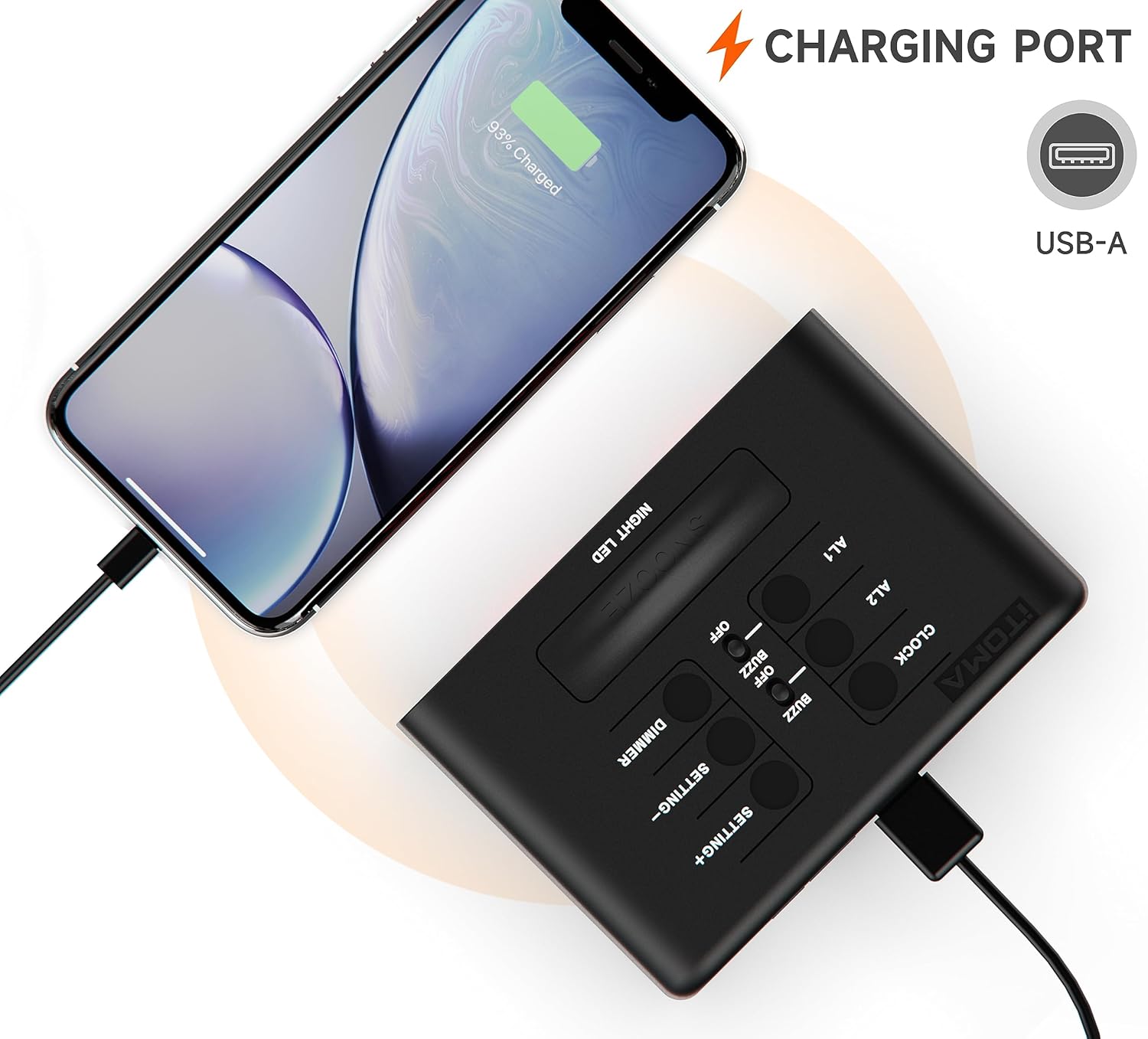
5. USB цэнэглэх порт
A USB-A charging port is located on the back of the unit. You can use this port to charge your smartphone or other mobile devices. Connect your device's USB charging cable to this port. The output is typically 1A.
Засвар үйлчилгээ
- Цэвэрлэгээ: Цагийг зөөлөн, хуурай даавуугаар арчина. Зүлгүүрийн цэвэрлэгч, уусгагчийг бүү ашигла.
- Зай солих: If the backup battery needs replacement, open the battery compartment on the bottom of the unit and replace the CR2032 battery with a new one, observing polarity.
Алдааг олж засварлах
| Асуудал | Шийдэл |
|---|---|
| Цагийн дэлгэц хоосон байна. | Ensure the power adapter is securely connected to both the clock and a working wall outlet. Check if the outlet has power. |
| Сэрүүлэг дуугарахгүй байна. | Verify that the alarm is activated (alarm icon visible). Check the alarm time and ensure it is set correctly for the desired day(s) of the week. |
| USB цэнэглэгч порт ажиллахгүй байна. | Ensure the clock is powered by the main adapter. Check the USB cable and the device being charged. The port is for charging only, not data transfer. |
| Time or settings reset after power outage. | The CR2032 backup battery may be depleted and needs replacement. |
Үзүүлэлтүүд
| Онцлог | Дэлгэрэнгүй |
|---|---|
| Загварын дугаар | CKS213 дугаартай |
| Дэлгэцийн төрөл | 0.9" Orange LED Digital Display |
| Цагийн формат | 12/24 цаг сонгох боломжтой |
| Сэрүүлэг | Dual Alarms with 4 Modes (7-Day, Weekday, Weekend, Single Day) |
| Түр хойшлуулах хугацаа | 9 Minutes (up to 6 times) |
| Гэрэлтүүлгийн хяналт | 3 Manual Levels & Automatic Dimmer |
| Шөнийн гэрэл | 2-Level Orange Night Light |
| USB цэнэглэх порт | USB-A (Output: 1A) |
| Эрчим хүчний эх үүсвэр | АС тэжээлийн хувиргагч |
| Нөөц батерей | 1 x CR2032 (Оруулсан) |
| Бүтээгдэхүүний хэмжээ (L x W x H) | 8.2 x 3.81 x 6.2 см (3.23 x 1.5 x 2.44 инч) |
| Зүйлийн жин | 280 гр |
| Материал | Акрилонитрил бутадиен стирол (ABS) |

Баталгаат болон дэмжлэг
iTOMA products are designed for reliability and performance. For any questions, concerns, or technical support regarding your CKS213 Digital Alarm Clock, please refer to the contact information provided with your purchase or visit the official iTOMA webсайт. Баталгаат заргад зориулж худалдан авалтаа нотлох баримтаа үлдээнэ үү.


