1. Бүтээгдэхүүн дууссанview
The Point Wired Mini Keyboard Pt-350 is a compact and versatile keyboard designed for both gaming and general typing. It features a high-quality build and a modern design, adhering to industry standards for reliable performance. This keyboard is an ideal choice for users seeking a durable and efficient input device.
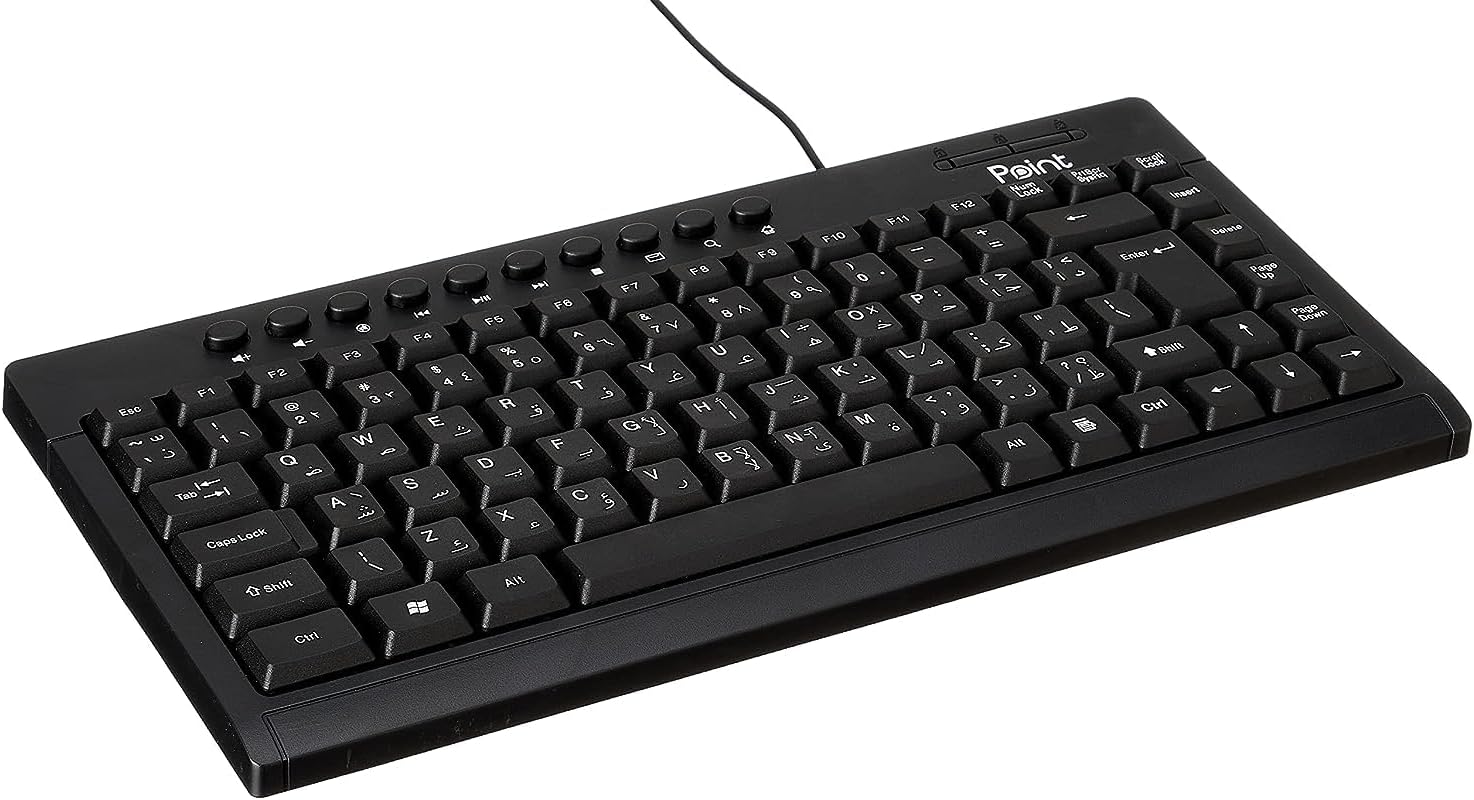
Зураг 1.1: Өнцөг view of the Point Wired Mini Keyboard Pt-350, showcasing түүний авсаархан дизайн, гол зохион байгуулалт.
Гол онцлогууд:
- Wired connectivity for stable performance.
- Compact design suitable for various setups.
- Durable construction from high-quality plastic materials.
- Designed for both gaming and typing applications.
2. Багцын агуулга
Бүх зүйл байгаа эсэхийг шалгахын тулд багцыг сайтар шалгана уу:
- Point Wired Mini Keyboard Pt-350
- Хэрэглэгчийн гарын авлага (энэ баримт бичиг)
3. Тохиргоо
Follow these steps to set up your Point Wired Mini Keyboard Pt-350:
- Гарыг задлах: Гарыг савлагаанаас нь болгоомжтой салга.
- Identify the USB Connector: The keyboard comes with an integrated USB cable.
- Өөрийн компьютерт холбогдох: Locate an available USB port on your computer (desktop PC, laptop, etc.). Insert the keyboard's USB connector firmly into the USB port.
- Драйвер суурилуулах (Залгаад тоглуулах): The keyboard is plug-and-play compatible. Your operating system (Windows, macOS, Linux) should automatically detect and install the necessary drivers. This process usually takes a few seconds.
- Функцийг шалгах: Once connected, open a text editor or any application that accepts text input and test the keys to ensure proper operation.

Зураг 3.1: Дээрээс доош view of the keyboard, illustrating the key layout and integrated cable for connection.
4. Ашиглалтын заавар
The Point Wired Mini Keyboard Pt-350 operates like a standard computer keyboard. Below are general instructions and tips for use:
Үндсэн бичих:
- Simply press the desired keys to input characters, numbers, and symbols into your active application.
- -г ашиглана уу Шилжилт key for uppercase letters and alternative symbols on keys.
- The Caps Lock key toggles permanent uppercase typing.
- The Backspace key deletes characters to the left of the cursor.
- The Оруулна уу key confirms input or moves to the next line.
Функцийн товчлуурууд (F1-F12):
The function keys (F1 through F12) perform various tasks depending on the active program or operating system. Some common uses include:
- F1: Often opens help for the active program.
- F2: Renames a selected item.
- F5: Сэргэдэг a web page or document.
- F11: Toggles full-screen mode in many browsers.
Мультимедиа түлхүүрүүд:
The keyboard may include dedicated multimedia keys or secondary functions on the F-keys (accessed via the Fn key, if present). These typically control:
- Volume control (Mute, Volume Up, Volume Down)
- Media playback (Play/Pause, Stop, Previous Track, Next Track)
5. Засвар үйлчилгээ
Зөв арчилгаа нь таны гарны урт наслалт, оновчтой ажиллагааг хангана:
- Цэвэрлэгээ: Regularly clean the keyboard to prevent dust and debris buildup. Use a soft, lint-free cloth slightly dampус эсвэл зөөлөн цэвэрлэгээний уусмалаар дүүргэнэ. Хүчтэй химийн бодис, зүлгүүрийн материалаас зайлсхий.
- Тоос арилгах: Use compressed air to blow out dust and crumbs from between the keys.
- Асгарахаас зайлсхийх: Дотоод эд ангиудыг гэмтээхээс сэргийлж шингэнийг гарнаас хол байлга. Асгарсан тохиолдолд гарыг нэн даруй салгаж, дахин холбохоосоо өмнө бүрэн хатаана уу.
- Хадгалах: Ашиглаагүй үед гарыг хэт өндөр температураас хол, цэвэр, хуурай орчинд хадгална.
6. Алдаа засах
If you encounter issues with your Point Wired Mini Keyboard Pt-350, refer to the following common problems and solutions:
Гар хариу өгөхгүй байна:
- USB холболтыг шалгана уу: USB кабелийг компьютер дээрээ ажиллаж байгаа USB портод найдвартай залгасан эсэхийг шалгаарай. Өөр USB портоор оролдоно уу.
- Компьютерийг дахин эхлүүлэх: Энгийн дахин эхлүүлэх нь холболтын асуудлыг шийдэж чаддаг.
- Өөр компьютер дээр туршилт хийх: Connect the keyboard to another computer to determine if the issue is with the keyboard or your computer's setup.
- Төхөөрөмжийн менежерийг шалгана уу (Windows): In Windows, go to Device Manager and check if the keyboard is listed under 'Keyboards' and if there are any error symbols. You might need to update or reinstall the driver.
Keys Not Working or Sticky:
- Цэвэр түлхүүрүүд: Dust, crumbs, or liquid residue can cause keys to stick or malfunction. Refer to the Maintenance section for cleaning instructions.
- Биеийн гэмтэл: Inspect the keys for any visible physical damage.
Буруу тэмдэгтийн гаралт:
- Check Language Settings: Ensure your operating system's keyboard language settings match the physical layout of your keyboard.
- Драйверын асуудал: Reinstalling the keyboard driver might resolve this.
Хэрэв эдгээр алхмуудыг хэрэгжүүлсний дараа асуудал хэвээр байвал хэрэглэгчийн дэмжлэгтэй холбогдоно уу.
7. Техникийн үзүүлэлтүүд
Technical specifications for the Point Wired Mini Keyboard Pt-350:

Зураг 7.1: Хажуу тал view of the keyboard, highlighting its profile and compact form factor.
| Онцлог | Дэлгэрэнгүй |
|---|---|
| Брэнд нэр | Оноо |
| Загвар | Pt-350 |
| Холболтын технологи | Утастай |
| Тохиромжтой төхөөрөмжүүд | Компьютер |
| Гарын тайлбар | Олон үйлдэлт |
| Зөвлөмж болгож буй хэрэглээ | PC тоглоом |
| Онцлог шинж чанарууд | Тоглоом |
| Өнгө | Хар |
| Загвар | Орчин үеийн |
| Материал | Хуванцар |
| Хүргэлтийн хэмжээ | 34.5 x 26.4 x 3 см |
| Жин | 800 грамм |
| Эхний боломжтой огноо | 4 оны есдүгээр сарын 2022 |
| ASIN | B0BD2DM9ZJ |
8. Баталгаат хугацаа ба дэмжлэг
This product is covered by a standard manufacturer's warranty. Please refer to the warranty card included with your purchase for specific terms and conditions, including the warranty period and coverage details.
For technical support, troubleshooting assistance, or warranty claims, please contact Point customer service through the contact information provided on the product packaging or the official Point website. When contacting support, please have your product model (Pt-350) and purchase details ready.


