Танилцуулга
This manual provides detailed instructions for the safe and efficient use of your walimex pro LED 60W Softbox 40x60cm Bi color Kit 2. This versatile lighting kit is designed for various photography and video applications, offering adjustable color temperature and flexible positioning.
Гол онцлогууд:
- Өнгөний температурыг 3000K-аас 6000K хүртэл тохируулж болно.
- Flexible tilting up to 135° for precise object illumination.
- Тохируулж болох lamp tripod height from 71 cm to 182 cm.
- Compact 40x60cm softbox for soft and even light distribution.
- Suitable for video, photo, and studio lighting in small spaces, easy to use for both professionals and beginners.

Image: A model is shown with two different lighting setups, highlighting the bi-color temperature capability of the walimex pro LED softbox. The left side shows warmer lighting, and the right side shows cooler lighting, both providing soft illumination.
Аюулгүй байдлын мэдээлэл
Бүтээгдэхүүнийг ашиглахаасаа өмнө аюулгүй байдлын бүх зааврыг анхааралтай уншина уу. Энэ гарын авлагыг цаашид лавлах зорилгоор хадгална уу.
- Төхөөрөмжийг бороо, чийгэнд бүү тавь.
- Цахилгаан хангамж нь төхөөрөмжийн шаардлагад нийцэж байгаа эсэхийг шалгаарай.
- Нүдний LED гэрлийн шууд нөлөөллөөс зайлсхий.
- Цэвэрлэх, засвар үйлчилгээ хийхээсээ өмнө төхөөрөмжийг үргэлж салга.
- Хүүхдийн гар хүрэхгүй газар хадгална.
Багцын агуулга
Доор жагсаасан бүх бүрэлдэхүүн хэсгүүд таны багцад байгаа эсэхийг шалгана уу.
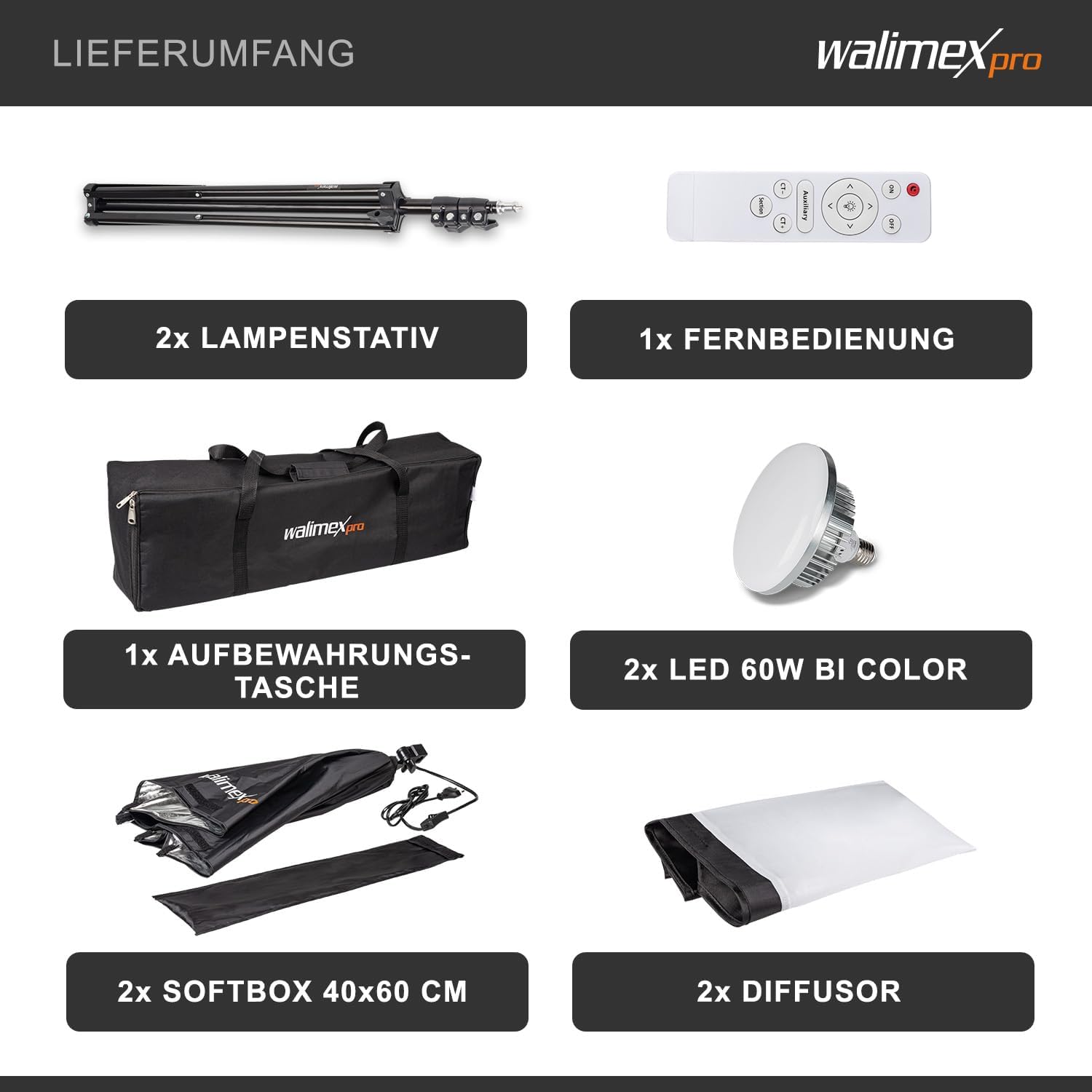
Зураг: Бүтэнview of the walimex pro LED 60W Softbox Kit 2 components, including two lamp tripods, one remote control, one storage bag, two 60W Bi Color LED bulbs, two 40x60cm softboxes, and two diffusers.
- 2х Lamp Tripod
- 1x Алсын удирдлага
- 1х хадгалах уут
- 2x LED 60W Bi Color Bulbs
- 2x Softbox 40x60 cm
- 2х диффузор
Тохируулах заавар
Follow these steps to assemble your walimex pro LED Softbox Kit:
1. Assemble the Light Stand:
- Unfold the tripod legs completely to ensure stability.
- Extend the central column to the desired height (maximum 182 cm) and secure it with the locking knobs.
- Ensure the stand is stable before attaching any components.

Image: The softbox dimensions (40x60cm) and the adjustable height of the light stand (71-182cm) are illustrated, showing the compact and extendable nature of the equipment.
2. Attach the Softbox and LED Bulb:
- Open the softbox by pushing the central mechanism until it locks into place.
- Screw the 60W Bi Color LED bulb into the E27 lamp holder inside the softbox.
- Attach the softbox to the top of the light stand using the standard spigot connection and tighten the knob to secure it.
- Secure the diffuser cloth to the front of the softbox using the Velcro fasteners for soft, even light.

Image: The walimex pro softbox is shown mounted on a light stand, highlighting its compatibility with standard spigot connections and the included remote control for easy operation of the Bi Color LED bulb.
Setup Video Guides:
Softbox Assembly and Light Adjustment
Video: This video demonstrates the quick and easy assembly of a softbox, including attaching the diffuser and adjusting the light's color and brightness using a remote control. It also shows practical applications for product photography and live streaming.
General Product Installation Guide
Video: A comprehensive guide on how to install various components of a lighting kit, including setting up the light stand, attaching the softbox, and securing the light source. It emphasizes ease of installation and adjustment.
Ашиглалтын заавар
Once assembled, your walimex pro LED Softbox Kit is ready for use. Here's how to operate it:
1. Асаах/унтраах:
Connect the power adapter to the softbox and plug it into a suitable power outlet. Use the power switch on the cable or the remote control to turn the light on or off.
2. Өнгөний температур ба тод байдлыг тохируулах:
Use the included remote control to adjust the color temperature (3000K to 6000K) and brightness levels. The remote has a range of 3-5 meters.

Image: A product photography setup illustrating the effect of different color temperatures (warm, natural, cool) on an object when using the walimex pro LED softbox, adjustable via remote control.
3. Adjusting Softbox Angle:
The softbox can be tilted up to 135° to direct the light precisely where needed. Loosen the adjustment knob on the stand, position the softbox, and then tighten the knob to secure it.
4. Adjusting Stand Height:
Adjust the height of the light stand from 71 cm to 182 cm by loosening the locking collars on the central column, extending or retracting the sections, and then securely tightening them.
Засвар үйлчилгээ
Proper maintenance ensures the longevity and optimal performance of your softbox kit:
- Цэвэрлэгээ: Use a soft, dry cloth to wipe down the exterior of the softbox and stand. Do not use abrasive cleaners or solvents.
- Хадгалах: When not in use, disassemble the softbox and stand, and store them in the provided storage bag in a cool, dry place to protect them from dust and damage.
- Булцуу солих: Ensure the LED bulb is completely cool before attempting to replace it. Use only compatible E27 LED bulbs.
Алдааг олж засварлах
If you encounter any issues with your walimex pro LED Softbox Kit, refer to the following common problems and solutions:
| Асуудал | Боломжит шалтгаан | Шийдэл |
|---|---|---|
| Гэрэл асдаггүй. | Power cable not connected, bulb loose, power outlet faulty. | Check power connections, ensure bulb is screwed in tightly, try a different power outlet. |
| Алсын удирдлага ажиллахгүй байна. | Batteries depleted, remote out of range, obstruction. | Replace remote batteries, ensure remote is within 3-5m range, remove any obstructions between remote and light. |
| Unstable light stand. | Legs not fully extended, locking knobs loose. | Ensure tripod legs are fully spread, tighten all locking knobs securely. |
For further assistance, please contact walimex pro customer support.
Үзүүлэлтүүд
| Онцлог | Дэлгэрэнгүй |
|---|---|
| Брэнд | walimex pro |
| Загварын дугаар | 23109 |
| Бүтээгдэхүүний хэмжээ (L x W x H) | 30 x 30 x 35 см |
| Жин | 3.18 кг |
| Өнгө | Хар |
| Загвар | Хайрцаг |
| Ботьtage | 240 вольт |
| Ватtage | 60 ватт |
| Булцууны төрөл | LED |
| Өнгөний температур | 3000K - 6000K (Тохируулж болно) |
| Өнгө дүрслэх индекс (CRI) | 95 |
| Lamp Tripod өндөр | 71 - 182 см |
| Softbox Хэмжээ | 40 x 60 см |
| Батерей багтсан уу? | Үгүй |
| Батерей шаардлагатай юу? | Үгүй |
Баталгаат болон дэмжлэг
For warranty information and customer support, please refer to the documentation included with your product or visit the official walimex pro webсайт. Аливаа баталгаат нэхэмжлэлийн хувьд худалдан авалтаа нотлох баримтаа хадгалаарай.