1. Танилцуулга
This manual provides detailed instructions for the proper use and maintenance of your Obbug Bluetooth Headset, Model YYK-530. Please read this manual thoroughly before using the product to ensure optimal performance and longevity.
2. Багцын агуулга
Таны багцад бүх зүйл байгаа эсэхийг шалгана уу:
- 1 x Obbug Bluetooth Headset
- 1 х цэнэглэх хайрцаг
- 1 x USB Type-C цэнэглэгч кабель
- 1 x Ear Hat (replacement ear tip)
- 1 х хэрэглэгчийн гарын авлага
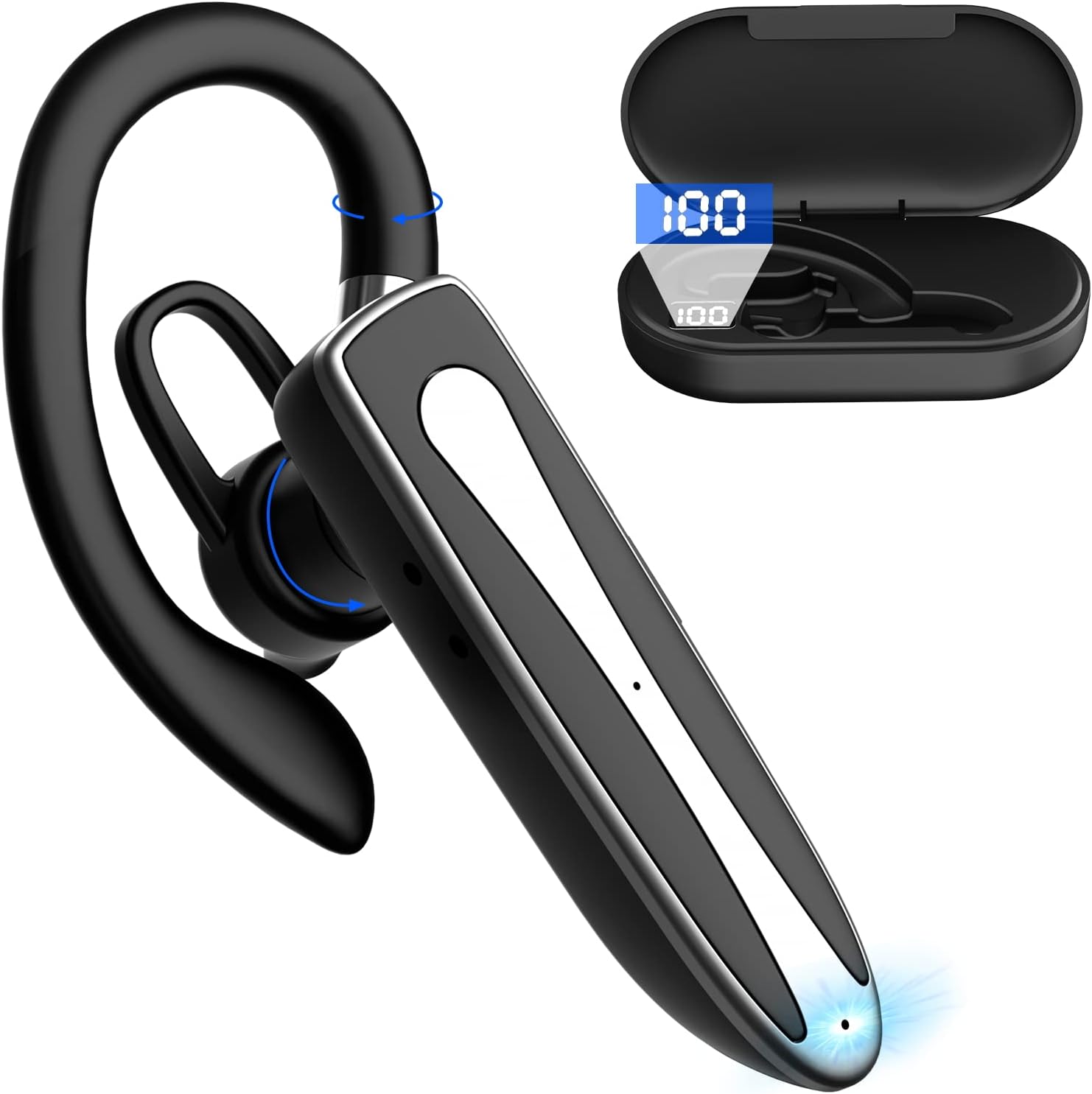
Image 2.1: Obbug Bluetooth Headset YYK-530 and its charging case.
3. Бүтээгдэхүүний онцлог
- Bluetooth 5.1 технологи: Provides stable connection and clear audio.
- Өргөтгөсөн зай: Up to 80 hours of continuous use with the charging case.
- Тав тухтай, тохируулгатай дизайн: Flexible earhook and rotatable boom mic for left or right ear wear.
- CVC8.0 Noise Reduction: Арын дуу чимээг бууруулснаар дуудлагын тодорхой байдлыг сайжруулна.
- Өргөн нийцтэй байдал: Connects with most Bluetooth-enabled devices including smartphones, tablets, and computers.
- Гар чөлөөтэй дуудлага: Integrated microphone for convenient communication.

Image 3.1: Illustration of CVC8.0 Noise Reduction for clear audio.
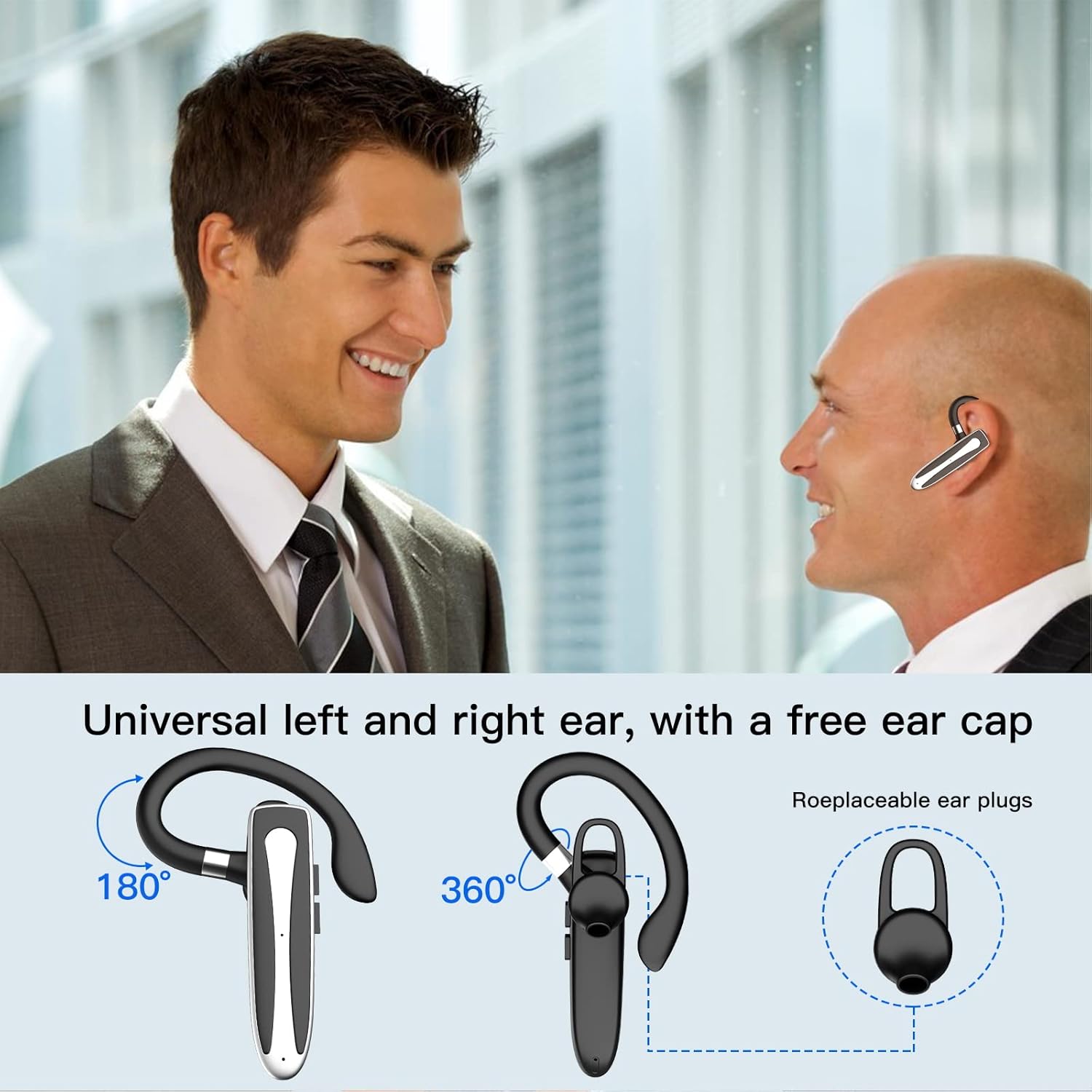
Image 3.2: Diagram illustrating the dual microphone noise reduction processing.
4. Тохиргоо
4.1 Charging the Headset and Case
Анх ашиглахаасаа өмнө чихэвч болон цэнэглэгч хайрцгийг бүрэн цэнэглээрэй.
- Place the headset into the charging case.
- Connect the USB Type-C cable to the charging port on the case and to a power source (e.g., USB wall adapter, computer USB port).
- The charging indicator on the case will show charging status. A full charge typically takes 1.5 hours.

Image 4.1: The Type-C charging port on the charging case.

Image 4.2: Battery life and charging time information for the headset and case.
4.2 Төхөөрөмжтэй хослуулах
The headset uses Bluetooth 5.1 for wireless connection.
- Асаах: Take the headset out of the charging case, or press and hold the Multi-function Button until the indicator light flashes blue and red, indicating pairing mode.
- Bluetooth-г идэвхжүүлэх: Төхөөрөмж дээрээ (ухаалаг утас, таблет гэх мэт) Bluetooth тохиргоо руу очоод Bluetooth-ийг асаана уу.
- Төхөөрөмж сонгох: In the list of available devices, select "YYK-530".
- Холболтыг баталгаажуулах: Once connected, the headset indicator light will flash blue slowly, and your device will show "Connected".

Image 4.3: Illustration of optimal Bluetooth connection distance (within 10 meters).
4.3 Хоёр төхөөрөмжид нэгэн зэрэг холбогдох
The headset supports connecting to two Bluetooth devices at the same time.
- Connect the headset to the first device (e.g., Phone A) as described in Section 4.2.
- Turn off Bluetooth on the first device. The headset will re-enter pairing mode.
- Connect the headset to the second device (e.g., Phone B) as described in Section 4.2.
- Turn on Bluetooth on the first device. The headset should automatically reconnect to both devices.
You can now answer calls or play music from either connected device.

Image 4.4: Step-by-step guide for connecting the headset to two devices.
4.4 Чихэвч зүүх
The headset is designed for comfortable wear on either the left or right ear.
- The earhook can rotate 360° vertically and 360° horizontally to fit your preferred angle.
- The retractable earhook can be adjusted to fit the shape of your ear.

Image 4.5: The headset's adjustable design for left or right ear wearing.
5. Ашиглалтын заавар
5.1 Асаах/унтраах
- Асаах: Take the headset out of the charging case, or press and hold the Multi-function Button for approximately 3 seconds until the indicator light flashes blue.
- Унтраах: Place the headset back into the charging case, or press and hold the Multi-function Button for approximately 5 seconds until the indicator light flashes red and then turns off.
5.2 Дуудлагын удирдлага
- Дуудлагад хариулах/дуусах: Олон үйлдэлт товчлуурыг нэг удаа дар.
- Дуудлагаас татгалзах: Олон үйлдэлт товчийг ойролцоогоор 2 секундын турш дарна уу.
- Сүүлийн дугаарыг дахин залгах: Олон үйлдэлт товчлуурыг давхар дар.
5.3 Хөгжим тоглуулах
- Тоглуулах/түр зогсоох: Олон үйлдэлт товчлуурыг нэг удаа дар.
- Дараагийн дуу: Дууг нэмэгдүүлэх товчийг удаан дар.
- Өмнөх бичлэг: Дууг багасгах товчийг удаан дар.
5.4 Дууны хяналт
- Эзлэхүүнийг нэмэгдүүлэх: Дууг нэмэгдүүлэх товчийг дарна уу.
- Эзлэхүүнийг бууруулах: Дууг багасгах товчийг дарна уу.
5.5 Дуут туслахыг идэвхжүүлэх
Төхөөрөмжийнхөө дуут туслахыг (Siri, Google Assistant) чихэвчнээс шууд идэвхжүүлнэ үү.
- Дуут туслахыг идэвхжүүлэх: Triple-press the Multi-function Button.

Image 5.1: The headset supports activation of Siri and Google Assistant.
6. Засвар үйлчилгээ
- Clean the headset and charging case regularly with a soft, dry cloth.
- Төхөөрөмжийг хэт өндөр температур, чийгшил эсвэл идэмхий бодист өртүүлэхээс зайлсхий.
- Чихэвчийг ашиглахгүй үедээ цэнэглэгч хайрцагт нь хийж хамгаалж, цэнэглэж байхаар хадгална уу.
- Төхөөрөмжийг өөрөө задлах, засах гэж бүү оролдоорой. Тусламж авахын тулд харилцагчийн үйлчилгээтэй холбогдоно уу.
7. Алдаа засах
7.1 Headset Not Powering On
- Ensure the headset is fully charged. Place it in the charging case and connect the case to a power source.
- Press and hold the Multi-function Button for 3-5 seconds to power on.
7.2 Төхөөрөмжтэй холбогдож чадахгүй байна
- Ensure the headset is in pairing mode (indicator flashes blue and red).
- Төхөөрөмжийнхөө Bluetooth-г унтраагаад дахин асаана уу.
- Ensure the headset is within 10 meters of your device and there are no significant obstacles.
- Төхөөрөмж дээрх Bluetooth холболтын жагсаалтыг устгаад дахин холбож үзнэ үү.
7.3 Дуу байхгүй эсвэл дууны чанар муу
- Чихэвч болон холбогдсон төхөөрөмжийнхөө дууг тохируулна уу.
- Чихэвч таны төхөөрөмжтэй зөв холбогдсон эсэхийг шалгаарай.
- Bluetooth-ийн хүрээнд байгаа эсэхээ шалгахын тулд төхөөрөмж рүүгээ ойртоорой.
- Бусад утасгүй төхөөрөмжүүдээс ямар нэгэн хөндлөнгийн оролцоо байгаа эсэхийг шалгана уу.
8. Техникийн үзүүлэлтүүд
| Онцлог | Тодорхойлолт |
|---|---|
| Загварын нэр | YYK-530 |
| Брэнд | Гайхалтай |
| Холболтын технологи | Утасгүй (Bluetooth) |
| Bluetooth хувилбар | 5.1 |
| Bluetooth хүрээ | 33 фут (10 метр) хүртэл |
| Дуу чимээний хяналт | Sound Isolation (CVC8.0 Noise Reduction) |
| Чихэвчний хэлбэр | Чихний дэгээ |
| Батерейны ашиглалтын хугацаа (Чихэвч) | 5 цаг (ойролцоогоор) |
| Зайны хугацаа (цэнэглэх хайрцагтай) | Up to 80 Hours (approx.) |
| Цэнэглэх хугацаа | 1.5 цаг |
| Цэнэглэх порт | USB Type-C |
| Усны эсэргүүцлийн түвшин | Усны хамгаалалттай |
| Зүйлийн жин | 4.9 унц (0.14 килограмм) |
| Давтамжийн хүрээ | 20 Гц - 20,000 Гц |
| Тохиромжтой төхөөрөмжүүд | Cellphones, Desktops, Laptops, Telephones |

Image 8.1: The headset is compatible with a wide range of Bluetooth-enabled devices.
9. Баталгаат хугацаа ба хэрэглэгчийн дэмжлэг
The Obbug Bluetooth Headset comes with a 1-month replacement warranty.
For any questions, issues, or support needs, please contact our customer service. We offer 24-hour customer service to assist you.
Холбоо барих тодорхой мэдээллийг худалдан авалтын баримт бичгээс үзнэ үү.


