Танилцуулга
This manual provides detailed instructions for setting up, operating, and maintaining your Echo Dot (5th Gen) Kids Owl Edition and Echo Glow bundle. This smart speaker and multicolor smart lamp combination is designed to provide a fun and engaging experience for children, with robust parental controls and access to age-appropriate content.
The Echo Dot Kids offers an improved speaker for clearer vocals and vibrant sound, while the Echo Glow provides customizable lighting to enhance routines and playtime. Both devices integrate seamlessly with Alexa for voice-controlled interactions.
Хайрцагт юу байна
- Echo Dot (5th Gen) Kids Owl Edition
- Echo Glow multicolor smart lamp
- Glacier white power adapter (15W)
- Түргэн эхлүүлэх гарын авлага
- Alexa Guide for kids
Тохиргоо
Follow these steps to set up your Echo Dot Kids and Echo Glow.
Анхдагч асаалттай
- Plug the power adapter into your Echo Dot (5th Gen) Kids.
- Plug the power adapter into a wall outlet. The light ring on the Echo Dot will turn blue, then orange, indicating it's ready for setup.
- Repeat the process for the Echo Glow.
Wi-Fi-д холбогдож байна
- Download the Amazon Alexa app on your smartphone or tablet.
- Alexa аппликейшнийг нээгээд Amazon бүртгэлээрээ нэвтэрнэ үү.
- Follow the on-screen instructions to add your new Echo Dot Kids device. The app will guide you through connecting it to your Wi-Fi network.
- Ensure your Wi-Fi network supports 802.11a/b/g/n/ac (2.4 and 5 GHz) networks. Ad-hoc networks are not supported.
Pairing Echo Glow
Once your Echo Dot Kids is set up, you can pair the Echo Glow:
- In the Alexa app, navigate to 'Devices'.
- Шинэ төхөөрөмж нэмэхийн тулд '+' дүрс дээр товшино уу.
- Select 'Light' and then 'Amazon Echo Glow'.
- Follow the app's instructions to discover and pair your Echo Glow.

Image: The Echo Dot (5th Gen) Kids Owl Edition and the Echo Glow lamp, ready for setup.

Image: The Echo Dot Kids Owl Edition and Echo Glow on a surface, with a speech bubble showing the command "Alexa, set a Rainbow Timer for 30 minutes on Charlie's lamp." This illustrates the voice control functionality for the Echo Glow.
Ашиглалтын заавар
Your Echo Dot Kids and Echo Glow are designed for intuitive voice control through Alexa.
Дуут командууд
To interact with your Echo Dot Kids, simply say the wake word "Alexa" followed by your command or question. Alexa will automatically provide kid-friendly responses and filter explicit content.
- Хөгжим: "Alexa, play music." (Streams from Amazon Music, Apple Music, Spotify, etc.)
- Түүхүүд: "Alexa, read a bedtime story."
- Асуултууд: "Alexa, how far away is the sun?"
- Дасгалууд: "Alexa, good night." (Can be configured to trigger bedtime routines like dimming lights or playing soothing sounds.)
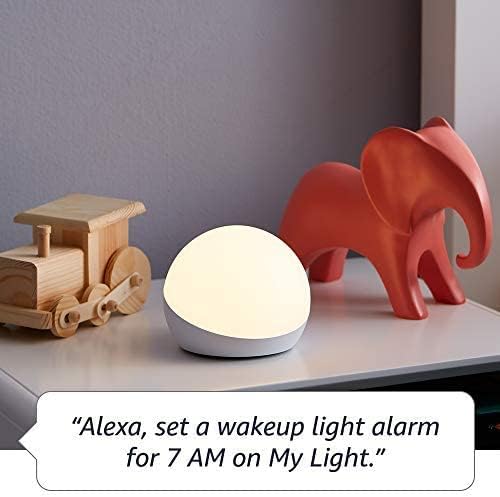
- Timers/Alarms: "Alexa, set a Rainbow Timer for 30 minutes on Charlie's lamp." or "Alexa, set a wakeup light alarm for 7 AM on My Light."
- Дуудлага: Kids can call parent-approved friends and family.

Image: The Echo Dot Kids Dragon Edition on a surface, with a speech bubble showing the command "Alexa, play music." This demonstrates the device's ability to stream audio content.

Image: The Echo Dot Kids Owl Edition on a desk, with a speech bubble showing the command "Alexa, how far away is the sun?" This highlights the device's capability to answer questions and provide information.
Эцэг эхийн хяналт
Manage your child's experience through the Amazon Parent Dashboard. Here you can:
- Set daily time limits for device usage.
- Review үйл ажиллагааны бүртгэлүүд.
- Approve contacts for calls.
- Filter explicit songs and content.
Amazon Kids+ Features
Your bundle includes 1 year of Amazon Kids+, a digital subscription for kids aged 3-12. This provides access to:
- Kid-friendly Audible books.
- Interactive games.
- Fun Morning Routines.
- Educational Alexa skills.

Image: A graphic displaying icons for various age-appropriate content available through Amazon Kids+, including Barbie, Disney, Frozen, and Nat Geo Kids. This illustrates the diverse range of content accessible to children.
Засвар үйлчилгээ
Цэвэрлэгээ
To clean your Echo Dot Kids and Echo Glow, use a soft, dry, lint-free cloth. Do not use abrasive cleaners or sprays directly on the devices.
Програм хангамжийн шинэчлэлтүүд
Your Echo Dot Kids receives automatic software security updates. Ensure your device is connected to Wi-Fi to receive these updates, which improve performance and add new features.
Нууцлалын онцлогууд
The Echo Dot Kids is designed with multiple layers of privacy controls:
- Микрофон унтраах товчлуур: Press the microphone off button on the top of the device to electronically disconnect the microphones. The light ring will turn red when the microphone is off.
- Wake Word технологи: Alexa devices are designed to detect the wake word only.
- Дамжуулалтын үзүүлэлтүүд: Visual indicators show when Alexa is streaming audio to the cloud.
- Дуу бичлэгийн удирдлага: Чадвартай view and delete your voice recordings through the Alexa app or Amazon Privacy Hub.
Зураг: Дээд хэсэг view of the Echo Dot Kids Owl Edition, with a red line through a microphone icon, indicating the microphone is turned off. Below it, text reads: "Press the mic off button to disconnect the microphones."
Алдааг олж засварлах
Нийтлэг асуудал ба шийдэл
- Төхөөрөмж хариу өгөхгүй байна: Ensure the device is plugged in and the light ring is active. Try unplugging and re-plugging the power adapter.
- Wi-Fi холболт байхгүй: Check your Wi-Fi router and ensure it's working. Re-run the Wi-Fi setup process in the Alexa app. Ensure your device is within range of your Wi-Fi network.
- Alexa not hearing commands: Ensure the microphone is not muted (red light ring indicates mute). Speak clearly and at a normal volume.
- Echo Glow not responding: Verify it's plugged in and paired correctly in the Alexa app. Try unpairing and re-pairing if issues persist.
- Content not playing: Verify your Amazon Kids+ subscription is active. Check internet connection.
Үзүүлэлтүүд
| Онцлог | Тодорхойлолт |
|---|---|
| Хэмжээ | 3.9” x 3.9” x 3.5” (100 мм x 100 мм x 89 мм) |
| Жин | 10.7 унци (304г) |
| Аудио | 1.73” (44 мм) урд талын чанга яригч, алдагдалгүй өндөр нягтралтай |
| Wi-Fi холболт | Хос зурвасын Wi-Fi нь 802.11a/b/g/n/ac (2.4 ба 5 GHz) сүлжээг дэмждэг. Түр зуурын сүлжээг дэмждэггүй. |
| Bluetooth холболт | Аудио дамжуулалтын A2DP дэмжлэг, холбогдсон хөдөлгөөнт төхөөрөмжүүдийн дуу хоолойгоор удирдах AVRCP. |
| Ухаалаг гэрийн протоколууд | Wi-Fi, Bluetooth Low Energy Mesh. |
| Системийн шаардлага | Alexa app compatible with Fire OS, Android, and iOS devices, or via web хөтөч. |
| Үе үе | Echo Dot (5-р үе) Kids - 2022 онд худалдаанд гарсан |
| Хэл | Alexa speaks English and Spanish. Spanish is not available in Amazon Kids. |
| Насны хүрээ | 3 ба түүнээс дээш насныхан. АНХААРУУЛГА: АМЬСГАЛЗАХ АЮУЛТАЙ – Жижиг эд ангиуд. 3-аас доош насны хүүхдэд тохиромжгүй. |
| Захиалга | Amazon Kids+-н 1 жилийн эрх багтсан. |
Баталгаат болон дэмжлэг
Баталгаат хугацааны мэдээлэл
Your Echo Dot (5th Gen) Kids and Echo Glow bundle comes with a 2-year worry-free guarantee. This warranty covers defects in materials and workmanship under normal use. For detailed terms and conditions, please refer to the warranty information provided with your product or visit the Amazon webсайт.
Хэрэглэгчийн дэмжлэг
Нэмэлт тусламж, алдааг олж засварлах, эсвэл баталгаат зарга авахыг хүсвэл Amazon хэрэглэгчийн дэмжлэгт зочилно уу website or contact Amazon customer service directly. You can also find more information and FAQs on the Amazon product page for the Echo Dot (5th Gen) Kids and Echo Glow.
Төхөөрөмжийг Амазон дээр шинэ нэгж болгон хамгийн сүүлд худалдан авах боломжтой болсны дараа програм хангамжийн аюулгүй байдлын шинэчлэлтүүд дор хаяж дөрвөн жилийн хугацаанд баталгаатай байна webсайтууд.


