1. Танилцуулга
This user manual provides comprehensive instructions for the installation, operation, and maintenance of your Weiser SmartCode Keypad Electronic Deadbolt. This advanced keyless entry system offers enhanced security and convenience for your home.
The SmartCode deadbolt features a sleek design, a backlit keypad for visibility, and the ability to store up to 50 user codes. It operates on 4 AA batteries and includes SmartKey re-key technology for added security and flexibility.
2. Аюулгүй байдлын мэдээлэл
Please read and understand all instructions before installing and using this product. Keep this manual for future reference.
- Do not attempt to disassemble or modify the lock. This may cause damage to the product and void the warranty.
- Use only the specified battery type (4 AA alkaline batteries). Do not mix old and new batteries or different types of batteries.
- Батерейг оруулахдаа зөв туйлшралыг шалгаарай.
- Keep all keys and user codes in a secure location.
- Avoid exposing the lock to extreme temperatures or direct moisture.
- Regularly check the lock's functionality and battery level.
3. Багцын агуулга
Суулгацыг эхлүүлэхийн өмнө бүх бүрэлдэхүүн хэсгүүд байгаа эсэхийг шалгана уу.

Image: Complete package contents of the Weiser SmartCode Keypad Electronic Deadbolt.
- Electronic Deadbolt (Exterior Keypad Assembly)
- Electronic Deadbolt (Interior Battery Unit)
- Түгжээ
- Ажил хаялтын хавтан
- Суурилуулах хавтан
- Суурилуулах тоног төхөөрөмж (эрэг)
- 2 түлхүүр
- SmartKey хэрэгсэл
- Суулгах гарын авлага (энэ баримт бичиг)
Note: 4 AA batteries are required and not included in the package.
4. Тохиргоо & Суурилуулалт
The Weiser SmartCode deadbolt is designed for easy installation. For a seamless setup experience, it is highly recommended to use the free BILT app, which provides step-by-step interactive 3D instructions with voice and video guidance.
4.1 Хаалганы нийцтэй байдал
This lock is designed to fit standard doors 1-3/8" to 1-3/4" (35 mm - 44 mm) thick with an adjustable backset (2-3/8" or 2-3/4"). It is ideal for most exterior and interior residential doors.
4.2 Суулгах үе шатууд (Дээрхview)
- Хаалгыг бэлтгэх: Ensure your door is properly drilled and aligned for a deadbolt installation.
- Түгжээг суулгах: Insert the latch into the door edge, ensuring the correct backset is selected.
- Гадна угсралтыг суурилуулах: Place the exterior keypad assembly onto the door, feeding the cable through the cross bore.
- Суурилуулах хавтанг суурилуулах: Secure the mounting plate to the door using the provided screws, ensuring the cable passes through the plate.
- Connect the Cable and Install Interior Assembly: Connect the cable from the exterior assembly to the interior battery unit. Mount the interior unit to the mounting plate.
- Батерейг суулгах: Insert 4 AA alkaline batteries into the interior unit, observing polarity.
- Хаалга хүлээлгэн өгөх үйл явцыг гүйцэтгэх: This crucial step teaches the lock the orientation of your door. Follow the specific instructions in the full manual or BILT app.
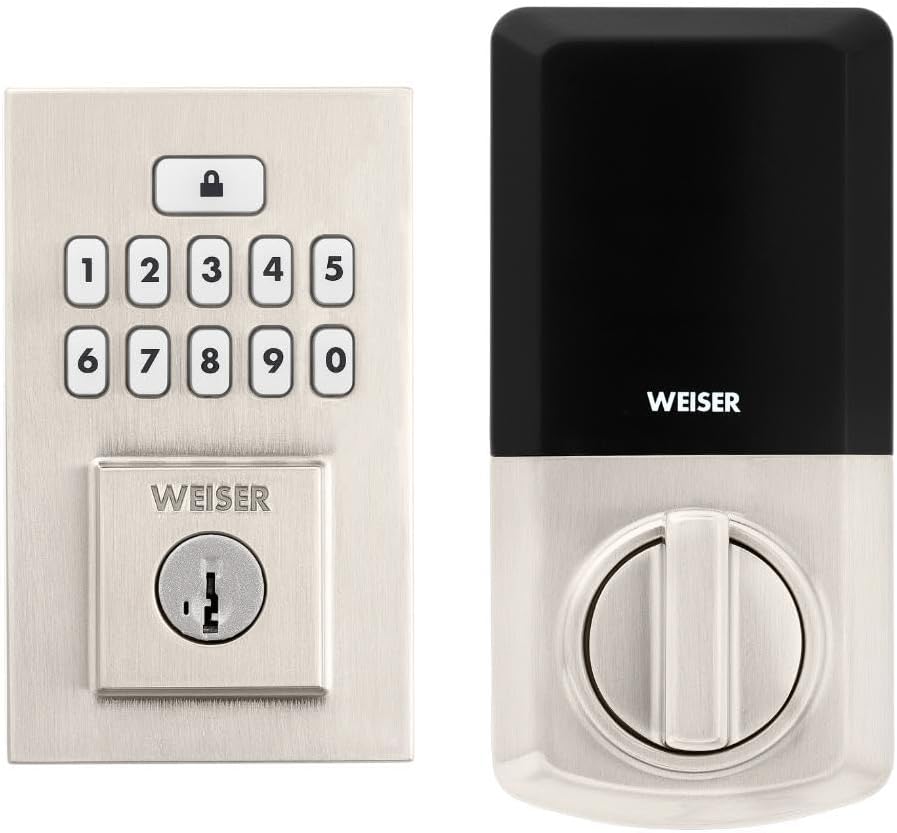
Image: Assembled Weiser SmartCode Keypad Electronic Deadbolt, showing both exterior and interior components.

Image: Close-up of the exterior keypad, featuring the backlit numeric buttons and keyhole.
5. Ашиглалтын заавар
5.1 Хаалгыг түгжих
- Нэг товшилтоор түгжих: Press the Lock button (top button with padlock icon) on the keypad. The deadbolt will extend.
- Автоматаар түгжих онцлог: If enabled, the deadbolt will automatically extend after a set period (e.g., 30 seconds) once unlocked.
5.2 Хаалганы түгжээг тайлах
- Хэрэглэгчийн код ашиглах: Enter your personalized 4-8 digit user code on the keypad. The deadbolt will retract.
- Түлхүүрийг ашиглах: Түлхүүрийн нүхэнд физик түлхүүрээ оруулаад түгжээг тайлахын тулд эргүүлнэ үү.
5.3 Хэрэглэгчийн кодуудыг програмчлах
The lock supports up to 50 user codes and 1 master code. Refer to the detailed programming instructions in the full manual for adding, deleting, or modifying codes.
- Мастер код: The master code is used to add and delete user codes. It does not unlock the door.
- Хэрэглэгчийн кодууд: These codes are used to unlock the door.


Image: Icons illustrating user management, programming, and auto-lock features.
5.4 SmartKey түлхүүр дахин оруулах технологи
The SmartKey re-key technology allows you to re-key your lock in seconds, maintaining key control and protecting against lost, stolen, or unauthorized keys without removing the lock from your door. Use the provided SmartKey tool and follow the instructions carefully.

Image: SmartKey Security feature, demonstrating how to re-key the lock.
6. Засвар үйлчилгээ
6.1 Батерейг солих
The lock operates on 4 AA alkaline batteries. When the batteries are low, the lock will provide an audible and/or visual low battery warning. Replace all four batteries simultaneously to ensure optimal performance.
- Дотоод хэсэг дээрх зайны тагийг ав.
- Хуучин батерейг салгаж, зохих ёсоор устгана уу.
- Зөв туйлшралыг (+/-) хангаж, шинэ АА шүлтлэг батерейг оруулна уу.
- Зайны тагийг солих.
Note: Battery life can vary based on usage frequency and environmental conditions. If the auto-lock feature is frequently used, battery life may be shorter.
6.2 Цэвэрлэгээ
Түгжээг зөөлөн, гamp даавуу. Зүлгүүрийн цэвэрлэгч, уусгагч, химийн шүршигч хэрэглэхээс зайлсхий, учир нь эдгээр нь өнгөлгөө болон электрон эд ангиудыг гэмтээж болно.
7. Алдаа засах
| Асуудал | Боломжит шалтгаан | Шийдэл |
|---|---|---|
| Lock does not respond or keypad is not lit. | Дууссан батерейнууд. | Дөрвөн АА батерейг бүгдийг нь солино. |
| Lock beeps 3 times during programming or code entry. | Incorrect code, programming error, or lock not handed correctly. | Verify the code. Re-attempt programming steps carefully. Perform the door handing process again. If issues persist, reset the unit to factory settings (refer to full manual). |
| Deadbolt extends when door is open (Auto-lock issue). | The lock does not have a sensor to detect if the door is open or closed. Auto-lock activates after the set time regardless of door position. | This is normal operation. Ensure the door is closed before the auto-lock time expires, or disable the auto-lock feature if it causes inconvenience. |
| Keypad is difficult to see at night. | Backlight not active. | The keypad is backlit and stays lit for 30 seconds after inactivity. Ensure there is enough battery power. |
| Lock is not operating smoothly. | Misalignment of door or strike plate, or internal mechanism issue. | Check door and frame alignment. Ensure the strike plate is correctly installed. If the issue persists, contact customer support. |
8. Техникийн үзүүлэлтүүд
| Онцлог | Дэлгэрэнгүй |
|---|---|
| Загварын дугаар | 9GED92600-003 |
| Бүтээгдэхүүний хэмжээс | 6.99 x 2.86 x 13.97 см (2.75 x 1.13 x 5.5 инч) |
| Зүйлийн жин | 454 гр (1 фунт) |
| Өнгө | Сатин никель |
| Загвар | Орчин үеийн |
| Дуусга | Сойзтой |
| Материал | Металл |
| Түгжээний төрөл | Цахилгаан түгжээтэй түгжээ |
| Товчлуур | 10-Button, Backlit |
| Хэрэглэгчийн код | Up to 50 user codes, 1 master code |
| Эрчим хүчний эх үүсвэр | 4 АА батерей (оруулаагүй) |
| Хаалганы зузаанын нийцтэй байдал | 1-3/8" to 1-3/4" (35 mm - 44 mm) |
| Бэккет | Тохируулах боломжтой 2-3/8" эсвэл 2-3/4" |
| Онцлог шинж чанарууд | Weather Resistant, Anti-Bump, Auto-Lock, One-Touch Lock, Back-Lit Keypad, SmartKey Security |
| ANSI зэрэглэл | 2-р анги |
| Гарал үүслийн улс | Хятад |
9. Баталгаат хугацаа ба дэмжлэг
9.1 Баталгаат хугацааны мэдээлэл
The Weiser SmartCode Keypad Electronic Deadbolt comes with a 1 жилийн баталгаат хугацаа худалдан авсан өдрөөс. Энэхүү баталгаа нь ердийн ашиглалтын үед хийгдсэн материал, хийцийн согогийг хамарна. Баталгаат заргад зориулж худалдан авалтаа нотлох баримтаа үлдээнэ үү.
For full warranty details and limitations, please refer to the official Weiser webсайт эсвэл хэрэглэгчийн дэмжлэгтэй холбоо барина уу.
9.2 Хэрэглэгчийн дэмжлэг
For technical assistance, troubleshooting, or warranty inquiries, please contact Weiser customer support:
- Онлайн дэмжлэг: Албан ёсны Weiser-т зочлоорой website for FAQs, video tutorials, and contact forms.
- Утасны дэмжлэг: Refer to the contact information provided on the Weiser packaging or webутасны дэмжлэгийн цагийн сайт.
- BILT апп: Utilize the BILT app for interactive 3D installation and programming guidance.
When contacting support, please have your product model number (9GED92600-003) and purchase date available.


