Танилцуулга
The Xiaomi Redmi Pad L83 is a WiFi-only tablet designed for entertainment and productivity. It features a 10.61-inch display, an Octa-Core MediaTek Helio G99 processor, and a large 8000mAh battery. This manual provides essential information to help you set up, operate, and maintain your device.
Хайрцагт юу байна
Upon unboxing your Xiaomi Redmi Pad, you should find the following items:
- 1 x Xiaomi Redmi Pad L83 Tablet
- 1 х машины цэнэглэгч
- 1 x USB кабель
Video: Unboxing and First Review of the Xiaomi Redmi Pad. This video demonstrates the contents of the product packaging and initial impressions of the device.
Тохиргоо
- Асаах: Press and hold the Power button located on the top edge of the tablet until the Xiaomi logo appears.
- Анхны тохиргоо: Хэл, бүс нутгаа сонгох, Wi-Fi сүлжээнд холбогдохын тулд дэлгэцэн дээрх зааврыг дагана уу.
- Google Бүртгэлийн тохиргоо: Google үйлчилгээ болон Play Store-д хандахын тулд Google бүртгэлээрээ нэвтэрч эсвэл шинээр үүсгэнэ үү.
- Дэлгэцийн түгжээ: Set up a screen lock method (Pattern, PIN, Password, or Face Unlock) for security. Note that Face Unlock is less secure than other methods.
- Програм хангамжийн шинэчлэлтүүд: Ensure your tablet is running the latest software by checking for updates in the Settings menu.
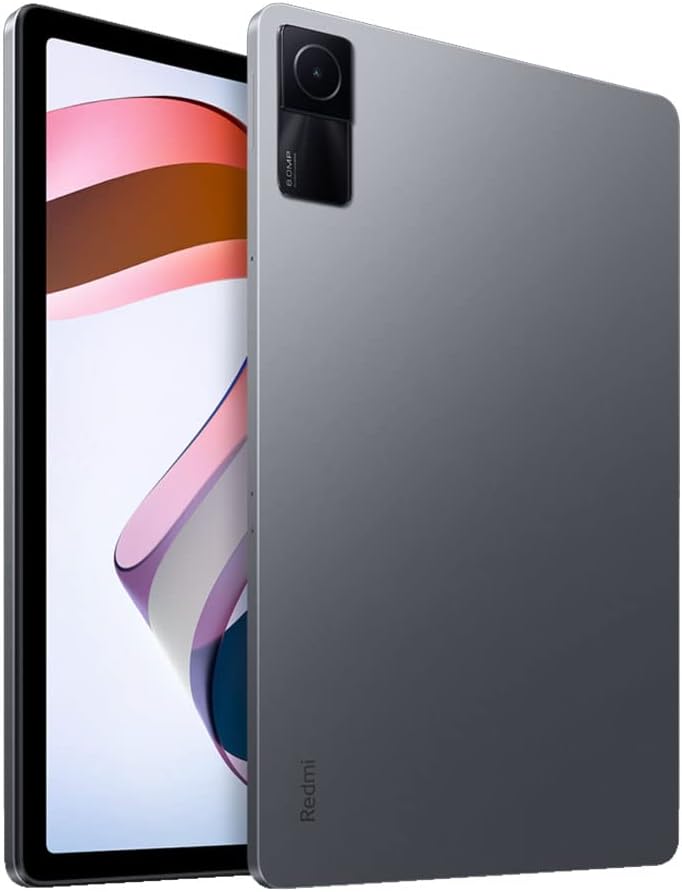
Зураг: Урд view of the Xiaomi Redmi Pad, showing the display and the location of the SIM/microSD card tray on the side.
Ашиглалтын заавар
Дэлгэц ба аудио
The Redmi Pad features a 10.61-inch IPS display with a resolution of 2000x1200 pixels and a 90Hz refresh rate, offering a smooth visual experience. It supports Dolby Atmos audio through its quad speakers, providing immersive sound for media consumption.
- Дэлгэц: 10.61-inch, 2000x1200 resolution, 90Hz refresh rate, 400 nits (typ) brightness.
- Аудио: Quad speakers with Dolby Atmos support for rich sound.
Video: A comprehensive review of the Xiaomi Redmi Pad, highlighting its display quality, audio performance, and overall user experience.
Гүйцэтгэл ба тоглоом
Powered by the MediaTek Helio G99 Octa-core processor, the Redmi Pad delivers smooth performance for daily tasks and medium-graphic gaming. It is available with 3GB, 4GB, or 6GB of RAM and 64GB or 128GB of storage, expandable via microSD card.
- Процессор: MediaTek Helio G99 Octa-core.
- RAM: 3GB, 4GB, or 6GB options.
- Хадгалах: 64GB or 128GB, expandable via microSD.
Video: A detailed comparison between the Redmi Pad and Samsung Galaxy Tab S6 Lite 2022, focusing on performance, display, and overall value for money.
Software & Updates
The tablet runs MIUI 13 based on Android 12. Xiaomi promises two major Android updates and three years of security updates, ensuring your device remains up-to-date and secure.
- Үйлдлийн систем: Android 12 with MIUI 13.
- Шинэчлэлтүүд: Two major Android updates and three years of security updates.
Камер
The Redmi Pad is equipped with an 8MP rear camera and an 8MP front camera (105° FOV with FocusFrame). Both cameras are suitable for casual photography, video calls, and document scanning.
- Арын камер: 8MP, Full HD Video Recording.
- Урд камер: 8MP (FOV - 105°), ideal for video calls.

Зураг: Буцах view of the Xiaomi Redmi Pad, showcasing the single 8MP rear camera module.
Зайны ашиглалт
With an 8000mAh battery, the Redmi Pad offers extended usage times, making it suitable for long commutes or entertainment sessions. It supports 18W fast charging.
- Зайны багтаамж: 8000 мАч.
- Цэнэглэж байна: 18Вт хурдан цэнэглэлттэй.
Засвар үйлчилгээ
- Цэвэрлэгээ: Дэлгэц болон их биеийг цэвэрлэхийн тулд зөөлөн, хөвөнгүй даавуу ашиглана уу. Химийн хүчтэй бодисоос зайлсхий.
- Програм хангамжийн шинэчлэлтүүд: Тохиромжтой гүйцэтгэл, аюулгүй байдлыг хангахын тулд системийн шинэчлэлтүүдийг тогтмол шалгаж, суулгаарай.
- Хадгалах менежмент: Үе үе тодорхой шаардлагагүй files and apps to free up storage space and improve device speed.
- Батерейны арчилгаа: Батерейны ашиглалтын хугацааг уртасгахын тулд хэт өндөр температураас зайлсхийж, цэнэгээ байнга бүрэн шавхахаас зайлсхий.
Алдааг олж засварлах
- Төхөөрөмж хариу өгөхгүй байна: If the tablet becomes unresponsive, press and hold the Power button for about 10 seconds to force a restart.
- Wi-Fi холболтын асуудал: Try restarting your Wi-Fi router and the tablet. If the issue persists, forget the network in Wi-Fi settings and reconnect.
- Аппын гэмтэл: Clear the cache and data of the problematic app in Settings > Apps. If it continues, uninstall and reinstall the app.
- Удаан гүйцэтгэл: Close background apps, clear cache, and ensure sufficient free storage. Consider a factory reset as a last resort (back up your data first).
- Дэмжлэгтэй холбоо барина уу: For persistent issues, refer to the Xiaomi support webсайт эсвэл харилцагчийн үйлчилгээтэй холбоо барина уу.
Бүтээгдэхүүний техникийн үзүүлэлтүүд
| Онцлог | Тодорхойлолт |
|---|---|
| Брэнд | XIAOMI |
| Загварын нэр | Redmi дэвсгэр |
| Загварын дугаар | L83 |
| Дэлгэцийн хэмжээ | 10.61 инч |
| Дэлгэцийн нягтрал | 2000х1200 |
| Сэргээх хурдыг харуулах | 90 Гц |
| Процессор | MediaTek Helio G99 найман цөмт (2.2 GHz) |
| RAM санах ой | 4 GB (available in 3GB, 4GB, 6GB variants) |
| Хадгалах багтаамж | 128 ГБ (64 ГБ, 128 ГБ хувилбараар авах боломжтой) |
| Үйлдлийн систем | Андройд 12 (MIUI 13) |
| Арын камер | 8 МП |
| Урд камер | 8 МП (105° FOV) |
| Зайны багтаамж | 8000 мАч |
| Холболт | Wi-Fi 5, Bluetooth v5.3, USB-C |
| Аудио | Quad Speakers, Dolby Atmos supported |
Баталгаат болон дэмжлэг
The Xiaomi Redmi Pad L83 comes with a limited warranty. For detailed warranty terms and conditions, please refer to the warranty card included in the box or visit the official Xiaomi support webсайт.
Техникийн дэмжлэг, алдааг олж засварлах тусламж эсвэл үйлчилгээний хүсэлтийн талаар Xiaomi-ийн албан ёсны сувгаар дамжуулан хэрэглэгчийн дэмжлэгтэй холбогдоно уу.


