Танилцуулга
This manual provides comprehensive instructions for the MAUL M112 calculator. It covers setup, basic operations, advanced functions, maintenance, and troubleshooting to ensure optimal performance and longevity of your device. Please read this manual thoroughly before using the calculator.
Бүтээгдэхүүн дууссанview

Зураг 1: Урд view of the MAUL M112 calculator, showcasing its 12-digit display and key layout. The calculator features a silver front panel and black keys with colored function buttons.
The MAUL M112 is a compact, 12-digit display calculator designed for office, home, and school use. It features both solar and battery power for reliable operation in various lighting conditions. Key functions include percentage and tax calculations, memory functions, and an automatic shutdown feature to conserve energy.

Зураг 2: The MAUL M112 calculator held in a hand, illustrating its compact size (approximately 11.9 cm x 7.0 cm x 1.0 cm). This image highlights its portability and ergonomic design.
Тохиргоо
Эрчим хүчний эх үүсвэр
The MAUL M112 calculator operates on a dual power system: solar and battery. This ensures continuous functionality even in low-light environments.
- Нарны эрчим хүч: The calculator primarily uses solar energy when sufficient light is available. Ensure the solar panel, located above the display, is exposed to light for optimal performance.
- Зайны хүч: For use in dark conditions or when solar power is insufficient, the calculator automatically switches to battery power. One LR1130 battery is included with the device.
Анхны хэрэглээ
Upon first use, the calculator should be ready for operation. If the display does not activate, ensure it is exposed to light or check the battery compartment.

Зураг 3: Арын view of the MAUL M112 calculator, displaying the battery compartment cover. This is where the LR1130 battery is housed and can be accessed for replacement.
Ашиглалтын заавар
Үндсэн үйлдлүүд
- Power On/Clear: дарна уу ON C·CE to turn on the calculator or clear the current entry.
- All Clear: дарна уу AC to clear all calculations and memory.
- Дугаар оруулах: Use the number keys (0-9) and the decimal point (.) to enter values.
- Арифметик үйлдлүүд: Ашиглах + (addition), - (subtraction), x (multiplication), and ÷ (division) for calculations.
- Тэнцүү: дарна уу = to display the result of a calculation.
- Double Zero: The 00 button allows for quick entry of two zeros.
- Delete Last Digit: дээр дарна уу → (backspace) button to delete the last entered digit.
Санах ойн функцууд
The calculator includes a 3-button memory function:
- M+: Харуулсан утгыг санах ойд нэмнэ.
- M-: Subtracts the displayed value from the memory.
- МГХ: Recalls the memory content (first press) or clears the memory (second press).
Тусгай функцууд
- % (Хувьtagд): хувийг тооцдогtages.
- Example (Add Percentagд): Enter value, press +, enter percentage, дарна уу %.
- Example (Discount): Enter value, press -, enter percentage, дарна уу %.
- ТАТВАР+ / ТАТВАР- (Татварын тооцоолол): These buttons are used for calculations involving tax rates.
- Setting Tax Rate: дарна уу SET, then enter the tax rate (e.g., 5 for 5%), then press TAX+. The tax rate is now stored.
- Add Tax: Enter original price, press TAX+.
- Subtract Tax: Enter price including tax, press TAX-.
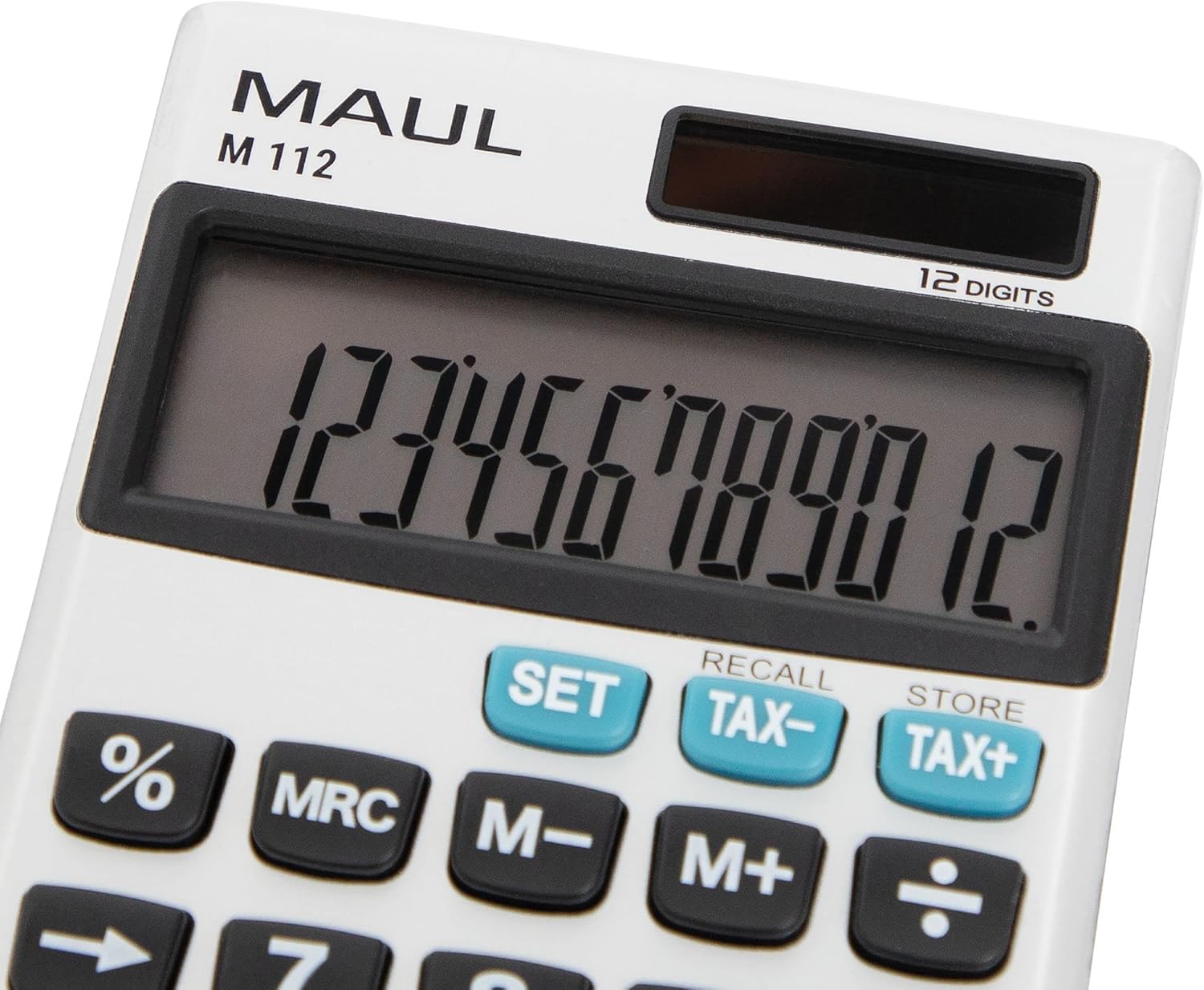
Зураг 4: Нарийвчилсан view of the MAUL M112 calculator's 12-digit LCD display and the function keys, including SET, TAX-, TAX+, %, MRC, M-, M+, and the arithmetic operators. This image highlights the clear labeling and distinct coloring of important keys.
Засвар үйлчилгээ
Цэвэрлэгээ
Тооцоолуурын гадаад төрх байдал болон ажиллагааг хадгалахын тулд:
- Тооцоолуурыг зөөлөн, хуурай даавуугаар арчина.
- Зөрүүд шороонд бага зэрэг dampдаавуугаар усаар. Хүчтэй химийн бодис, зүлгүүрийн цэвэрлэгч хэрэглэхээс зайлсхий.
- Ensure no liquid enters the calculator's internal components.
Зай солих
When the display becomes dim or unresponsive in low light, the LR1130 battery may need replacement.
- Turn the calculator over.
- Locate the battery compartment cover (refer to Image 3).
- Carefully open the cover using a small screwdriver or coin.
- Remove the old LR1130 battery.
- Insert a new LR1130 battery, ensuring correct polarity (+/-).
- Зайны тасалгааны тагийг найдвартай солино.
Жич: Ашигласан батерейг орон нутгийн дүрэм журмын дагуу устгана уу.
Алдааг олж засварлах
- Дэлгэц хоосон байна:
- Ensure the calculator is exposed to sufficient light for solar power.
- Check if the battery needs replacement (refer to Battery Replacement section).
- дарна уу ON C·CE төхөөрөмжийг асаахын тулд.
- Incorrect calculations:
- дарна уу AC to clear all previous entries and memory.
- Double-check your input values and the sequence of operations.
- Түлхүүрүүд хариу өгөхгүй байна:
- Ensure the keys are clean and free from debris.
- If the issue persists, try replacing the battery.
Үзүүлэлтүүд
| Загварын нэр | M112 |
| Дэлгэц | 12-digit LCD, 1-line display |
| Эрчим хүчний эх үүсвэр | Solar powered and battery operated (LR1130) |
| Хэмжээ (L x W x H) | 11.9 x 7.0 x 1.0 см |
| Материал | Plastic (front made of aluminium) |
| Санах ойн функцууд | 3-button memory (M+, M-, MRC) |
| Тусгай функцууд | Персенtage (%), Tax Calculation (TAX+, TAX-), Double Zero (00), Delete Last Digit (→) |
| Автомат унтрах | Тиймээ |
| Үйлдвэрлэгч | Жакоб Маул ХХК |
Баталгаат хугацаа
The MAUL M112 calculator comes with a 5 жилийн баталгаат хугацаа from the date of purchase. This warranty covers manufacturing defects under normal use. Please retain your proof of purchase for warranty claims. For detailed warranty terms and conditions, please refer to the official MAUL webсайт эсвэл хэрэглэгчийн дэмжлэгтэй холбоо барина уу.
Дэмжлэг
For further assistance, technical support, or inquiries regarding your MAUL M112 calculator, please visit the official MAUL webсайт эсвэл харилцагчийн үйлчилгээний хэлтэстэй холбогдоно уу. Холбоо барих мэдээллийг ихэвчлэн бүтээгдэхүүний сав баглаа боодол эсвэл үйлдвэрлэгчээс олж болно webсайт.
Үйлдвэрлэгч: Жакоб Маул ХХК


