Miofive Dash Cam Dual

Miofive Dash Cam урд болон хойд хэрэглэгчийн гарын авлага

Model: Dash Cam Dual

Танилцуулга

The Miofive Dash Cam Front and Rear system provides comprehensive video recording for your vehicle, featuring 4K resolution for the front camera and 2K for the rear. Designed for reliability and ease of use, this dual dash camera system incorporates advanced features such as 5G WiFi connectivity, built-in GPS, motion detection, and G-sensor technology, all powered by a durable super capacitor. This manual provides detailed instructions for setup, operation, maintenance, and troubleshooting to ensure optimal performance of your device.
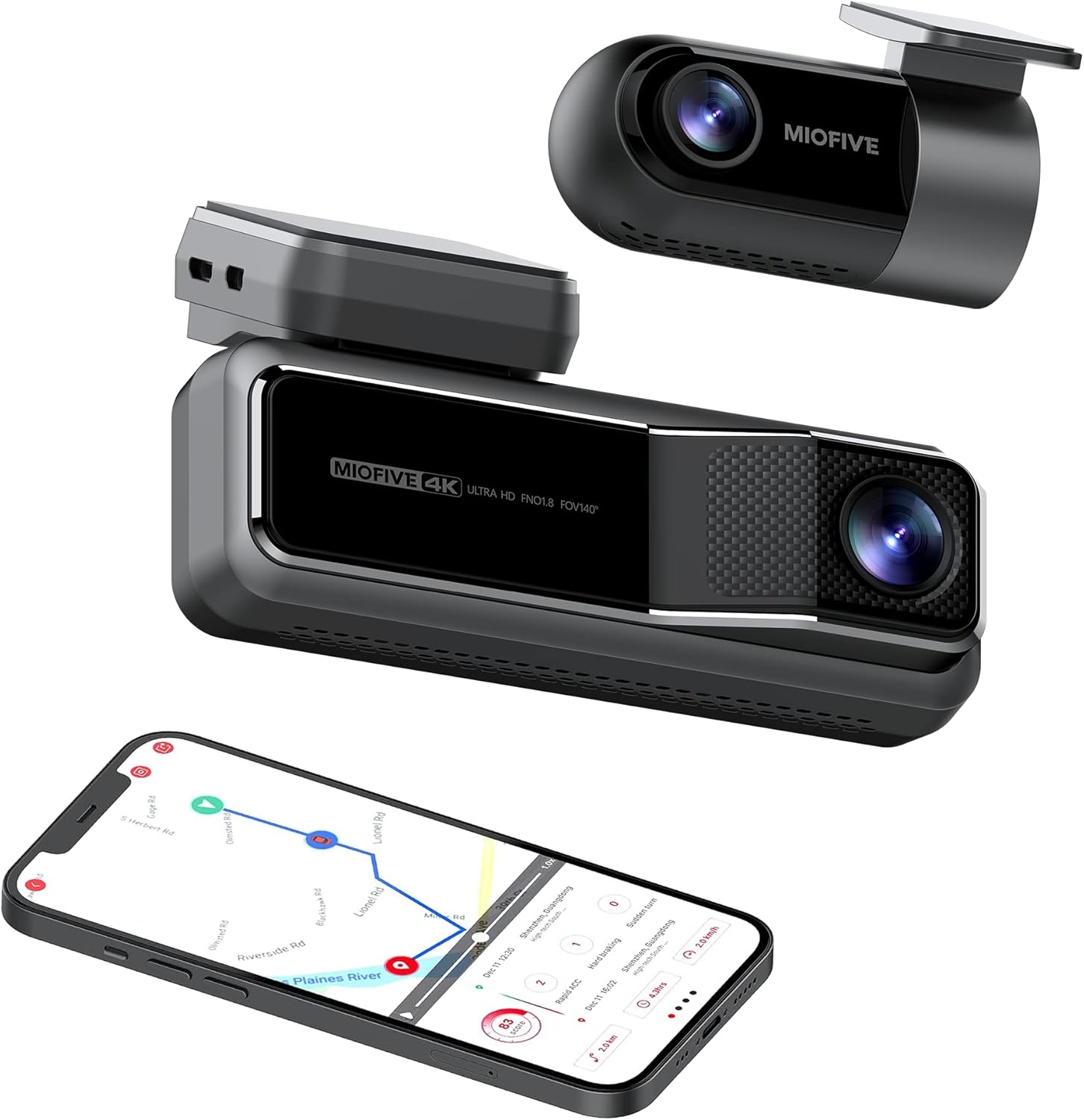
Miofive Dash Cam Front and Rear with smartphone showing map

The Miofive Dash Cam system, featuring both front and rear cameras, along with its companion mobile application.

Хайрцагт юу байна

Доор жагсаасан бүх зүйл таны багцад байгаа эсэхийг шалгана уу.

Contents of the Miofive Dash Cam package laid out

All components included in the Miofive Dash Cam Front and Rear package.

Тохиргоо ба суурилуулалт

Зураасан камер суурилуулах

  1. Хяналтын камер суурилуулах салхины шилний хэсгийг цэвэрлэ. Тоос шороо, тосгүй эсэхийг шалгаарай.
  2. Apply one of the static stickers to the cleaned area on the windshield. This helps protect your windshield and makes removal easier.
  3. Attach the main dash cam unit to the static sticker using the provided adhesive tape. Press firmly for 30 seconds to ensure a secure bond.
  4. Adjust the camera lens angle to ensure it captures the road ahead clearly, typically centered with the horizon.

Эрчим хүчийг холбох

  1. Connect the provided car charger to the dash cam's power input port.
  2. Машины цэнэглэгчийг тээврийн хэрэгслийнхээ 12 вольтын цахилгаан залгуурт (тамхины асаагуурын залгуур) залгаарай.
  3. Route the power cable neatly along the edge of the windshield and dashboard using the crow bar to tuck it into crevices, ensuring it does not obstruct your view эсвэл тээврийн хэрэгслийн удирдлага.
  4. For continuous parking monitoring, an optional hardwire kit (sold separately) is required to provide constant power to the dash cam. Refer to the hardwire kit's instructions for installation.

Арын камерын холболт

  1. Mount the rear camera on your rear windshield, typically at the top center, ensuring a clear view of the road behind. Use a static sticker and adhesive tape as with the front camera.
  2. Connect the rear camera cable to the rear camera and route it to the main dash cam unit.
  3. Plug the rear camera cable into the designated rear camera input port on the main dash cam.
Diagram showing front and rear dash cam installation in a car

Illustration of the Miofive Dash Cam Front and Rear installation process.

Ашиглалтын заавар

Асаах/унтраах

The dash cam will automatically power on and begin recording when connected to your vehicle's power supply and the ignition is turned on. It will power off automatically when the vehicle's power is cut.

Үндсэн бичлэг

Once powered on, the dash cam will automatically start loop recording. This means it continuously records video in segments, overwriting the oldest footage when the storage is full. Important footage-г дарж бичихээс сэргийлж түгжиж болно.

5G WiFi and App Control

The Miofive Dash Cam features built-in 5G WiFi for seamless connection to the Miofive mobile application. Download the Miofive app from your smartphone's app store. Once connected, you can:

Miofive App Support iconMiofive App interface on a smartphone

The Miofive App provides comprehensive control and access to your dash cam's features and recordings.

G-Sensor and Motion Detection

The built-in G-sensor automatically detects sudden impacts or collisions. When an event is detected, the dash cam will automatically lock the current video segment, preventing it from being overwritten by loop recording. This ensures critical evidence is preserved.

G-shock Sensor icon

The G-sensor ensures automatic recording and locking of footagнөлөөллийн үед.

Машины зогсоолын хяналт

With the optional hardwire kit, the dash cam can monitor your vehicle even when parked. The 24-hour parking monitor and time-lapse recording features capture disturbances or continuous footage, providing security when you're away from your car.

Image showing a smartphone with a car icon and text 'Always On Guard' related to parking monitoring

The parking monitor feature provides continuous surveillance for your vehicle when parked.

Шөнийн хараа

Equipped with the Sony Starvis IMX415 sensor and High Dynamic Range (HDR) technology, the Miofive Dash Cam delivers clear and bright video quality in low-light conditions, enhancing visibility during nighttime driving or in dimly lit environments.

Comparison of Sony Starvis Night Vision versus Normal Dashcam Sensor

Enhanced night vision capabilities for clear recordings in low light.

AI Algorithm and Go Assist

The intelligent AI algorithm monitors road conditions and provides helpful alerts. The Go Assist feature can notify you of sudden turns, braking, and accelerations, and prompt you to proceed when the vehicle ahead moves, improving driving awareness.

AI Algorithm icon

AI algorithm for smart driving assistance and alerts.

GPS хянах

Built-in GPS technology records your driving route, speed, and coordinates, providing detailed information for each journey. This data can be accessed and reviewed through the Miofive app.

Built-in GPS technology and AI algorithm features

Integrated GPS technology records essential driving data.

Засвар үйлчилгээ

Regular maintenance helps ensure the longevity and optimal performance of your Miofive Dash Cam:

Алдааг олж засварлах

Нийтлэг асуудал ба шийдэл

Үзүүлэлтүүд

ОнцлогДэлгэрэнгүй
БрэндМиофив
Загварын нэрDash Cam Dual
Бүтээгдэхүүний хэмжээс2.87 x 5.98 x 6.94 инч
Зүйлийн жин1.81 фунт
ҮйлдвэрлэгчMIOFIVE Technology Limited Co., Ltd.
CPUNovatek Processor
Зургийн мэдрэгчSony Starvis
Дэлгэц2.2 инчийн IPS дэлгэц
FOV камер140° хэвтээ ба босоо Viewing Angings
АпертурF1.8
Image Resolution (Front)4K UHD (3840x2160) @30fps
Image Resolution (Rear)2K QHD (2560x1440) @30fps
ХадгалахСуурилуулсан 128 ГБ eMMC
G-мэдрэгчBuilt-in 6 Gyro sensor
Wi-Fi2.4 / 5 GHz
Эрчим хүчний хангамжСупер конденсатор
Эрчим хүчний оролт5V / 2.4A
Ашиглалтын температур-10°C - 45°C (14°F - 113°F)
Холболтын технологиWi-Fi
Тээврийн хэрэгслийн үйлчилгээний төрөлМикроавтобус, автобус, машин, ачааны машин
Суурилуулах төрөлСалхины шил
ӨнгөХар
Miofive Dash Cam Dual specifications diagram

Detailed specifications for the Miofive Dash Cam Dual.

Баталгаат болон дэмжлэг

Miofive is committed to providing excellent customer service and support for its products:

Дэмжлэгийн талаар лавлах бол дараах хаягаар холбогдоно уу:

Имэйл: support@miofive.com

Warranty and Service information with icons for money back, customer support, and warranty coverage

Miofive's commitment to customer satisfaction and product support.

Холбогдох баримт бичиг - Dash Cam Dual

Урьдчилсанview MIOFIVE S1 Ultra 4K Dash Cam User Manual: Installation, Features, and Support
Comprehensive user manual for the MIOFIVE S1 Ultra 4K Dash Cam. Learn about installation, operation, advanced features like Parking Mode and Time Lapse, memory card management, and troubleshooting tips.
Урьдчилсанview Miofive S1 Pro User Manual - Your Guide to Safe Driving
Comprehensive user manual for the Miofive S1 Pro dash cam. Learn about installation, features, operation, and troubleshooting to maximize your driving safety and recording experience.
Урьдчилсанview MIOFIVE S1 User Manual: Installation, Operation, and Troubleshooting Guide
Comprehensive user manual for the MIOFIVE S1 Dash Cam, covering installation, setup, operation, advanced features, specifications, and troubleshooting for optimal use.
Урьдчилсанview Miofive DASH CAM хэрэглэгчийн гарын авлага: Суурилуулалт, онцлог шинж чанарууд болон алдааг олж засварлах
Miofive DASH CAM-ийн цогц хэрэглэгчийн гарын авлага, суулгах алхамууд, аппликейшны хэрэглээ, төхөөрөмжийн онцлогууд, нийтлэг асуудлуудыг олж засварлах, техникийн үзүүлэлтүүд болон чухал аюулгүй байдлын урьдчилан сэргийлэх арга хэмжээг нарийвчлан харуулсан.
Урьдчилсанview MIOFIVE S1 камерын хэрэглэгчийн гарын авлага
MIOFIVE S1 Dash Cam-ийн цогц хэрэглэгчийн гарын авлага, суурилуулалт, тохиргоо, апп холболт, функцууд, алдааг олж засварлах, техникийн үзүүлэлтүүдийг хамарсан.
Урьдчилсанview MIOFIVE MINI 2 User Manual: Installation, Operation, and Specifications
Comprehensive user manual for the MIOFIVE MINI 2 dashcam, covering installation, app connection, features, specifications, safety precautions, and support.