1. Танилцуулга
Худалдан авалт хийсэнд баярлалааasing the Ysametp 5G WiFi Bluetooth Projector. This device is designed to provide a high-quality home theater experience with its native 1080p Full HD resolution, 4K support, and integrated Android system. Please read this manual thoroughly before using the projector to ensure proper operation and to maximize its lifespan.
2. Аюулгүй байдлын мэдээлэл
Please observe the following safety precautions to prevent damage to the projector and ensure user safety:
- Эрчим хүчний хангамж: Use only the specified power adapter. Ensure the power outlet voltage нь проекторын шаардлагад нийцдэг.
- Агааржуулалт: Агааржуулалтын нүхийг бүү бөглөөрэй. Хэт халалтаас сэргийлж, проекторын эргэн тойронд хангалттай агаарын урсгалыг хангана уу.
- Байршил: Проекторыг тогтвортой, тэгш гадаргуу дээр байрлуул. Нарны шууд тусгал, дулааны эх үүсвэрийн ойролцоо эсвэл өндөр чийгшилтэй эсвэл тоос шороотой орчинд байрлуулахаас зайлсхий.
- Цэвэрлэгээ: Цэвэрлэхийн өмнө цахилгааныг салга. Зөөлөн, хуурай даавуу хэрэглээрэй. Шингэн эсвэл аэрозоль цэвэрлэгч хэрэглэж болохгүй.
- Нүд хамгаалах: l байх үед проекторын линз рүү шууд харж болохгүйamp тод гэрэл нь нүдийг гэмтээж болзошгүй тул асаалттай байна.
- Засвар: Проекторыг өөрөө засах гэж бүү оролдоорой. Бүх үйлчилгээг мэргэшсэн боловсон хүчинд шилжүүлээрэй.
3. Багцын агуулга
Бүх зүйл багцад байгаа эсэхийг шалгана уу:
- Ysametp 5G WiFi Bluetooth Projector (Model DE-M8-E-An)
- Алсын удирдлага
- Power Cable (AC 220V with Schuko plug)
- HDMI кабель
- Хэрэглэгчийн гарын авлага
4. Бүтээгдэхүүн дууссанview
Проекторын бүрэлдэхүүн хэсгүүд болон интерфэйсүүдтэй танилцаарай.
4.1 Урд хэсэг View

Зураг: Урд view of the Ysametp Projector, highlighting the projection lens and side ventilation grilles.
4.2 Rear and Side Interfaces
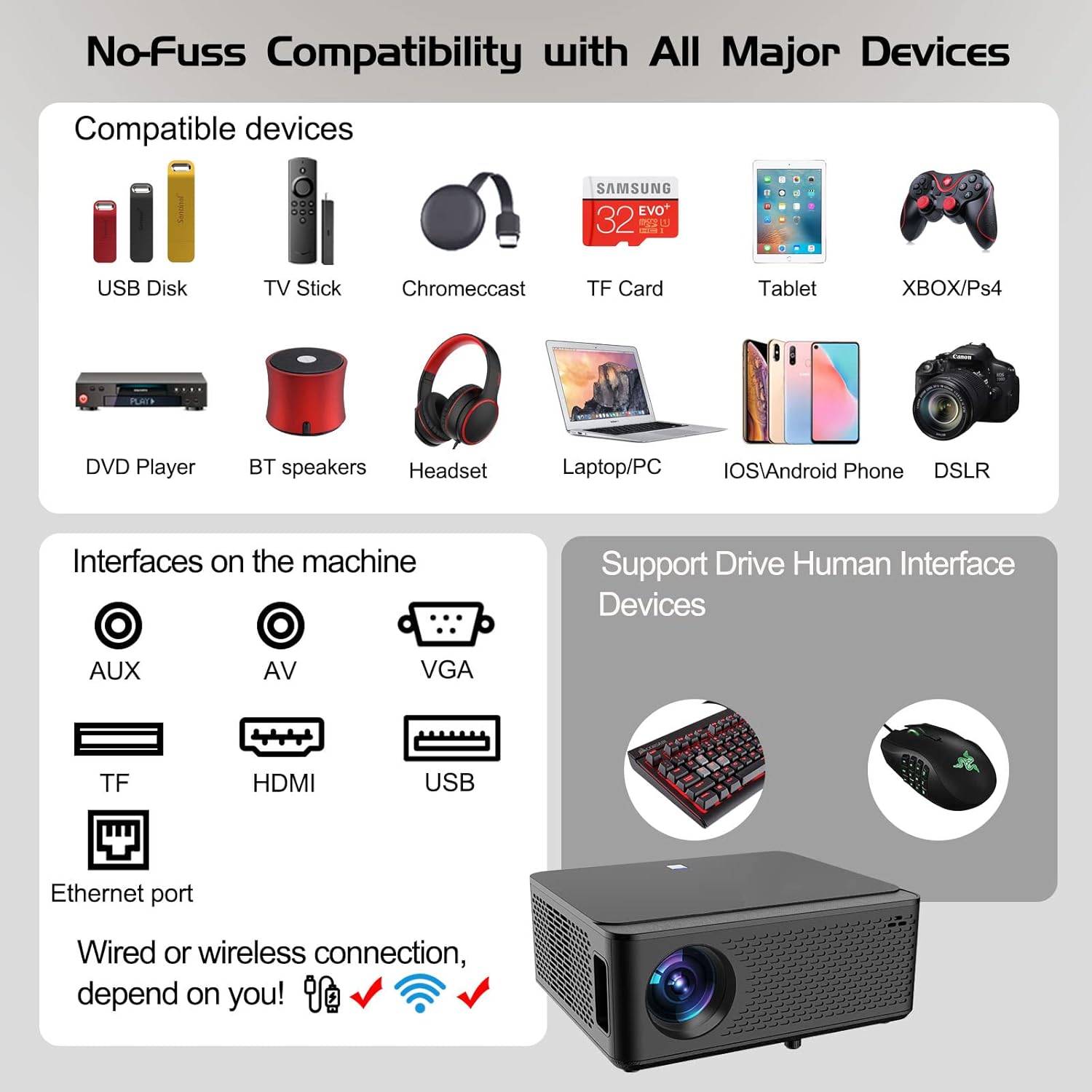
Image: Diagram illustrating the various input and output ports available on the Ysametp Projector, including USB, HDMI, AV, VGA, TF card slot, and Ethernet port.
The projector features a comprehensive set of ports for versatile connectivity:
- Ethernet порт: Утастай интернет холболтын хувьд.
- VGA порт: Хуучин компьютеруудтай холбогдох зориулалттай.
- USB-A порт: For connecting USB flash drives or external devices.
- HDMI порт: For high-definition audio and video input from various sources.
- AV оролт: For connecting analog audio/video devices.
- 3.5 мм аудио гаралт: Гадаад чанга яригч эсвэл чихэвч холбох зориулалттай.
- TF картын оролт: For reading media from Micro SD cards.
- Эрчим хүчний оролт: Хувьсах гүйдлийн тэжээлийн кабелийг холбох зориулалттай.
4.3 Дээд удирдлага
The top of the projector includes a power button for basic on/off functionality. Further controls are available via the remote control and the on-screen display.
4.4 Фокусын тохируулга
A mechanical focus adjustment screw is located on the side of the lens for manual image clarity control.
5. Тохиргоо
5.1 Байршил
Position the projector on a stable surface. The projection distance will determine the screen size. For optimal viewпроектор нь проекцийн гадаргуутай перпендикуляр байгаа эсэхийг шалгаарай.
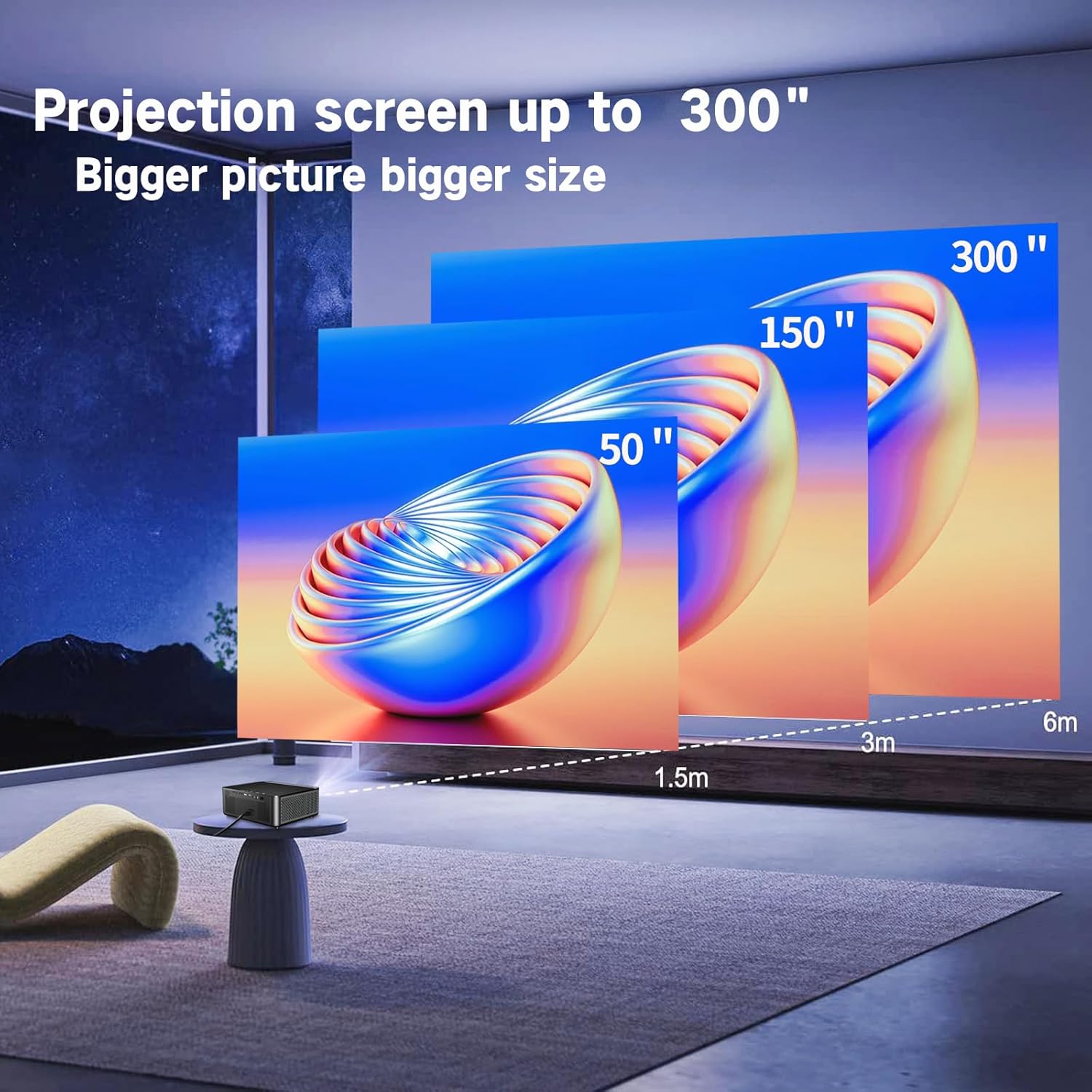
Image: Illustration demonstrating recommended projection distances for achieving screen sizes of 50, 150, and 300 inches.
5.2 Эрчим хүчний холболт
- Цахилгааны кабелийг проекторын тэжээлийн оролтод холбоно.
- Цахилгааны кабелийн нөгөө үзүүрийг тохирох цахилгаан залгуурт холбоно.
5.3 Анхдагч асаалттай
- Проектор эсвэл алсын удирдлага дээрх цахилгаан товчийг дарж төхөөрөмжийг асаана уу.
- Allow a few moments for the projector to boot up.
5.4 Төвлөрөл ба гол чулууг засах
After powering on, adjust the image for clarity and proper geometry:
- Фокус: Rotate the mechanical focus adjustment screw near the lens until the image appears sharp and clear.
- Түлхүүр чулууны залруулга: If the projected image is trapezoidal (wider at the top or bottom), use the 4D keystone correction feature via the on-screen menu to adjust the image corners until it forms a perfect rectangle.

Image: Diagram showing how 4P/4D keystone correction can be used to adjust the corners of a projected image to achieve a rectangular shape.
6. Ашиглалтын заавар
6.1 Гадаад төхөөрөмжүүдийг холбох
The projector supports various connection methods:
- HDMI: Connect gaming consoles (PS4, Xbox), laptops, or other HDMI-enabled devices using an HDMI cable.
- USB: Insert a USB flash drive into the USB-A port to play media fileшууд.
- TF карт: Insert a Micro SD (TF) card into the TF card slot to access media.
- VGA/AV: Use these ports for older devices requiring analog connections.
- Bluetooth: Сайжруулсан аудио авахын тулд Bluetooth чанга яригч эсвэл чихэвчийг холбоно уу.

Image: The projector shown with various compatible devices, including laptops, smartphones, gaming consoles, USB drives, and external speakers, demonstrating its versatile connectivity.
6.2 Using the Integrated Android System
The projector comes with an integrated Android system, allowing access to a wide range of applications.

Image: The projector displaying its Android interface, featuring icons for popular streaming services and apps such as Netflix, YouTube, Prime Video, Hulu, Spotify, and TikTok.
- Сүлжээний холболт: Connect the projector to your home Wi-Fi network via the settings menu or use an Ethernet cable for a wired connection.
- Апп хандалт: Navigate the Android interface using the remote control. You can download and install applications from the Google Play Store.
- Дамжуулж байна: Enjoy content from pre-installed or downloaded streaming services.
6.3 5G WiFi Screen Mirroring
Mirror your smartphone, tablet, or PC screen wirelessly to the projector.

Image: A family enjoying content mirrored from a smartphone onto the large projected screen, illustrating the 5G WiFi Screen Mirroring feature for iOS, Android, and Windows devices.
- Ensure both the projector and your device are connected to the same 5G WiFi network.
- Select the "Screen Mirroring" option on the projector's menu.
- On your smartphone/tablet/PC, activate its screen mirroring function (e.g., "Smart View" for Android, "AirPlay" for iOS, "Cast" for Windows).
- Select the projector from the list of available devices to establish the connection.
7. Засвар үйлчилгээ
7.1 Линзийг цэвэрлэх
Проекторын линзийг оптик гадаргууд зориулсан зөөлөн, хөвөнгүй даавуугаар зөөлөн арчина. Зүлгүүрийн цэвэрлэгч эсвэл хэт их хүч хэрэглэж болохгүй.
7.2 Проекторын их биеийг цэвэрлэх
Проекторын гадна талыг зөөлөн, хуурай даавуугаар цэвэрлэ. Хүчтэй химийн бодис эсвэл уусгагч хэрэглэхээс зайлсхий.
7.3 Optical Engine Protection
The projector features a full-sealed optical engine designed to prevent dust from entering the internal components, reducing the need for frequent internal cleaning and extending the device's lifespan.

Зураг: Дотоод view diagram of the projector's full-sealed optical engine, highlighting its design to prevent dust from entering and affecting performance.
7.4 лamp Амьдрал
The projector utilizes advanced SmarEco technology to minimize energy consumption and extend the lamp's lifespan up to 60,000 hours, providing long-term reliability.

Зураг: Нарийвчилсан диаграммыг үзүүлэвasing the projector's lamp technology, indicating a lifespan of over 30,000 hours.
8. Алдаа засах
Хэрэв та проектортой холбоотой асуудалтай тулгарвал дараах нийтлэг асуудал, шийдлүүдийг үзнэ үү.
| Асуудал | Боломжит шалтгаан | Шийдэл |
|---|---|---|
| Дэлгэц дээр зураг байхгүй. | Power cable loose; incorrect input source; device not connected. | Check power connections. Select correct input source (HDMI, AV, etc.). Ensure external device is powered on and connected properly. |
| Зураг бүдэг байна. | Focus not adjusted; projector too far/close. | Линз дээрх фокусын цагиргийг тохируулна уу. Проектор проекцын оновчтой зайд байгаа эсэхийг шалгаарай. |
| Image is trapezoidal. | Проектор дэлгэцтэй перпендикуляр биш. | Use the 4D keystone correction feature in the settings menu to adjust the image shape. |
| Дуу алга. | Volume too low; external audio device not connected; incorrect audio output selected. | Increase volume. Check external speaker/headphone connection. Ensure correct audio output is selected in settings. |
| WiFi-д холбогдох боломжгүй байна. | Нууц үг буруу; хүрээнээс гадуур; сүлжээний асуудал. | Verify WiFi password. Move projector closer to router. Restart router and projector. |
9. Техникийн үзүүлэлтүүд
Key technical specifications for the Ysametp 5G WiFi Bluetooth Projector (Model DE-M8-E-An):
- Брэнд: Ysametp
- Загварын дугаар: DE-M8-E-An
- Өнгө: Хар
- Бүтээгдэхүүний төрөл: Зөөврийн проектор
- Холболтын технологи: HDMI, USB, Wi-Fi (5G), Bluetooth
- Онцлог шинж чанарууд: Integrated WiFi, Android System, 4D Keystone Correction
- Тохиромжтой төхөөрөмжүүд: Game Consoles, Speakers, Laptops, Smartphones, Tablets
- Дэлгэцийн нягтрал: Төрөлх 1920 x 1080 (Бүтэн HD)
- Хамгийн их дэлгэцийн нягтрал: 4096 x 2160 (4K Support)
- Дэлгэцийн төрөл: DLP
- Бүтээгдэхүүний хэмжээ: 26L x 23W x 11H сантиметр
- Формат хүчин зүйл: Зөөврийн
- Суурилуулах төрөл: Ширээний бэхэлгээ
- Lamp Амьдрах хугацаа: 60,000 цаг хүртэл

Image: A visual comparison highlighting the projector's 20,000 Lumens brightness, Native 1080P resolution, and 4K support, contrasting it with a lower specification projector.
10. Баталгаат хугацаа ба дэмжлэг
The Ysametp Projector comes with a 3-year service warranty. For technical support or warranty claims, please contact Ysametp customer service through your purchase platform or the official Ysametp webсайт.


