1. Танилцуулга
The Café Couture Countertop Oven is designed to flawlessly prepare a wide range of recipes, from snacks to elaborate meals. It features 14 essential cooking modes, including Air Fry, CrispFinish, Bake, Broil, Roast, Toast, Bagel, Pizza, Cookies, Proof, Dehydrate, Slow Cook, Reheat, and Keep Warm. This manual provides detailed instructions for safe and efficient operation of your new appliance.

Урд view of the Café Couture Countertop Oven in Matte White, showcasing a roasted chicken on a baking tray inside the illuminated oven cavity.
2. Аюулгүй байдлын чухал мэдээлэл
Always read all instructions before using this appliance. Basic safety precautions should be followed, including:
- Халуун гадаргуу дээр хүрч болохгүй. Бариул эсвэл бариулыг ашигла.
- Цахилгаан цочролоос хамгаалахын тулд утас, залгуур, цахилгаан хэрэгслийг ус болон бусад шингэнд дүрж болохгүй.
- Хүүхэд болон түүний ойролцоо ямар нэгэн цахилгаан хэрэгсэл ашиглаж байгаа үед нарийн хяналт тавих шаардлагатай.
- Ашиглаагүй үед болон цэвэрлэхийн өмнө залгуураас салга. Эд ангиудыг өмсөх, тайлахын өмнө хөргөнө.
- Гэмтсэн утас, залгууртай, эсвэл төхөөрөмж эвдэрсэн эсвэл ямар нэгэн байдлаар гэмтсэний дараа ямар ч төхөөрөмжийг бүү ажиллуул.
- Төхөөрөмжийн үйлдвэрлэгчээс зөвлөдөггүй нэмэлт хэрэгслийг ашиглах нь гэмтэл учруулж болзошгүй.
- Гадаа бүү ашигла.
- Ширээ, лангууны ирмэг дээр утсыг өлгөх, халуун гадаргуу дээр хүрч болохгүй.
- Халуун хий, цахилгаан шатаагч, халсан зууханд хийж болохгүй.
- Халуун тос эсвэл бусад халуун шингэн агуулсан төхөөрөмжийг зөөхдөө маш болгоомжтой байх хэрэгтэй.
- Эхлээд залгуурт залгаж, дараа нь утсыг ханын залгуурт холбоно уу. Салахын тулд аливаа удирдлагыг "унтраах" болгож, залгуурыг залгуураас салга.
- Төхөөрөмжийг зориулалтаас өөр зориулалтаар бүү ашиглаарай.
3. Хайрцагт юу байна
Your Café Couture Countertop Oven comes with the following accessories:
- Heavy-Duty Wire Rack
- Талх барих
- 12" Pizza Pan
- Агаарын шарсан мах/усгүйжүүлэх сагс
- Бутлуурын тавиур
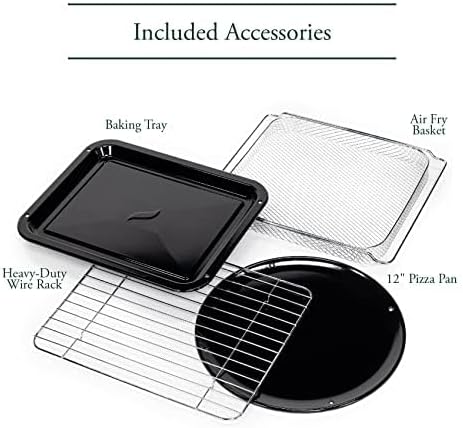
A collection of accessories included with the oven: a heavy-duty wire rack, a baking tray, a 12-inch pizza pan, and an air fry/dehydrate basket.
This video showcases the various accessories included with the Café Couture Oven, such as the heavy-duty wire rack, pizza pan, baking pan, and air fry basket, demonstrating their use with different foods like bagels, pizza, and avocado fries.
4. Тохиргоо
4.1 Анхны бэлтгэл
- Before first use, wipe the interior walls of the oven with a damp хөвөн.
- Accessories may be cleaned in the dishwasher, but hand washing with warm, soapy water is recommended for longevity.
4.2 Байршил
- Place the oven on a level, heat-resistant surface.
- Ensure at least 4 inches of clearance on all sides for proper ventilation.
- Зуухны дээд хэсэгт дагалдах хэрэгслүүдээс бусад зүйлийг бүү байрлуул, бүү хадгал.
4.3 First Use Operation
- Plug in the oven. The appliance alarm will sound, and the control display will illuminate.
- It is recommended to operate the oven empty on Air Fry mode for 20 minutes at 400°F (205°C) before cooking for the first time. This helps to eliminate any manufacturing odors.
- During this initial operation, the unit may emit visible vapors and a slight odor. This is normal, safe, and not detrimental to the oven.
This video provides initial setup instructions for the Café Couture Oven, including wiping the interior, cleaning accessories, proper placement on a heat-resistant surface, and the recommended first-time operation on Air Fry mode to eliminate manufacturing odors.
5. Ашиглалтын заавар
5.1 Хоол хийх горимыг сонгох
- Rotate the 'Cook Mode' knob until your desired cooking mode is shown on the control display.
- When using the oven for the first time, default cooking settings will be displayed. Otherwise, the oven will always store the last used settings for any given cooking mode.
5.2 Adjusting Cooking Mode Settings
- The settings for each cooking mode can be adjusted using the 'Temp/Time/Slices/Shade' knob.
- Rotate the knob clockwise to increase the temperature or time.
- Rotate the knob counter-clockwise to decrease the temperature or time.
- The 'Temp/Time/Slices/Shade' knob also functions as a button. Pushing the button toggles the setting being adjusted (e.g., between temperature and time).
5.3 Starting the Oven
- After selecting your desired cooking mode and adjusting the settings, place the food in the oven.
- Хоол хийж эхлэхийн тулд "Эхлүүлэх" товчийг дарна уу.
- For Bake, Roast, and Cookies modes, the 'Preheating' indicator will illuminate on the control display, and the oven will begin heating to the set temperature.
- When the oven has reached the set temperature, the oven alarm will sound, and the 'Preheating' indicator will disappear. The 'Press Start' reminder will illuminate. If the 'Start' button is not pressed within 10 minutes, the oven will automatically turn off.
- The preheat mode may be skipped manually by pressing the 'Start' button a second time. The cooking timer will begin counting down immediately.
- All other cooking modes do not require preheating. When starting one of these modes, the cooking timer will begin counting down immediately.
5.4 Cancelling a Cooking Mode
- When the oven has finished cooking, it will shut off automatically, and the oven alarm will sound to indicate that the cooking cycle is complete.
- The cooking cycle can also be ended manually by pressing the 'Cancel' button.
5.5 Turning on the Oven Light
- To turn on the oven light, press the 'Light' button to the left of the control display.
- To turn off the light, press the 'Light' button again.
- The oven light will also automatically turn on whenever the oven door is opened.
5.6 Activating the Convection Fan
- Some cooking modes offer an optional convection feature.
- To manually activate the convection fan for these cooking modes, press the 'Conv.' button to the right of the control display.

The Café Couture Countertop Oven's control panel showing 'ROAST' mode, alongside a comprehensive list of its 14 cooking modes: Air Fry, Crisp Finish, Bake, Broil, Roast, Toast, Bagel, Pizza, Cookies, Proof, Dehydrate, Slow Cook, Reheat, and Keep Warm.
This video demonstrates the CrispFinish feature of the Café Couture Oven, showing how it can be used to brown, caramelize, melt, or crisp dishes like crème brûlée.
This video provides a guide on how to use the Café Couture Oven, covering selection of cooking modes, adjusting settings, starting the oven, and cancelling a cooking cycle. It also shows how to turn the oven light on/off and activate the convection fan.
This video highlights the large capacity of the Café Couture Oven, demonstrating how it can accommodate various dishes like a whole roasted chicken, lasagna, and pizza.
6. Цэвэрлэгээ ба засвар үйлчилгээ
6.1 Дотор цэвэрлэгээ
- Цэвэрлэхийн өмнө зуухаа үргэлж салгаад бүрэн хөргөхийг хүлээнэ үү.
- Дотор ханыг зараар арчихamp sponge and mild detergent. Avoid abrasive cleaners or scouring pads.
- Зөрүүд толбыг арилгахын тулд хүнсний сода, устай зуурмаг түрхэж, хэдэн минут байлгасны дараа арчиж цэвэрлэнэ.
6.2 Цэвэрлэгээний хэрэгслүүд
- All included accessories (wire rack, baking tray, pizza pan, air fry/dehydrate basket, crumb tray) can be washed by hand with warm, soapy water.
- Most accessories are dishwasher safe, but hand washing is recommended to preserve their finish and extend their lifespan.
- Үйрмэгтэй тавиурыг аяга таваг угаагчинд хийж болохгүй.
6.3 Гадна талын цэвэрлэгээ
- Гадна талын гадаргууг зөөлөн арчиж, damp даавуу.
- Өнгөлгөөг гэмтээж болох хүчтэй химийн бодис, зүлгүүрийн материалыг ашиглахаас зайлсхий.
7. Алдаа засах
| Асуудал | Боломжит шалтгаан | Шийдэл |
|---|---|---|
| Зуух асахгүй байна. | Холбогдоогүй; хүчээ өгөөчtage; Хэлхээ таслагч уналтад орсон. | Зуух нь ажлын залгуурт найдвартай холбогдсон эсэхийг шалгаарай. Өрхийн таслуурыг шалгана уу. |
| Хоол жигд чанаж болохгүй. | Incorrect rack position; overcrowding; uneven food distribution. | Refer to recipe for recommended rack position. Avoid overcrowding the oven. Arrange food in a single layer for best results. |
| Oven emits smoke or strong odor during first use. | Үйлдвэрлэлийн үлдэгдэл тос. | This is normal. Operate empty on Air Fry mode at 400°F for 20 minutes to burn off residues. Ensure adequate ventilation. |
| Display shows "Press Start" but oven doesn't start. | Preheating cycle complete, awaiting confirmation. | Press the 'Start' button again to begin the cooking timer. |
8. Техникийн үзүүлэлтүүд
- Брэнд: Кафе
- Загварын нэр: Café™ Couture™ Oven with Air Fry
- Загварын дугаар: C9OAAAS4RW3
- Өнгө: Матт цагаан
- Бүтээгдэхүүний хэмжээ: 17"D x 18.6"W x 14"H
- Барааны жин: 28 фунт
- Хүчин чадал: 0.8 куб. фут.
- Хяналтын төрөл: Бариул
- Хаалганы загвар: Унждаг хаалга
- Хаалганы материалын төрөл: Чанартай шил
- Эрчим хүчний эх үүсвэр: AC
- Температурын хүрээ: Фаренгейтийн 80 - 450 градус
- Тавиурын тоо: 1
- Онцлог шинж чанар: CrispFinish™ - Use CrispFinish at the end of any standard cooking mode to melt, caramelize, brown or crisp, and put the perfect finishing touch on any of your signature dishes.
- Холболт: WiFi & Smart Connected, Voice Control (via SmartHQ app, Echo, or Google Home devices)
- UPC: 084691857563

Хажуу тал view of the Café Couture Countertop Oven in Matte White, illustrating its dimensions: 18.6 inches width, 14 inches height, and 17 inches depth. An air fry basket is visible inside.

A hand interacting with the SmartHQ app on a smartphone, demonstrating remote control capabilities for the Café Couture Countertop Oven. The oven's display shows 'AIR FRY' mode.
9. Баталгаат хугацаа ба дэмжлэг
For detailed warranty information, please refer to the warranty card included with your product packaging or visit the official Café Appliances website. For customer support, technical assistance, or to register your product, please visit the Café Appliances support page or contact their customer service line.
You can also connect your Café Smart Appliance by downloading the free SmartHQ app from your Apple or Android smartphone. Open the app, sign in or create an account, and follow the instructions to connect your appliance.
- Онлайн дэмжлэг: -д зочилно уу Café Store on Amazon бүтээгдэхүүний мэдээлэл, нөөцийн хувьд.
- SmartHQ App: Available on Apple App Store and Google Play Store.


