Танилцуулга
Thank you for choosing the XTUGA CT120 12-Channel Audio Mixer. This professional audio mixing console is designed for a wide range of applications, from live performances and webcasting to studio recording and home audio setups. It features versatile connectivity options, including Bluetooth and USB, along with precise sound control for optimal audio quality.
Please read this manual thoroughly before operating the device to ensure proper usage, maximize performance, and prevent damage.

Зураг 1: Урд view of the XTUGA CT120 12-Channel Audio Mixer, showcasing all inputs, controls, and outputs.
Аюулгүй байдлын урьдчилан сэргийлэх арга хэмжээ
To ensure safe operation and prolong the life of your XTUGA CT120 mixer, please observe the following:
- Operate the device in a well-ventilated environment, away from heat sources and open flames.
- Avoid contact with water or any liquids. Do not expose the mixer to rain or moisture.
- If the product is wireless, keep it away from other sources of interference during operation.
- Төхөөрөмжийг өөрөө задлах, засах гэж бүү оролдоорой. Бүх үйлчилгээг мэргэшсэн боловсон хүчинд шилжүүлээрэй.
- For products requiring power, use only the standard power supply provided or specified. Incorrect voltagтоног төхөөрөмжийг гэмтээж болно.
- Avoid scratching the casing and surface of the equipment with sharp objects.

Figure 2: Important safety guidelines for handling and operating the mixer.
Тохиргоо
Эрчим хүчний холболт
Connect the provided power adapter to the mixer's power input and then to a suitable electrical outlet. Ensure the power switch is in the OFF position before connecting.
Оролтын холболтууд
The CT120 mixer features 12 channels, each with XLR and 1/4-inch line inputs. Connect your microphones, instruments, or other audio sources to the appropriate input jacks.
- XLR оролтууд: For microphones and other balanced audio sources.
- 1/4-inch Line Inputs: For instruments, line-level devices, and unbalanced audio sources.

Figure 3: The +48V phantom power feature, essential for condenser microphones. Each channel supports independent phantom power.
+48V Phantom Power: For condenser microphones, activate the +48V phantom power switch. This supplies the necessary voltage to the microphone via the XLR cable. Ensure dynamic microphones are not connected when phantom power is engaged, unless they are designed to handle it.
Гаралтын холболтууд
Connect your main speakers or recording devices to the L MAIN OUT R (XLR or 1/4-inch TRS) outputs. Use the PHONES output for headphone monitoring.
Ашиглалтын заавар
Үндсэн үйл ажиллагаа
- Асаах: After all connections are made, switch on the power.
- Үр ашгийн тохируулга: Use the GAIN knob for each channel to set the input level. Adjust until the signal is strong but does not clip (indicated by the PEAK LED).
- Сувгийн хэмжээ: Use the channel faders to control the individual volume of each input.
- Үндсэн холимог: Adjust the L MAIN R faders to control the overall output volume.
Тэнцвэржүүлэх (EQ)
Each channel features a 3-band equalizer (HI, MF, LF) for tone shaping. Adjust these knobs to enhance or cut specific frequencies:
- HI (High Frequency): Adjusts treble.
- MF (Mid Frequency): Adjusts midrange.
- LF (бага давтамж): Adjusts bass.

Зураг 4: Нарийвчилсан view of the 3-band EQ controls, allowing for precise sound adjustments for each channel.
Bluetooth холболт
The CT120 supports wireless Bluetooth streaming. To connect a device:
- Activate Bluetooth on your mobile phone, tablet, or other smart device.
- On the mixer's digital MP3 player section, select the Bluetooth mode.
- хайх "BT-Speaker" in your device's Bluetooth settings and pair.
- Холбогдсоны дараа та аудиог утасгүйгээр холигч руу дамжуулж болно.

Figure 5: The mixer's Bluetooth function allows seamless wireless audio streaming from compatible smart devices.
USB/MP3 Player and Recording
The integrated USB interface allows for direct playback from USB drives and connection to a computer for recording and editing.
- USB тоглуулах: Insert a USB flash drive containing MP3/WAV/WMA files into the USB port. Use the digital MP3 player controls to navigate and play tracks.
- Компьютерийн холболт: Connect the mixer to your computer via a USB cable. The mixer will be recognized as an audio interface, allowing you to record the mixed audio directly to your computer or play audio from your computer through the mixer.

Figure 6: The USB port enables connection to computers for recording and playback, and direct playback from USB flash drives.
Хяналт
Use the 3.5mm PHONES jack for real-time monitoring of your mix. Adjust the HEADPHONES volume knob to control the monitoring level.

Figure 7: The dedicated headphone output allows for real-time monitoring of the audio mix.
Түвшингийн үзүүлэлтүүд
The PFL/AFL and L MAIN R LED level indicators provide visual feedback on signal levels, helping you prevent clipping and ensure optimal audio output.
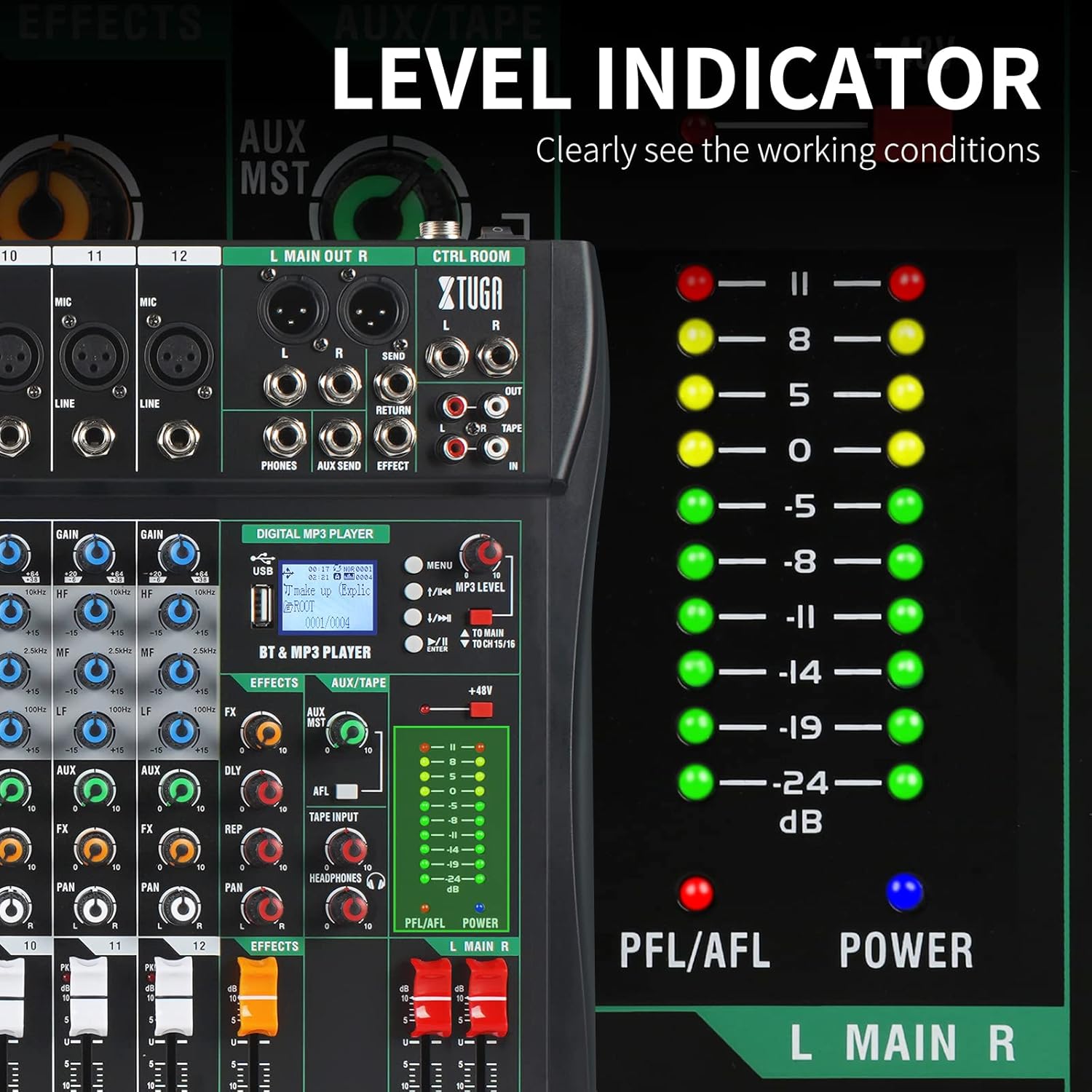
Figure 8: The LED level indicators clearly display the working conditions and signal strength of the audio output.
Засвар үйлчилгээ
Regular maintenance helps ensure the longevity and optimal performance of your XTUGA CT120 mixer.
- Цэвэрлэгээ: Use a soft, dry cloth to clean the exterior of the mixer. For stubborn dirt, a slightly damp cloth can be used, followed by a dry cloth. Do not use abrasive cleaners, solvents, or waxes.
- Тоос хамгаалах: Keep the mixer covered when not in use to prevent dust accumulation, especially on faders and knobs. The sealed rotary controls are designed to resist dust, but general cleanliness is still important.
- Хадгалах: Миксерийг сэрүүн, хуурай газар, нарны шууд тусгал болон хэт өндөр температураас хол хадгална уу.
- Кабелийн менежмент: Холбогч болон портуудыг гэмтээхээс сэргийлж бүх кабелийг цэвэрхэн байрлуулж, ачаалал өгөхгүй байгаа эсэхийг шалгаарай.
Алдааг олж засварлах
| Асуудал | Боломжит шалтгаан | Шийдэл |
|---|---|---|
| Хүч чадалгүй | Power cable not connected; Power switch off; Faulty power adapter/outlet | Check power cable connection; Ensure power switch is ON; Try a different power outlet or adapter. |
| Дууны гаралт байхгүй | Main volume faders down; Channel faders down; Incorrect input/output connections; Mute engaged | Increase main and channel faders; Verify all audio connections; Check for any mute buttons. |
| Гажуудсан дуу чимээ | Input gain too high; Output level too high; Faulty cable/microphone | Reduce GAIN knob for the affected channel; Lower main output level; Test with different cables/microphones. |
| Bluetooth холбогдоогүй байна | Mixer not in Bluetooth mode; Device not discoverable; Interference | Ensure mixer is in Bluetooth mode; Make sure your device's Bluetooth is on and discoverable; Move closer to the mixer; Restart both devices. |
| Фантом хүч ажиллахгүй байна | Phantom power switch off; Faulty XLR cable; Condenser microphone not connected | Ensure +48V switch is ON; Check XLR cable integrity; Confirm a condenser microphone is in use. |
Үзүүлэлтүүд
| Онцлог | Дэлгэрэнгүй |
|---|---|
| Загвар | CT120 |
| Сувгийн тоо | 12 |
| Аудио оролт | XLR, Balanced Line (1/4 inch TRS) |
| Гаралтын холболтын төрөл | 1/4 inch TRS jack, XLR |
| Фантомын хүч | +48V (selectable per channel) |
| Холболтын технологи | USB, Bluetooth |
| Эрчим хүчний эх үүсвэр | Цахилгаан кабель |
| Хэмжээ (багц) | 57.29 x 45.6 x 12.2 см (22.56 x 17.95 x 4.8 инч) |
| Зүйлийн жин | 5.57 килограмм (12.28 фунт) |
| Үйлдвэрлэгч | XTUGA |
| Гарал үүслийн улс | Хятад |
Баталгаат болон дэмжлэг
For warranty information and technical support, please contact XTUGA customer service. Details regarding warranty periods and service procedures are typically provided with your purchase documentation or can be found on the official XTUGA webсайт.
When contacting support, please have your product model (CT120) and purchase details ready.
Онлайн нөөцүүд: For additional support, FAQs, and driver downloads (if applicable), please visit the official XTUGA webсайт.