REAL-EL X-770 Portable Speaker User Manual
Загвар: EL121600004
1. Танилцуулга
Thank you for choosing the REAL-EL X-770 Portable Speaker. This manual provides essential information for the safe and efficient operation of your device. Please read it thoroughly before use and retain it for future reference.
2. Аюулгүй байдлын мэдээлэл
To ensure safe operation and prevent damage to your device, please observe the following precautions:
- Чанга яригчийг ус, чийг, хэт өндөр температурт бүү байлга.
- Чанга яригчийг унагах эсвэл хүчтэй нөлөөнд оруулахаас зайлсхий.
- Чанга яригчийг өөрөө задлах, засах эсвэл өөрчлөх гэж бүү оролдоорой. Тусламж авахын тулд мэргэшсэн үйлчилгээний ажилтантай холбогдоно уу.
- Чанга яригчийг дулааны эх үүсвэр, нарны шууд тусгал, шатамхай материалаас хол байлга.
- Use only the specified charging cable and power adapter (if included) to charge the device.
- Дууны өндөр түвшинд удаан хугацаагаар сонсох нь сонсголд гэмтэл учруулж болзошгүй.
3. Багцын агуулга
Хайрцагыг болгоомжтой задалж, бүх зүйл байгаа эсэхийг шалгаарай:
- REAL-EL X-770 Portable Speaker Unit
- Charging Cable (USB-A to USB-C, or similar, specific type not provided)
- Хэрэглэгчийн гарын авлага (энэ баримт бичиг)
Note: The product data mentioned "Camera Body" as an included component. This is likely an error. The actual included components for a portable speaker typically include the speaker unit and a charging cable.
4. Бүтээгдэхүүн дууссанview
Familiarize yourself with the main components of your REAL-EL X-770 Portable Speaker:
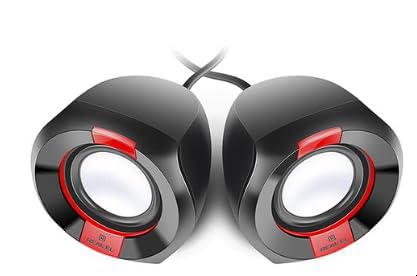
Зураг 1: Урд view of the REAL-EL X-770 Portable Speaker. This image displays the speaker's compact design, the main speaker grille, and typical control buttons for power, volume, and playback.
- Цахилгаан товч: Чанга яригчийг асаах/унтраахын тулд дараад барина уу.
- Дууг нэмэгдүүлэх/Дараах дууны товчлуур: Дууны хэмжээг нэмэгдүүлэхийн тулд богино дарж, дараагийн дууг удаан дарна уу.
- Дууг багасгах/Өмнөх дууны товчлуур: Дууны дууг багасгахын тулд богино дарж, өмнөх дууг удаан дарна уу.
- Тоглуулах/түр зогсоох товчлуур: Аудио тоглуулах эсвэл түр зогсоохын тулд дарна уу.
- Горимын товчлуур: Press to switch between input modes (e.g., Bluetooth, HDMI, AUX).
- Цэнэглэх порт: Цэнэглэх кабелийг холбох зориулалттай.
- HDMI порт: For audio input from compatible devices.
5. Тохиргоо
5.1 Чанга яригчийг цэнэглэх
- Цэнэглэгчийн кабелийг чанга яригчийн цэнэглэх порт руу холбоно уу.
- Connect the other end of the charging cable to a USB power adapter (not included) or a powered USB port.
- Чанга яригч цэнэглэж байгааг харуулахын тулд цэнэглэх заагч гэрэл асна (өнгө нь өөр байж болно).
- Once fully charged, the indicator light may change color or turn off. Disconnect the speaker from the charger.
5.2 Асаах/унтраах
- To power ON: Press and hold the Цахилгаан товч for approximately 3 seconds. An indicator light will turn on, and you may hear an audible prompt.
- To power OFF: Press and hold the Цахилгаан товч for approximately 3 seconds. The indicator light will turn off, and you may hear an audible prompt.
6. Чанга яригчийг ажиллуулах
6.1 Bluetooth холболт
- Ensure the speaker is powered ON and in Bluetooth pairing mode (usually indicated by a flashing blue LED). If not, press the Горим товчлуур until Bluetooth mode is active.
- Гар утасны төхөөрөмж дээрээ (ухаалаг утас, таблет, компьютер) Bluetooth-г асаагаад боломжтой төхөөрөмжүүдийг хайгаарай.
- Select "REAL-EL X-770" from the list of found devices.
- Once paired, the speaker will emit a confirmation sound, and the Bluetooth indicator light will stop flashing and remain solid.
- Та одоо чанга яригчаар дамжуулан төхөөрөмжөөсөө аудио тоглуулах боломжтой.
6.2 HDMI Audio Input
The REAL-EL X-770 supports audio input via HDMI. This allows connection to devices such as TVs, gaming consoles, or media players that output audio through HDMI.
- Connect an HDMI cable (not included) from the audio output port of your source device to the HDMI input port on the REAL-EL X-770 speaker.
- Power on both the speaker and the source device.
- дээр дарна уу Горим товчлуур on the speaker until the HDMI input mode is selected.
- Ensure the audio output settings on your source device are configured to send audio via HDMI.
- Adjust the volume on both the speaker and the source device as needed.
6.3 Дууны хяналт
- To increase volume: Short press the Дууг нэмэгдүүлэх/Дараагийн дууны товчлуур.
- To decrease volume: Short press the Дууг бууруулах/Өмнөх дууны товчлуур.
6.4 Тоглуулах хяналт
- To play/pause: Press the Тоглуулах/түр зогсоох товч.
- To skip to the next track: Long press the Дууг нэмэгдүүлэх/Дараагийн дууны товчлуур.
- To go to the previous track: Long press the Дууг бууруулах/Өмнөх дууны товчлуур.
7. Засвар үйлчилгээ
7.1 Цэвэрлэгээ
- Wipe the speaker's exterior with a soft, dry, lint-free cloth.
- Зүлгүүрийн цэвэрлэгч, спирт, бензол болон бусад химийн уусгагчийг бүү хэрэглэ, учир нь эдгээр нь гадаргууг гэмтээж болзошгүй.
- Аливаа нүхэнд чийг орохоос зайлсхий.
7.2 Хадгалалт
- Удаан хугацаагаар ашиглаагүй бол чанга яригчийг нарны шууд тусгал, хэт температураас хол, сэрүүн, хуурай газар хадгална.
- It is recommended to charge the speaker at least once every three months to maintain battery health.
8. Алдаа засах
| Асуудал | Боломжит шалтгаан | Шийдэл |
|---|---|---|
| Чанга яригч асахгүй байна. | Батерей дуусч байна. | Чанга яригчийг бүрэн цэнэглэ. |
| Чанга яригчаас ямар ч чимээ алга. | Volume is too low or muted. Incorrect input mode selected. Device not paired (Bluetooth). | Increase volume on both speaker and source device. Ensure correct input mode (Bluetooth/HDMI). Re-pair Bluetooth device. |
| Bluetooth-ээр холбох боломжгүй. | Чанга яригч холболтын горимд ажиллахгүй байна. Төхөөрөмж хэт хол байна. Саад тотгор байна. | Ensure speaker is in Bluetooth pairing mode. Move devices closer. Turn off other Bluetooth devices. |
| HDMI audio not working. | Incorrect mode. Cable issue. Source device settings. | Ensure speaker is in HDMI mode. Check HDMI cable connection. Verify source device audio output settings. |
9. Техникийн үзүүлэлтүүд
| Онцлог | Дэлгэрэнгүй |
|---|---|
| Брэнд | РЕАЛ-ЭЛЬ |
| Загварын нэр | X-770 |
| Загварын дугаар | EL121600004 |
| Холболтын технологи | HDMI, Bluetooth (assumed for portable speaker) |
| Бүтээгдэхүүний хэмжээс | 25.4 x 5.08 x 6.86 см |
| Зүйлийн жин | 5.29 кг |
| Өнгө | олон өнгийн |
| Батерейнууд багтсан | Үгүй |
| Батерей шаардлагатай | Үгүй |
Note: While the product data indicates no batteries are included or required, portable speakers typically feature an internal rechargeable battery for wireless operation. This specification might refer to the absence of user-replaceable or external batteries. The speaker is designed to be charged via its charging port. Specifications are subject to change without prior notice. For the most up-to-date information, please refer to the manufacturer's official webсайт.
10. Баталгаат хугацаа ба дэмжлэг
The REAL-EL X-770 Portable Speaker comes with a manufacturer's warranty. Please refer to the warranty card included with your purchase or visit the official REAL-EL webнарийвчилсан баталгаат нөхцөлийг сайтаас авна уу.
For technical support, service inquiries, or further assistance, please contact REAL-EL customer service through their official channels. Contact information can typically be found on the product packaging or the manufacturer's webсайт.


