MOUNTUP MU2005 Gas Spring Single Monitor Wall Mount
Зааварчилгааны гарын авлага
1. Танилцуулга
This manual provides instructions for the installation, operation, and maintenance of your MOUNTUP MU2005 Gas Spring Single Monitor Wall Mount. This mount is designed to securely hold computer screens and televisions, offering adjustable positioning for an ergonomic viewing experience. Please read these instructions carefully before installation to ensure safe and correct usage.
2. Аюулгүй байдлын мэдээлэл
АНХААРУУЛГА: Буруу суурилуулалт нь хүний биед ноцтой гэмтэл учруулж, эд хөрөнгийн хохирол учруулж болзошгүй. Хэрэв та эдгээр зааврыг ойлгохгүй байгаа эсвэл суурилуулалтын аюулгүй байдлын талаар эргэлзэж байвал мэргэшсэн суурилуулагчтай холбоо барина уу.
- Do not install on drywall alone. This mount is designed for installation on wood studs, solid concrete walls, or brick walls.
- Суурилуулалтын гадаргуу нь угсралт болон дэлгэцийн нийт жинг найдвартай дааж чадах эсэхийг шалгаарай.
- 26.5 фунт (12 кг) жингийн багтаамжаас хэтрүүлж болохгүй.
- Use only the provided hardware. If any parts are missing or defective, contact MOUNTUP customer service.
- Суулгах явцад хүүхэд, тэжээвэр амьтдыг хол байлга.
- Холбогч нь найдвартай, бүх бэхэлгээ нь нягт байгаа эсэхийг үе үе шалгана.
3. Багцын агуулга
Суулгацыг үргэлжлүүлэхийн өмнө бүх бүрэлдэхүүн хэсгүүд байгаа бөгөөд гэмтэлгүй эсэхийг шалгаарай.
- Monitor Wall Mount Arm (MU2005)
- VESA хавтан
- VESA Extension Kit (for larger VESA patterns)
- Mounting Hardware (screws, anchors, washers)
- Hex Keys for Adjustment
- Зааварчилгааны гарын авлага

Image: Main components of the MOUNTUP MU2005 monitor wall mount, including the gas spring arm, VESA mounting plate, and VESA extension brackets.
4. Техникийн үзүүлэлтүүд
| Онцлог | Тодорхойлолт |
|---|---|
| Загварын дугаар | MU2005 |
| Дэлгэцийн хэмжээтэй нийцтэй байдал | 22-35 инч |
| Жингийн багтаамж | 4.4 - 26.5 фунт (2 - 12 кг) |
| VESA нийцтэй байдал | 75x75mm, 100x100mm, 100x200mm, 200x100mm, 200x200mm |
| Суурилуулах төрөл | Wall Mount (Wood Stud, Concrete Wall, Brick Wall) |
| Хөдөлгөөний төрөл | Tilt, Rotate, Swivel, Height Adjust, Full Motion |
| Налалтын өнцөг | Up 90° / Down 45° |
| Эргэдэг өнцөг | 180° (at wall plate), 360° (at arm joint), 180° (at VESA plate) |
| Эргүүлэх | 360° (Хөрөг зураг/Ландшафт) |
| Өндөр тохируулга | 11 инч хүртэл |
| Ханан хүртэлх хамгийн бага зай | 3.9 инч (9.9 см) |
| Maximum Extension from Wall | 20.5 инч |
| Материал | Хөнгөн цагаан, металл |

Image: Detailed diagram illustrating the mount's dimensions, VESA compatibility (75x75, 100x100, 100x200, 200x100, 200x200), weight capacity (4.4-26.5 lbs), and supported screen sizes (22-35 inches).
5. Тохиргоо ба суурилуулалт
Before beginning, ensure you have all necessary tools and that your wall type is compatible. This mount is suitable for wood studs, concrete walls, and brick walls. It is NOT for drywall alone.
5.1 Тохиромжтой байдлын шалгалт
Confirm your monitor meets the following criteria:
- Мониторын хэмжээ: 22-35 инч
- Мониторын жин: 4.4-26.5 фунт
- VESA загвар: 75x75mm, 100x100mm, 100x200mm, 200x100mm, 200x200mm
- Ханын төрөл: Wood Stud, Brick Wall, or Concrete Wall

Image: A visual guide to checking monitor compatibility with the mount, covering screen size, weight, VESA pattern, and suitable wall types.
5.2 Суурилуулалтын үе шатууд
- Install the Arm to the Wall: Securely attach the wall plate of the monitor arm to a wood stud, concrete wall, or brick wall using the appropriate hardware. Ensure it is level and firmly anchored.
- Attach VESA Plate to Monitor Back: Fasten the VESA plate to the back of your monitor using the screws that fit your monitor's VESA holes. Use the VESA extension kit if your monitor requires a larger VESA pattern.
- Attach Monitor onto the Arm: Carefully slide the monitor (with the attached VESA plate) onto the arm's mounting head. Ensure it clicks into place securely.
- Adjust Gas Spring to Proper Tension: This is crucial for the arm to hold your monitor at the desired height. Refer to the 'Operating' section for detailed adjustment instructions.

Image: Illustration of mounting the arm's wall plate to the wall.

Image: Illustration of attaching the VESA plate to the monitor's rear.
Image: Illustration of sliding the monitor onto the arm's VESA head.

Image: Illustration of adjusting the gas spring tension on the arm.
5.3 Кабелийн менежмент
Route your cables through the integrated cable management channels on the arm to maintain a clean and organized workspace.
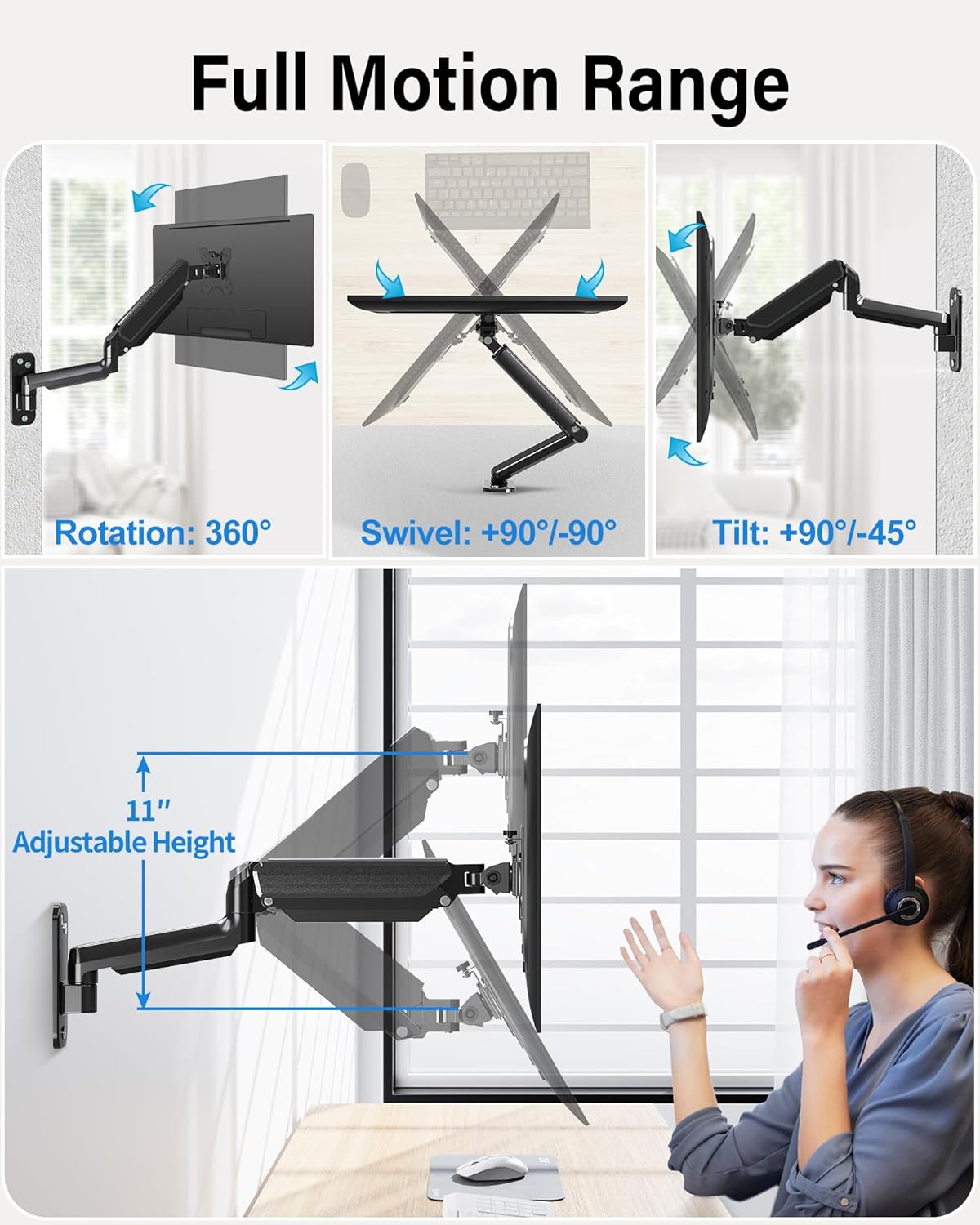
Image: The monitor arm demonstrating its full range of motion, including 360° rotation, 90°/-90° swivel, 90°/-45° tilt, and 11 inches of adjustable height.
6. Хяналтын гарыг ажиллуулах
The MOUNTUP MU2005 offers extensive adjustability to achieve optimal viewөнцөг болон эргономик байрлал.
6.1 Gas Spring Adjustment (Monitor Height)
The gas spring allows for effortless height adjustment. If your monitor does not stay at the desired height, adjust the tension:
- Monitor raises up (too light): Turn the screw clockwise ("-" direction) to reduce tension.
- Monitor drops down (too heavy): Turn the screw counter-clockwise ("+" direction) to increase tension.
Жич: Hold the arm in a horizontal position during adjustment. Refer to the table below for approximate turns based on monitor weight.
| Жин хянах | Хүрээлэл (НАДАЖ) |
|---|---|
| 4.4 фунт (2 кг) | Мин |
| 6.6 фунт (3 кг) | 2 |
| 11 фунт (5 кг) | 6 |
| 17.6 фунт (8 кг) | 10 |
| 19.8 фунт (9 кг) | 11 |
| 22 фунт (10 кг) | 12 |
| 26.4 фунт (12 кг) | Макс |

Image: Comprehensive guide for adjusting gas spring tension and tilt angle, including a table correlating monitor weight with the number of turns for adjustment.
6.2 Tilt Angle Adjustment
If your monitor faces down or up unintentionally, adjust the tilt tension:
- Loosen the tilting bolt (Turn to "-" direction).
- Adjust the monitor to your desired angle.
- Retighten the tilting bolt (Turn to "+" direction).

Image: Visual instructions for adjusting the gas spring tension and the monitor's tilt angle using a hex key.
6.3 Swivel and Rotation
- The arm can swivel 180° at the wall plate and 360° at the arm joint.
- The VESA plate allows for 180° swivel and 360° rotation, enabling easy switching between portrait and landscape orientations.
Image: The monitor arm demonstrating its full range of motion, including 360° rotation, 90°/-90° swivel, 90°/-45° tilt, and 11 inches of adjustable height.
Video: This video demonstrates the various movements and space-saving capabilities of the MOUNTUP Ultrawide Single Monitor Wall Mount, showcasing its full motion range and how it can optimize your workspace.
7. Засвар үйлчилгээ
Тогтмол засвар үйлчилгээ нь таны мониторын суурийн удаан эдэлгээ, аюулгүй ажиллагааг хангана.
- Цэвэрлэгээ: Холбогчийг зөөлөн арчих, damp даавуу. Зүлгүүрийн цэвэрлэгчээс зайлсхий.
- Холболтуудыг шалгах: Periodically inspect all screws and bolts to ensure they are tight. Retighten if necessary.
- Gas Spring Function: If the gas spring's performance changes over time, re-adjust the tension as described in the 'Operating' section.
8. Алдаа засах
If you encounter issues with your MOUNTUP monitor arm, refer to the following common problems and solutions:
8.1 Arm Does Not Stay at Desired Height
- Асуудал: Monitor arm falls down.
- Шийдэл: The gas spring tension is too low for the monitor's weight. Increase tension by turning the adjustment screw counter-clockwise ("+" direction).
- Асуудал: Monitor arm rises up.
- Шийдэл: The gas spring tension is too high for the monitor's weight. Decrease tension by turning the adjustment screw clockwise ("-" direction).
Refer to the 'Gas Spring Adjustment' section for detailed instructions and the weight-to-turns table.
8.2 Monitor Tilts Down Unintentionally
- Асуудал: The monitor head cannot maintain its tilt angle.
- Шийдэл: The tilting bolt is loose. Loosen the tilting bolt, adjust the monitor to the desired angle, and then retighten the tilting bolt firmly.
Video: This video provides troubleshooting steps for common issues with MOUNTUP monitor wall mounts, such as adjusting the gas spring tension if the arm falls or rises, and tightening the tilt mechanism if the monitor sags.
9. Баталгаат хугацаа ба дэмжлэг
MOUNTUP provides a 3-year support for this product. If you have any questions regarding pre-purchase compatibility, installation, or require assistance with any issues, please do not hesitate to contact MOUNTUP customer service. Our team is available to provide friendly and helpful support.


