1. Танилцуулга
Thank you for choosing the typecase Touch iPad Keyboard Case. This manual provides detailed instructions for setting up, operating, and maintaining your keyboard case to ensure optimal performance and longevity. Please read this manual thoroughly before use.
2. Тохиромжтой байдал
This keyboard case is designed for specific iPad models. Please verify your iPad model number to ensure compatibility.
- iPad 10th Generation (10.9-inch, 2022): A2696, A2757, A2777 загварууд
- iPad A16 (11th Generation, 2025): A3354, A3355, A3356 загварууд
To verify your iPad model:
- Арга 1: iPad-ынхаа ар талаас загварын дугаарыг шалгана уу (жишээ нь, A2696).
- Арга 2: Go to iPad Settings > General > About > Model Number. Tap the model number to display the A-number.
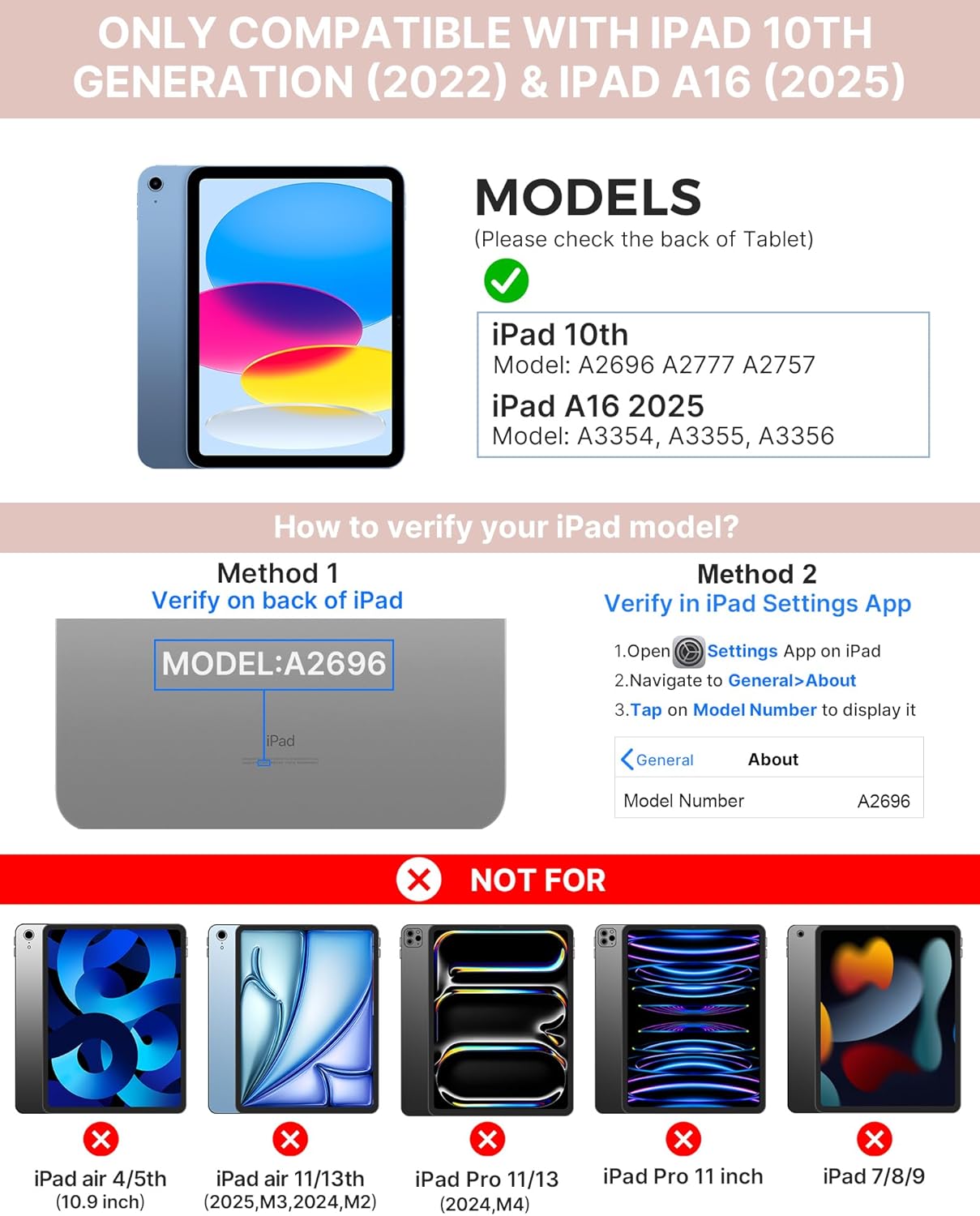
Image: Visual guide for identifying compatible iPad models and verifying the model number on the device or through settings.
3. Багцын агуулга
Багцад дараахь зүйлс орно.
- 1 x typecase Touch iPad Keyboard Case
- 1 х USB-C цэнэглэх кабель
- 1 х хэрэглэгчийн гарын авлага
4. Тохируулах заавар
4.1 Гарыг цэнэглэх
Before initial use, fully charge the keyboard. Connect the provided USB-C charging cable to the keyboard's charging port and a power source. The charging indicator light will show the charging status.
- Зогсолт: 1 жил хүртэл
- Daytime use (2 hours/day with backlight off): 3 сар хүртэл
- Nighttime use (2 hours/day with backlight on): 2 долоо хоног хүртэл

Image: Close-up of the keyboard's USB-C charging port and battery life specifications.
4.2 iPad-тай хослуулах
- Гар цэнэглэгдсэн эсэхийг шалгаарай.
- Turn on the keyboard by pressing the power button. The Bluetooth indicator light will flash.
- Өөрийн iPad дээр очно уу Тохиргоо > Bluetooth.
- Bluetooth-г асаана уу. Таны iPad боломжтой төхөөрөмжүүдийг хайх болно.
- Select "typecase Keyboard" from the list of devices.
- Хослуулах үйл явцыг дуусгахын тулд дэлгэц дээрх зааврыг дагана уу. Амжилттай хослуулсны дараа гар дээрх Bluetooth заагч гэрэл тогтвортой асна.
5. Ашиглалтын заавар
5.1 Installing Your iPad
Gently insert your iPad into the case, ensuring all edges are securely seated. The case provides full protection for your device.
5.2 Гарны функцууд
The keyboard features a standard 78-key layout with a dedicated row of iPadOS shortcut keys for enhanced productivity.

Зураг: Толгой дээрх view of the keyboard layout, highlighting the 78-key design and iPadOS shortcuts.
Арын гэрэлтүүлэгтэй товчлуурууд
The keyboard features 11-color RGB LED backlighting with adjustable brightness levels. This allows for comfortable typing in various lighting conditions.
- дээр дарна уу гэрлийн чийдэнгийн түлхүүр to cycle through backlight colors.
- дарна уу Fn + гэрлийн чийдэнгийн товчлуур арын гэрэлтүүлгийг тохируулах.
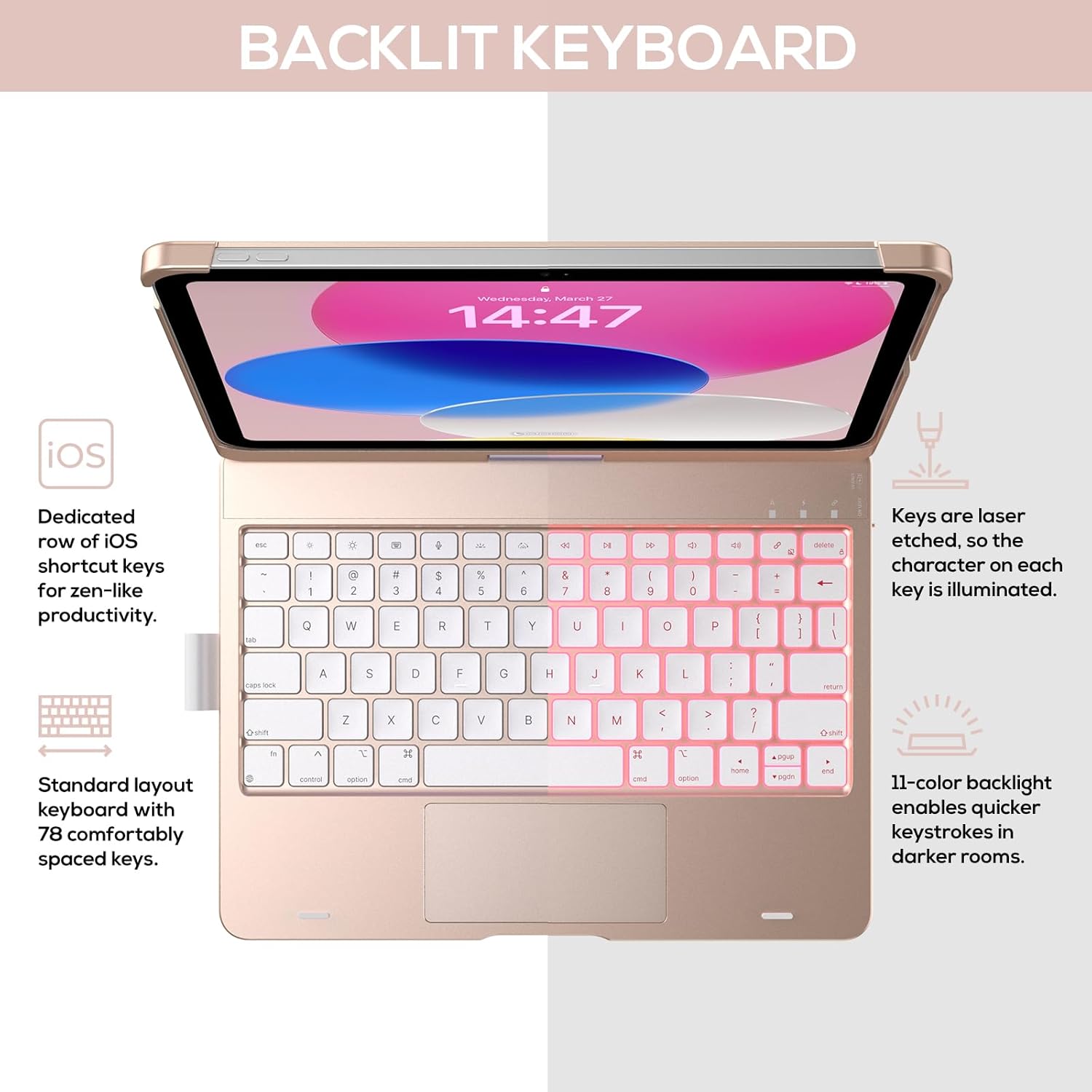
Image: The keyboard with illuminated keys, demonstrating the 11-color backlight and dedicated iOS shortcut keys.
5.3 Олон мэдрэгчтэй мэдрэгч самбар
The integrated precision trackpad supports multi-gesture controls, enhancing productivity for tasks like document editing, web browsing, and presentation building.
- Нэг хуруугаараа товших: Дарах/Сонгох
- Хоёр хуруугаар гүйлгэх: Дээш/доош эсвэл зүүн/баруун гүйлгэх
- Томруулахын тулд хавчих: Томруулах/багасгах
- Гурван хуруугаар дээш шудрах: Апп шилжүүлэгчийг нээнэ үү
- Three-finger swipe down: Үндсэн дэлгэц рүү буцах

Image: Diagram showing common multi-touch gestures for the trackpad, including managing files, web хөтөч ашиглах болон аппликейшн солих.
5.4 360° Rotatable Hinge and Use Modes
The patented 360° hinge allows for versatile use of your iPad in 7 unique modes, adapting to various tasks from typing to viewing.
- Зөөврийн компьютерын горим: Traditional laptop setup for typing.
- Зогсоох горим: -д тохиромжтой viewагуулга.
- Майхны горим: Stable for touch interaction or presentations.
- Таблет горим: Fold the keyboard behind the iPad for tablet use. Keys are protected in this mode.
- Булангийн горим: Angled for comfortable drawing or writing.
- Хуваалцах горим: Rotate the screen to share content with others.
- Protect Mode: Close the case to fully protect the iPad.
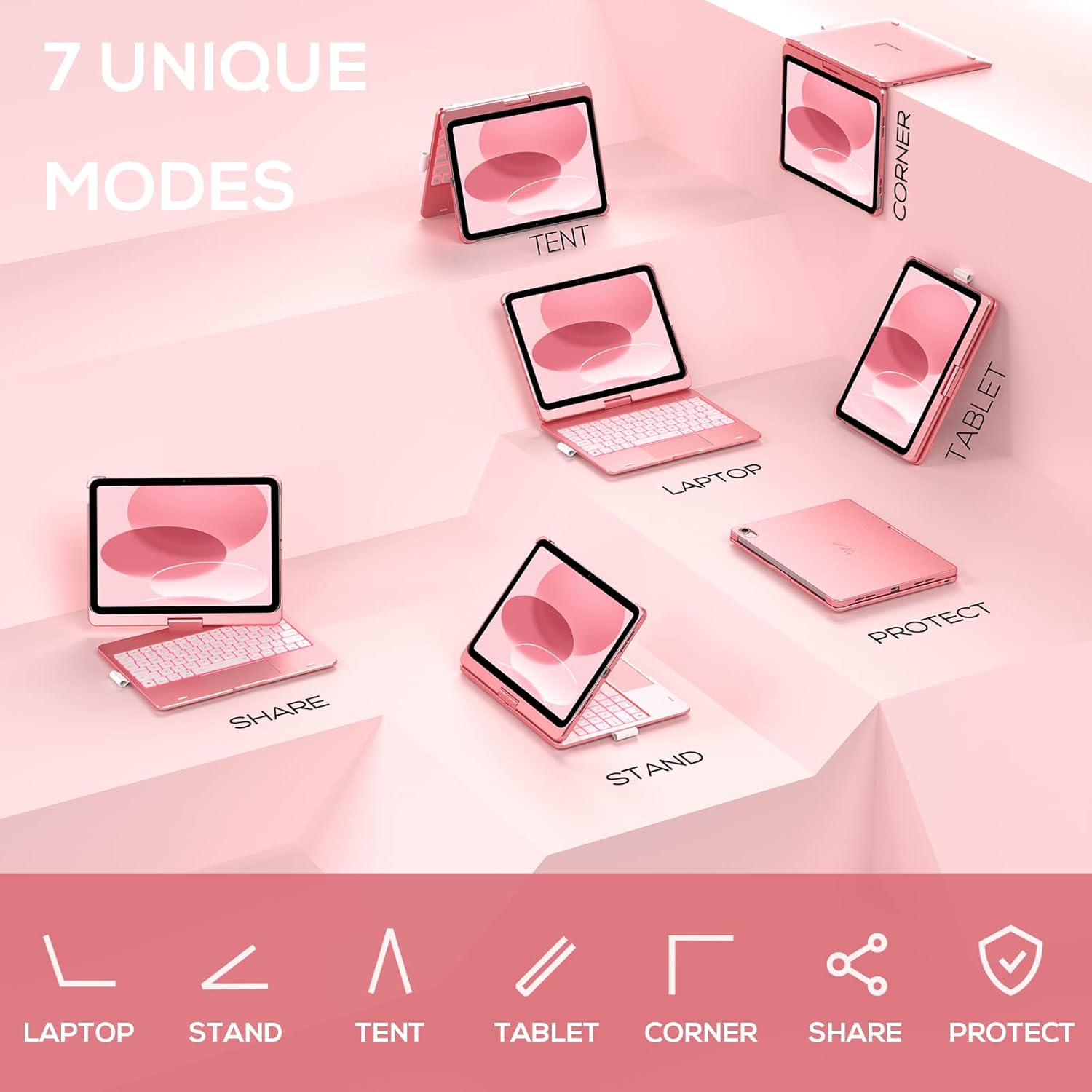
Image: A visual representation of the seven different configurations the keyboard case can be used in, including laptop, stand, and tablet modes.
5.5 Auto Sleep/Wake Function
The case features an auto sleep/wake function. Opening the case will wake your iPad, and closing it will put your iPad to sleep, helping to conserve battery life for both the iPad and the keyboard.

Image: A user's hand on the trackpad, illustrating the built-in trackpad and the auto sleep/wake feature that activates when the case is opened or closed.
5.6 Алимны харандаа бариул
An integrated holder is provided for your Apple Pencil, ensuring it is securely stored and easily accessible.
6. Засвар үйлчилгээ
6.1 Цэвэрлэгээ
To clean the keyboard case, use a soft, damp cloth. Avoid using harsh chemicals or abrasive materials, as these may damage the surface. Ensure the charging port is dry before charging.
6.2 Хадгалалт
When not in use for extended periods, store the keyboard case in a cool, dry place. It is recommended to fully charge the keyboard before long-term storage to maintain battery health.
7. Алдаа засах
7.1 Гар холбогдоогүй байна
- Гар асаалттай, цэнэглэгдсэн эсэхийг шалгаарай.
- Таны iPad дээр Bluetooth идэвхжсэн эсэхийг шалгана уу.
- Төхөөрөмжөө iPad-ынхаа Bluetooth тохиргоонд мартаад дахин хослуулахыг оролдоорой.
- iPad болон гарыг хоёуланг нь дахин эхлүүлнэ үү.
7.2 Түлхүүр хариу өгөхгүй байна
- Гар нь Bluetooth-ээр зөв холбогдсон эсэхийг шалгаарай.
- Гарны батерейны түвшинг шалгана уу.
- Түлхүүрүүдийн эргэн тойрон дахь хог хаягдлыг цэвэрлэ.
7.3 Trackpad Not Working
- Гар холбогдсон эсэхийг шалгана уу.
- iPad-ын тохиргоонд trackpad функцийг шалгана уу (Тохиргоо > Ерөнхий > Trackpad).
- Гар болон iPad-г дахин эхлүүлнэ үү.
7.4 Арын гэрэл ажиллахгүй байна
- Гар асаалттай байгаа эсэхийг шалгаарай.
- Press the backlight control keys (light bulb key, Fn + light bulb key) to activate or adjust.
- Check battery level; low battery may disable backlighting.
8. Техникийн үзүүлэлтүүд
| Загварын дугаар | KB201T-100 |
| Бүтээгдэхүүний хэмжээс | 11 x 8.6 x 1.5 инч (11"L x 8.6"W x 1.5"H) |
| Зүйлийн жин | 1.43 фунт |
| Холболтын технологи | Bluetooth |
| Гарын тайлбар | Flexible, 78-key layout with iPadOS shortcuts |
| Онцлог шинж чанарууд | 360° Rotatable, 11-Color Backlit, Ergonomic, Lightweight, Multi-Touch Trackpad, Auto Sleep/Wake, Apple Pencil Holder |
| Гарны арын гэрэлтүүлэг | RGB (11 өнгө) |
| Зайны төрөл | 1 Лити Полимер батерей (дагсан) |
9. Баталгаат хугацаа ба дэмжлэг
typecase is committed to product quality and customer satisfaction. This product comes with the following support:
- Солих үйлчилгээ: Within 1 year of purchase.
- Буцаан олголтын бодлого: Худалдан авснаас хойш 30 хоногийн дотор.
For any issues or inquiries, please contact typecase customer support for quick feedback and assistance.

Image: Information on typecase's after-sales service, including replacement, refund, and customer support.


