1. Танилцуулга
The YIZEELFAR Wake Up Light Sunrise Alarm Clock is a multi-functional device designed to enhance your sleep and wake-up experience. It combines a sunrise simulation alarm, sound machine, Bluetooth speaker, and night light, all controllable via a dedicated mobile application or touch buttons. This manual provides detailed instructions for setup, operation, maintenance, and troubleshooting to ensure optimal use of your device.
2. Тохиргоо
2.1 Хайрцаг задлах болон цахилгаан холболт
Carefully remove all components from the packaging. Ensure all parts are present: the Wake Up Light unit and its power adapter. Connect the provided power adapter to the DC input port on the back of the device and plug it into a standard electrical outlet.

Зураг: Ар талд view of the YIZEELFAR Wake Up Light, highlighting the power input and USB port.
2.2 Апп татаж авах болон Bluetooth холболт
For full functionality and advanced control, download the "E-life Explorer" application. The app is available on the Apple App Store. Please note that some users have reported the app primarily supports iOS devices.
To connect the device via Bluetooth:
- Open the E-life APP on your cellphone.
- Click the Bluetooth icon on the top left corner.
- Choose to connect APP Bluetooth "E-life BLE".
- Turn to the Bluetooth Settings Page of your cellphone.
- Choose and tap Bluetooth "E-life" to pair.
- The device will prompt "connected" once successfully paired. The blue indicator light on the device will be steady on.
Video: Instructions on how to connect the E-life app with Bluetooth.
Video: E-Life Alarm Clock Tutorial Video, demonstrating app connection and features.
3. Ашиглалтын заавар
3.1 Цаг харуулах
The device displays time in a 24-hour format. To adjust the brightness of the time display:
- Click the setting icon in the app.
- Choose L0 to close the time and indicator light.
- Choose L3 for the brightest display.
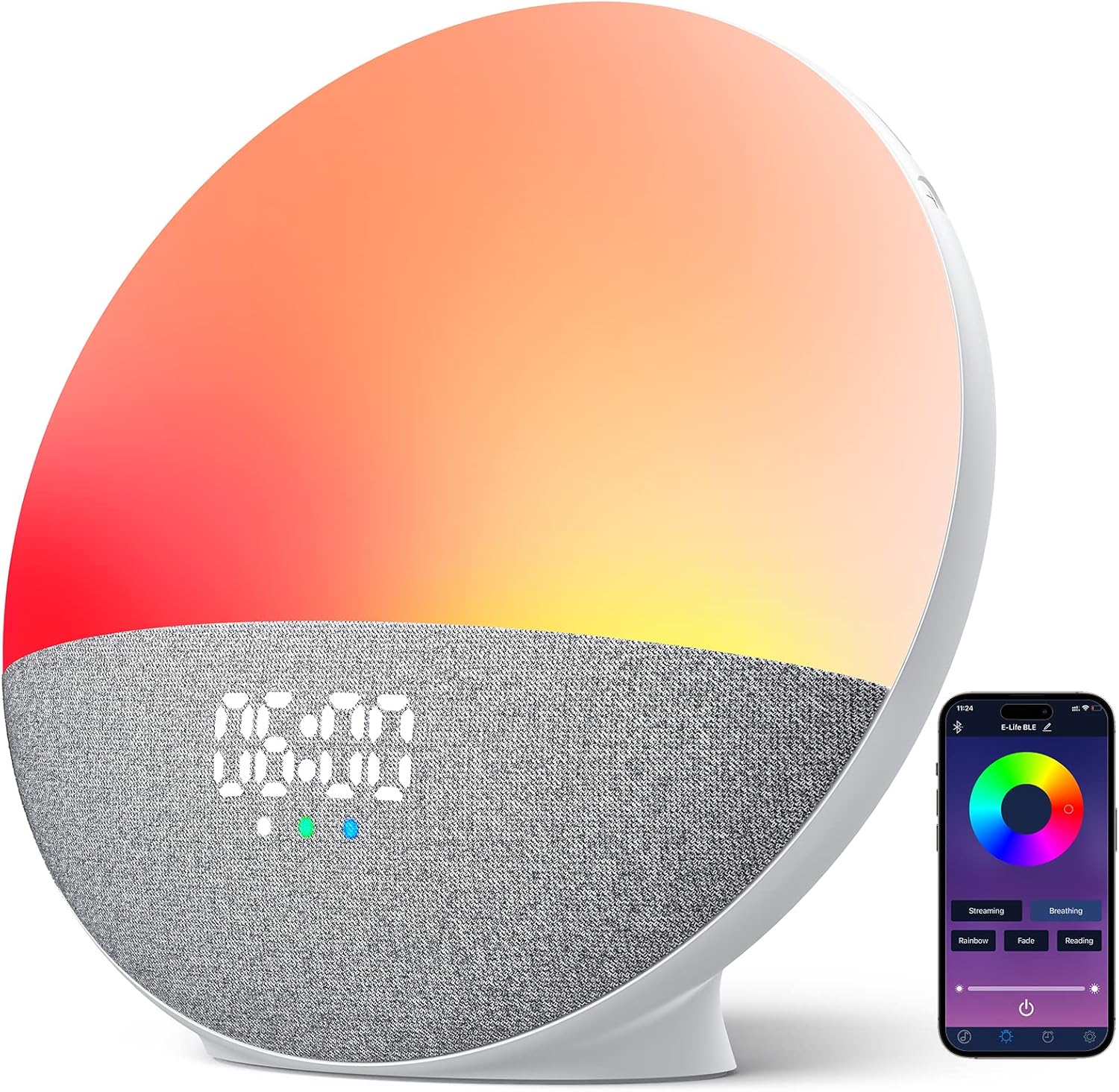
Зураг: Урд view of the YIZEELFAR Wake Up Light, showing the digital time display.
3.2 Light Modes and Brightness
The device offers 5 light modes and rich custom colors. You can control these via touch buttons on the device or through the app.
- Мэдрэгчтэй удирдлага: Tap the side of the device to cycle through different colors and light modes.
- Програмын хяналт: Open the Light Setting interface in the app. Click and choose your desired light mode (Streaming, Breathing, Rainbow, Fade, Reading) or select a fixed color from the color disk. Adjust brightness using the slider.

Зураг: Сэрүүлэгтэй цагны үзүүлбэрasing different light modes and the corresponding app interface for control.
Video: Demonstration of touch button controls for light modes.
3.3 Sound Machine Features
The device includes 15 soothing sounds for better sleep, categorized into Natural Sounds, White Noises, and Piano Music.
- Дууны сонголт: Use the app or the touch buttons on the device to cycle through available sounds.
- Дууны тохируулга: Adjust the sound volume by swiping up/down on the designated touch area on the device or using the volume slider in the app.

Image: Visual representation of the 15 soothing sounds available on the alarm clock.
3.4 Alarm Settings (Sunrise Simulation)
Set up to 3 alarms with sunrise simulation and 5 wake-up sounds. Snooze function is supported.
- Add or Revise Alarm: Use the app to add or modify alarm settings.
- Цаг сонгох: Select your desired alarm time.
- Дуу сонгох: Select a wake-up sound from the available options.
- Тоглуулах хугацаа: Choose the duration for the alarm sound.
- Sunset/Sunrise Setting: Choose to turn on or off the sunset/sunrise simulation.
- Дууны хэмжээг тохируулах: Adjust the alarm volume as needed.
- Хадгалах: Save your alarm settings in the app.

Image: The alarm clock simulating a sunrise for a gentle wake-up experience.
3.5 Bluetooth чанга яригчийн функц
The device features a premium loud Bluetooth speaker. After connecting your phone via Bluetooth (as described in Section 2.2), you can stream music from your device.
- Хөгжим тоглуулах: Play your favorite music through the alarm clock's speaker.
- Замын хяналт: Use the touch buttons on the device to skip tracks (last/next) or control playback from your phone.

Image: A user enjoying music played through the alarm clock's Bluetooth speaker.
4. Засвар үйлчилгээ
To ensure the longevity and optimal performance of your YIZEELFAR Wake Up Light, follow these simple maintenance guidelines:
- Цэвэрлэгээ: Gently wipe the device with a soft, dry cloth. Do not use abrasive cleaners or solvents, as they may damage the surface.
- Байршил: Place the device on a stable, flat surface away from direct sunlight, excessive heat, or moisture.
- Хадгалах: Хэрэв төхөөрөмжийг удаан хугацаагаар хадгалах бол залгуураас салгаад сэрүүн, хуурай газар хадгална уу.
5. Алдаа засах
If you encounter issues with your Wake Up Light, please refer to the following common problems and solutions:
| Асуудал | Боломжит шалтгаан / шийдэл |
|---|---|
| App connectivity issues (Bluetooth disconnects, app doesn't work) |
|
| Time display is in 24-hour format and cannot be changed to 12-hour. | The device's time display is fixed to a 24-hour format. This is a design feature and cannot be adjusted to 12-hour format. |
| Touch buttons are unresponsive or have a significant lag. | Ensure your fingers are clean and dry. Apply a firm but gentle touch. If issues persist, try restarting the device by unplugging and re-plugging it. |
| Alarm light works but sound doesn't, or vice-versa. |
|
6. Техникийн үзүүлэлтүүд
- Брэнд: ЙИЗЭЭЛФАР
- Загварын дугаар: S202
- ASIN: B0BPMFP7L2
- Өнгө: Олон өнгийн
- Дэлгэцийн төрөл: Дижитал
- Эрчим хүчний эх үүсвэр: Утастай цахилгаан
- Өрөөний төрөл: Унтлагын өрөө
- Дүрс: Тэгш өнцөгт
- Дотор/гадаа ашиглах: Дотор
- Хүрээний материал: Хуванцар
- Барааны жин: 1.81 фунт
- Бүтээгдэхүүний хэмжээ: 3.7 x 7.4 x 7.9 инч
- Суурилуулах төрөл: Ширээний тавцан
- Сэрүүлэгтэй цаг: Тиймээ
- Үзсэн хөдөлгөөн: Автомат
7. Баталгаат хугацаа ба дэмжлэг
This product comes with a manufacturer's warranty. For detailed warranty information and support, please refer to the official User Manual (PDF) available for download or contact YIZEELFAR customer service.
Албан ёсны хэрэглэгчийн гарын авлага (PDF): Эндээс татаж авна уу


