1. Танилцуулга
Thank you for choosing the Vetroo 1000W Black Power Supply. This power supply unit (PSU) is designed to provide stable and efficient power to your personal computer, especially for high-performance gaming and workstation builds. It features 80 Plus Gold certification for energy efficiency, full modular cabling for easy management, and is compliant with the latest ATX 3.1 and PCIe 5.1 standards. This manual provides essential information for safe installation, operation, and maintenance of your PSU.
2. Аюулгүй байдлын мэдээлэл
Please read and understand all safety warnings before installing or operating this product. Failure to follow these instructions may result in electric shock, fire, or serious injury.
- Өндөр ботьtage: Цахилгаан хангамжийн систем нь өндөр вольт агуулдагtage бүрэлдэхүүн хэсгүүд. Цахилгаан тэжээлийн хэсгийг бүү нээasing. Дотор нь хэрэглэгчийн засвар үйлчилгээ хийх хэсэг байхгүй.
- Мэргэжлийн суурилуулалт: Installation should be performed by qualified personnel. Incorrect installation can damage your system or the PSU.
- Эрчим хүчийг салгах: Always disconnect the AC power cord from the wall outlet before installing, removing, or cleaning the PSU or any other components in your computer.
- Газардуулга: Ensure the PSU is properly grounded. Use only the provided power cord.
- Байгаль орчин: Operate the PSU in a dry, well-ventilated environment. Avoid exposure to moisture, extreme temperatures, or direct sunlight.
- Агааржуулалт: Do not block the ventilation openings of the PSU. Ensure adequate airflow around the unit.
- Кабелийн менежмент: Ensure all cables are securely connected and routed to prevent interference with cooling fans or other components.
3. Багцын агуулга
Таны багцад бүх зүйл байгаа эсэхийг шалгана уу:
- Vetroo 1000W Black Power Supply Unit
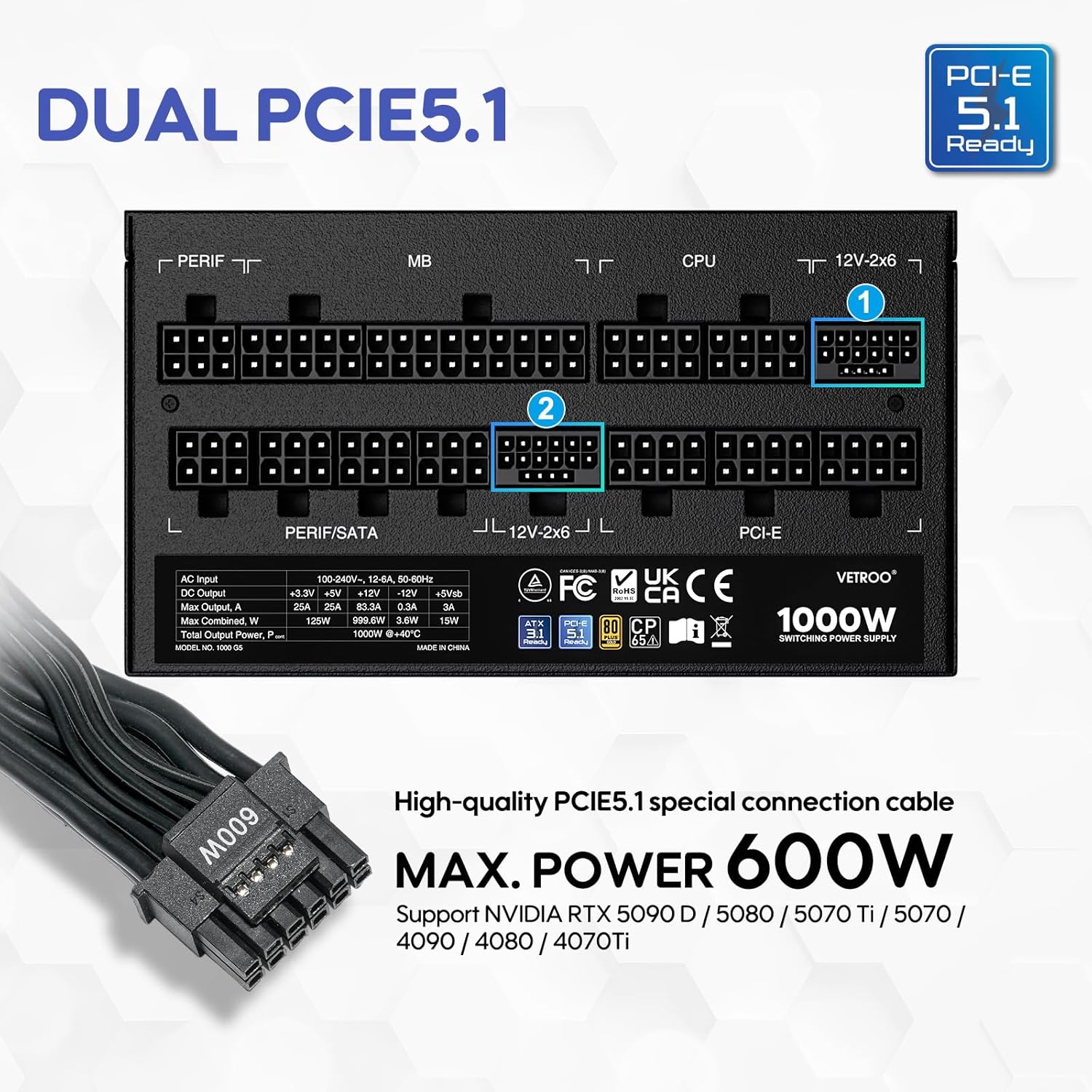
- Modular Cable Set (including 24-pin ATX, 8-pin CPU, PCIe 5.1 12+4-pin, PCIe 6+2-pin, SATA, Molex, FDD cables)
- Хувьсах гүйдлийн цахилгааны утас
- Суурилуулах эрэг
- Кабелийн уяа/Velcro оосор
- Хэрэглэгчийн гарын авлага (энэ баримт бичиг)


4. Бүтээгдэхүүний онцлог
- 80 Plus Gold гэрчилгээтэй: Ensures high energy efficiency, reducing power consumption and heat generation.
- Fully Compliant with ATX 3.1 Specifications: Designed to meet the latest power delivery standards for modern PC components.
- PCIe Gen 5.1 бэлэн байна: Equipped with dedicated 12+4-pin connectors for the latest PCIe 5.1 graphics cards, offering up to 600W power delivery. Also backwards compatible with PCIe 4.0 and 3.0.
- Premium 105° C Capacitors: Utilizes high-quality Japanese capacitors for enhanced stability, reliability, and extended lifespan.
- Full Modular Design: Allows users to connect only the necessary cables, improving airflow and simplifying cable management within the PC case.
- Eco Mode with 120mm FDB Fan: Features a fluid dynamic bearing (FDB) fan that operates silently under low loads, with an Eco Mode switch to stop the fan entirely when power consumption is below 50%.
- Компакт хэмжээ: Designed to fit comfortably in various PC chassis types.
- Иж бүрэн хамгаалалт: Over Voltage Protection (OVP), Over Current Protection (OCP), Over Power Protection (OPP), Short Circuit Protection (SCP), Under Voltage Protection (UVP), and Over Temperature Protection (OTP).

5. Техникийн үзүүлэлтүүд
| Онцлог | Дэлгэрэнгүй |
|---|---|
| Загварын нэр | 1000G5 |
| Гаралтын ватtage | 1000 ватт |
| Form Factor | ATX |
| Цахилгаан хангамжийн дизайн | Бүрэн модуль |
| Үр ашгийн гэрчилгээ | 80 Plus алт |
| ATX стандарт | ATX 3.1 бэлэн |
| PCIe стандарт | PCIe 5.1 Ready (Dual) |
| Хөргөх арга | Агаар (120 мм FDB сэнс) |
| Бүтээгдэхүүний хэмжээ (L x W x H) | 5.9 x 5.5 x 3.4 инч |
| Зүйлийн жин | 5.83 фунт |
| Тохиромжтой төхөөрөмжүүд | Хувийн компьютер |
| Холбогч төрөл | ATX & PCIE |

6. Тохиргоо ба суурилуулалт
Follow these steps to install your Vetroo 1000W Power Supply:
- Системээ бэлтгэ: Ensure your computer is completely powered off and unplugged from the wall outlet. Open your PC case to access the PSU mounting area.
- Хуучин PSU-г арилгах (хэрэв байгаа бол): Disconnect all cables from your old power supply and remove it from the chassis.
- Шинэ цахилгаан тэжээлийн блокийг суурилуулах: Carefully slide the Vetroo 1000W PSU into the designated power supply bay in your PC case. Secure it with the provided mounting screws.
- Модульчлагдсан кабелийг холбох: Identify the necessary cables for your motherboard, CPU, graphics card(s), and storage devices. Connect these cables to the corresponding ports on the PSU first, then route them to your components.
- Эх хавтан: 24 зүүтэй ATX кабелийг эх хавтан дээрээ холбоно уу.
- CPU: Connect the 8-pin (or 4+4-pin) CPU power cable(s) to your motherboard.
- График карт(ууд): For modern GPUs, use the PCIe 5.1 12+4-pin cable. For older or additional GPUs, use the PCIe 6+2-pin cables.
- Storage/Peripherals: Connect SATA power cables to SSDs/HDDs and Molex cables for other peripherals as needed.
- Кабелийн менежмент: Use the included cable ties or Velcro straps to organize cables, ensuring optimal airflow and a tidy build.
- Эцсийн холболтууд: Close your PC case. Connect the AC power cord to the PSU and then to a wall outlet or surge protector.

7. Ашиглалтын заавар
- Асаах/унтраах: After all connections are secure, flip the main power switch on the back of the PSU to the 'ON' position. Your computer can now be powered on via its front panel button. To power off, shut down your computer normally, then flip the PSU switch to 'OFF' for complete power disconnection.
- Эко горим: The Vetroo 1000W PSU features an Eco Mode switch on the rear panel.
- Eco Mode ON: When the Eco Mode switch is in the 'ON' position, the PSU fan will remain off under low to moderate loads (typically below 50% load) for silent operation. The fan will automatically activate when the load increases or internal temperature rises.
- Eco Mode OFF: When the Eco Mode switch is in the 'OFF' position, the PSU fan will spin continuously regardless of the load, providing constant cooling.

8. Засвар үйлчилгээ
Зөв засвар үйлчилгээ нь таны PSU-ийн урт наслалт, оновчтой гүйцэтгэлийг баталгаажуулдаг.
- Тоос цэвэрлэх: Periodically clean the PSU fan and ventilation grilles to prevent dust buildup, which can hinder cooling performance. Use compressed air to gently blow dust away. Always disconnect power before cleaning.
- Кабелийн үзлэг: Regularly check all modular cable connections to ensure they are secure and free from damage.
- Байгаль орчны нөхцөл: Maintain a clean, dry, and well-ventilated environment for your PC to prevent excessive heat and moisture exposure to the PSU.
9. Алдаа засах
If you encounter issues with your Vetroo 1000W Power Supply, try the following steps:
- Эрчим хүчгүй:
- Хувьсах гүйдлийн тэжээлийн утсыг цахилгаан тэжээлийн хэсэг болон ханын залгуурт найдвартай залгасан эсэхийг шалгаарай.
- Verify the main power switch on the PSU is in the 'ON' position.
- Check all modular cable connections, especially the 24-pin ATX and 8-pin CPU cables, to ensure they are fully seated.
- Ханын залгуурт тэжээл байгаа эсэхийг шалгахын тулд өөр төхөөрөмжөөр шалгана уу.
- Системийн тогтворгүй байдал/санамсаргүй унтрах:
- Цахилгаан хангамжийн системийнхээ хүчин чадлыг шалгаарайtage is sufficient for all your components, especially high-power GPUs.
- Хэт халалтаас сэргийлэхийн тулд компьютерийн гэр доторх агааржуулалтыг сайтар шалгаарай.
- Verify that all PCIe power cables to your graphics card(s) are correctly connected.
- If Eco Mode is enabled, try disabling it to see if continuous fan operation resolves the issue.
- Ер бусын дуу чимээ:
- If you hear a fan noise, ensure the PSU fan is not obstructed by cables or dust.
- If a 'coil whine' noise is present, it is often harmless but can sometimes indicate a component under stress. Ensure your system is not drawing excessive power.
If problems persist after performing these checks, please contact Vetroo customer support for further assistance.
10. Баталгаат хугацаа ба дэмжлэг
The Vetroo 1000W Black Power Supply comes with a 10 жилийн баталгаат хугацаа худалдан авсан өдрөөс. Энэхүү баталгаа нь ердийн ашиглалтын үед хийгдсэн материал, хийцийн согогийг хамарна.
Баталгаат үйлчилгээнд хамаарахгүй:
- Осол, зүй бусаар ашиглах, зүй бусаар ашиглах, үер, гал түймэр, газар хөдлөлт болон бусад гадны шалтгааны улмаас учирсан хохирол.
- Damage caused by operating the product outside the permitted or intended uses described by Vetroo.
- Damage caused by service (including upgrades and expansions) performed by anyone who is not a representative of Vetroo.
- Products or parts that have been modified to alter functionality or capability without the written permission of Vetroo.
For warranty claims or technical support, please visit the official Vetroo website or contact their customer service department with your product model and proof of purchase.


